Prefer a full transcript? Open the video watch page.
Complex automation breaks single-agent systems.
If you have ever tried to run a full marketing campaign, incident response flow, or data enrichment pipeline with one “smart” agent, you already know the failure mode. The agent either becomes too generic, too expensive, or too brittle to handle real-world edge cases.
This is where agentic AI and multi-agent workflows come in.
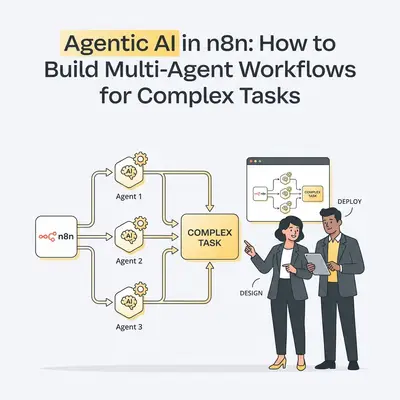
In this guide, you will learn how to design and build multi-agent systems in n8n, using architectural patterns that are becoming standard in 2026. We will move from concepts to implementation, showing how to orchestrate agents that plan, act, evaluate, and adapt across complex workflows.
Agentic AI Explained: Why It Matters for Your Workflows
Agentic AI goes beyond prompt-in, response-out automation.
An agentic system:
- Pursues a goal instead of executing a single instruction
- Breaks problems into steps
- Uses tools and data sources
- Evaluates its own outputs
- Adjusts behavior based on feedback or memory
In practice, this means replacing rigid workflows with adaptive systems.
Single-agent automations struggle because they must:
- Reason
- Execute
- Validate
- Recover from errors
All inside one prompt or one node.
Multi-agent systems solve this by separating responsibilities.
Why n8n is Perfect for Multi-Agent Workflows
n8n’s architecture makes it unusually good for agentic AI compared to linear automation tools.
Key enablers include:
- AI Agent nodes with tool access
- Sub-workflows for delegation
- Looping and branching logic
- Native error handling
- External memory via databases, vector stores, or files
Instead of one massive workflow, you can build systems of cooperating agents.
Think of n8n less as a workflow builder and more as an agent orchestrator.
n8n Multi-Agent Architecture: Core Patterns
Before touching implementation, it’s critical to understand the mental models.
1. Orchestrator + Specialist Agents
This is the most common pattern.
-
Orchestrator Agent
- Understands the goal
- Breaks it into tasks
- Delegates work
- Aggregates results
-
Specialist Agents
- Perform focused tasks
- Have limited tools and context
- Return structured outputs
In n8n, the orchestrator is often the main workflow, while specialists live in sub-workflows.
2. Planner → Executor → Critic Loop
This pattern adds quality control.
- Planner Agent
- Creates a task plan
- Executor Agent
- Performs actions using tools
- Critic Agent
- Reviews results
- Flags issues or requests revisions
This loop dramatically improves reliability for content generation, analysis, and ops workflows.
3. Memory-Backed Agents
Agentic systems improve when they remember.
Memory can include:
- Past decisions
- User preferences
- Known failures
- Historical context
In n8n, memory is typically stored in:
- Postgres
- Redis
- Vector databases
- Google Sheets or files (for lightweight cases)
Agents read from memory at the start and write back after execution.
Step-by-Step: Building Multi-Agent Workflows in n8n
Let’s move into implementation.
Step 1: Define Agent Roles Explicitly
Do not start with nodes. Start with roles.
Example:
- Agent A: Campaign Planner
- Agent B: Content Generator
- Agent C: QA Reviewer
- Agent D: Publisher
Each role gets:
- A narrow responsibility
- A specific prompt
- Limited tool access
This keeps agents reliable and predictable.
Step 2: Build Specialist Agents as Sub-Workflows
Each agent lives in its own sub-workflow.
Typical structure:
- Input: JSON task payload
- AI Agent node with scoped prompt
- Tool nodes (API, HTTP, DB)
- Output: Structured JSON result
This makes agents reusable across systems.
Step 3: Orchestrate with the Main Workflow
The main workflow:
- Receives the initial trigger
- Calls sub-workflows
- Applies conditional logic
- Handles retries and failures
This is where system-level reasoning lives.
Real-World Example: Agentic Marketing Campaigns
Goal: Launch a multi-channel campaign from a single brief.
Agents Involved
- Planner Agent: Defines channels and assets
- Copy Agent: Writes copy
- QA Agent: Reviews for tone and compliance
- Publisher Agent: Schedules posts and emails
Flow
- Trigger: New campaign brief
- Planner Agent generates campaign plan
- Loop through channels
- Copy Agent generates assets
- QA Agent validates outputs
- Publisher Agent schedules content
Failures loop back to QA or Planner automatically.
Real-World Example: Agentic IT Operations
Goal: Respond to incidents with minimal human intervention.
Agents Involved
- Triage Agent: Classifies severity
- Diagnostics Agent: Gathers logs and metrics
- Resolution Agent: Applies fixes or scripts
- Auditor Agent: Records outcome and lessons learned
Flow
- Trigger: Alert from monitoring system
- Triage Agent determines severity
- Diagnostics Agent collects context
- Resolution Agent executes actions
- Auditor logs decisions and updates memory
This pattern reduces response time without removing human oversight.
Essential Agent Components: Tools, Memory, Feedback Loops
Tool Access
Give each agent only what it needs:
- HTTP requests
- Databases
- SaaS APIs
- File systems
Avoid “god agents” with unlimited access.
Feedback Loops
Critical for reliability.
Use:
- Critic agents
- Confidence thresholds
- Retry counters
- Human approval steps
If output quality is uncertain, the system should pause, not guess.
Memory Writes
After each run:
- Store outcomes
- Log failures
- Track costs and latency
This data improves future decisions and debugging.
Scaling & Managing Agentic Workflows: Cost & Errors
Scaling
- Parallelize independent agents
- Cache stable outputs
- Use lightweight models for planners, heavier ones for critics
Cost Control
- Avoid reprocessing identical inputs
- Limit context windows
- Track token usage per agent
Error Handling
- Use n8n error branches
- Gracefully degrade to human review
- Never allow silent failures
Common Mistakes When Building Agentic n8n Workflows
- Overloading a single agent with too many responsibilities
- Skipping validation and feedback loops
- Ignoring cost visibility
- Treating agentic systems as “set and forget”
Agentic AI systems require governance, not just prompts.
Conclusion: Master Reliable Multi-Agent Workflows in n8n
Agentic AI is not about making automations smarter. It is about making them more resilient, modular, and adaptable.
With n8n, you can:
- Design multi-agent architectures
- Orchestrate complex workflows
- Add memory and feedback
- Scale safely into production
The teams succeeding with agentic AI in 2026 are not chasing novelty. They are building systems that think in steps, not scripts.
Further Reading & Resources for Agentic AI
- n8n AI Agent Guide: https://hatchworks.com/blog/ai-agents/n8n-guide
- Gartner Top Technology Trends 2026: https://www.gartner.com/en/articles/top-technology-trends-2026
- n8n Masterclass Video: https://www.youtube.com/watch?v=TZ43SRdTMs0
- Awesome n8n Templates: https://github.com/enescingoz/awesome-n8n-templates
By Kevin Michael Schindler, AI Automation Expert at Evalics