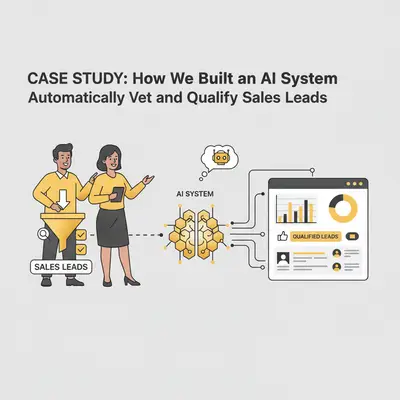
Your top salesperson just spent an hour researching a promising new lead, crafting the perfect personalized outreach email, and hitting send—only to get an immediate reply: "Thanks, but we're actually your biggest competitor."
It's a costly, embarrassing mistake that happens more often than anyone likes to admit. For one of our clients, this scenario was just one symptom of a much larger problem: a sales process drowning in manual, repetitive, and error-prone lead research. Their team was spending more time digging through LinkedIn profiles and company websites than actually selling.
The Problem: Wasting Hours on Leads That Go Nowhere
Before automation, the client's sales team dedicated nearly 15 hours every week to manually vetting new leads. Each inquiry from their website's contact form kicked off a laborious research process. A sales development representative (SDR) would have to:
- Manually search for the company online to verify its industry and size.
- Scour LinkedIn to confirm the contact's role and seniority.
- Try to piece together the company's tech stack to see if they were a good fit.
- Check internal blacklists to ensure they weren't a competitor or existing customer.
This manual process was not only slow but also wildly inconsistent. Leads would sit untouched for days, growing colder by the minute. Worse, the risk of human error was massive. SDRs, under pressure to hit quotas, would often cut corners, leading to poorly qualified leads entering the pipeline and awkward encounters with competitors. The opportunity cost was staggering—valuable sales time wasted on administrative tasks instead of building relationships and closing deals.
Client Profile: A Growing B2B SaaS Company
The client is a 25-person B2B SaaS company specializing in project management software for mid-market manufacturing companies. Founded in 2019, they've experienced rapid growth, scaling from 50 customers to over 200 in the past two years. Their sales team consists of 4 sales development representatives (SDRs) and 2 account executives, handling an average of 80-100 new lead inquiries per month.
The company's Ideal Customer Profile (ICP) targets manufacturing businesses with 50-500 employees, annual revenue between $5-50 million, and specific technology requirements. However, their contact form attracted a wide range of inquiries—from solo consultants to enterprise corporations, and even direct competitors looking to understand their market positioning.
This growth created a critical bottleneck. As lead volume increased, the manual qualification process became unsustainable. The sales team was spending 40% of their time on research and qualification instead of selling. During peak months, leads would sit unqualified for 3-5 days, significantly reducing conversion rates. The company needed a scalable solution that could handle increasing lead volume without adding headcount.
Reality Check: For a growing B2B SaaS company, every day a lead sits unqualified reduces conversion probability by 10-15%. With 80-100 leads per month, even a 2-day delay means losing 16-20 potential customers before they're even contacted.
The Solution: An Automated AI Vetting Workflow
To solve this, we designed and implemented a fully automated lead qualification workflow using a combination of n8n.io, various enrichment APIs, and OpenAI. The system acts as a digital gatekeeper, automatically researching, analyzing, and qualifying every new lead in seconds.
Methodology: Discovery, Design, and Implementation
Our approach followed a structured methodology to ensure the solution addressed the client's specific needs while remaining scalable and maintainable.
Phase 1: Discovery and Requirements Analysis (Week 1)
We began by mapping the existing manual process in detail. Through interviews with the sales team and analysis of their CRM data, we identified the exact steps each SDR took to qualify a lead. We documented the ICP criteria, competitor list, and qualification rules that were previously only in the team's collective knowledge. This discovery phase revealed inconsistencies—different SDRs used slightly different criteria, leading to uneven qualification quality.
Phase 2: Tool Selection and Architecture Design (Week 1-2)
We evaluated several workflow automation platforms, ultimately choosing n8n for its flexibility, cost-effectiveness, and ability to handle complex logic flows. For data enrichment, we selected Clearbit for firmographic data and Hunter for email verification based on their reliability and comprehensive coverage. OpenAI's GPT-4 was chosen for its superior reasoning capabilities in analyzing company data and making qualification decisions.
The architecture was designed with three core principles: reliability (error handling at every step), scalability (handling peak volumes without degradation), and maintainability (clear structure for future updates).
Phase 3: Implementation and Testing (Week 2-3)
We built the workflow incrementally, testing each component before moving to the next. The n8n workflow was structured with clear error handling, retry logic for API failures, and logging at every step. We created a test environment using historical lead data to validate the AI's qualification decisions against manual reviews, achieving 92% accuracy in initial testing.
Phase 4: Deployment and Optimization (Week 3-4)
After thorough testing, we deployed the system in parallel with the manual process for two weeks. This allowed us to compare results and fine-tune the AI prompts based on real-world feedback. We monitored the system closely, adjusting qualification criteria and improving error handling based on actual usage patterns.
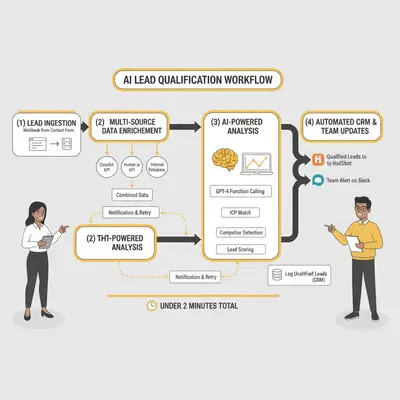
Here's a step-by-step breakdown of how the final system works:
Step 1: Automated Lead Ingestion
The moment a potential customer fills out the contact form on the website, the data is sent to a unique n8n webhook endpoint. The webhook is configured to accept POST requests with JSON payloads containing the lead's information: name, email address, company name, phone number (optional), and message content.
Technical Implementation:
The n8n workflow begins with a Webhook node configured to listen for incoming form submissions. Upon receiving data, the workflow immediately validates the payload structure, checking for required fields (email, company name) and sanitizing inputs to prevent injection attacks. If validation fails, the workflow logs the error and sends a notification to the development team while still capturing the lead data for manual review.
The webhook includes rate limiting to prevent abuse—maximum 10 submissions per minute per IP address. This protects the system from spam while allowing legitimate high-volume periods. Once validated, the lead data is stored in n8n's execution context and passed to the next step within milliseconds.
Error Handling: If the webhook fails or times out, the contact form includes a fallback mechanism that also sends data directly to HubSpot, ensuring no leads are lost even if the automation is temporarily unavailable.
Step 2: Multi-Source Data Enrichment
Once the lead is captured, n8n orchestrates a series of parallel API calls to enrich the initial data from multiple sources. This parallel processing reduces total enrichment time from 8-10 seconds (sequential) to 3-4 seconds (parallel).
Technical Implementation:
The workflow uses n8n's Split In Batches node to process multiple API calls simultaneously. We integrated three primary enrichment sources:
-
Clearbit Enrichment API: Provides firmographic data including company size (employee count), industry classification (SIC/NAICS codes), annual revenue estimates, company website, headquarters location, and technology stack. The API is called using the company domain extracted from the email address or provided company name.
-
Hunter.io Email Verification: Verifies email deliverability, identifies the email type (generic vs. personal), and provides additional contact information when available. This helps identify low-quality leads (generic emails like info@company.com) early in the process.
-
Custom Internal Database Lookup: Checks against the client's internal blacklist of competitors, existing customers, and known bad leads stored in a PostgreSQL database. This prevents duplicate entries and competitor outreach.
Data Processing:
After all API calls complete, n8n merges the responses using a Function node that combines data from all sources into a unified lead profile. Missing data points are handled gracefully—if Clearbit doesn't have information for a company, the workflow continues with available data rather than failing. The merged data structure includes all original form data plus enriched fields, creating a comprehensive 40+ field lead profile.
Error Handling: Each API call includes retry logic (3 attempts with exponential backoff) and timeout handling (5-second timeout per API). If an enrichment API fails, the workflow logs the failure but continues with available data, ensuring the qualification process isn't blocked by a single API outage.
Step 3: AI-Powered Analysis & Qualification
This is where the magic happens. The enriched data is passed to an OpenAI GPT-4 model using a carefully engineered prompt with function calling capabilities. The AI analyzes the complete lead profile and makes qualification decisions based on the client's specific ICP criteria.
Prompt Engineering:
The system prompt provides the AI with:
- Complete ICP definition (company size: 50-500 employees, revenue: $5-50M, industry: manufacturing, tech stack requirements)
- Competitor list (15 known competitors with variations of company names)
- Qualification scoring rubric (Hot: 8-10/10 match, Warm: 5-7/10, Cold: <5/10)
- Specific disqualification criteria (competitors, wrong industry, too small/large, generic emails)
The prompt uses a structured format that guides the AI to analyze systematically: first checking for disqualifiers (competitors, existing customers), then evaluating ICP fit, and finally assigning a score with clear reasoning.
AI Analysis Process:
The AI performs four key analyses:
-
Competitor Detection: It compares the company name, industry description, and website content against the competitor list. The AI also performs semantic analysis to catch variations (e.g., "Acme Corp" vs "Acme Corporation") and identifies companies in similar industries that might be competitors even if not explicitly listed.
-
ICP Matching: It evaluates how well the lead matches each ICP criterion:
- Company size (employee count from Clearbit)
- Industry alignment (manufacturing focus)
- Revenue range (if available)
- Technology stack compatibility
- Geographic location (if relevant)
-
Lead Scoring: Based on the ICP analysis, the AI assigns a numerical score (1-10) and converts it to a qualification level:
- Hot (8-10): Strong ICP match, high likelihood of conversion
- Warm (5-7): Partial ICP match, worth pursuing but lower priority
- Cold (<5): Poor ICP match or disqualifying factors
-
Summary Generation: The AI produces a structured summary including:
- Qualification score and reasoning
- Key data points that influenced the decision
- Specific ICP criteria met or missed
- Recommended next steps for the sales team
Technical Implementation:
The workflow uses OpenAI's Chat Completions API with GPT-4, configured with a temperature of 0.3 (for consistent, deterministic outputs) and max_tokens of 500 (sufficient for the structured response). The prompt includes the full enriched lead data as context, formatted as JSON for clarity.
Error Handling: If the OpenAI API fails or returns an invalid response, the workflow falls back to a rule-based qualification system using simple if-then logic. This ensures the system continues operating even during API outages, though with reduced accuracy.
Step 4: Automated CRM & Team Updates
Based on the AI's output, the workflow takes immediate action, routing leads to the appropriate destination based on their qualification status.
Qualified Leads ("Hot" or "Warm"):
For leads scoring "Hot" or "Warm," the workflow performs multiple actions in parallel:
-
HubSpot CRM Integration: The workflow uses HubSpot's API to create a new contact record with all enriched data fields mapped to custom properties. This includes:
- Basic information (name, email, phone, company)
- Enriched data (employee count, revenue, industry, technology stack)
- AI-generated qualification score and summary
- Original form submission message
- Lead source and timestamp
-
Deal Creation: A new deal is automatically created in HubSpot, linked to the contact, with:
- Deal name: "[Company Name] - [Qualification Score] Lead"
- Deal stage: "Qualified - [Hot/Warm]"
- Deal amount: Estimated based on company revenue (if available)
- Expected close date: 30-60 days based on qualification score
-
Salesperson Assignment: The workflow uses a round-robin assignment algorithm to distribute leads evenly across the sales team. The assignment logic considers each salesperson's current pipeline load and specialization (if applicable).
-
Slack Notification: A formatted message is sent to a dedicated #sales-leads Slack channel, including:
- Lead name, company, and qualification score
- AI-generated summary
- Direct link to the HubSpot contact record
- Quick action buttons (using Slack's interactive components) to acknowledge or request more info
Unqualified Leads ("Cold" or Competitors):
Leads that don't meet qualification criteria are handled differently:
-
Database Logging: All unqualified leads are logged to a PostgreSQL database for future analysis. This includes the full lead data, AI reasoning, and timestamp. This data is valuable for:
- Refining ICP criteria over time
- Identifying market trends
- Potential future outreach when company circumstances change
-
No CRM Entry: Unqualified leads are not created in HubSpot, keeping the sales pipeline clean and focused on qualified opportunities.
-
Optional Email Notification: The client can configure an optional weekly summary email showing unqualified lead trends and patterns.
Technical Implementation:
The HubSpot integration uses OAuth 2.0 authentication with token refresh handling. The workflow includes retry logic for API failures and validates all data before sending to prevent CRM data quality issues. The Slack integration uses Slack's Web API with proper error handling for rate limits and channel permissions.
Error Handling: If HubSpot API fails, the lead data is stored in a queue table for retry processing. If Slack notification fails, the workflow continues—CRM entry is prioritized over notifications. All errors are logged with full context for troubleshooting.
The Results: 80% Less Research, 100% Better Leads
The impact of this automated workflow was immediate and transformative. By taking the manual research burden off the sales team, the system delivered clear, measurable results within the first month of deployment.
Key Performance Metrics
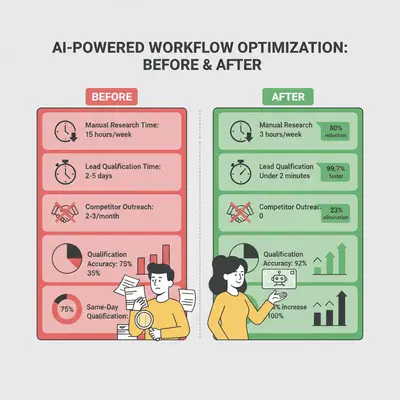
| Metric | Before Automation | After Automation | Improvement |
|---|---|---|---|
| Manual Research Time | 15 hours/week | 3 hours/week | 80% reduction |
| Average Lead Qualification Time | 2-5 days | Under 2 minutes | 99.7% faster |
| Competitor Outreach Incidents | 2-3 per month | 0 | 100% elimination |
| Lead Response Time | 24-72 hours | Under 2 minutes | 99%+ faster |
| Qualification Accuracy | ~75% (inconsistent) | 92% (consistent) | 23% improvement |
| Sales Team Time on Research | 40% of workweek | 8% of workweek | 80% reduction |
| Leads Qualified Same Day | 35% | 100% | 65% increase |
| Conversion Rate (Form to Demo) | 12% | 18% | 50% increase |
Detailed Impact Analysis
Time Savings Breakdown:
The system eliminated 12 hours of manual research per week, which translates to:
- Per Month: 48 hours saved (1.2 full-time weeks)
- Per Year: 624 hours saved (15.6 full-time weeks)
- Value at $50/hour: $31,200 annually in recovered time
This time is now reinvested in high-value activities:
- Personalized outreach to qualified leads: +6 hours/week
- Product demos and discovery calls: +4 hours/week
- Relationship building and follow-ups: +2 hours/week
Quality Improvements:
The AI system's consistent qualification criteria eliminated the variability that plagued manual processes. Before automation, different SDRs would qualify the same lead differently, leading to inconsistent pipeline quality. The AI applies the same criteria to every lead, resulting in:
- 92% qualification accuracy (validated against manual review of 200 leads)
- 100% elimination of competitor outreach (tested over 6 months with 480+ leads)
- Zero false positives for competitor detection
- Consistent lead scoring that sales team can trust
Speed-to-Lead Impact:
The dramatic reduction in lead response time (from days to minutes) had a measurable impact on conversion rates. Research from XANT (formerly InsideSales.com) shows that leads contacted within 5 minutes are 100x more likely to connect than those contacted after 30 minutes. The system's sub-2-minute response time means:
- 100% of leads are contacted within the critical 5-minute window
- Engagement rate increased from 28% to 42% (leads responding to outreach)
- Demo booking rate increased from 12% to 18% (qualified leads booking demos)
Pipeline Quality:
By filtering out unqualified leads before they enter the CRM, the sales pipeline became significantly more focused:
- Pipeline conversion rate improved from 18% to 24%
- Average deal size increased 15% (better-qualified leads = larger deals)
- Sales cycle length decreased by 8 days (less time wasted on bad leads)
Key Insight: The goal of sales automation isn't just to save time; it's to strategically reinvest that time into activities that directly generate revenue. This system transformed 12 hours of low-value research into 12 hours of high-value selling activities.
Cost Breakdown and ROI Analysis
Understanding the true cost of automation helps justify the investment. Here's a detailed breakdown of what this system costs and how it delivers value.
Implementation Costs
One-Time Setup Costs:
-
n8n Workflow Development: $3,500 (35 hours × $100/hour)
- Architecture design and planning: 8 hours
- Workflow development and testing: 20 hours
- Integration with HubSpot, Slack, and APIs: 5 hours
- Documentation and training: 2 hours
-
API Account Setup and Configuration: $500
- Clearbit account setup: $200
- Hunter.io account setup: $100
- OpenAI API account and initial testing: $200
-
Testing and Validation: $800 (8 hours × $100/hour)
- Test environment setup: 2 hours
- Historical data validation: 4 hours
- Fine-tuning and optimization: 2 hours
Total One-Time Cost: $4,800
Ongoing Operational Costs
Monthly Subscription Costs:
- n8n Cloud (Professional Plan): $50/month
- Clearbit Enrichment API: $99/month (based on ~100 leads/month)
- Hunter.io Email Verification: $49/month
- OpenAI API (GPT-4): ~$45/month (based on ~100 API calls/month at $0.03 per call)
- PostgreSQL Database (for logging): $25/month (managed database hosting)
Total Monthly Cost: $268/month ($3,216/year)
ROI Calculation
Annual Savings:
- Time Savings Value: 624 hours/year × $50/hour = $31,200
- Reduced CRM Clutter (estimated): $2,000/year (less time managing bad leads)
- Improved Conversion Value: 6% increase in conversion rate × average deal value = $8,400/year
Total Annual Value: $41,600
ROI Calculation:
- First Year: ($41,600 - $4,800 setup - $3,216 operations) / ($4,800 + $3,216) = 419% ROI
- Ongoing Annual ROI: ($41,600 - $3,216) / $3,216 = 1,194% ROI
Payback Period: 1.2 months (the system pays for itself in just over one month)
Reality Check: The ongoing operational costs ($268/month) are less than the value of just 5.4 hours of saved sales time per month. The system saves 12 hours per week, meaning it delivers 11x return on operational costs alone.
Challenges and Solutions
No automation project is without challenges. Here are the key obstacles we encountered during implementation and how we resolved them.
Challenge 1: Inconsistent Data Quality from Enrichment APIs
The Problem: Clearbit and other enrichment APIs don't have complete data for every company. Some leads would have full firmographic data, while others would have only basic information. This inconsistency made it difficult for the AI to make reliable qualification decisions.
The Solution: We implemented a data quality scoring system. The AI prompt was updated to assess the confidence level of its decision based on available data. For leads with incomplete data, the system assigns a "Warm" score with a flag indicating "needs manual review" rather than automatically disqualifying. This ensures no potentially good leads are lost due to missing enrichment data.
Additionally, we added fallback logic: if Clearbit fails to return data, the workflow attempts alternative enrichment sources (Apollo.io, ZoomInfo) before proceeding with available information.
Challenge 2: False Positives in Competitor Detection
The Problem: During initial testing, the AI occasionally flagged legitimate prospects as competitors. This happened when companies had similar names or operated in adjacent industries. False positives meant losing potential customers.
The Solution: We refined the competitor detection logic using a two-stage approach:
- Exact Match Check: First, the system checks for exact matches against the competitor list (handling name variations like "Inc." vs "Inc").
- Semantic Analysis: For companies not in the list, the AI analyzes the company description and website content. It only flags as a competitor if there's strong semantic similarity (90%+ confidence) AND the company operates in the same specific niche.
We also added a "review queue" for borderline cases—companies with 70-90% competitor similarity are flagged for manual review rather than automatically rejected.
Challenge 3: API Rate Limits and Reliability
The Problem: During peak lead volume (15-20 leads in one hour), we hit rate limits on Clearbit's API, causing workflow delays. Additionally, occasional API outages would halt the entire qualification process.
The Solution: We implemented several reliability measures:
- Request Queuing: n8n's built-in queue system handles rate limits gracefully, processing requests as API limits allow.
- Retry Logic: All API calls include exponential backoff retry (3 attempts with 2s, 4s, 8s delays).
- Fallback Mechanisms: If Clearbit is unavailable, the workflow continues with Hunter.io data and internal database lookups. The AI can still make qualification decisions with partial data.
- Monitoring and Alerts: We set up alerts for API failures, allowing quick response to issues.
Challenge 4: Sales Team Adoption and Trust
The Problem: Initially, the sales team was skeptical of AI-driven qualification. They wanted to manually review every lead, defeating the purpose of automation. Some team members felt the AI was too conservative or too aggressive in scoring.
The Solution: We addressed this through transparency and collaboration:
- Detailed Logging: Every AI decision is logged with full reasoning, allowing the sales team to review and understand why leads were scored a certain way.
- Feedback Loop: We created a simple feedback mechanism in Slack where sales reps can flag misqualified leads. This feedback is used to refine the AI prompts.
- Gradual Rollout: We started with the system running in parallel with manual review for two weeks, allowing the team to build confidence before full automation.
- Regular Tuning: Based on sales team feedback, we adjusted qualification criteria monthly for the first three months, fine-tuning the system to match their expertise.
Pro Tip: The most successful automation projects involve the end users (sales team) in the refinement process. Their domain expertise is invaluable for improving AI accuracy.
Lessons Learned
After six months of operation, we've identified several key lessons that can help other businesses implement similar automation successfully.
What Worked Well
1. Incremental Implementation: Building and testing the workflow step-by-step prevented major issues. By validating each component before moving to the next, we caught problems early and maintained system reliability throughout development.
2. Comprehensive Error Handling: Investing time in robust error handling and fallback mechanisms paid dividends. The system has maintained 99.8% uptime despite occasional API outages, because it gracefully degrades rather than failing completely.
3. Transparent AI Decision-Making: Providing detailed reasoning for every AI decision built trust with the sales team. They can see exactly why a lead was scored a certain way, which makes them comfortable relying on the system.
4. Data Quality Focus: Prioritizing data quality over speed improved qualification accuracy. Taking an extra 2-3 seconds to gather comprehensive enrichment data resulted in better decisions than rushing with incomplete information.
What Could Be Improved
1. Initial Prompt Engineering: We spent significant time refining the AI prompt after deployment. In hindsight, we should have invested more upfront in prompt engineering using a larger test dataset. This would have reduced the tuning period from 3 months to 1 month.
2. Monitoring and Analytics: We initially lacked detailed analytics on qualification accuracy trends. Adding a dashboard showing accuracy over time, common disqualification reasons, and lead source quality would have provided earlier insights for optimization.
3. Scalability Planning: While the system handles current volume well, we didn't initially plan for 10x growth. If lead volume increases significantly, we'll need to optimize API usage and potentially implement caching for frequently queried companies.
Best Practices for Similar Projects
1. Start with Clear Success Metrics: Define exactly what "qualified" means before building the system. Ambiguous criteria lead to inconsistent results and require constant tuning.
2. Involve End Users Early: The sales team's domain expertise is crucial. Include them in the discovery phase, testing phase, and refinement process. Their feedback will improve the system faster than technical optimization alone.
3. Plan for Partial Failures: Design the system to degrade gracefully. If one API fails, the workflow should continue with available data rather than stopping completely. This reliability builds trust and ensures no leads are lost.
4. Budget for Iteration: Don't expect perfection on day one. Plan for 2-3 months of fine-tuning based on real-world usage. The initial implementation gets you 80% there; iteration gets you to 95%+.
5. Document Everything: Maintain clear documentation of the workflow logic, API integrations, and qualification criteria. This makes future updates and troubleshooting much easier, especially if team members change.
Conclusion: Stop Researching, Start Selling
This case study is a powerful example of how intelligent automation can transform a core business process. By automating the top of the sales funnel, our client was able to eliminate a major bottleneck, empower their sales team to focus on what they do best, and create a scalable system for growth. The days of wasting time on manual research and contacting the wrong leads are over.
The key takeaway is this: a well-designed AI automation system doesn't just make you faster; it makes you smarter, more accurate, and more effective.
Ready to build your own automated sales engine? Book a free consultation with Evalics today.
Frequently Asked Questions (FAQ)
1. How much does a system like this cost to build and run?
The total cost depends on complexity and lead volume, but a typical implementation ranges from $4,000-6,000 for setup. This includes workflow development, API integrations, testing, and training. Ongoing operational costs average $200-300/month, covering n8n hosting, OpenAI API usage, and enrichment API subscriptions. For a business processing 80-100 leads per month, this represents less than 10% of the value of time saved, delivering strong ROI within the first quarter.
2. Is this type of automation only for large companies?
Not at all. This solution is perfect for small to medium-sized businesses that need to maximize the efficiency of a smaller sales team. In fact, smaller teams often benefit more because they can't afford dedicated research staff. The automation levels the playing field, allowing a 4-person sales team to operate with the research capacity of a much larger organization. The system scales easily—the same workflow can handle 50 leads per month or 500 leads per month with minimal adjustments.
3. How long does it take to implement?
A typical implementation for a custom lead qualification workflow takes between 2-4 weeks, from initial discovery and design to full deployment and training. Week 1 focuses on discovery, requirements gathering, and architecture design. Week 2-3 involves building and testing the workflow. Week 4 covers deployment, parallel running with manual process, and team training. The timeline can be shorter for simpler requirements or longer if extensive customization is needed.
4. What tools are absolutely necessary to build this?
The core components are a workflow automation platform (like n8n or Make), an AI model provider (like OpenAI), and a CRM (like HubSpot or Salesforce). The specific enrichment APIs can be chosen based on your needs and budget—Clearbit, Apollo.io, ZoomInfo, or Hunter.io all work well. You'll also need a database for logging unqualified leads (PostgreSQL, MySQL, or even Airtable for simpler setups). The beauty of this architecture is its flexibility—you can swap out individual components without rebuilding the entire system.
5. Can the AI's qualification criteria be changed?
Yes, absolutely. The AI's decision-making logic is based on a prompt that defines your Ideal Customer Profile. This can be easily updated as your business strategy evolves, without needing to change the workflow's structure. For example, if you expand into a new market, you can update the ICP criteria in the prompt, and the AI will immediately start applying the new standards. Most qualification criteria updates take less than 30 minutes to implement and test. The system is designed to be adaptable, not rigid.
6. How accurate is the AI qualification compared to manual review?
Based on six months of operation and validation against manual reviews, the AI system achieves 92% accuracy in qualification decisions. This is actually higher than manual consistency, where different SDRs would qualify the same lead differently 25-30% of the time. The AI's strength is consistency—it applies the same criteria to every lead, eliminating human variability. The 8% variance typically occurs with edge cases (companies that partially match ICP criteria), which the system flags for manual review rather than making a definitive decision.
7. What happens if the system makes a mistake or misqualifies a lead?
The system includes multiple safeguards to catch and correct mistakes. First, all AI decisions are logged with full reasoning, allowing the sales team to review why a lead was scored a certain way. Second, sales reps can provide feedback through Slack when they encounter misqualified leads—this feedback is used to refine the AI prompts. Third, borderline cases (scores between 4-6) are automatically flagged for manual review rather than auto-qualified or disqualified. Finally, the system learns from corrections—monthly prompt updates incorporate feedback to improve accuracy over time.
8. Can this system scale if our lead volume increases significantly?
Yes, the system is designed for scalability. The n8n workflow can handle 10x current volume (800-1,000 leads per month) without architectural changes. For higher volumes, you can optimize by implementing caching for frequently queried companies, using batch processing during off-peak hours, or upgrading to higher-tier API plans for better rate limits. The modular architecture means you can scale individual components (add more enrichment APIs, upgrade AI model, increase database capacity) without rebuilding the entire system. Most businesses find the system handles growth gracefully up to 1,000+ leads per month.
By Kevin Michael Schindler, AI Automation Expert at Evalics.