
Your customer onboarding automation sends welcome emails to 200 new signups. Three days later, you discover 47 emails bounced, 12 customers received duplicate messages, and 5 critical accounts never received their setup instructions. The automation worked perfectly—it processed exactly what you gave it. The problem? Your data.
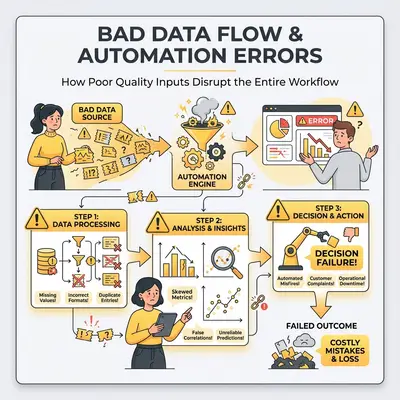
This scenario plays out daily in businesses that invest in automation without first addressing data quality. You can build the most sophisticated workflow, but if your data contains duplicates, missing fields, or invalid formats, your automation will amplify those errors across every process it touches.
Key Insight: Automation doesn't create data problems—it exposes them. A single bad email address can break an entire customer onboarding flow. One duplicate record can trigger duplicate orders, invoices, or support tickets.
The principle is simple: garbage in, garbage out (GIGO). Your automation is only as reliable as the data feeding into it. Understanding common data quality problems and how to fix them transforms automation from a source of frustration into a powerful business tool.
Why Bad Data Breaks Automations
Automations follow rules. They execute steps based on the data you provide. When that data is incomplete, inconsistent, or incorrect, the automation can't make intelligent decisions—it just processes what it receives.
Consider a simple email automation workflow:
- Trigger: New customer signup
- Action: Send welcome email
- Action: Create account in CRM
- Action: Add to email marketing list
If the email address is invalid (like "john@company" instead of "john@company.com"), step 2 fails. The workflow might stop entirely, or it might continue with incomplete data. Either way, the customer experience breaks down.
Reality Check: Most automation failures aren't technical bugs—they're data quality issues. A workflow that runs perfectly on bad input produces bad output faster than a person would have.
The impact multiplies when bad data flows through multiple systems. A duplicate customer record might trigger:
- Duplicate welcome emails
- Duplicate invoices
- Duplicate support ticket creation
- Confusion in your CRM
- Wasted marketing spend
Each error compounds, creating a cascade of problems that manual processes might catch but automated workflows amplify.
Common Data Quality Problems
Understanding the types of data quality issues helps you spot them before they break your automations. Here are the most common problems small businesses face:
Duplicate Records
Duplicates occur when the same entity exists multiple times in your system. Common causes include:
- Manual data entry errors
- Importing data from multiple sources without deduplication
- Customers signing up multiple times with slight variations (e.g., "John Smith" vs "John A. Smith")
- System integrations that create records without checking for existing matches
Impact on Automation: Duplicate records trigger duplicate actions. Your email automation sends multiple messages. Your invoicing automation creates duplicate bills. Your CRM automation creates duplicate contacts.
Missing Fields
Required fields that are empty or null break automations that depend on that data. Common missing fields include:
- Email addresses (critical for email automations)
- Phone numbers (required for SMS workflows)
- Customer names (needed for personalization)
- Addresses (required for shipping automations)
- Unique identifiers (needed to match records across systems)
Impact on Automation: Workflows that require specific fields will fail or skip steps when data is missing. An email automation can't send a message without an email address. A shipping automation can't create a label without an address.
Inconsistent Formats
Data entered in different formats creates matching and processing problems:
- Phone numbers: "(555) 123-4567" vs "555-123-4567" vs "5551234567"
- Dates: "01/15/2025" vs "2025-01-15" vs "January 15, 2025"
- Names: "John Smith" vs "Smith, John" vs "J. Smith"
- Addresses: "123 Main St" vs "123 Main Street" vs "123 Main St."
Impact on Automation: Inconsistent formats prevent proper matching and sorting. A workflow that matches customers by phone number won't recognize "(555) 123-4567" and "555-123-4567" as the same person. Date-based automations fail when dates aren't in the expected format.
Outdated Information
Data that was accurate when collected but has since changed:
- Email addresses that no longer work
- Phone numbers that have been disconnected
- Addresses for customers who have moved
- Job titles that have changed
- Company names after mergers or rebrands
Impact on Automation: Outdated data causes automations to fail silently or reach the wrong people. Email bounces increase. SMS messages fail to deliver. Shipping addresses send packages to old locations.
Invalid Data
Data that doesn't meet format requirements or business rules:
- Email addresses without "@" symbols
- Phone numbers with letters
- Dates in impossible formats
- Negative quantities for physical products
- Prices set to zero when they should have values
Impact on Automation: Invalid data causes immediate workflow failures. Validation steps catch some issues, but many slip through, causing downstream errors that are difficult to trace.
How to Spot Data Quality Issues Before They Break Your Automation
Catching data quality problems early prevents automation failures. Here are practical methods to identify issues before they cause problems:
Run Data Quality Audits
Regular audits help you understand your data's health. Check for:
Completeness: What percentage of records have all required fields filled?
- Calculate: (Records with all required fields / Total records) × 100
- Target: 95%+ completeness for critical fields
Uniqueness: How many duplicate records exist?
- Count records with identical key fields (email, phone, customer ID)
- Target: Less than 2% duplicate rate
Validity: How many records fail format validation?
- Test email formats, phone number formats, date formats
- Target: Less than 1% invalid format rate
Consistency: How uniform is your data formatting?
- Check for format variations in phone numbers, dates, addresses
- Target: 90%+ format consistency
Pro Tip: Start with a sample of 100-200 records. If you find significant issues in the sample, expand your audit to the full dataset. Focus on the data fields your automations actually use.
Use Automated Validation Rules
Set up validation rules that check data quality automatically:
Format Validation:
- Email addresses must contain "@" and a valid domain
- Phone numbers must match expected patterns
- Dates must be in a consistent format
- URLs must start with "http://" or "https://"
Business Rule Validation:
- Order totals must be greater than zero
- Quantities must be positive integers
- Discount percentages must be between 0-100
- Dates must be in the past for historical records, future for scheduled items
Cross-Field Validation:
- Shipping addresses require both street and city
- Customer records require either email or phone
- Orders require both customer and product information
Monitor Automation Error Rates
Your automations themselves can alert you to data quality problems:
Track Failure Patterns:
- Which workflows fail most often?
- What error messages appear repeatedly?
- Which data fields cause the most failures?
Set Up Alerts:
- Notify when error rates exceed thresholds (e.g., more than 5% failure rate)
- Alert on specific error types (email bounces, invalid formats, missing fields)
- Monitor for unusual patterns (sudden spike in duplicates, increase in missing data)
Review Error Logs Regularly:
- Weekly review of automation errors
- Identify common data quality issues
- Update validation rules based on patterns you discover
Test with Sample Data
Before deploying automations to production, test with sample data that includes:
- Valid records (the happy path)
- Missing required fields
- Invalid formats
- Duplicate records
- Edge cases (very long names, special characters, etc.)
This helps you identify how your automation handles data quality issues and where you need additional validation.
Simple Data Cleaning Techniques
Once you've identified data quality problems, use these techniques to clean your data:
Removing Duplicates
Method 1: Exact Match Deduplication Find records where all key fields match exactly:
- Email addresses
- Phone numbers
- Customer names + email combinations
- Unique identifiers
Method 2: Fuzzy Matching Identify duplicates with slight variations:
- "John Smith" vs "John A. Smith"
- "company@email.com" vs "company@email.co"
- "(555) 123-4567" vs "555-123-4567"
Most automation platforms and data tools offer fuzzy matching algorithms that can identify likely duplicates even with minor differences.
Method 3: Keep the Most Complete Record When merging duplicates, keep the record with:
- Most complete data (fewest missing fields)
- Most recent update timestamp
- Highest data quality score
Quick Win: Start with exact matches on email addresses—this catches the majority of duplicate customer records. Then move to fuzzy matching for more complex cases.
Standardizing Formats
Phone Numbers: Choose one format and convert all records:
- Standard: "+1 (555) 123-4567"
- Or: "555-123-4567"
- Or: "5551234567" (digits only)
Use regular expressions or data transformation tools to normalize formats automatically.
Dates: Standardize to ISO format (YYYY-MM-DD) or your system's preferred format:
- Convert "01/15/2025" → "2025-01-15"
- Convert "January 15, 2025" → "2025-01-15"
- Handle timezone conversions if needed
Names: Normalize name formats:
- "Smith, John" → "John Smith"
- "J. SMITH" → "John Smith" (if you have full name data)
- Remove extra spaces and capitalization inconsistencies
Addresses: Standardize address components:
- "St" vs "Street"
- "Ave" vs "Avenue"
- "Rd" vs "Road"
- Abbreviate or expand consistently
Validating Email Addresses
Format Validation: Check that emails contain:
- "@" symbol
- Valid domain name
- Proper structure (local@domain.com)
Domain Validation: Verify that domains exist and accept email:
- Check DNS records for the domain
- Validate MX records (mail exchange records)
- Test if the domain is a known disposable email provider
Deliverability Checks: For critical automations, verify emails are deliverable:
- Send test emails to verify addresses work
- Check bounce rates from previous campaigns
- Remove addresses that consistently bounce
Reality Check: Email validation can be time-consuming for large lists. Start with format validation (fast and catches most issues), then add domain validation for critical workflows. Full deliverability checks are best reserved for high-value automations.
Handling Missing Data
Option 1: Fill with Defaults Use sensible defaults for missing non-critical fields:
- Missing phone number: Use a placeholder or skip phone-based automations
- Missing address: Mark as "Address required" and flag for follow-up
- Missing preferences: Use system defaults
Option 2: Flag for Manual Review Mark records with missing critical fields:
- Create a "Data Quality Issues" list
- Set up alerts for records needing attention
- Assign team members to fill missing data
Option 3: Skip Automation Steps Configure workflows to skip steps when required data is missing:
- If email is missing, skip email automation but continue other steps
- If address is missing, skip shipping automation but process payment
- Log skipped steps for later review
Tools and Techniques for Data Validation in Automation Workflows
Modern automation platforms offer built-in data validation tools. Here's how to use them effectively:
Built-in Validation in Automation Platforms
Make.com (Integromat):
- Data validation filters in scenarios
- Data transformation tools for formatting
- Error handling routes for invalid data
- Data stores for temporary data cleaning
n8n:
- Data validation nodes (IF conditions, Switch nodes)
- Data transformation expressions
- Error workflows for handling failures
- Data quality checks using code nodes
Zapier:
- Filter by Zap for data validation
- Formatter tool for standardizing formats
- Paths for routing based on data quality
- Error handling with retry logic
Data Validation Patterns
Pattern 1: Validate Before Processing Add validation steps at the start of your workflow:
- Check if required fields exist
- Validate formats (email, phone, date)
- Check for duplicates
- Only proceed if validation passes
Pattern 2: Validate and Clean Transform data as it flows through the workflow:
- Receive data
- Standardize formats (phone, date, name)
- Fill missing fields with defaults
- Continue with cleaned data
Pattern 3: Validate and Route Route records based on data quality:
- Validate data
- Route high-quality data to main workflow
- Route problematic data to cleaning workflow
- Route invalid data to manual review queue
Third-Party Data Quality Tools
Dedicated Data Cleaning Tools:
- OpenRefine: Free, open-source tool for data cleaning and transformation
- Trifacta: Enterprise data preparation platform
- Talend: Data integration and quality platform
- Data Ladder: Data matching and deduplication software
API-Based Validation Services:
- Email Validation APIs: Verify email addresses in real-time
- Phone Validation APIs: Validate and format phone numbers
- Address Validation APIs: Standardize and verify addresses
- Data Enrichment APIs: Fill missing fields with external data
Integration Approach: Use these tools to clean data before it enters your automation workflows:
- Export data from source system
- Clean using data quality tool
- Import cleaned data back
- Run automation on clean dataset
Pro Tip: For ongoing data quality, set up a pre-processing workflow that cleans data before it reaches your main automations. This adds a small delay but prevents downstream errors.
How to Set Up Automated Data Quality Checks
Preventing data quality issues is better than fixing them. Set up automated checks that run continuously:
Real-Time Validation in Workflows
Add Validation Steps: Insert validation checks at key points in your workflows:
- Before sending emails (validate email format)
- Before creating records (check for duplicates)
- Before processing payments (validate amounts)
- Before generating reports (verify data completeness)
Use Conditional Logic: Route workflows based on data quality:
IF email is valid AND phone is valid:
  → Continue with full automation
ELSE IF email is valid:
  → Continue with email-only automation
ELSE:
  → Route to manual review
Scheduled Data Quality Audits
Daily Checks:
- Scan for new duplicates
- Check for missing critical fields in recent records
- Monitor error rates in automations
Weekly Reviews:
- Comprehensive data quality report
- Identify trends in data quality issues
- Review and update validation rules
Monthly Deep Dives:
- Full dataset audit
- Calculate data quality scores
- Identify root causes of recurring issues
- Plan data quality improvement initiatives
Automated Data Cleaning Workflows
Deduplication Automation:
- Daily scan for duplicate records
- Identify duplicates using matching rules
- Merge duplicates (keep most complete record)
- Notify team of merged records
- Update related records in other systems
Format Standardization Automation:
- Detect records with non-standard formats
- Transform to standard format
- Update records in source system
- Log transformations for audit trail
Missing Data Detection:
- Identify records with missing critical fields
- Attempt to fill from other sources (enrichment)
- Flag records that still need manual attention
- Create tasks for team to complete missing data
Data Quality Monitoring Dashboards
Create dashboards that track:
- Completeness Score: Percentage of records with all required fields
- Uniqueness Score: Percentage of records that are unique (no duplicates)
- Validity Score: Percentage of records passing format validation
- Consistency Score: Percentage of records using standard formats
- Overall Data Quality Score: Weighted average of all metrics
Set up alerts when scores drop below thresholds, indicating new data quality issues that need attention.
Real Examples: How Bad Data Breaks Automations
Understanding real-world scenarios helps you recognize and prevent similar issues:
Example 1: One Bad Email Address Breaks Customer Onboarding
The Scenario: A 15-person marketing agency automated their customer onboarding process. When a new client signed up, the workflow:
- Created a CRM record
- Sent welcome email
- Added client to project management tool
- Scheduled kickoff call
- Sent contract for signature
The Problem: One client entered their email as "sarah@company" (missing ".com"). The workflow failed at step 2. Because the workflow didn't have error handling, it stopped completely. The client never received their welcome email, wasn't added to the project management tool, and the kickoff call wasn't scheduled.
The Impact:
- Client waited 3 days for onboarding materials
- Team didn't know the client existed in the system
- Manual intervention required to complete onboarding
- Client experience damaged by the delay
The Solution: Added email format validation at the start of the workflow. Invalid emails are flagged immediately, and the workflow routes to a manual review queue. Valid emails proceed through the full automation.
The Lesson: Validate critical data fields before processing. One invalid field can break an entire workflow.
Example 2: Duplicate Records Trigger Duplicate Invoicing
The Scenario: A consulting firm automated their invoicing process. When a project was marked complete, the workflow:
- Calculated final invoice amount
- Generated invoice PDF
- Sent invoice to client
- Created accounting record
- Updated project status
The Problem: The client existed twice in the CRM—once as "Acme Corp" and once as "Acme Corporation." Both records had the same email address. When the project completed, the workflow found both records and created two invoices for the same project.
The Impact:
- Client received duplicate invoices
- Accounting records showed double revenue
- Client confusion and support tickets
- Manual correction required
- Delayed payment while issue was resolved
The Solution: Implemented deduplication check before invoice generation. The workflow now checks for existing invoices for the same project and client combination. Duplicate records are merged, keeping the most complete version.
The Lesson: Check for duplicates before creating financial records. Duplicate data causes duplicate actions.
Example 3: Inconsistent Phone Formats Break SMS Automation
The Scenario: A service business automated appointment reminders via SMS. The workflow:
- Triggered 24 hours before appointment
- Looked up client phone number
- Sent SMS reminder
- Logged reminder in system
The Problem: Phone numbers were stored in multiple formats:
- "(555) 123-4567"
- "555-123-4567"
- "5551234567"
- "+1 555 123 4567"
The SMS service required a specific format (E.164: +15551234567). Some numbers worked, others failed silently.
The Impact:
- 30% of reminders failed to send
- Clients missed appointments
- Revenue lost from no-shows
- Manual reminder calls required
The Solution: Added phone number standardization step. All phone numbers are converted to E.164 format before sending SMS. Invalid phone numbers are flagged, and the workflow sends email reminders as a fallback.
The Lesson: Standardize data formats before using them in automations. Inconsistent formats cause silent failures.
Key Insight: These examples show a pattern: data quality issues cause automation failures that are often silent or hard to detect. The automation "works" but produces wrong results. Validation and cleaning prevent these problems before they impact your business.
Building Data Quality into Your Automation Strategy
Data quality isn't a one-time fix—it's an ongoing process. Build it into your automation strategy from the start:
Start with Data Quality Assessment
Before building automations, assess your data:
- Audit existing data for the fields your automation will use
- Identify data quality issues (duplicates, missing fields, format inconsistencies)
- Prioritize fixes based on impact on automation
- Clean critical data before automation deployment
Design Automations with Data Quality in Mind
Build validation into your workflows:
- Validate early—check data quality at workflow start
- Handle errors gracefully—route problematic data to manual review
- Log data quality issues—track what fails and why
- Monitor continuously—set up alerts for data quality problems
Maintain Data Quality Over Time
Data quality degrades over time. Set up ongoing maintenance:
- Regular audits—weekly or monthly data quality checks
- Automated cleaning—workflows that clean data continuously
- Team training—ensure data entry follows standards
- Process improvements—update validation rules based on new issues
Measure and Improve
Track data quality metrics:
- Before automation: Baseline data quality scores
- After cleaning: Improved scores after initial cleanup
- Ongoing: Monitor scores to catch new issues early
- Trend analysis: Identify patterns in data quality problems
Use these metrics to prioritize data quality improvements and measure the impact of your efforts.
Conclusion
Your automation is only as good as your data. Bad data doesn't just cause errors—it breaks entire workflows, damages customer relationships, and wastes time and money on manual fixes.
The good news? Data quality problems are solvable. Start by understanding common issues: duplicates, missing fields, inconsistent formats, outdated information, and invalid data. Then implement simple cleaning techniques and validation checks to catch problems before they break your automations.
Remember: automation amplifies data quality issues. One bad email address can break customer onboarding. One duplicate record can trigger duplicate invoices. One inconsistent format can cause silent failures.
Build data quality into your automation strategy from the start. Validate early, clean regularly, and monitor continuously. Your automations will run smoother, your team will spend less time fixing errors, and your customers will have better experiences.
Ready to improve your automation data quality? Book a demo with Evalics to discuss data quality strategies for your specific workflows.
Frequently Asked Questions
What is the most common data quality problem in automation?
Missing required fields is the most common issue. When automations expect specific data (like email addresses or phone numbers) and that data is missing, workflows fail or skip critical steps. Always validate that required fields exist before processing.
How often should I clean my data?
For active automations, run data quality checks weekly. Clean data before deploying new automations, and set up automated cleaning workflows that run continuously. Monthly deep-dive audits help identify trends and root causes of recurring issues.
Can I automate data quality checks?
Yes. Most automation platforms support data validation steps, conditional routing based on data quality, and automated cleaning workflows. Set up validation at workflow entry points, use conditional logic to route problematic data, and create dedicated workflows for ongoing data cleaning.
What's the difference between data validation and data cleaning?
Data validation checks if data meets quality standards (format, completeness, validity). Data cleaning fixes problems found during validation (removing duplicates, standardizing formats, filling missing fields). Use validation to identify issues, then cleaning to fix them.
How do I know if my data quality is good enough for automation?
Run a data quality audit focusing on the fields your automation uses. Target 95%+ completeness for critical fields, less than 2% duplicate rate, less than 1% invalid format rate, and 90%+ format consistency. If your data meets these thresholds, it's likely good enough for automation.
What should I do if my automation keeps failing due to data quality issues?
First, identify the specific data quality problems causing failures. Add validation steps at the start of your workflow to catch issues early. Route problematic data to a manual review queue instead of failing silently. Set up automated data cleaning workflows to fix recurring issues. Consider pausing the automation temporarily to clean your data, then re-enable with better validation.
Can bad data quality affect my automation costs?
Yes. Poor data quality increases automation costs in several ways: failed workflow executions that need to be rerun, API calls wasted on invalid data, manual intervention time to fix errors, and potential overage charges from retry logic. Cleaning data before automation reduces these costs significantly.
By Kevin Michael Schindler, AI Automation Expert at Evalics