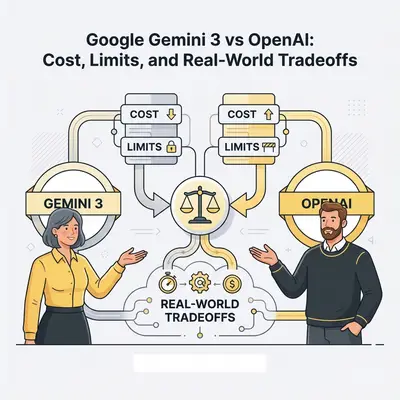
Your automation bill keeps growing. You're processing millions of tokens a month, and you're not sure if switching models would cut costs or break your workflows.
This isn't a theoretical question. The difference between Google Gemini 3 and OpenAI's current models can mean a lower bill or a higher one, depending on your workload patterns. More importantly, the wrong choice can mean hitting rate limits during peak hours, context windows that truncate your data, or reliability issues that cost you customers.
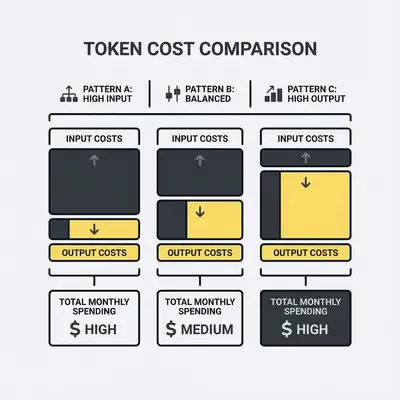
Quick Win: The biggest cost driver isn't the per-token price, it's output tokens. Gemini 3 Flash charges $3.00 per 1M output tokens, a quarter of Gemini 3 Pro's $12.00 and less than a quarter of GPT-5.2's $14.00.
This comparison focuses on what matters for production: pricing structures that actually affect your bill, context limits that determine what you can process, rate limits that throttle your automations, and the practical tradeoffs that determine which platform fits your stack.
Gemini vs. OpenAI: Key Cost Drivers & Hidden Fees
Before comparing specific models, understand what drives your API bill:
Input vs Output Tokens: Most models charge separately for input (what you send) and output (what you get back). Output costs more: 4x on GPT-4o and GPT-4o Mini, 6x on Gemini 3, and 8x on GPT-5.2.
Context Length: Longer context windows let you process more data in one call. You pay for the tokens you send, so a 1M token window costs nothing extra if you only send 50K tokens.
Rate Limits: Free tiers and lower-cost models often have stricter rate limits. If you need to process 10,000 requests per hour, a cheaper model that caps you at 1,000 requests/hour forces you to upgrade.
Tiered Pricing: Both platforms offer multiple tiers. Using the right tier for each task (simple queries → budget tier, complex reasoning → premium tier) keeps premium rates for the requests that need them.
Gemini 3 vs. OpenAI: A Direct Pricing Comparison
Google Gemini 3 Pricing Structure
Gemini 3 Flash Preview (Budget tier for simple tasks):
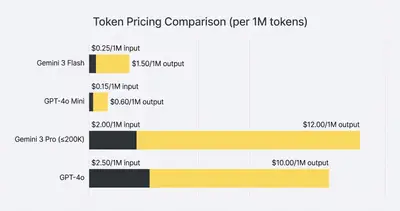
- Input: $0.50 per 1 million tokens
- Output: $3.00 per 1 million tokens
- Context window: 1 million tokens
- Best for: High-volume simple tasks, cost-sensitive applications
Gemini 3 Pro Preview (Balanced performance):
- Input: $2.00 per 1 million tokens (prompts ≤200K tokens), $4.00 per 1 million tokens (prompts >200K tokens)
- Output: $12.00 per 1 million tokens (prompts ≤200K tokens), $18.00 per 1 million tokens (prompts >200K tokens)
- Context window: 1 million tokens
- Best for: Complex reasoning, multimodal tasks, production applications
Source: Google Gemini API Pricing
OpenAI Model Pricing Structure
OpenAI's pricing varies by model tier. Current models include:
GPT-4o Mini (Cost-effective tier):
- Input: Approximately $0.15 per 1 million tokens
- Output: Approximately $0.60 per 1 million tokens
- Context window: 128K tokens
- Best for: Simple tasks, high-volume applications
GPT-4o (Balanced performance):
- Input: Approximately $2.50 per 1 million tokens
- Output: Approximately $10.00 per 1 million tokens
- Context window: 128K tokens
- Best for: General-purpose tasks, multimodal applications
GPT-5.2 (Premium tier):
- Input: $1.75 per 1 million tokens
- Output: $14.00 per 1 million tokens
- Context window: 400,000 tokens
- Best for: Complex reasoning, coding tasks, maximum capability
Source: OpenAI API Pricing
Reality Check: Official pricing changes frequently. Always verify current rates on the official pricing pages before making budget decisions. The numbers above reflect pricing as of December 2025.
Context Windows: Gemini vs. OpenAI Limits & Performance
Context window size determines how much data you can process in a single API call. This affects both capability and cost.
Gemini 3: 1 million tokens across all tiers
- Can process entire codebases, full-length books, or extensive conversation histories
- Enables analysis of complete repository histories
- Useful for document intelligence platforms processing large collections
OpenAI Models: Depends on the model
- GPT-4o: 128K tokens
- GPT-5.2: 400,000 tokens (model page)
- Sufficient for most business automation tasks
- May require chunking for very long documents
Key Insight: A larger context window doesn't automatically mean better value. If you're processing 50K token documents, paying for 1M token capacity adds cost without benefit. Choose based on your actual use case, not the maximum capability.
When 1M tokens matter:
- Analyzing entire codebases with full context
- Processing complete book-length documents with detailed queries
- Maintaining extensive conversation histories without summarization
- Document intelligence platforms ingesting large collections
When 128K-400K is sufficient:
- Most business automation workflows
- Customer support ticket analysis
- Email processing and response generation
- Standard document analysis and summarization
Rate Limits: Gemini vs. OpenAI Bottlenecks & Workarounds
Rate limits determine how many requests you can make per minute, hour, or day. They're often the bottleneck that forces you to upgrade tiers or switch platforms.
Gemini 3 Rate Limits:
- Free tier: Generous limits for development and testing
- Pay-as-you-go: Higher limits for production deployments
- Specific limits vary by tier and are subject to change
OpenAI Rate Limits:
- Vary by model, tier, and account type
- Free tier: Lower limits for experimentation
- Paid tiers: Higher limits, with options for dedicated capacity
- Limits can be increased through enterprise agreements
Pro Tip: Test your expected request volume against both platforms before committing. Rate limits can change, and hitting limits during peak hours can break production workflows. Build in retry logic and fallback strategies.
Impact on Automation:
- High-volume workflows (10,000+ requests/day) may hit free tier limits
- Batch processing can help work around rate limits
- Enterprise agreements can provide dedicated capacity
- Consider rate limits when choosing between budget and premium tiers
Multimodal Capabilities: Gemini 3 vs. OpenAI Features
Both platforms support multimodal inputs, but with different strengths.
Gemini 3:
- Native multimodal processing: text, images, audio, video in a single context
- No separate model calls required for different media types
- Integrated processing across all media types
- Best for: Applications requiring diverse media analysis
OpenAI:
- Strong image and audio processing
- Video generation through separate Sora app
- May require separate API calls for different media types
- Best for: Text-focused applications with occasional image/audio needs
Example: A content moderation system analyzing user uploads (text, images, video) benefits from Gemini 3's native multimodal processing. A customer support chatbot primarily handling text with occasional image analysis might find OpenAI's approach sufficient.
Platform Integration: Gemini vs. OpenAI Lock-in Tradeoffs
Gemini 3:
- Deep integration with Google Cloud Platform (GCP)
- Seamless integration with Google Workspace, Gmail, Docs, Drive
- May require GCP infrastructure for optimal performance
- Potential vendor lock-in if building extensive GCP-dependent infrastructure
OpenAI:
- More flexible cloud provider options
- Works across AWS, Azure, GCP, and other platforms
- Less platform-specific infrastructure required
- Easier to maintain multi-cloud strategy
Reality Check: Vendor lock-in isn't inherently bad—it often provides better performance and integration. But it reduces flexibility. If you're already on GCP, Gemini 3's integration is a strength. If you're on AWS or prefer multi-cloud, OpenAI offers more flexibility.
Example Costs: Gemini vs. OpenAI for Small Businesses
Scenario 1: Customer Support Triage (High Volume, Simple Tasks)
Workload: 5,000 support tickets per month, average 2,000 input tokens, 500 output tokens per ticket
Gemini 3 Flash:
- Input: (5,000 × 2,000) / 1,000,000 × $0.50 = $5.00
- Output: (5,000 × 500) / 1,000,000 × $3.00 = $7.50
- Total: $12.50/month
GPT-4o Mini:
- Input: (5,000 × 2,000) / 1,000,000 × $0.15 = $1.50
- Output: (5,000 × 500) / 1,000,000 × $0.60 = $1.50
- Total: $3.00/month
Winner for this scenario: GPT-4o Mini (lower cost, sufficient capability)
Scenario 2: Document Intelligence Platform (Long Context, Complex Analysis)
Workload: 500 documents per month, average 150,000 input tokens, 5,000 output tokens per document
Gemini 3 Pro (≤200K tier):
- Input: (500 × 150,000) / 1,000,000 × $2.00 = $150.00
- Output: (500 × 5,000) / 1,000,000 × $12.00 = $30.00
- Total: $180.00/month
GPT-5.2 (400K context):
- Input: (500 × 150,000) / 1,000,000 × $1.75 = $131.25
- Output: (500 × 5,000) / 1,000,000 × $12.00 = $30.00
- Total: $166.25/month
Winner for this scenario: GPT-5.2 on price ($13.75/month less). Both windows fit a 150K-token document, so test output quality before you switch.
Scenario 3: Sales Automation (Mixed Complexity, Routing Strategy)
Workload: 2,000 leads per month
- 1,500 simple leads (1,000 input, 200 output tokens) → budget tier
- 500 complex leads (5,000 input, 2,000 output tokens) → premium tier
Hybrid Approach (Gemini 3 Flash + Gemini 3 Pro):
- Simple: (1,500 × 1,000) / 1,000,000 × $0.50 + (1,500 × 200) / 1,000,000 × $3.00 = $0.75 + $0.90 = $1.65
- Complex: (500 × 5,000) / 1,000,000 × $2.00 + (500 × 2,000) / 1,000,000 × $12.00 = $5.00 + $12.00 = $17.00
- Total: $18.65/month
Single Premium Model (GPT-4o for all):
- Input: (1,500 × 1,000 + 500 × 5,000) / 1,000,000 × $2.50 = $10.00
- Output: (1,500 × 200 + 500 × 2,000) / 1,000,000 × $10.00 = $13.00
- Total: $23.00/month
Winner for this scenario: Hybrid routing with Gemini 3 (19% cost savings)
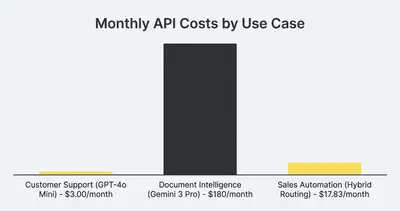
Pro Tip: Most production systems benefit from intelligent routing. Use budget tiers (Gemini 3 Flash, GPT-4o Mini) for simple queries, and reserve premium tiers for complex reasoning. Scenario 3 shows the saving depends on how much of your volume is simple.
Benchmarking Performance: How to Compare Gemini & OpenAI
Before standardizing on a platform, test both with your actual workflows. Here's a simple methodology:
Step 1: Create a Test Suite
- Gather 20-50 real examples from your workflow
- Include edge cases: long inputs, complex reasoning, multimodal content
- Document expected outputs or success criteria
Step 2: Run Parallel Tests
- Test both platforms on identical prompts
- Record: accuracy, latency, cost per request, error rates
- Test at different times (models can have performance variations)
Step 3: Measure What Matters
- Accuracy: Does the output meet your quality bar?
- Latency: Is response time acceptable for your use case?
- Cost: Calculate actual cost per request (not just per-token pricing)
- Reliability: Do you see consistent behavior across retries?
Step 4: Test Under Load
- Simulate your expected production volume
- Check rate limits, error handling, and fallback behavior
- Measure cost at scale (pricing can change with volume)
Step 5: Re-test Periodically
- Models and pricing change over time
- Re-run tests when you upgrade model versions
- Monitor for behavior drift or performance regressions
Key Insight: A model that works perfectly in testing can fail in production if you don't account for rate limits, cost at scale, or reliability under load. Test the full stack, not just the model.
Decision Framework: When to Choose Gemini or OpenAI
Choose Gemini 3 if:
- You need to process very long documents (1M token context)
- Your application requires native multimodal processing (text, images, audio, video)
- You're already on Google Cloud Platform or Google Workspace
- Cost efficiency is a primary concern (Flash tier is very competitive)
- You're building document intelligence or codebase analysis tools
Choose OpenAI if:
- You need maximum reasoning capability for complex tasks
- You prefer flexibility across cloud providers (AWS, Azure, GCP)
- You're building coding tools or automation requiring strong code generation
- You need proven reliability and a large ecosystem of integrations
- Your use case doesn't require 1M token context windows
Use Both (Hybrid Approach) if:
- You have mixed workload complexity (simple + complex tasks)
- Cost optimization is critical (route simple queries to budget tiers)
- You want to avoid vendor lock-in
- You're experimenting and want to compare performance over time
Reality Check: Many successful production systems use both platforms. Intelligent routing—sending simple queries to budget tiers and complex reasoning to premium tiers—can optimize both cost and capability.
Your Action Plan: Next Steps for Gemini & OpenAI
If you're evaluating models for a new project or reconsidering your current choice:
Day 1-2: Gather Your Data
- Document your current or expected workload (requests/day, average tokens per request)
- Identify your use case patterns (simple vs complex, text-only vs multimodal)
- Calculate current costs if you're already using a platform
Day 3-4: Run Parallel Tests
- Set up test accounts on both platforms
- Run your test suite (20-50 real examples)
- Measure accuracy, latency, and cost per request
Day 5: Make the Decision
- Compare results against your priorities (cost, capability, reliability)
- Consider hybrid routing if you have mixed workloads
- Document your decision criteria for future reference
Ongoing: Monitor and Optimize
- Track actual costs vs projections
- Monitor for rate limit issues or reliability problems
- Re-test when model versions change or pricing updates
If you want help evaluating which model fits your specific automation needs, we can run a cost analysis and test comparison in under 30 minutes. Book a free automation audit.
Conclusion: Gemini vs. OpenAI – The Best Fit for Your Needs
There's no single "best" model. The right choice depends on your workload patterns, cost constraints, and technical requirements.
Key Takeaways:
- Output tokens drive costs: If you generate long responses, budget tiers (Gemini 3 Flash, GPT-4o Mini) charge a quarter or less of premium output rates
- Context windows matter for specific use cases: 1M tokens enable whole-codebase analysis, but many business automations fit well under 128K
- Hybrid routing optimizes cost and capability: Using budget tiers for simple queries and premium tiers for complex reasoning lowers the bill, by how much depends on your mix
- Test before you commit: Run parallel tests with your actual workflows—pricing and performance can vary significantly by use case
The AI model landscape changes rapidly. What's optimal today may shift in 6-12 months as both platforms release updates and adjust pricing. The most reliable approach is to architect your systems for flexibility, test regularly, and optimize based on actual production data.
Ready to optimize your AI automation costs? Book a free consultation to get personalized model recommendations and cost projections for your specific use case.
About the Author
Kevin Michael Schindler is an AI Automation Expert at Evalics, helping small businesses implement practical automation systems that save time and reduce operational costs.