
Your competitor launches a new pricing tier on Tuesday. They announce a major feature update on Thursday. By Friday, you're scrambling to respond, but you've already lost a week of strategic advantage. Meanwhile, your sales team spent 8 hours manually checking competitor websites and social media accounts, only to miss the most critical changes.
This scenario plays out daily for businesses relying on manual competitor tracking. While your team manually searches Google, scrolls through LinkedIn, and checks competitor websites once a week, AI-powered automation monitors competitors continuously. When a competitor changes pricing, launches a feature, or makes a strategic announcement, you know within minutes—not days.
Key Insight: Companies using automated competitor monitoring respond to competitive threats 10x faster than those relying on manual tracking. The difference isn't just speed—it's the ability to identify significant changes from noise, enabling strategic responses before opportunities disappear. According to Gartner research on competitive intelligence strategies, businesses with real-time monitoring capabilities see 30% better market positioning and faster adaptation to competitive moves.
AI-powered competitor tracking transforms competitive intelligence from reactive to proactive. Instead of discovering competitor changes weeks after they happen, you're alerted immediately when significant events occur. This guide shows you exactly how AI tracks competitors in real time, from understanding what automation can monitor to building workflows that deliver daily intelligence digests to your team. For more on how real-time data transforms business processes, see our guide on how real-time data improves sales processes.
The Problem with Manual Competitor Tracking
Most businesses track competitors the old-fashioned way: someone on your team manually checks competitor websites weekly, scrolls through their social media feeds, and reads press releases when they remember. This approach has three critical limitations.
Time consumption: A sales leader spending 2 hours per week manually tracking 5 competitors loses 100+ hours annually on research that could be automated. For a marketing team monitoring 10 competitors across multiple channels, manual tracking becomes a full-time job that never gets done properly.
Inconsistent coverage: Manual tracking means you check competitors when you have time, not when they make changes. A competitor launches a new product on Monday, but you don't discover it until Friday's weekly check. By then, they've already announced it to customers, and you're playing catch-up.
Missing critical signals: Manual tracking focuses on obvious changes—new website pages, social media posts, press releases. But significant competitive moves often happen in subtler ways: pricing page updates, feature additions to existing products, changes in messaging or positioning. Without systematic monitoring, these signals get missed.
Real-world example: A 15-person SaaS company's marketing team manually tracked three main competitors. They checked competitor websites every Friday and reviewed social media posts weekly. In January, a competitor launched a new pricing model that undercut their prices by 30%. The team didn't discover this until a customer mentioned it in a sales call three weeks later. By then, they'd lost two deals worth $40,000 annually. After implementing automated competitor monitoring, they received alerts within 15 minutes of the competitor's pricing page update, enabling immediate strategic response. This aligns with industry research showing that competitive intelligence programs significantly improve strategic decision-making.
Reality Check: Manual competitor tracking creates a false sense of security. You think you're monitoring competitors because someone checks their websites occasionally, but you're missing 70-80% of significant changes. The cost isn't just lost deals—it's strategic positioning that erodes over time as competitors move faster than you can track.
What AI-Powered Competitor Tracking Actually Does
AI-powered competitor tracking automates the entire monitoring process. Instead of manually checking websites and social media, automation continuously monitors multiple channels, detects changes, and summarizes significant updates using AI.
Automated monitoring across channels:
Website monitoring: Automation checks competitor websites for changes to pricing pages, feature lists, product descriptions, and content. When a competitor updates their pricing or adds a new feature, you're alerted immediately.
Social media tracking: Automation monitors competitor social media accounts (LinkedIn, Twitter, Facebook) for announcements, product launches, and strategic messaging. AI identifies high-value posts from routine updates, ensuring you see what matters.
Press release monitoring: Automation scans press release sites, news outlets, and industry publications for competitor announcements. When a competitor makes a public announcement, you know within minutes.
News and industry tracking: Automation monitors industry publications, blogs, and news sites for mentions of competitors. This catches third-party coverage, analyst reports, and industry discussions you might miss.
Real-time change detection:
AI doesn't just monitor—it identifies what's significant. When a competitor updates their website, AI analyzes the change to determine if it's meaningful. A typo fix doesn't trigger an alert. A pricing change or new product launch does.
Intelligent summarization:
Instead of forwarding raw competitor updates, AI summarizes key information. A 500-word press release becomes a 3-sentence summary highlighting the most important points: what changed, why it matters, and what action you might consider.
Filtering noise from signal:
Most competitor activity is routine: daily social media posts, blog updates, minor website changes. AI filters this noise to surface only significant changes: pricing updates, product launches, strategic announcements, or messaging shifts.
Pro Tip: Start with monitoring 3-5 key competitors across 2-3 channels (website, LinkedIn, press releases). This gives you comprehensive coverage without overwhelming your team with alerts. You can expand to more competitors and channels once the workflow is proven.
Setting Up Automated Monitoring
Building automated competitor monitoring requires connecting monitoring tools, AI summarization, and alert systems. Here's how to set it up step by step.
Website monitoring setup:
Use website change detection tools like Visualping, ChangeTower, or Distill.io to monitor competitor websites. These tools check pages at regular intervals (every hour, daily, or weekly) and alert you when content changes.
What to monitor: Focus on high-value pages: pricing pages, product feature pages, homepage messaging, and "About" pages. These are where competitors make strategic changes that impact your business.
Setting up monitors: For each competitor, create monitors for their pricing page, main product page, and homepage. Most monitoring tools allow you to select specific page sections, so you can ignore footer updates and focus on content that matters.
Social media tracking setup:
Use automation platforms like n8n or Make.com to monitor competitor social media accounts. These platforms can connect to LinkedIn, Twitter, and Facebook APIs to track new posts automatically.
What to track: Monitor competitor LinkedIn company pages for product announcements, feature launches, and strategic updates. Track Twitter accounts for real-time announcements and industry engagement. Focus on posts that indicate product changes or strategic shifts, not routine content.
Filtering strategy: Set up filters to only alert on posts containing keywords like "launch," "announcement," "new feature," "pricing," or "partnership." This reduces noise and ensures you only see significant updates.
Press release monitoring setup:
Use RSS feeds and news monitoring tools to track competitor press releases. Most press release sites (PR Newswire, Business Wire) offer RSS feeds you can monitor with automation platforms.
What to monitor: Track competitor press releases for product launches, funding announcements, partnership deals, and strategic initiatives. These announcements often signal competitive moves that require response.
News and industry publication tracking:
Set up Google Alerts or use news monitoring APIs to track mentions of competitors in industry publications. This catches third-party coverage, analyst reports, and industry discussions.
Integration approach:
Connect all monitoring sources to a central automation platform (n8n or Make.com). When any source detects a change, the workflow triggers AI summarization and routes alerts to your team via Slack, email, or your CRM. For a deeper understanding of automation platforms and how to choose the right one, see our guide on what is rule-based vs AI automation.
Quick Win: You can set up basic competitor monitoring in 2-3 hours using free tools. Start with website monitoring (Visualping free tier) and LinkedIn tracking (n8n free tier). This gives you immediate value while you plan a more comprehensive system.
AI Summarization and Change Detection
Not all competitor changes are equal. A competitor updating their blog with a new post is routine. A competitor changing their pricing by 20% is critical. AI helps distinguish between these by analyzing changes and summarizing what matters.
How AI identifies significant changes:
Content analysis: AI analyzes the text of competitor updates to identify key information. When a competitor posts "We're excited to announce our new Enterprise tier," AI extracts: new product tier, target market (Enterprise), and timing (now).
Change comparison: AI compares new content against previous versions to identify what changed. If a competitor's pricing page showed "$99/month" last week and now shows "$79/month," AI flags this as a pricing change and calculates the percentage decrease.
Context understanding: AI understands context to filter noise. A competitor posting "Happy Friday!" on social media doesn't trigger an alert. A competitor posting "We just raised $10M in Series A funding" does.
Example: Pricing change detection:
A competitor updates their pricing page. The monitoring tool detects the change and sends the new page content to an AI summarization workflow. AI analyzes the page, identifies that the "Pro" tier changed from $99/month to $79/month (20% decrease), and generates a summary: "Competitor X reduced Pro tier pricing by 20% ($99 to $79/month). This undercuts our Pro tier pricing by $20/month. Consider reviewing our pricing strategy."
Example: Feature launch detection:
A competitor announces a new feature on LinkedIn. AI analyzes the post, identifies it as a product announcement, extracts the feature details, and summarizes: "Competitor X launched AI-powered analytics feature. Targets enterprise customers. Positioned as differentiator. May impact our enterprise sales conversations."
Filtering noise from signal:
Most competitor activity is routine: daily social media posts, blog updates, minor website tweaks. AI filters this to surface only significant changes. You receive alerts for pricing updates, product launches, and strategic announcements—not for every blog post or social media update.
Customization options:
You can train AI to focus on what matters to your business. If pricing changes are critical, prioritize those alerts. If product launches matter most, emphasize feature announcements. Most AI summarization tools allow you to customize what gets flagged and how it's summarized.
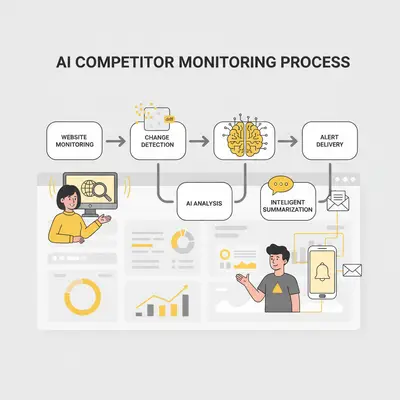
Key Insight: AI summarization saves 80% of the time you'd spend reading competitor updates manually. Instead of reviewing 20 social media posts and 5 press releases daily, you receive 2-3 summarized alerts highlighting only significant changes. This makes competitor monitoring sustainable and actionable.
Workflow Example: Daily Slack Digest
Here's a complete workflow example that delivers a daily competitor intelligence digest to your Slack channel every morning at 8 AM.
Workflow overview:
The automation monitors 5 competitors across 3 channels (websites, LinkedIn, press releases), uses AI to summarize significant changes, and delivers a formatted digest to Slack.
Step-by-step implementation:
1. Set up website monitoring:
Create website monitors for each competitor's key pages using Visualping or ChangeTower. Configure monitors to check pages daily and send webhook notifications when changes are detected.
2. Configure social media tracking:
In n8n or Make.com, create workflows that monitor competitor LinkedIn company pages. Use LinkedIn API or RSS feeds to track new posts. Set up filters to only capture posts containing keywords like "announcement," "launch," "feature," or "pricing."
3. Set up press release monitoring:
Create RSS feed monitors for competitor press releases. Most press release sites offer RSS feeds you can subscribe to. Configure automation to check feeds daily and capture new releases.
4. Build AI summarization workflow:
When any monitoring source detects a change, trigger an AI summarization step. Use OpenAI's API or similar AI service to analyze the content and generate a summary. Configure the AI to:
- Identify the type of change (pricing, feature, announcement, etc.)
- Extract key details (numbers, dates, features)
- Summarize in 2-3 sentences
- Flag urgency (high, medium, low)
5. Create daily digest aggregation:
Set up a workflow that collects all competitor updates from the past 24 hours, formats them into a digest, and sends to Slack at 8 AM daily. The digest should include:
- Competitor name
- Change type (pricing, feature, announcement)
- AI-generated summary
- Link to original source
- Urgency flag
Sample digest format:
📊 Daily Competitor Intelligence - January 20, 2025

🔴 HIGH PRIORITY
Competitor A - Pricing Change
Reduced Pro tier from $99/month to $79/month (20% decrease).
This undercuts our Pro tier by $20/month.
Source: [competitor website pricing page]

🟡 MEDIUM PRIORITY
Competitor B - Feature Launch
Launched AI-powered analytics dashboard targeting enterprise customers.
Positioned as key differentiator for data-driven teams.
Source: [LinkedIn post URL]

🟢 LOW PRIORITY
Competitor C - Content Update
Published blog post on "5 Trends in [Industry] for 2025."
No strategic implications identified.
Source: [competitor blog post URL]

---
Summary: 1 high-priority change, 1 medium-priority update, 1 routine content update.
Customization options:
Alert frequency: Instead of daily digests, set up real-time alerts for high-priority changes (pricing updates, major launches) and daily digests for routine updates.
Channel routing: Route alerts to different Slack channels based on competitor or change type. Sales team gets pricing alerts, product team gets feature announcements.
CRM integration: Automatically create records in your CRM when significant competitor changes are detected, enabling sales teams to reference competitive intelligence in customer conversations.
Team notifications: Tag specific team members in Slack alerts based on relevance. Pricing changes tag the sales leader, feature launches tag the product manager.
Example: A 20-person agency implemented this workflow to monitor 8 competitors. They receive a daily Slack digest at 8 AM with all competitor updates from the past 24 hours. High-priority changes (pricing, major launches) trigger immediate alerts. This system replaced 12 hours of weekly manual tracking and ensures they never miss significant competitive moves. Their response time to competitive threats dropped from 2 weeks to under 24 hours.
Ethical Considerations
Competitor monitoring must stay within legal and ethical boundaries. Here's how to ensure your tracking practices are compliant and ethical.
Focus on publicly available information:
Only monitor information that's publicly accessible: websites, public social media posts, press releases, and news articles. Never attempt to access private information, internal communications, or restricted content.
Respecting terms of service:
Review the terms of service for platforms you're monitoring. Most websites and social media platforms allow automated monitoring of public content, but some have restrictions. Ensure your monitoring practices comply with platform policies.
Legal boundaries:
Competitor monitoring is legal when it focuses on publicly available information. However, avoid practices that could be considered:
- Industrial espionage (accessing private information)
- Unfair competition (misrepresenting your identity to gain information)
- Copyright infringement (scraping copyrighted content without permission)
For comprehensive guidance on legal and ethical business intelligence practices, refer to SCIP's Code of Ethics for competitive intelligence professionals.
Best practices:
Transparency: If you're monitoring competitors, you can assume they're monitoring you. Focus on building better products and services rather than obsessing over every competitor move.
Value focus: Use competitor intelligence to inform strategy, not to copy. Understanding competitor pricing helps you position your offering, but directly copying features or messaging can backfire.
Frequency limits: Don't overwhelm competitor websites with excessive monitoring requests. Most monitoring tools respect rate limits automatically, but ensure you're not creating unnecessary load.
Data usage: Use competitor intelligence to make informed decisions, not to disparage competitors or mislead customers. Focus on differentiation and value creation.
Reality Check: Ethical competitor monitoring is about staying informed, not spying. When you focus on publicly available information and use intelligence to improve your own offerings, you're operating within ethical and legal boundaries. The goal is competitive awareness, not competitive sabotage.
Getting Started: Your First Competitor Monitoring Setup
Ready to implement automated competitor tracking? Here's a practical roadmap to get started.
Week 1: Identify and prioritize competitors
List your top 5-10 competitors. Prioritize based on:
- Market overlap (competitors targeting the same customers)
- Competitive threat level (competitors winning deals against you)
- Strategic importance (competitors making moves that impact your market)
Focus on monitoring the top 3-5 competitors initially. You can expand later once the system is working.
Week 2: Set up basic monitoring
Choose one monitoring channel to start: website monitoring is the easiest and most valuable. Set up monitors for each competitor's pricing page and main product page using a tool like Visualping (free tier available).
Test the system for a week to ensure alerts are working and changes are being detected accurately.
Week 3: Add AI summarization
Once basic monitoring is working, add AI summarization using n8n or Make.com. Connect your monitoring tool to an AI service (OpenAI API) to automatically summarize detected changes.
Test with a few competitor updates to ensure summaries are accurate and useful.
Week 4: Build daily digest workflow
Create a workflow that aggregates competitor updates and delivers a daily digest to Slack or email. Start with daily digests, then add real-time alerts for high-priority changes once you understand what matters most.
Tool recommendations:
Website monitoring: Visualping (free tier), ChangeTower (paid), Distill.io (paid) Automation platforms: n8n (self-hosted free, cloud paid), Make.com (paid) AI summarization: OpenAI API, Anthropic Claude API, or built-in AI in automation platforms Alert delivery: Slack, email, or Microsoft Teams
Common pitfalls to avoid:
Over-monitoring: Don't try to monitor everything at once. Start with 3-5 competitors and 2-3 channels, then expand gradually.
Alert fatigue: Too many alerts overwhelm your team. Use AI filtering to only surface significant changes, not every minor update.
Incomplete setup: Don't skip the testing phase. Ensure monitoring is working correctly before relying on it for strategic decisions.
Neglecting maintenance: Competitor websites change structure, social media APIs update, and monitoring tools need occasional adjustments. Plan for 1-2 hours monthly maintenance.
Quick Win: You can set up basic competitor monitoring in one afternoon. Use Visualping's free tier to monitor 3 competitor pricing pages, set up email alerts, and you'll receive notifications within 24 hours of any pricing changes. This immediate value justifies investing time in a more comprehensive system.
Conclusion: Staying Ahead with Automated Intelligence
Manual competitor tracking is unsustainable. Spending hours weekly checking competitor websites and social media accounts doesn't scale, and you'll miss critical changes that impact your business. AI-powered competitor tracking automates this entire process, monitoring competitors continuously and alerting you to significant changes in real time.
The three key takeaways:
Automation enables continuous monitoring: Instead of checking competitors weekly, automation monitors them 24/7. When a competitor makes a significant change, you know within minutes, not days or weeks.
AI filters noise from signal: Most competitor activity is routine. AI identifies significant changes—pricing updates, product launches, strategic announcements—and summarizes them, so you only see what matters.
Real-time intelligence drives faster responses: Companies using automated competitor monitoring respond to competitive threats 10x faster than those relying on manual tracking. This speed advantage translates to better market positioning and more strategic decision-making.
The transition from manual to automated competitor tracking isn't just about saving time—it's about gaining strategic advantage. When you know about competitor moves immediately, you can respond proactively instead of reactively. When AI summarizes what matters, you can focus on strategy instead of research.
Ready to implement automated competitor tracking for your business? Book a demo with Evalics to see how we can help you build AI-powered monitoring workflows that keep you ahead of competitive moves.
FAQ
1. What information can be legally tracked about competitors?
You can legally track any publicly available information: competitor websites, public social media posts, press releases, news articles, and industry publications. Avoid accessing private information, internal communications, or restricted content. Most competitor monitoring focuses on public-facing content that competitors intentionally share with the market.
2. How accurate is AI competitor tracking compared to manual monitoring?
AI competitor tracking is more consistent and comprehensive than manual monitoring. Automation checks competitors continuously without missing updates, while manual monitoring depends on someone remembering to check. AI also filters noise better, surfacing only significant changes. However, AI may occasionally misinterpret context or miss subtle strategic shifts that a human analyst would catch. The best approach combines automated monitoring with periodic human review of high-priority alerts.
3. What tools are needed to set up automated competitor tracking?
You need three components: monitoring tools (Visualping, ChangeTower, or similar for website monitoring), automation platforms (n8n or Make.com to build workflows), and AI services (OpenAI API or similar for summarization). Total setup cost ranges from free (using free tiers) to $100-300/month for comprehensive monitoring of 5-10 competitors. Most businesses start with free or low-cost tools and expand as needed.
4. How much does automated competitor monitoring cost?
Costs vary by scale. Basic monitoring (3-5 competitors, website only) can be free using Visualping's free tier and n8n's self-hosted option. Comprehensive monitoring (10 competitors, multiple channels, AI summarization) typically costs $100-300/month for monitoring tools, automation platform, and AI API usage. The time saved on manual tracking (10-20 hours monthly) typically justifies this cost within the first month.
5. How long does it take to set up automated competitor monitoring?
Initial setup takes 4-8 hours: 2 hours to identify competitors and set up monitoring tools, 2-3 hours to build automation workflows, and 2-3 hours for testing and refinement. Most automation platforms like n8n and Make.com don't require coding, so marketing or sales operations staff can build workflows with proper guidance. Ongoing maintenance is minimal—1-2 hours monthly to adjust monitors and review alert quality.
6. How do I avoid information overload from competitor monitoring?
Use AI filtering to only surface significant changes. Configure alerts to trigger only for high-value events: pricing changes, product launches, major announcements. Set up daily digests instead of real-time alerts for routine updates. Start with monitoring 3-5 competitors and 2-3 channels, then expand gradually once you understand what alerts are most valuable. Most teams find that 2-5 alerts per week is the right balance between staying informed and avoiding overload.
7. Can automated competitor tracking integrate with my existing workflows?
Yes. Automation platforms like n8n and Make.com integrate with most business tools: Slack for alerts, email for digests, CRMs for record creation, and project management tools for task assignment. You can route competitor alerts to the appropriate teams (sales gets pricing alerts, product gets feature announcements) and automatically create records in your CRM when significant changes are detected. Integration typically takes 1-2 hours per tool.
By Kevin Michael Schindler, AI Automation Expert at Evalics