
n8n workflows can slow down as they grow, leading to higher costs and inefficiencies. Here’s how you can make them faster and more reliable:
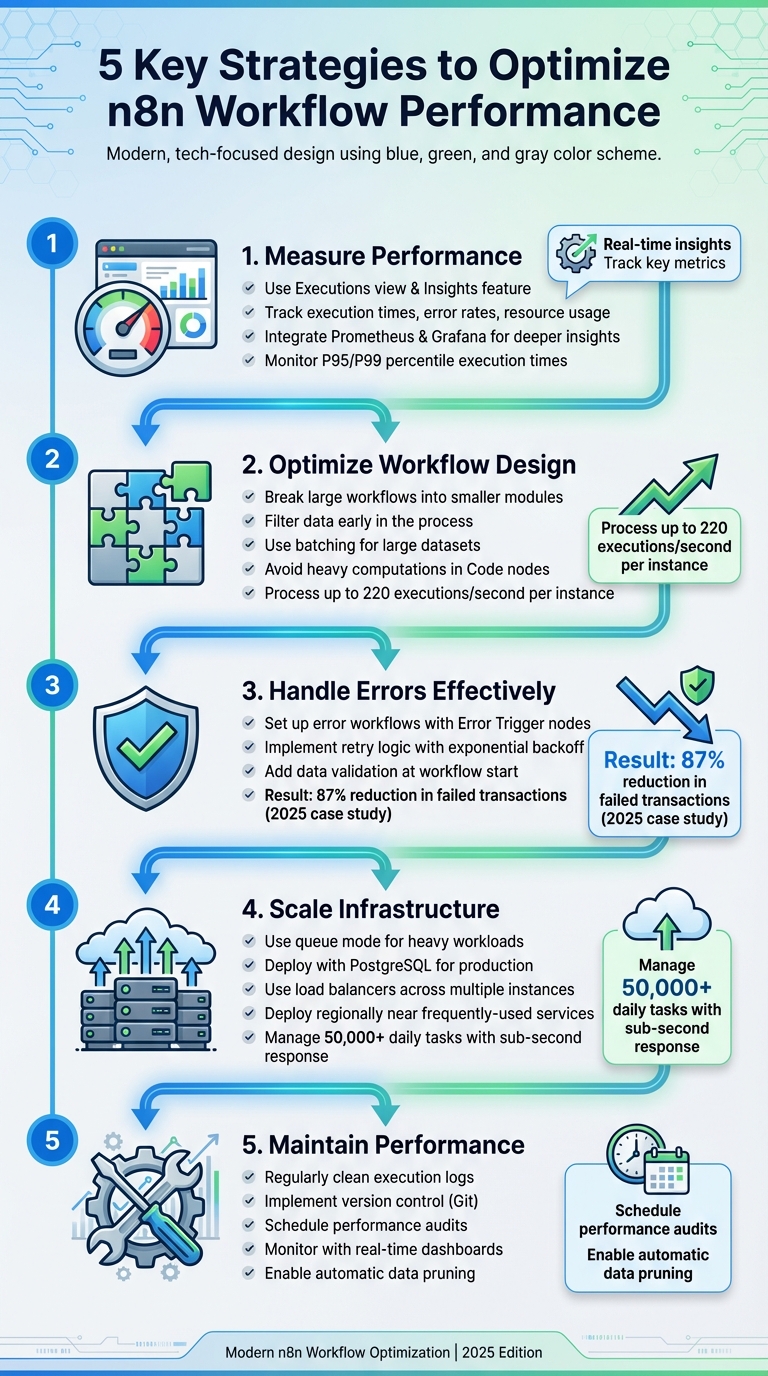
- Measure Performance: Use n8n’s built-in tools like the Executions view and Insights feature to track execution times, error rates, and resource usage. External tools like Prometheus and Grafana can provide deeper insights.
- Optimize Workflow Design: Break large workflows into smaller modules, filter data early, and use batching for large datasets. Avoid heavy computations in Code nodes.
- Handle Errors Effectively: Set up error workflows, retry logic, and data validation to reduce manual intervention and prevent crashes.
- Scale Infrastructure: Use queue mode for heavy workloads, allocate resources efficiently, and deploy n8n close to frequently used services to reduce latency.
- Maintain Performance Over Time: Regularly clean execution logs, monitor key metrics, and implement version control for workflows.
These strategies not only improve execution speed but also ensure workflows remain stable and manageable as automation needs increase.
The Ultimate Guide to Building Production-Ready n8n Workflows
How to Measure Workflow Performance in n8n
To fine-tune your workflows in n8n, start by assessing their current performance. n8n provides several built-in tools that offer valuable insights into execution times, error rates, and resource usage. Pairing these tools with external monitoring systems creates a more complete picture of your automation's overall health. Once you've gathered these insights, you can focus on improving workflow design to boost efficiency.
Using n8n's Built-in Performance Tools
n8n's Executions view and Insights feature are essential for tracking workflow performance. These tools let you review run statuses, execution times, and performance trends over time [8][7]. The Insights summary banner highlights key stats from the last seven days, such as total executions, failed executions, failure rates, time saved, and average run times. For Pro and Enterprise users, the Insights dashboard offers historical comparisons across workflows, with Enterprise plans allowing access to data ranging from 24 hours to a full year [7].
For logging, n8n uses the winston library, which allows you to customize log verbosity through environment variables. For instance, the N8N_LOG_LEVEL variable lets you set the logging level (error, warn, info, debug, or silent), while N8N_LOG_OUTPUT determines whether logs are sent to the console, a file, or both. In production, it's recommended to set N8N_LOG_LEVEL to info, while debug is more suitable for troubleshooting [8].
Another helpful feature is the Error Workflow, which uses the Error Trigger node. This workflow automatically activates when another workflow fails, sending immediate notifications via tools like Slack or email [8].
Setting Up External Monitoring Systems
External monitoring tools can enhance visibility into workflow performance. For instance, you can integrate Prometheus (by enabling METRICS_ENABLED=true and setting METRICS_PORT) to visualize data in Grafana. Tools like Loki or Fluentd are great for aggregating logs [8]. Enterprise users can also take advantage of direct log streaming.
For deeper insights, distributed tracing can help identify performance bottlenecks [6]. These external monitoring practices complement n8n's built-in tools, creating a strong foundation for workflow optimization.
Defining Baseline Metrics for Future Improvements
To measure the impact of your optimizations, establish baseline metrics. Start by tracking the average run time of your workflows, along with the 95th (P95) and 99th (P99) percentile execution times. These metrics highlight how your slowest workflows perform and can uncover hidden inefficiencies [9][10].
Monitor error rates at both the workflow and node levels, and keep an eye on queue depth and drain rates during peak traffic. For workflows that connect to external systems, measure API response times and webhook success rates under various load conditions [9][10].
Resource utilization is another critical area to track. Keep tabs on CPU usage, memory consumption, and disk usage to identify processes that might be resource-intensive or prone to memory leaks. If you're using PostgreSQL as your database, monitor its size, vacuum health, and slow queries. Since n8n stores execution history and metadata in PostgreSQL, keeping an eye on these metrics can help you address potential issues before they escalate. Use dashboards to visualize these data points for proactive management [2][9].
Workflow Design Best Practices
Once you've got your baseline metrics sorted, the next step is to create workflows that operate smoothly and efficiently. By building a smart workflow structure, you can cut down on resource usage, speed up execution, and avoid the need for extra infrastructure.
Streamlining Workflow Structures
Breaking down large workflows into smaller, interconnected modules can significantly improve performance. For instance, one client restructured a customer onboarding workflow that originally spanned over 50 nodes into modular workflows like "Ingest & Create User", "Financial & Comms", and "Notify Team." This modular setup not only made the system more efficient but also allowed the "Notify Team" workflow to be reused in other automations [5].
"Splitting a large, complex process into smaller, interconnected 'micro‐workflows' is a game-changer." - n8npro.in [5]
Using modular workflows also prevents canvas lag. You can connect these smaller pieces with nodes like Execute Workflow or Execute Sub-workflow [5][11].
Another tip? Filter data as early as possible. Use nodes like Filter or Edit Fields to clean up data and IF or Switch nodes to reject invalid inputs. This reduces payload size and saves processing time, directly impacting the execution times you measured earlier [5][9][11].
For handling large datasets, the Split In Batches node is your best friend. It processes data in chunks, avoiding out-of-memory errors and boosting efficiency. This is especially useful when working with APIs that support bulk operations. A retail company applied this approach to its inventory system, cutting processing time from 45 minutes to under 3 minutes while managing 200% more data [3].
Keep Code nodes simple. Avoid heavy computations or creating massive objects. For large transformations, process data in chunks instead of copying entire arrays [9]. To further optimize, stagger Cron triggers to prevent traffic spikes and disable saving successful execution logs in high-volume workflows to avoid database overload [9].
Balancing Parallel and Sequential Processing
Parallel processing allows multiple nodes to run at the same time, cutting down execution time for workflows that handle a lot of data [2][3]. But here's the catch: you need to balance parallel operations with your system's resource limits. If you don't, you risk resource contention, which can actually hurt performance.
"By allowing multiple nodes to execute simultaneously, workflows can leverage available resources more effectively, reducing overall execution time. However, it's crucial to balance parallel execution with resource availability to avoid contention, which can lead to diminished performance." - Ali Hafizji, CEO, Wednesday.is [2]
To manage this balance, use throttling mechanisms or adjust the number of concurrent executions dynamically [2].
On the other hand, sequential processing with the Execute Sub-workflow node offers better modularity and makes debugging easier. For workflows that deal with large datasets repeatedly, incremental processing - tracking the last processed record and only handling new or changed data - can be a game-changer [3].
Implementing Caching and Throttling
Caching is all about storing the results of expensive operations or API calls to save time and reduce costs [1][3]. Instead of repeatedly querying external APIs, store static configurations or reference tables locally [1]. For basic in-memory caching, the Function node works well. For more advanced needs, tools like Redis or Memcached can be integrated via HTTP Request nodes [3]. You can also use HTTP headers like If-None-Match to avoid redundant API calls [9].
A great example: a mid-sized financial services company cached AI responses for similar inputs. This reduced manual review time by 78% and boosted accuracy by 23% [3].
Throttling ensures your workflows respect external service rate limits, preventing failures and maintaining smooth operations [1][2][3]. The Wait node can add delays to keep workflows within rate limits [1]. Pairing this with a short Time To Live (TTL) cache in Redis can ease system load during busy periods [9].
Up next, we’ll dive into how robust error handling can make your workflows even more reliable.
Improving Reliability Through Error Handling
Even the best-designed workflows can encounter problems. What sets a dependable automation apart is how well it handles errors. Effective error handling minimizes disruptions, prevents cascading failures, and reduces the need for constant troubleshooting. The result? Workflows that run more smoothly and require less manual oversight.
Setting Up Error Triggers and Alerts
n8n makes error handling more manageable by allowing you to assign a dedicated error workflow to each main workflow. If a main workflow fails, an error workflow automatically kicks in, starting with an Error Trigger node that listens for failure signals. By creating a centralized error workflow and linking it to multiple main workflows, you can simplify error management. This setup logs important details, sends alerts, and even attempts automatic retries when possible.
In 2025, a financial services company implemented tiered error handling across their n8n workflows. The results? An 87% drop in failed transaction processing and a 94% reduction in manual intervention for payment reconciliation tasks [3].
Next, let’s dive into handling transient issues and validating data to further enhance reliability.
Adding Retry Logic and Data Validation
Transient issues like network interruptions, API downtime, or rate limits are inevitable. n8n’s retry mechanisms, paired with exponential backoff, help manage these hiccups without overwhelming external systems. Setting retry limits ensures workflows don’t get stuck indefinitely, while idempotency keys prevent duplicate processing during retries - critical for operations like payment processing.
Data validation is another key reliability booster. By using IF or Switch nodes at the start of a workflow, you can catch missing or malformed data early. This prevents unnecessary processing and ensures workflows operate efficiently.
The Continue On Fail option for individual nodes can also be a game-changer. For instance, in 2025, a client restructured a customer onboarding workflow with over 50 nodes into smaller, more manageable parts. Previously, a failed Slack notification would halt the entire process. By enabling Continue On Fail, critical actions like sending welcome emails continued, even when non-essential steps - such as Stripe integrations - encountered issues [5].
While real-time error handling is crucial, managing execution storage ensures long-term performance remains strong.
Managing Execution Storage and Retention
Saving every successful execution can bog down your database, especially for high-volume workflows. To avoid this, disable saving successful runs while keeping failed executions for debugging. Retain manual runs only when needed for troubleshooting.
For self-hosted setups, enable data pruning via environment variables to clear old successful execution logs automatically. This keeps the database lean and ensures your n8n instance performs at its best. Additionally, regular database cleanup using safe SQL patterns helps maintain a balance between auditability and performance.
If you’re using PostgreSQL in production, consider adding indexes to the execution_entity table for faster queries on fields like startedAt, status, and workflowId:
CREATE INDEX IF NOT EXISTS idx_execution_startedAt ON execution_entity ("startedAt");
CREATE INDEX IF NOT EXISTS idx_execution_status ON execution_entity ("status");
CREATE INDEX IF NOT EXISTS idx_execution_workflow ON execution_entity ("workflowId");
Routine database maintenance - such as vacuuming, running analyses, and creating backups - keeps things running smoothly. Reviewing execution logs periodically can also help you spot recurring issues before they escalate.
With error handling strategies in place, the next step is fine-tuning your infrastructure and deployment settings to scale these workflows effectively.
Infrastructure and Deployment Settings
Even the best workflow design and error handling can't make up for weak infrastructure. Factors like deployment mode, resource allocation, and server placement play a huge role in boosting execution speed and ensuring stability.
Choosing the Right Deployment Mode
For straightforward, linear tasks or smaller workloads, running a single n8n instance in main mode might be sufficient. But as your automation needs grow, this setup can quickly become a bottleneck. You’ll notice the editor slowing down, debugging becoming more difficult, and performance dropping under heavy loads [5].
Switching to queue mode is a game-changer for scalability. This setup offloads workflow executions to dedicated worker processes, keeping the editor responsive while handling more extensive workloads [1][9]. In fact, n8n can process up to 220 workflow executions per second on a single instance. Need more? Add additional instances to scale further [4]. For example, in 2025, a global manufacturing company optimized its n8n deployment using containerization, managing over 50,000 daily automation tasks across 12 facilities worldwide - all while maintaining sub-second response times for critical processes [3].
In production environments, using PostgreSQL is highly recommended. PostgreSQL enhances concurrency and scalability, performing exceptionally well under heavy workloads [1][2][9]. Pair this with container orchestration for automated deployment, scaling, and failover management [2][3].
Scaling and Tuning Resources
Efficient resource allocation is essential for smooth workflow performance. For Docker deployments, set CPU and memory limits based on actual resource usage to prevent individual workflows from consuming too much [1][3]. Use a load balancer to distribute workloads across multiple instances for horizontal scaling, and assign specific workers to handle different types of tasks [1][2][3]. For example, dedicate separate worker nodes to long-running workflows and time-sensitive ones to avoid resource-heavy tasks slowing down critical operations [3]. Boost database performance and reliability by implementing clustering [3]. Additionally, configure auto-scaling policies that adjust resources dynamically based on real-time workflow metrics [3].
Combining vertical scaling (upgrading hardware) with horizontal scaling (adding more instances) offers flexibility. While vertical scaling is simpler, it has limits. Horizontal scaling, on the other hand, eliminates single points of failure and avoids bottlenecks [2].
Reducing Latency with Regional Optimization
Network latency can be a major drag on workflow execution, especially when n8n interacts with third-party APIs or cloud services [2]. The fix? Deploy n8n close to the services it communicates with most.
If your workflows rely heavily on cloud services in a specific region, deploying n8n instances in or near that region can significantly reduce round-trip times and network delays [2]. For scenarios requiring ultra-low latency or local data handling, edge computing is a great option. By placing n8n instances closer to critical data sources or action points, edge deployments ensure responsive automation - even in areas with limited connectivity [3].
With regional optimization in place, you’re well-positioned to maintain high performance while implementing governance practices.
Maintaining Workflow Performance Over Time
Keeping workflows fast and stable requires regular attention. As automation needs grow and data volumes increase, performance can slip without consistent maintenance. To stay ahead, it's crucial to adopt strong governance practices.
Implementing Workflow Governance Practices
Good governance is the backbone of sustainable workflows. Just like earlier recommendations for design and error handling, proactive governance ensures your workflows remain reliable over time. One essential practice is version control - export workflows as JSON files and store them in Git repositories like GitHub or GitLab. This approach allows you to track every change, roll back errors, and review updates via pull requests before they go live [3].
In 2025, a software development company streamlined its operations by integrating Git-based version control with n8n. This reduced deployment errors by 76% and fostered better collaboration, enabling teams to work on different parts of workflows simultaneously [3].
Testing is another key step. Always trial changes in a staging environment with well-defined settings to avoid production mishaps [3][5]. Documentation also plays a massive role in clarity - use tools like n8n's Sticky Note feature to annotate complex logic directly on the canvas. Adopting clear naming conventions (e.g., "Get Customer Data from API" instead of "HTTP Request1") makes workflows easier to understand and maintain [5][11].
"Documentation is essential for clarity and collaboration." – Hostinger [11]
Scheduling Regular Performance Audits
Monitoring your workflows is critical for catching problems early. Tools like Prometheus, Grafana, or the ELK Stack can help you track key metrics such as execution times, failure rates, CPU usage, memory consumption, and API response times in real time [2][3][12]. Setting up alerts for critical metrics ensures you're notified immediately when issues arise [2][3].
In 2025, a retail analytics company transformed its content workflows by deploying real-time monitoring dashboards with n8n. This change slashed the time needed to resolve workflow issues - from hours to just minutes - and improved overall system reliability by 99.7% [3].
Regularly reviewing logs and metrics can help identify bottlenecks before they escalate. For example, pruning old execution data is a simple yet effective way to keep your database lean. Enable automatic data pruning in your environment settings to clear out successful execution logs [5]. Additionally, fine-tune batch sizes, adjust timeouts, and revisit retry policies based on your monitoring insights [2][3]. For businesses requiring extra support, expert optimization services are available.
Using Evalics for Long-term Automation Success
As businesses scale, maintaining peak workflow performance across dozens - or even hundreds - of processes becomes increasingly complex. Evalics specializes in helping U.S. businesses optimize their n8n workflows with AI-driven automation solutions. Their team conducts in-depth audits, redesigns workflows for efficiency, and sets up monitoring systems that deliver measurable results.
Evalics offers a range of services tailored to different needs. Quick-win automations, priced between $1,000 and $10,000, can be completed in 1–4 weeks. For more extensive projects, their AI Accelerator Partnerships start at $40,000 and span 6+ months. From custom API integrations to team training, Evalics ensures your automation infrastructure evolves seamlessly with your business demands.
Conclusion
Improving n8n workflows isn't a one-time task - it’s an ongoing process that involves thoughtful design, consistent monitoring, and routine maintenance. These efforts ensure your automations run smoothly, adapt to growing business demands, and deliver reliable results.
To keep things running efficiently, focus on the essentials: measure key metrics, embrace modular design, clean your data from the start, and batch API requests to avoid bottlenecks. As Mark O'Connor of Lumadock wisely said, "Without metrics, you're tuning blind." A strong foundation like this ensures your workflows can handle even high-volume operations.
Addressing errors is just as important. Set up error triggers, retry logic, and centralized workflows to catch and fix issues before they snowball. For production environments, PostgreSQL is the recommended choice, and scaling up with queue mode and multiple workers can handle heavy workloads effectively. Regular audits and cleaning up data keep your system lean and responsive.
For businesses looking to take their automation efforts to the next level, expert guidance can make a big difference. Evalics provides tailored support for U.S. businesses, offering solutions that fit your needs. Whether you’re after quick automation wins (ranging from $1,000–$10,000 over 1–4 weeks) or more long-term AI Accelerator Partnerships (starting at $40,000+ for 6+ months), Evalics delivers measurable improvements. They specialize in workflow audits, custom integrations, and ongoing optimization, turning your n8n workflows into a powerhouse for sustainable growth.
FAQs
1. What are the best ways to monitor the performance of my n8n workflows over time?
To keep a close eye on your n8n workflows, begin by enabling the /metrics endpoint. This will allow you to collect performance data effectively. Make sure to set up detailed logging to capture essential execution details, such as response times and error rates. For a more visual approach, tools like Grafana or Prometheus can help you track trends and pinpoint potential bottlenecks. Reviewing execution logs regularly is also a smart way to catch issues early and keep your workflows running efficiently. Pay attention to critical metrics like resource consumption, failure rates, and execution speed to maintain smooth and reliable performance over time.
2. What are the best ways to manage errors in n8n workflows?
When working with n8n workflows, managing errors is crucial to keep things running smoothly. One way to do this is by using try-catch nodes or enabling the 'Continue On Fail' option. These methods help prevent your workflow from stopping due to errors. To handle temporary glitches, consider adding retries with exponential backoff, which spaces out retry attempts to avoid overwhelming systems.
For tracking and managing errors, set up a dedicated error workflow. This can log failures and send notifications, keeping you informed when something goes wrong. Incorporate conditional nodes like 'IF' or 'Switch' early in your workflow. This approach helps you filter out invalid or failed data, saving time and resources by skipping unnecessary steps. Finally, make it a habit to review execution logs and monitor system resource usage to spot and address any bottlenecks before they become bigger issues.
3. How can I make my n8n workflows faster and handle large datasets more efficiently?
To make your n8n workflows faster and more efficient when working with large datasets, start by filtering your data early. This cuts down on unnecessary processing and keeps things running smoother. When dealing with external services, use batching for API calls to prevent overloading them, and aim to minimize the number of nodes in your workflows to keep execution streamlined.
For more complex tasks, take advantage of Function nodes to combine multiple operations into a single step. You can also organize workflows better by breaking them into smaller, modular pieces with the Execute Workflow node, making them easier to manage and scale.
Another helpful tip is to use caching for static or frequently accessed data. This reduces repetitive operations and saves time. If you're handling large volumes of data, enabling queue mode can help manage the load, and containerization allows you to scale horizontally if needed. Lastly, keep an eye on performance metrics regularly to catch and resolve bottlenecks before they cause issues.