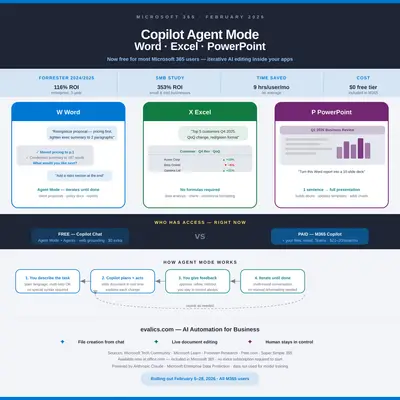
Here is what changed in February 2026.
Before: you typed a prompt into Copilot inside Word, got a draft, copied it, cleaned it up, formatted it, restructured it yourself.
After: you describe what you want in plain language — "Reorganize this proposal so the pricing comes first, then tighten the executive summary to two paragraphs" — and Copilot makes the changes. It shows you what it did, explains its reasoning, and asks: what next?
Microsoft rolled out Agent Mode across Word, Excel, and PowerPoint starting February 5, 2026. It is available to virtually every Microsoft 365 user, including those on the free Copilot Chat tier. No new subscription, no IT project required.
This is not a small upgrade to the Copilot you may have tried and been underwhelmed by. It is a fundamentally different interaction model — and the productivity data behind it is hard to ignore.
What Agent Mode Actually Does
There are two capabilities arriving simultaneously, and it is worth being precise about each.
1. Agent Mode inside the apps
Agent Mode turns a single AI response into an ongoing, iterative collaboration happening directly inside your Word document, Excel workbook, or PowerPoint presentation.
Standard Copilot: one prompt, one response, done.
Agent Mode: you describe a multi-step task in plain language. Copilot plans it, executes it in steps, shows you what it did at each step, and pauses for your feedback before continuing. You stay in control of every change. The document, spreadsheet, or deck in front of you updates in real time as the conversation progresses.
A practical example: in Word, you could say "Review this 12-page proposal, find any sections where we make a claim without backing it up, flag them, and add a placeholder for a supporting statistic in each." Copilot reads the document, identifies the weak spots, makes the edits, and tells you exactly what it changed and why — all while you watch it work.
2. Office Agents — file creation from Copilot Chat
Starting February 9, 2026, you can open the Copilot Chat sidebar (available on the web at office.com across all Microsoft 365 apps) and ask it to create a complete document, spreadsheet, or presentation from a single prompt.
"Create an employee onboarding checklist for a new part-time retail associate. Include sections for Day 1, Week 1, and Month 1." In seconds, a formatted Word document appears in your OneDrive. You start from a finished draft, not a blank page.
Both capabilities are powered by Anthropic's Claude model, operating under Microsoft's enterprise data protection terms (your data is not used to train any AI model; Anthropic confirmed as a subprocessor by Microsoft on January 7, 2026).
🖥️ alt text: Three panels showing Word, Excel, and PowerPoint with Copilot chat sidebar open and a multi-step conversation underway, documents being edited in real time
Four Real Scenarios for Small Business Owners
These are not hypotheticals. Each of these is something you can try today at office.com.
1. Client proposal in Word — ready in under two minutes
Open a new Word document in Copilot Chat and type: "Create a professional services proposal for a website redesign project. Client is a local restaurant, budget is $4,500, timeline is 6 weeks. Use a formal tone with sections for overview, scope of work, timeline, investment, and next steps."
Copilot generates a complete, formatted proposal. Switch to Agent Mode to refine it: "Add a risk and dependencies section" or "Rewrite the scope section to be more specific about what's included and what's not." Each instruction produces a specific set of changes with an explanation of what was done.
2. Sales data analysis in Excel — no formulas required
Open your revenue spreadsheet. Activate Agent Mode and type: "Analyze this data. Identify the top 5 customers by revenue in Q4 2025, calculate the quarter-over-quarter change for each, and create a summary table with conditional formatting showing growth in green and decline in red."
Copilot reads your data, builds the formulas, creates the formatted summary table, and explains each step. You give feedback — "Actually filter this to show only repeat customers" — and it adjusts. No need to know VLOOKUP, no need to remember conditional formatting rules.
3. Report to presentation in PowerPoint — one sentence
You have a 10-page Word report. Open PowerPoint Agent Mode and type: "Turn this report into a 10-slide executive presentation. Lead with the key findings, include the three main recommendations on separate slides, and keep each slide to one main point with supporting bullet points."
Copilot reads the Word document and builds the presentation. You iterate: "Make slide 4 more visual, replace the bullet points with a comparison table." Agent Mode executes the restructure and waits for your next instruction.
4. Onboarding documentation in Word — ready before the hire starts
"Create a first-week onboarding guide for a new marketing coordinator. Include: how to access our tools (Slack, Google Drive, Asana), daily meeting schedule, who to contact for what, and a Day 1 checklist." Complete formatted document, ready to edit and distribute. What would have taken an hour of writing takes two minutes.
Who Gets What — Access and Pricing Without the Jargon
The February 2026 update is notable precisely because it extends meaningful capability to users who are not paying for the premium Copilot add-on.
Free (included in any Microsoft 365 subscription):
- Copilot Chat available at office.com
- Agent Mode in Word and Excel (February 5 rollout)
- Agent Mode in PowerPoint on web (February 2026 rollout)
- File creation Agents — generate complete documents, workbooks, and presentations from a single prompt (February 9 rollout)
- Web grounding: Copilot draws on public internet data
Microsoft 365 Copilot add-on ($30/user/month, or $21/user/month for organizations under 300 users as Microsoft 365 Copilot Business):
- Everything above, plus
- Work grounding: Copilot can pull from your company's own emails, Teams conversations, SharePoint files, and calendar
- Priority access, deeper document analysis, and extended context windows
The honest answer for most small business owners: start with the free tier. Agent Mode with web grounding alone is enough to dramatically reduce the time you spend on proposals, reports, and spreadsheet analysis. Add the paid license when you find yourself wanting Copilot to reference your company's specific documents, email history, or project context in its responses.
| Free (Copilot Chat) | Paid Copilot add-on | |
|---|---|---|
| Agent Mode in Word, Excel, PowerPoint | ✅ | ✅ |
| File creation Agents | ✅ | ✅ |
| Web grounding | ✅ | ✅ |
| Work grounding (your files, email, Teams) | ✗ | ✅ |
| Price | Included | $21–30/user/month |
The Numbers: Does It Actually Save Time?
Forrester Research conducted two separate Total Economic Impact studies commissioned by Microsoft. The results are specific enough to be useful.
For enterprise organizations (March 2025 Forrester study):
- 116% ROI over three years — composite organization of 25,000 employees
- $36.8M in total benefits against $17.1M in costs over three years, a $19.7M net present value
- 9 hours saved per user per month on average
- 16 decision-makers at 12 organizations interviewed; 367 Copilot users surveyed
For small and medium businesses (October 2024 Forrester study):
- 132% to 353% ROI for SMBs, on a composite of 200 employees
- 25% faster new-hire onboarding
What 9 hours per month looks like in dollars:
If your loaded labor cost is $40 per hour (a conservative number for a skilled office worker), 9 hours recovered per user per month is $360 in productivity value. The Microsoft 365 Copilot add-on costs $30/month. That is a 12:1 return in recovered time value alone — before any revenue impact from faster proposals, better sales analysis, or more professional presentations.
Even at the free tier: the file creation Agents and Agent Mode in Word eliminate hours of weekly formatting and reformatting work without any incremental cost at all. The Forrester SMB finding of up to 353% ROI becomes plausible when you account for how much of a small business owner's week goes into creating, formatting, and revising documents.
One important caveat: always review AI-generated numbers, claims, and client-facing documents before sending. Copilot is highly capable and will occasionally hallucinate a specific figure or make an incorrect inference. The human review step is not optional when the output is going to a client or investor.
How to Get Started Today
No IT project, no admin configuration, no new subscription required.
Step 1: Go to office.com and open Word, Excel, or PowerPoint.
Log in with your Microsoft 365 account. Open any existing document — or start a new one.
Step 2: Find the Copilot icon.
In Word and Excel on the web, look for the Copilot button in the top toolbar or in the right-side panel. In the Copilot Chat sidebar, look for the Tools button (grid icon) at the bottom of the text input — this opens the list of available Agents.
Step 3: Try one of these prompts right now.
- Word: "Summarize this document into a one-page executive brief with three key recommendations."
- Excel: "Look at this data and tell me which three rows have the most unusual values and why."
- PowerPoint: "Reorganize these slides so the problem statement comes before the solution, and add a takeaway sentence at the bottom of each slide."
- Copilot Chat (new file): "Create an Excel budget tracker for a small retail business with columns for category, budgeted amount, actual amount, and variance with conditional formatting."
Step 4: Iterate with follow-up instructions.
The power of Agent Mode is in the second, third, and fourth prompt. Once Copilot makes a change, respond with "Now do X" or "Actually, change the tone in section 2 to be more direct." Each round of feedback produces a targeted edit rather than a full regeneration.
Step 5: Decide if the paid add-on is worth it for you.
After two weeks of using the free tier, ask yourself: would these tasks be meaningfully better if Copilot could also access my emails, calendar, Teams messages, and SharePoint documents? If yes — the $21–$30/user/month Copilot add-on is likely to pay for itself. If no — the free tier may be enough for your current needs.
Key Takeaway: Microsoft Copilot's new Agent Mode, rolling out in February 2026, changes Word, Excel, and PowerPoint from tools you operate into tools that work with you in real time. The free tier is enough to start. Forrester found users save an average of 9 hours per month — at any labor rate, that math is clear. Open office.com, find the Copilot panel, and try a multi-step prompt today.
Official Sources
- What's New in Microsoft 365 Copilot – January 2026 (Microsoft Tech Community)
- Introducing Word, Excel, and PowerPoint Agents in Microsoft 365 Copilot
- Create Files with Word, Excel, and PowerPoint Agents – Microsoft Learn
- Microsoft Expands Agent Mode Across PowerPoint, Excel, Word – Petri.com
- Forrester Total Economic Impact of Microsoft 365 Copilot (enterprise)
- Microsoft 365 Copilot Drove Up to 353% ROI for SMBs – Microsoft Blog
- Microsoft 365 Copilot Plans and Pricing
- New Features Coming to Free Copilot Chat – Super Simple 365
By Kevin Michael Schindler, AI Automation Expert at Evalics