
A customer service automation classifies incoming emails using AI. Monday's results are perfect—every support ticket gets routed to the right team. By Wednesday, the same automation misclassifies 30% of emails. The AI model hasn't changed. The automation logic is identical. The difference? The prompt.
This scenario frustrates business owners who've invested in AI-powered automations. They see the potential: automated email classification, intelligent data extraction, smart content summarization. But inconsistent results make these automations unreliable. The problem isn't the AI model or the automation platform—it's how you're instructing the AI.
Key Insight: The same AI model can produce dramatically different results based on how you phrase your instructions. Prompt engineering—the art of crafting effective instructions for AI—transforms unreliable automations into consistent, valuable workflows.
Understanding prompt engineering for automation isn't about becoming an AI expert. It's about learning to communicate clearly with AI systems so they produce the results your business needs. Small changes in how you structure prompts can improve accuracy by 40% or more, turning frustrating automations into reliable business tools.
What Is Prompt Engineering in Simple Terms
Prompt engineering is giving AI better instructions. Just like clear instructions help a human employee complete tasks correctly, well-crafted prompts help AI understand exactly what you want.
In automation workflows, prompts are the instructions you give AI models to perform specific tasks:
- Classify emails into categories
- Extract key information from documents
- Summarize long content into brief overviews
- Generate responses based on context
- Transform data from one format to another
A prompt is more than just a question or request. It's a complete instruction set that includes:
- Context: What the AI needs to know about the situation
- Task: What you want the AI to do
- Format: How you want the output structured
- Constraints: Rules or limitations the AI should follow
Think of it like writing a job description. A vague description like "handle customer emails" leads to inconsistent results. A detailed description with specific responsibilities, expected outputs, and clear guidelines produces consistent, high-quality work.
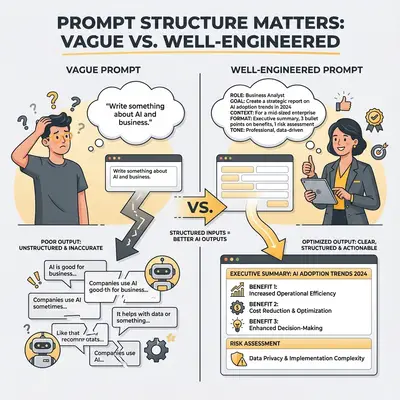
Example: Compare these two prompts for email classification:
Vague Prompt: "Classify this email"
Engineered Prompt: "You are an email classification system for a customer service team. Classify the following email into one of these categories: Support Request, Sales Inquiry, Billing Question, or General Feedback. Return only the category name, nothing else. Email: [email content]"
The first prompt gives the AI no context, no categories, no format requirements. The second provides everything needed for consistent classification.
Why the Same AI Model Gives Different Results
AI models are probabilistic systems. They don't produce identical outputs for identical inputs—they generate responses based on patterns learned during training. This means the same model can produce different results when given different prompts, even for the same underlying task.
Prompt Sensitivity
Small changes in wording can dramatically change AI outputs. Consider these variations for a data extraction task:
Version 1: "Extract the customer name from this text" Version 2: "From the following text, identify and extract only the customer's full name. Return just the name, no additional text." Version 3: "You are a data extraction specialist. Your task is to find the customer's name in the text below. Extract only the name in the format 'First Last'. Do not include titles, company names, or any other information. Text: [content]"
All three prompts ask for the same information, but each provides different levels of instruction. Version 3 is most likely to produce consistent, accurate results because it:
- Provides role context ("You are a data extraction specialist")
- Specifies the exact task clearly
- Defines the output format precisely
- Sets constraints (no titles, no company names)
How Context Affects Outputs
AI models use the entire prompt as context. Every word matters. Including examples, specifying formats, and providing constraints all influence how the AI processes your request.
Without Context: "Summarize this email"
With Context: "You are summarizing customer support emails for a team dashboard. Create a 2-sentence summary that includes: (1) the customer's main issue, and (2) the urgency level (High/Medium/Low). Email: [content]"
The second version produces summaries that are consistent in format, include required information, and match your team's needs.
Temperature and Variability
Most AI models have a "temperature" setting that controls randomness. Higher temperatures produce more creative but less consistent outputs. Lower temperatures produce more predictable results. For automation workflows, you typically want lower temperatures (0.2-0.4) to ensure consistency.
However, even with low temperature settings, prompt quality determines output quality. A well-engineered prompt with higher temperature often outperforms a vague prompt with lower temperature.
Basic Prompt Structure: Context, Task, Format, Examples
Effective prompts follow a consistent structure. Understanding each component helps you craft prompts that produce reliable results in your automations.
Component 1: Context
Context tells the AI what role it's playing and what situation it's operating in. This helps the AI understand the domain and apply appropriate knowledge.
Good Context Examples:
- "You are a customer service email classifier for an e-commerce business."
- "You are analyzing support tickets for a SaaS company that sells project management software."
- "You are extracting contact information from business cards for a CRM system."
Context sets expectations and helps the AI access relevant knowledge from its training.
Component 2: Task
The task is the specific action you want the AI to perform. Be explicit and clear.
Vague Task: "Process this email"
Clear Task: "Read the following email and determine if it requires immediate attention (respond within 1 hour) or can be handled during normal business hours. Consider factors like: mentions of urgent deadlines, customer complaints, payment issues, or system outages."
The clear task provides specific criteria the AI can evaluate.
Component 3: Format
Specify exactly how you want the output structured. This is critical for automation workflows that need to parse AI responses.
Without Format Specification: "Extract the order number"
With Format Specification: "Extract the order number from the text below. Return only the order number in this exact format: ORDER-XXXXXX where X is a digit. If no order number is found, return 'NOT_FOUND'. Text: [content]"
Format specifications ensure outputs can be reliably processed by downstream automation steps.
Component 4: Examples
Examples (few-shot learning) show the AI exactly what you want. They're especially powerful for classification and extraction tasks.
Prompt with Examples:
You are classifying customer feedback. Categorize each message as: Positive, Negative, or Neutral.

Examples:
Input: "Love this product! Works perfectly."
Output: Positive

Input: "This is broken and I want a refund."
Output: Negative

Input: "Received my order today."
Output: Neutral

Now classify: "The delivery was fast but the packaging was damaged."
Examples provide concrete patterns the AI can follow, reducing ambiguity and improving accuracy.
Putting It All Together
Here's a complete prompt structure for an automation workflow:
[CONTEXT] You are a data extraction system for a real estate agency processing property listings.

[TASK] Extract the following information from the property description: property type (House/Apartment/Condo), number of bedrooms, number of bathrooms, square footage, and price.

[FORMAT] Return the data as a JSON object with these exact keys: property_type, bedrooms, bathrooms, square_feet, price. If any information is missing, use null for that field.

[EXAMPLES]
Input: "Beautiful 3-bedroom, 2-bathroom house, 1,800 sq ft, listed at $350,000"
Output: {"property_type": "House", "bedrooms": 3, "bathrooms": 2, "square_feet": 1800, "price": 350000}

Input: "Cozy apartment, 2 beds, 1 bath, $200k"
Output: {"property_type": "Apartment", "bedrooms": 2, "bathrooms": 1, "square_feet": null, "price": 200000}

[ACTUAL TASK] Extract from: [property description]
This prompt provides everything the AI needs: role context, clear task, exact format, and examples of correct outputs.
Pro Tip: Start with this four-component structure for any automation prompt. Once you have a working version, you can refine each component based on results. Document what works so you can reuse successful patterns.
Common Mistakes in Prompt Engineering
Understanding common mistakes helps you avoid them and improve your prompts faster. Here are the most frequent issues in automation workflows:
Mistake 1: Being Too Vague
Vague prompts force the AI to guess what you want, leading to inconsistent results.
Vague: "Summarize this" Better: "Create a 3-sentence summary of this customer support ticket. Include: (1) customer's issue, (2) current status, (3) next action needed."
Vague: "Classify this" Better: "Classify this email into one category: Urgent Support, General Inquiry, Billing Question, or Feature Request. Return only the category name."
Mistake 2: Asking for Too Much at Once
Complex prompts that try to do multiple things often fail. Break complex tasks into simpler steps.
Too Complex: "Read this email, classify it, extract the customer name and order number, determine urgency, and suggest a response template."
Better Approach: Split into multiple automation steps:
- Step 1: Classify the email
- Step 2: Extract customer name and order number
- Step 3: Determine urgency based on classification and content
- Step 4: Select response template based on classification
Each step has a focused prompt that's easier to optimize.
Mistake 3: Forgetting Constraints
Without constraints, AI might include information you don't want or use formats that break your automation.
Missing Constraints: "Extract the email address" With Constraints: "Extract only the email address from the text below. Return just the email address, no labels, no additional text. If multiple emails exist, return only the first one. Text: [content]"
Common constraints to include:
- Output length limits
- Format requirements
- What to exclude
- How to handle edge cases (missing data, multiple matches, etc.)
Mistake 4: Ignoring Edge Cases
Automation workflows encounter unexpected inputs. Your prompts should handle these gracefully.
No Edge Case Handling: "Extract the phone number" With Edge Case Handling: "Extract the phone number from the text. If a phone number is found, return it in format XXX-XXX-XXXX. If no phone number is found, return 'NO_PHONE'. If multiple phone numbers exist, return only the first one. Text: [content]"
Mistake 5: Not Testing with Real Data
Prompts that work with perfect examples often fail with messy real-world data. Test with actual automation inputs.
Testing Strategy:
- Test with ideal examples (clean, well-formatted data)
- Test with messy examples (typos, incomplete information, unusual formats)
- Test with edge cases (empty inputs, very long inputs, special characters)
- Test with your actual automation data
Reality Check: Most prompt engineering failures happen because prompts are tested only with clean, ideal data. Real automation workflows process messy, inconsistent inputs. Build prompts that handle both perfect and imperfect data.
Mistake 6: Not Iterating Based on Results
Prompt engineering is iterative. Your first attempt rarely produces perfect results. Review outputs, identify patterns in failures, and refine prompts accordingly.
Iteration Process:
- Deploy initial prompt
- Monitor outputs for 24-48 hours
- Identify common failure patterns
- Update prompt to address failures
- Test updated prompt
- Repeat
Document what changes improve results so you can apply similar improvements to other prompts.
Practical Examples: Improving Real Automation Use Cases
Seeing before-and-after prompt comparisons helps you understand how to improve your own automations. Here are three common automation use cases with improved prompts:
Example 1: Improving Email Classification
Use Case: Automatically route customer service emails to the right team (Support, Sales, Billing, Technical).
Initial Prompt (Vague):
Classify this email: [email content]
Problems:
- No categories defined
- No format specified
- No context about the business
- AI might return long explanations instead of category names
Improved Prompt:
You are an email classification system for a SaaS company that provides project management software.

Classify the following customer email into exactly one of these categories:
- SUPPORT (technical issues, bug reports, how-to questions)
- SALES (pricing inquiries, feature requests, upgrade questions)
- BILLING (payment issues, subscription questions, refund requests)
- FEEDBACK (product suggestions, testimonials, general comments)

Return only the category name in uppercase (SUPPORT, SALES, BILLING, or FEEDBACK). Do not include explanations or additional text.

Email: [email content]
Improvements:
- Clear role and business context
- Explicit category definitions with examples
- Format constraint (uppercase, category name only)
- Prevents unwanted explanations
Result: Classification accuracy improves from ~60% to ~90% because the AI understands categories, has clear format requirements, and knows what to exclude.
Example 2: Generating Better Summaries
Use Case: Create brief summaries of customer support tickets for a team dashboard.
Initial Prompt (Too Vague):
Summarize this support ticket: [ticket content]
Problems:
- No length guidance
- No structure requirements
- No indication of what information is important
- Summaries vary wildly in length and content
Improved Prompt:
You are creating a summary of a customer support ticket for a team dashboard.

Create a 2-sentence summary following this structure:
Sentence 1: State the customer's main issue or question in one clear sentence.
Sentence 2: Indicate the ticket's priority level (High/Medium/Low) and the next action needed.

Keep each sentence under 20 words. Use clear, concise language. Do not include customer names, ticket numbers, or dates.

Support Ticket: [ticket content]
Improvements:
- Specific length requirement (2 sentences, under 20 words each)
- Clear structure for each sentence
- Explicit exclusions (no names, numbers, dates)
- Format that works for dashboard display
Result: Summaries are now consistent in length, include required information, and can be reliably displayed in automation dashboards.
Example 3: Extracting Data More Accurately
Use Case: Extract order information from customer emails to create records in an order management system.
Initial Prompt (Incomplete):
Extract order details from this email: [email content]
Problems:
- Doesn't specify what "order details" means
- No format for output
- Doesn't handle missing information
- Output can't be reliably parsed by automation
Improved Prompt:
You are extracting order information from customer emails for an order management system.

Extract the following information if present in the email:
- Order number (look for patterns like "ORDER-12345", "Order #12345", or "order number 12345")
- Product name or SKU
- Quantity
- Total price (include currency if mentioned)

Return the data as a JSON object with these exact keys: order_number, product, quantity, price.

Rules:
- If information is not found, use null for that field
- For order numbers, extract only the numeric part (e.g., "12345" not "ORDER-12345")
- For prices, extract only the number (e.g., 99.99 not "$99.99")
- If multiple orders are mentioned, extract only the first one

Email: [email content]
Improvements:
- Specific fields to extract with pattern examples
- JSON format that automation can parse
- Rules for handling missing data
- Rules for data normalization (removing labels, extracting numbers)
- Edge case handling (multiple orders)
Result: Data extraction accuracy improves significantly, and outputs are in a format that can be reliably processed by downstream automation steps.
Quick Win: Start by adding format specifications to your existing prompts. Simply telling the AI "Return as JSON" or "Return only the category name" often improves consistency by 20-30% with minimal effort.
How to Test and Iterate on Prompts Without Breaking Your Automation
Testing prompts safely is critical. You can't afford to break production automations while experimenting. Here's a systematic approach to testing and improving prompts:
Testing Strategy 1: Shadow Mode Testing
Run your new prompt alongside your existing prompt without using the new output. Compare results to see if the new prompt performs better.
Implementation:
- Keep your current prompt in production
- Add a parallel step that runs the new prompt
- Log both outputs for comparison
- Analyze differences over 24-48 hours
- Switch to the new prompt only if it consistently outperforms
This approach lets you test improvements without risking automation failures.
Testing Strategy 2: Sample Testing
Test new prompts on a small sample of real data before full deployment.
Process:
- Export 50-100 recent automation inputs
- Run both old and new prompts on the sample
- Compare outputs manually
- Measure improvement (accuracy, consistency, format compliance)
- Deploy new prompt only if improvement is significant
Testing Strategy 3: A/B Testing in Production
For high-volume automations, run both prompts on a percentage of inputs and compare results.
Setup:
- Route 10% of automation inputs to new prompt
- Route 90% to existing prompt
- Monitor both for 48-72 hours
- Compare metrics (accuracy, error rates, processing time)
- Gradually increase new prompt percentage if it performs better
Version Control for Prompts
Track prompt versions so you can roll back if needed and understand what changes improved results.
Versioning Approach:
- Store prompts in a version control system (Git) or documentation
- Include version numbers in prompt comments:
[PROMPT v2.3] - Document what changed in each version
- Keep a changelog of improvements
Example Versioning:
v1.0 - Initial prompt
v1.1 - Added format specification
v1.2 - Added examples for edge cases
v2.0 - Complete restructure with context, task, format, examples
Monitoring Prompt Performance
Set up monitoring to track prompt performance over time.
Key Metrics:
- Accuracy Rate: Percentage of outputs that meet quality standards
- Consistency Score: How similar outputs are for similar inputs
- Error Rate: Frequency of failed or invalid outputs
- Processing Time: How long prompts take to execute
- Format Compliance: Percentage of outputs in correct format
Monitoring Setup:
- Log all prompt inputs and outputs
- Flag outputs that don't meet quality criteria
- Generate daily/weekly performance reports
- Set alerts for performance degradation
- Review trends to identify when prompts need updates
Iteration Workflow
Follow this workflow for continuous prompt improvement:
- Deploy Initial Prompt: Start with a well-structured prompt using the context-task-format-examples framework
- Monitor for 48-72 Hours: Collect data on performance
- Identify Failure Patterns: Review errors and inconsistencies
- Hypothesize Improvements: Based on failure patterns, determine what might fix them
- Test Improvements: Use shadow mode or sample testing
- Deploy Improved Version: If testing shows improvement, deploy to production
- Repeat: Continue monitoring and iterating
Pro Tip: Keep a prompt improvement log. Document what problems you encountered, what changes you made, and how much improvement resulted. This builds institutional knowledge and helps you improve prompts faster over time.
When to Use Simple vs. Complex Multi-Step Prompts
Not every automation task needs a complex prompt. Understanding when to use simple prompts versus breaking tasks into multiple steps helps you build more efficient, maintainable automations.
Use Simple Prompts When:
Task is Single-Purpose:
- Extracting one piece of information
- Classifying into a small number of categories
- Performing a straightforward transformation
Example Simple Prompt:
Extract the order number from this text. Return only the number in format XXXXX. If not found, return "NOT_FOUND". Text: [content]
Inputs are Consistent:
- Data comes from the same source
- Format is predictable
- Edge cases are rare
Output Format is Simple:
- Single value or short text
- No complex structure needed
- Easy to parse
Use Complex Multi-Step Prompts When:
Task Requires Multiple Decisions:
- Classification followed by extraction
- Analysis then summarization
- Validation then transformation
Example Multi-Step Approach: Instead of one complex prompt, use multiple simple prompts:
Step 1 - Classification:
Classify this customer message as: Complaint, Question, or Compliment. Return only the category.
Step 2 - Extract Based on Classification:
IF category is Complaint: Extract the issue description and requested resolution.
IF category is Question: Extract the question text.
IF category is Compliment: Extract what the customer praised.
Inputs are Variable:
- Data comes from multiple sources
- Formats vary significantly
- Many edge cases exist
Output Needs Complex Structure:
- Multiple fields with relationships
- Nested data structures
- Conditional fields based on input
Decision Framework
Ask these questions to decide between simple and complex:
-
Can the task be completed in one clear instruction?
- Yes → Simple prompt
- No → Consider multi-step
-
Does the output need conditional logic?
- No → Simple prompt
- Yes → Multi-step approach
-
Are there multiple distinct sub-tasks?
- No → Simple prompt
- Yes → Multi-step approach
-
Can you test and debug easily?
- Simple prompt → Easier to test
- Multi-step → More complex but more maintainable
Hybrid Approach: Prompt Chaining
For complex tasks, chain simple prompts together in your automation workflow:
Workflow Example:
- Step 1: Classify email (simple prompt)
- Step 2: Route to appropriate extraction prompt based on classification
- Step 3: Extract relevant data (simple, focused prompt)
- Step 4: Format output based on classification and extracted data
Each step uses a simple, focused prompt that's easy to test and optimize independently.
Key Insight: Complex prompts are harder to debug and optimize. Breaking complex tasks into multiple simple prompts makes automations more maintainable, testable, and reliable. Each simple prompt can be optimized independently.
Tools and Techniques for Prompt Versioning and A/B Testing
Managing prompts at scale requires tools and processes. Here are practical approaches for versioning, testing, and managing prompts in automation workflows:
Prompt Management Tools
Version Control Systems: Store prompts in Git or similar version control:
- Track changes over time
- Roll back to previous versions
- Compare versions side-by-side
- Document improvements in commit messages
Configuration Management: Store prompts as configuration in your automation platform:
- Use variables for dynamic parts
- Separate prompts from automation logic
- Update prompts without changing workflows
- Test different prompt versions easily
Prompt Libraries: Create a shared library of proven prompts:
- Reusable prompt templates
- Documented use cases and results
- Version history and improvements
- Team knowledge sharing
Versioning Strategies
Semantic Versioning: Use version numbers to indicate change types:
- Major (2.0.0): Complete restructure or significant changes
- Minor (1.1.0): Added components or improved structure
- Patch (1.0.1): Small fixes or clarifications
Example:
email_classification_v1.0.0.md - Initial prompt
email_classification_v1.1.0.md - Added examples
email_classification_v1.1.1.md - Fixed typo in category name
email_classification_v2.0.0.md - Complete restructure with context-task-format-examples
Environment-Based Versioning: Maintain different versions for different environments:
- Development: Latest experimental prompts
- Staging: Prompts being tested before production
- Production: Stable, proven prompts
A/B Testing Techniques
Percentage-Based Routing: Route a percentage of automation inputs to different prompt versions:
Setup:
- 90% of inputs → Current production prompt (v1.0)
- 10% of inputs → New test prompt (v2.0)
- Compare metrics over 48-72 hours
- Gradually increase test percentage if it performs better
Time-Based Testing: Test different prompts during different time periods:
- Week 1: Use prompt v1.0
- Week 2: Use prompt v2.0
- Compare weekly metrics
- Choose the better-performing version
Feature Flags: Use feature flags to toggle between prompt versions:
- Enable/disable new prompts instantly
- Test in production without code changes
- Roll back quickly if issues arise
- Test multiple versions simultaneously
Monitoring and Analytics
Performance Tracking: Monitor key metrics for each prompt version:
- Accuracy rates
- Processing times
- Error frequencies
- Format compliance rates
Comparison Dashboards: Create dashboards comparing prompt versions:
- Side-by-side performance metrics
- Trend analysis over time
- Cost comparisons (if using paid AI APIs)
- Quality scores
Alerting: Set up alerts for prompt performance issues:
- Accuracy drops below threshold
- Error rate increases significantly
- Processing time exceeds limits
- Format compliance decreases
Best Practices for Prompt Management
Documentation: Document every prompt version:
- What it does
- When to use it
- What inputs it expects
- What outputs it produces
- Known limitations
- Performance metrics
Testing Procedures: Establish standard testing procedures:
- Test with sample data before deployment
- Use shadow mode for initial testing
- Monitor for 48-72 hours after changes
- Have rollback procedures ready
Team Collaboration: Enable team collaboration on prompts:
- Code reviews for prompt changes
- Shared knowledge base of what works
- Regular prompt optimization sessions
- Learn from each other's improvements
Reality Check: Prompt management gets complex quickly as you scale. Start simple with version control and basic A/B testing. Add more sophisticated tools as your prompt library grows. The key is consistency—use the same approach across all your automations.
Conclusion
Prompt engineering transforms unreliable AI automations into consistent, valuable business tools. The difference between frustrating inconsistencies and reliable results often comes down to how you structure your instructions to AI models.
Start with the basics: provide context, define tasks clearly, specify output formats, and include examples. Avoid common mistakes like being too vague, asking for too much at once, or forgetting constraints. Test prompts safely using shadow mode or sample testing before deploying to production.
Remember: simple prompts are often better than complex ones. Break complex tasks into multiple focused prompts that you can test and optimize independently. Use version control and A/B testing to continuously improve your prompts based on real performance data.
Your automations are only as good as the prompts that power them. Invest time in prompt engineering, and you'll see dramatic improvements in accuracy, consistency, and reliability across all your AI-powered workflows.
Ready to improve your automation prompts? Book a demo with Evalics to discuss prompt engineering strategies for your specific workflows.
Frequently Asked Questions
What is prompt engineering?
Prompt engineering is the practice of crafting effective instructions for AI models to produce desired outputs. In automation workflows, it involves structuring prompts with context, clear tasks, format specifications, and examples to ensure consistent, accurate results from AI-powered automations.
How do I know if my prompts need improvement?
Signs your prompts need improvement include: inconsistent outputs for similar inputs, outputs that don't match your format requirements, high error rates in downstream automation steps, outputs that include unwanted information, or results that require significant manual correction. Monitor your automation outputs and track accuracy, consistency, and format compliance metrics.
How often should I update prompts?
Update prompts when you notice performance degradation, encounter new edge cases, or identify failure patterns. There's no fixed schedule—update based on data. However, review prompt performance monthly to catch gradual degradation. After major changes to your automation inputs or requirements, test and update prompts accordingly.
Can I use the same prompt for different automations?
Sometimes, but usually not. Prompts are most effective when tailored to specific use cases, data sources, and output requirements. While you can reuse prompt structures and patterns, adapt prompts for each automation's specific context, task, and format needs. A prompt that works for email classification might not work for document summarization, even if both use the same AI model.
What's the difference between simple and complex prompts?
Simple prompts handle single-purpose tasks with clear, straightforward instructions. Complex prompts attempt to handle multiple tasks or conditional logic in one instruction. Generally, prefer simple prompts and break complex tasks into multiple automation steps, each with its own focused prompt. This makes automations more maintainable, testable, and reliable.
How do I test prompts safely without breaking my automation?
Use shadow mode testing (run new prompts alongside existing ones without using the output), sample testing (test on 50-100 real inputs before full deployment), or gradual A/B testing (route a small percentage of inputs to new prompts). Always have a rollback plan and monitor performance metrics closely during testing periods.
What tools help with prompt management?
Use version control systems (Git) to track prompt changes, configuration management to separate prompts from automation logic, and monitoring tools to track performance metrics. Some automation platforms offer built-in prompt versioning and A/B testing features. For teams, create a shared prompt library with documented templates and proven patterns.
By Kevin Michael Schindler, AI Automation Expert at Evalics