You spend an hour every morning manually copying sales data from emails into a spreadsheet. You know there’s a better way. You’ve heard about AI and automation, and you’re convinced of its potential, but you’re stuck on one critical question: Where do I even start?
It's a common roadblock for business owners. The market is flooded with powerful tools, but the real challenge isn't picking the right software—it's identifying the right opportunities. Choosing the wrong process to automate can lead to wasted time, budget overruns, and frustration. Many initial automation projects fail to deliver expected ROI, often because they target the wrong problems or attempt to automate processes that aren't ready for automation.
This guide provides a practical framework to help you develop an "automation mindset." You'll learn how to move beyond tools, map your business processes, and confidently spot your first—and best—automation opportunities.
Key Insight: Successful automation is a business strategy, not a technology purchase. Before you evaluate a single tool, you must first understand the process you intend to improve.
The Rule of 5: Your First Filter for High-Impact Opportunities
The "Rule of 5" is a simple heuristic to quickly identify tasks with high automation potential. The rule is:
If you perform a repetitive, digital task more than five times a day, or if it consumes more than an hour of your day in total, it deserves a closer look.
This rule helps you filter out infrequent tasks and focus on the high-frequency, low-value activities that quietly drain your productivity. These are your starting points.
Examples of "Rule of 5" Tasks in a Small Business:
- Sales: Manually copying lead information from emails or LinkedIn into your CRM.
- Marketing: Reposting the same content across multiple social media platforms every day.
- Operations: Generating a daily sales report by pulling data from three different systems.
- Customer Support: Answering the same five customer questions via email every day.
- Finance: Sending reminder emails for unpaid invoices.
These tasks are often small and seem insignificant on their own, but their cumulative impact is substantial. Automating just one of these can reclaim hours per week.
Pro Tip: Keep a simple "task log" for a week. In a notebook or spreadsheet, jot down every repetitive digital task you do. At the end of the week, you'll have a data-driven list of your best automation opportunities, making it much easier to decide where to start.
Process Mapping: A Simple Guide to Visualizing Your Workflow
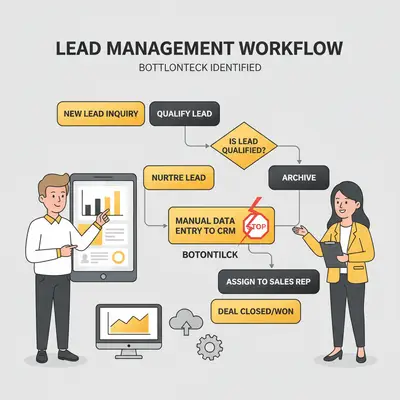
Once you've identified a candidate for automation, the next step is to map the process from start to finish. Process mapping is simply creating a visual representation of a workflow. It helps you understand every step, identify bottlenecks, and see clearly where an automation could fit.
You don't need to be an expert to do this. A simple flowchart on a whiteboard or using a tool like Lucidchart or Miro is all you need.
How to Map Your Business Process in 7 Steps:
- Define the Start and End Points: What triggers the process, and what is the final outcome? For example, "Starts when a new lead fills out the contact form" and "Ends when the lead is added to the CRM and assigned to a sales rep."
- List Every Step: Write down every single action that happens between the start and end points. Be specific. Don't say "process the lead"; say "Open email notification," "Copy lead's name," "Paste lead's name into CRM."
- Identify the People Involved: Who is responsible for each step? This helps clarify handoffs.
- Add Decision Points: Where do choices happen? (e.g., "Is the lead from a target industry?"). These are typically represented by a diamond shape in a flowchart.
- Connect the Steps: Draw arrows to show the flow of work from one step to the next.
- Review and Refine: Walk through the map with your team. Have you missed any steps? Is this how the process actually works, or just how it's supposed to work?
- Identify Bottlenecks and Repetitive Tasks: Look at your map. Where does the process slow down? Which steps are purely manual data entry? These are your prime automation opportunities.
Reality Check: Your first process map will likely be messy and reveal some inefficiencies you didn't know you had. That's a good thing. The goal is to get an honest picture of your current workflow, not a perfect one. Don't try to automate a broken or inefficient process—fix the process first.
Criteria for Your Perfect First Automation Project
Not all automation opportunities are created equal. Your first project should be a confident win that builds momentum. Look for opportunities that meet three key criteria:
- Low Risk: Your first automation shouldn't touch a mission-critical, customer-facing process where a mistake could have serious consequences. Automating internal reports is much safer than automating your invoicing system for the first time. Choose a process that has a low impact on revenue or customer relationships if it fails.
- High Repetition: The best candidates for automation are the boring, repetitive tasks you do every day. The "Rule of 5" is a great starting point here. The more frequently a task is performed, the faster you'll see a return on the time you invest in automating it.
- Easy to Measure: You need to be able to quantify the success of your automation. Choose a process with clear metrics. For example, it's easy to measure "time saved" on data entry. It's much harder to measure the ROI of automating a creative process.
Your First Project Checklist:
Use this simple checklist to score your potential automation projects. The higher the score, the better the candidate.
- Is the task performed daily or weekly? (Repetitive)
- Is the process internal and not customer-facing? (Low Risk)
- Can I easily measure how long this task takes? (Measurable)
- Are the rules of the task clear and consistent? (Low Risk)
- Does this task involve moving data between digital systems? (Repetitive)
Example: A 10-person marketing agency maps its client onboarding process. They discover that an account manager spends 20 minutes manually creating a new client folder in Google Drive, setting up a Slack channel, and adding the client to their project management tool. This task is low-risk (internal), high-repetition (done for every new client), and easy to measure (time saved). It’s a perfect first automation project.
Ready to find your perfect first project? If you've mapped your process and identified a candidate, but you're not sure how to take the next step, we can help. Book a free automation consultation with Evalics today.
Common Traps: What NOT to Automate
Just as important as knowing what to automate is knowing what not to automate. Avoid these common traps, especially for your first few projects:
- Broken or Inefficient Processes: Automation is an accelerant. If you automate a bad process, you'll just get bad results faster. As we mentioned in the process mapping section, fix the underlying process before you try to automate it.
- Processes That Require Complex Decision-Making: If a process requires nuanced judgment, creativity, or complex problem-solving, it's a poor candidate for simple automation. Don't try to automate tasks that rely heavily on human intuition.
- Processes That Change Frequently: If a workflow is constantly evolving, you'll spend more time updating your automation than you'll save by running it. Look for stable, consistent processes.
- Customer-Facing Communication (at first): Avoid automating direct, personal communication with clients until you are more experienced. A poorly designed chatbot or automated email sequence can do more harm than good. Start with internal processes first.
Reality Check: The goal of automation isn't to eliminate all manual work. It's to eliminate the low-value, repetitive work, freeing up human talent for the high-value, strategic work that truly drives business growth.
Your Action Plan: From Identification to Implementation
You've adopted the mindset, mapped a process, and chosen a high-potential first project. Here’s a step-by-step plan to take you from idea to a working automation.
- Set a Clear Goal: What is the primary objective? Is it to save time, reduce errors, or something else? Define a specific, measurable target (e.g., "Reduce the time spent on manual data entry for new leads by 90%").
- Choose Your Tools: Now is the time to think about tools. For many first projects, no-code platforms like Make.com or Zapier are excellent choices. Start with their free tiers. For more ideas, see our guide on Your First AI Automation.
- Build a Small Prototype: Don't try to build the entire automation at once. Create a simple, two-step version to prove the concept. For example, just get the data from the email and put it into a single cell in a spreadsheet.
- Test Thoroughly: Run your prototype with test data. Try to break it. What happens if a field is missing? What if the format is different? Anticipating these edge cases is crucial. See our guide on 7 Common AI Automation Mistakes Beginners Make for more on this.
- Iterate and Expand: Once the core of your automation is working, start adding the other steps from your process map. Test at each stage.
- Deploy and Monitor: Once you're confident, let your automation run with real data. Keep an eye on it for the first week to ensure it's behaving as expected.
- Measure Your Success: After a few weeks, go back to your initial goal. Did you achieve it? How much time are you saving? Quantifying the win will build momentum and justification for your next project. For more on this, read our guide on how to measure if your AI automation is working.
Quick Win: Start with a process you can automate for free. Most leading automation platforms have generous free tiers that are more than enough for your first project. This removes the budget barrier and lets you learn without financial risk.
Conclusion: From Overwhelmed to Empowered
The journey into automation doesn't have to start with a big, complex project. It starts with a simple shift in mindset: from focusing on tools to focusing on processes. By learning to see your business as a collection of workflows, you unlock a powerful new way to identify opportunities for efficiency and growth.
Remember the core principles:
- Adopt the Automation Mindset: Think process first, tool second.
- Use the Rule of 5: Quickly identify high-frequency, repetitive tasks.
- Map Your Process: Visualize your workflow to find bottlenecks.
- Choose a Low-Risk First Project: Build momentum with an early win.
You are now equipped with a framework to move from feeling overwhelmed by the possibilities of automation to feeling empowered to take action. The goal isn't just to do things faster; it's to free yourself and your team to do the things that matter most.
Ready to take the next step and turn your first automation opportunity into a reality?
Book a free 30-minute automation strategy session with Evalics. We’ll help you validate your first project idea and create a clear roadmap for implementation.
FAQ
1. What is the automation mindset? The automation mindset is a problem-solving approach that prioritizes understanding and improving a business process before selecting a technology to automate it. It's about thinking "process first, tool second" to ensure you're solving the right problem effectively.
2. How do I know if a task is worth automating? A task is generally worth automating if it's repetitive, prone to human error, and takes up a significant amount of time. Use the "Rule of 5": if you do it more than five times a day, it's a strong candidate. Also, consider tasks that are critical for data accuracy, like transferring information between systems.
3. What if I can't identify any automation opportunities? Every business has automation opportunities. Try keeping a "task log" for a week, as suggested in this guide. Simply writing down your daily repetitive tasks will almost certainly reveal several strong candidates for automation that you might have overlooked.
4. How long does it take to see ROI from automation? For a well-chosen first project, you can often see a positive ROI within weeks. Since you are targeting high-repetition tasks, the time saved adds up quickly. Automating a task that takes 10 minutes and is done five times a day saves over 3 hours of work every week.
5. What's the biggest mistake when starting with automation? The biggest mistake is starting with a tool instead of a process. This leads to trying to fit your problem to the tool's features, rather than finding the right tool to solve your actual problem. The second biggest mistake is trying to automate a complex, mission-critical process for your first project.
6. Should I automate everything I can? No. The goal is strategic automation, not total automation. Processes that require creativity, complex decision-making, or personal relationships should not be automated. Focus on automating low-value, repetitive tasks to free up human capacity for high-value work.
7. How do I measure if my automation is working? Measure success against the goal you set in your action plan. The most common metrics are time saved and error rate reduction. Before you automate, benchmark how long the task takes manually and how often errors occur. After automating, compare the results.