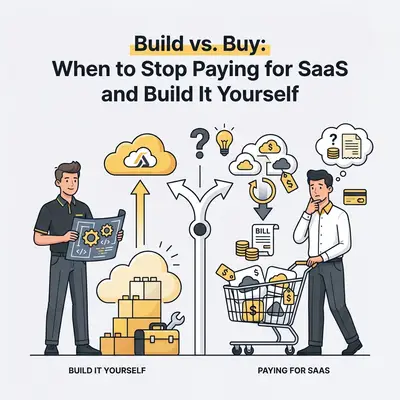
You review your business credit card statement at the end of the month. You see $150 here, $300 there, and $99 for a tool your team barely uses.
Software subscriptions quietly eat into your profit margins. A typical small business uses dozens of SaaS products, often paying premium prices for enterprise features they never touch. You end up paying 100% of the price for 20% of the functionality.
With the rise of powerful, low-code automation platforms like n8n and Make, business owners face a new reality. You no longer have to accept rigid pricing tiers. You can build your own custom solutions using APIs and workflow automation.
But building your own tools isn't free. It costs time, focus, and ongoing maintenance. Here is the exact framework to decide when to keep paying for software, and when to cancel your subscriptions and build it yourself.
The 80/20 Rule of SaaS Pricing
Most software companies design their pricing tiers to capture the maximum amount of value from the broadest audience. They bundle features together.
If you want a specific CRM integration, you are often forced to upgrade to the "Enterprise" tier. Suddenly, a $50-per-month tool becomes a $300-per-month expense, just so you can access one specific feature or API endpoint.
Key Insight: You are rarely paying for the software's core function. You are usually paying for the interface, the hosting, and the convenience of not having to maintain it.
When you build a custom solution using a platform like n8n, you strip away the user interface and the marketing markup. You only pay for the raw API calls and the computing power to run the workflow. This often results in a 90% cost reduction for that specific function.
The Build vs. Buy Decision Framework
Do not cancel all your software subscriptions tomorrow. Some tools are worth every penny. Others are massive drains on your resources. Use this framework to evaluate your tech stack.
When to BUY (Keep the SaaS)
You should continue paying for off-the-shelf software when the tool fits into one of these categories:
- It is a strict commodity. Do not build your own email hosting, payroll system, or accounting ledger. Products like Google Workspace, Gusto, and QuickBooks solve highly standardized problems perfectly.
- Security and compliance are critical. If the software handles HIPAA data, complex tax compliance, or processes credit cards, let a dedicated SaaS company carry that liability.
- The User Interface (UI) is the main value. If your team spends six hours a day clicking around inside the tool (like a complex video editor or a highly visual project management board), buy it. Rebuilding a slick, intuitive UI is incredibly expensive and difficult.
When to BUILD (Cancel the SaaS)
You should strongly consider building a custom automated workflow when:
- The pricing scales aggressively with volume. If a lead enrichment tool charges you $0.50 per lead, but the underlying API costs $0.02, you are losing money at scale. High-volume, repetitive tasks are prime targets for custom builds.
- You only use one specific feature. You pay $200 a month for an all-in-one marketing suite, but you only use it to automatically post to LinkedIn. Build a workflow for this instead.
- The software forces you to change your process. If you find yourself fighting the software or using clunky workarounds because the SaaS lacks flexibility, it is time to build a solution that fits your exact business logic.
The Cost Comparison: Real Numbers
Let's look at a practical example we see constantly: Automated Lead Enrichment and Outreach.
Many businesses pay for premium sales platforms to scrape leads, enrich them with AI, and send personalized emails. A mid-tier plan for a tool like this easily costs $500 per month.
Alternatively, you can build this exact system yourself. You can connect an n8n workflow to the Apollo API for data, use the OpenAI API to write the emails, and connect directly to your Gmail account to send them.
Here is how the costs break down over one year for processing 1,000 leads per month:
- The SaaS Route: $500/month = $6,000 per year.
- The Custom Build Route: n8n hosting ($20/mo) + OpenAI API costs ($5/mo) + Apollo API basic tier ($49/mo) = $74/month. That is $888 per year.
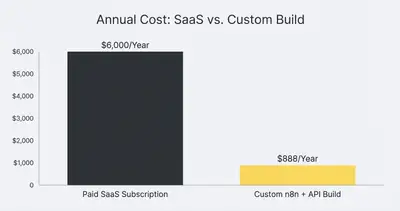
The custom build saves you over $5,100 annually on a single workflow. Now multiply that by three or four different processes across your company.
The Hidden Costs of Building It Yourself
The financial savings look incredible on paper. But you must factor in the Total Cost of Ownership (TCO). Building custom workflows introduces new responsibilities.
1. The Initial Build Time
You or a team member must sit down and actually build the workflow. If an agency owner's time is worth $150 an hour, and it takes 10 hours to build and test the lead enrichment workflow, the true cost of that build is $1,500.
Pro Tip: Only build custom solutions if the annual savings significantly outweigh the initial time investment. If building it saves you $50 a year but takes 20 hours to create, just buy the SaaS.
2. Maintenance and Breakages
APIs change. Connections drop. Edge cases happen. When you buy a SaaS, their engineering team wakes up at 3:00 AM to fix a broken API. When you build it yourself, you are the engineering team.
3. Feature Creep
Once you realize how powerful custom automation is, it is tempting to keep adding features. A simple lead scraper turns into a massive, tangled workflow that nobody but you understands. Keep your custom builds focused and documented.
Reality Check: Your custom automation will eventually break. Set aside 1-2 hours every month strictly for auditing and maintaining your workflows. If you skip this, your systems will silently fail.
How to Transition Your Stack
If you are ready to trim your SaaS bill and build custom workflows, do not do it all at once. Follow a strategic transition plan.
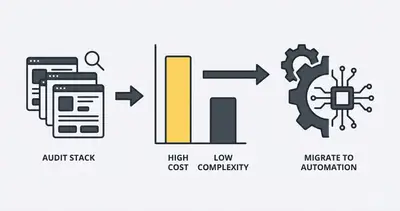
Step 1: Audit Your Current Tools
List every piece of software your business pays for. Note the monthly cost, the primary feature you use, and how many hours your team spends inside the tool's interface. Flag the tools with high costs but low interface usage.
Step 2: Start with the "Dumb" Routers
Look for tools that simply move data from Point A to Point B. If you are paying $150 a month for a premium Zapier account just to move Facebook Leads into a Google Sheet, stop. You can build that in a self-hosted n8n instance in 15 minutes and run it for free.
Step 3: Standardize Your Tech Stack
When you build custom tools, standardization is your best friend. Choose one automation platform (like n8n) and master it. Do not string together a messy web of Make, Zapier, Python scripts, and n8n. Centralize your logic so it is easy to monitor and maintain.
Summary and Next Steps
SaaS sprawl is a silent killer of profitability. While off-the-shelf software is essential for complex interfaces and heavy compliance, it is a massive waste of money for simple data routing and basic AI processing.
Here are your next steps:
- Review your company's credit card statement this week.
- Identify one tool that costs over $100 a month where you only use a fraction of the features.
- Map out the logic to rebuild that single feature using an API and a workflow tool.
If the math makes sense, build it. If you need help architecting custom workflows that replace expensive software without creating maintenance nightmares, you don't have to figure it out alone.
Book a demo with Evalics today. We help businesses audit their SaaS stacks and build robust, reliable automations that scale.
By Kevin Michael Schindler, AI Automation Expert at Evalics
Related Resources
- Building vs Buying AI Automation
- Stop Paying for 10 Different SaaS Tools Build Them in n8n
- N8n vs Make Why Small Businesses Are Switching 2025
- Hidden AI Automation Costs No One Warns You About
Official Sources
- Harvard Business Review: How to Make the Right Software Buy-vs-Build Decision
- Gartner: Worldwide IT Spending Forecast
- Forbes: Software Statistics and Trends