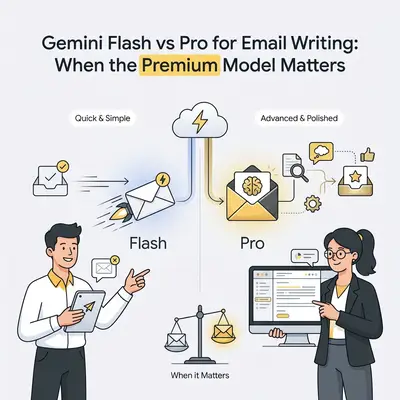
A consultant writes 50 emails per week. Some are quick status updates. Others are delicate client negotiations where every word matters. She's wondering: does Gemini Pro's "better reasoning" actually improve email quality, or is Flash good enough?
Email writing is the perfect test case for comparing AI models. Everyone writes emails. Complexity varies dramatically. Quality differences are easy to feel. A simple status update doesn't need nuanced reasoning. A negotiation email where tone affects a $50,000 contract does.
Here's what most people miss: For 80% of business emails, Gemini Flash produces results that are indistinguishable from Pro—at a fraction of the cost. The remaining 20% benefit from Pro's deeper reasoning, but only when complexity and stakes actually matter.
This guide breaks down when Flash handles email perfectly versus when Pro's nuanced reasoning justifies the premium. You'll get practical examples, a simple comparison framework, and rules of thumb to choose the right model for each email. For a broader comparison across all daily tasks, see our complete Flash vs Pro decision guide.
Why Email Writing Is a Good Test Case
Email writing reveals model differences more clearly than most tasks for three reasons.
Universal task: Every role writes emails. Sales teams, consultants, operations managers, executives—everyone needs clear, professional communication. This makes email comparisons relevant to a wide audience.
Wide complexity range: Email complexity spans from "confirming a meeting time" to "negotiating a contract amendment with multiple stakeholders and emotional tension." This range lets you see where Flash suffices versus where Pro adds value.
Easy to compare: Unlike abstract reasoning tasks, email quality is immediately apparent. You can read two versions side-by-side and feel which one sounds more professional, empathetic, or persuasive. The differences are tangible.
Email writing also mirrors real business communication patterns. Most emails are routine. A few are critical. Understanding when to use Flash versus Pro helps optimize both cost and quality across your communication workflow.
What to Expect From Gemini Flash for Email
Gemini Flash handles most routine email tasks reliably. It's fast, cost-effective, and produces professional results for straightforward communications.
Flash Strengths
Simple, routine emails: Flash excels at status updates, confirmations, meeting requests, and straightforward inquiries. It produces clear structure, proper grammar, and appropriate tone for standard business communications.
Fast responses: Flash generates email drafts in 1-2 seconds. This speed matters when you're processing high volumes or need quick replies during busy periods.
Clear structure: Flash organizes emails logically with clear subject lines, opening context, body paragraphs, and calls to action. It follows standard business email conventions without overthinking.
Cost efficiency: At $0.25-0.50 per million input tokens, Flash costs a fraction of Pro. For high-volume email workflows, this savings compounds quickly.
Flash Limitations
Generic phrasing on complex emails: For longer emails or emotionally nuanced situations, Flash can sound formulaic. It may miss subtle relationship dynamics or fail to adapt tone to sensitive contexts.
Limited context awareness: Flash may not fully leverage prior conversation history or relationship context. It handles the immediate prompt well but may miss connections to previous threads or stakeholder dynamics.
Shorter, more direct style: Flash tends toward concise, pragmatic emails. This works for routine tasks but may lack the depth or nuance needed for persuasive or relationship-building communications.
Example: Flash Handling a Simple Email
Prompt: "Write a professional email confirming a client meeting next Tuesday at 2 PM. Include the agenda items we discussed."
Flash output characteristics:
- Clear subject line: "Meeting Confirmation: Tuesday, 2 PM"
- Professional greeting and confirmation
- Bulleted agenda items
- Polite closing with next steps
- Result: Professional, complete, ready to send with minor edits
For routine confirmations like this, Flash produces emails that are indistinguishable from Pro at a fraction of the cost.
Quick Win: Use Flash for all routine emails: confirmations, status updates, simple requests, internal communications. Reserve Pro for emails where persuasion, nuance, or relationship impact matters.
What Gemini Pro Adds for Email (When It Matters)
Gemini Pro brings deeper reasoning, better nuance handling, and superior context awareness to email writing. These improvements matter when emails involve complexity, emotion, or high stakes.
Pro Improvements
Better nuance and tone: Pro adapts tone more precisely to context. It understands when to be empathetic versus direct, when to be formal versus warm, and how to balance multiple emotional tones within a single email.
Refined phrasing: Pro produces more natural, polished language for longer emails. It maintains coherence across multiple paragraphs and weaves complex ideas together smoothly.
Context awareness: Pro better leverages prior conversation history, relationship dynamics, and stakeholder context. It references previous threads naturally and adapts to ongoing relationship patterns.
Risk management: Pro is better at identifying potential misunderstandings, managing sensitive topics, and avoiding language that could damage relationships or business outcomes.
Where Pro Shines
Negotiations: When emails involve contract terms, pricing discussions, or deal structures, Pro's nuanced reasoning helps craft messages that advance your position while maintaining relationships.
Escalations: For conflict resolution or addressing complaints, Pro's empathy and careful phrasing help de-escalate situations and preserve business relationships.
Sensitive feedback: When providing critical feedback or delivering difficult news, Pro's tone management helps communicate clearly without damaging relationships.
Multi-stakeholder communications: For emails involving multiple parties with different interests, Pro better balances competing needs and maintains appropriate tone for each recipient.
Example: Pro vs Flash on the Same Complex Email
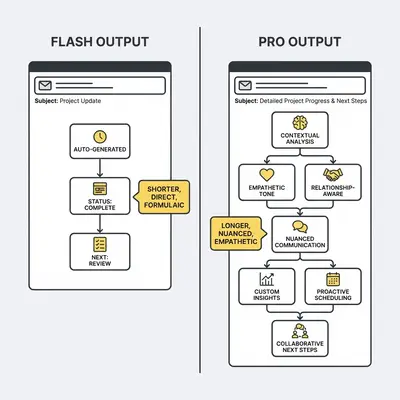
Prompt: "Write an email to a client explaining that their project timeline needs to extend by two weeks due to unexpected technical challenges. They were already frustrated about previous delays. Be empathetic but professional, acknowledge their concerns, and propose a solution."
Flash output characteristics:
- Acknowledges delay and reason
- Apologizes briefly
- Proposes new timeline
- Gap: May sound formulaic, might not fully address emotional context, could miss relationship repair elements
Pro output characteristics:
- Opens with empathy and acknowledgment of their frustration
- Explains technical challenges with appropriate detail
- Proposes timeline extension with clear rationale
- Offers specific solutions or compensations
- Closes with commitment to communication
- Result: More nuanced, relationship-aware, better at managing emotional context
For sensitive situations like this, Pro's deeper reasoning produces emails that better manage relationships and business outcomes.
Example Scenarios: Flash vs Pro by Email Type
Different email types benefit from different models. Here's how Flash and Pro compare across common business email scenarios.
Routine Status Update
Email type: Weekly project status to internal team
Prompt shape: Short, straightforward ("Write a status update email covering this week's progress on the Q1 campaign")
Flash performance: Excellent. Produces clear bullet points, professional tone, appropriate detail level. Ready to send with minimal editing.
Pro performance: Similar quality, but the improvement is marginal. Pro may add slightly more polish, but Flash's output is already sufficient.
Recommendation: Use Flash. The cost difference isn't justified for routine internal updates.
Complex Stakeholder Email
Email type: Update to multiple stakeholders with competing interests about a delayed product launch
Prompt shape: Medium length with context ("Write an email to product team, sales team, and executives explaining the launch delay, addressing each group's concerns, and proposing next steps")
Flash performance: Adequate structure and information, but may miss nuanced stakeholder concerns or fail to balance competing interests effectively.
Pro performance: Better at addressing each stakeholder group's specific concerns, balancing competing interests, and maintaining appropriate tone for different audiences.
Recommendation: Use Pro. The complexity and multi-stakeholder nature benefit from Pro's deeper reasoning.
Responding to Criticism
Email type: Client complaint about service quality
Prompt shape: Medium length with emotional context ("Write a response to a client who complained about slow response times. They're a long-term client and seem frustrated. Acknowledge the issue, explain what happened, and propose a solution")
Flash performance: Acknowledges issue and proposes solution, but may sound formulaic or miss emotional repair elements.
Pro performance: Better empathy, more nuanced acknowledgment of their frustration, relationship repair language, and solution-focused approach that addresses both the issue and the relationship.
Recommendation: Use Pro. Relationship management and emotional intelligence matter here.
Personalized Outreach
Email type: Cold outreach to potential client with specific personalization
Prompt shape: Medium length with research context ("Write a personalized outreach email to [company name] CEO about their recent expansion. Reference their [specific achievement] and propose how we can help with [specific need]")
Flash performance: Includes personalization elements and proposal, but may sound slightly generic or miss subtle connection opportunities.
Pro performance: Better at weaving personalization naturally, creating authentic connections, and crafting persuasive messaging that feels personalized rather than templated.
Recommendation: Use Pro if this email could lead to significant revenue. Use Flash for lower-stakes outreach where volume matters more than individual email quality.
Summarizing Discussion Points
Email type: Follow-up email summarizing a complex meeting with action items
Prompt shape: Medium length with meeting notes ("Write a follow-up email summarizing our discussion about [topic]. Include key decisions, action items for each person, and next steps")
Flash performance: Good structure and clarity, captures main points effectively. May miss subtle implications or connections between discussion points.
Pro performance: Better at identifying underlying themes, connecting related points, and highlighting implications that weren't explicitly stated but matter for next steps.
Recommendation: Use Flash for straightforward summaries. Use Pro if the meeting involved complex strategic discussions where implications matter.
Comparison Framework for Email Quality
Use this simple framework to evaluate Flash vs Pro on four key email quality criteria.
| Criterion | Simple Emails | Medium Complexity | High-Stakes/Nuanced |
|---|---|---|---|
| Tone/Politeness | Flash: Excellent | Flash: Good, Pro: Better | Pro: Superior nuance |
| Clarity/Structure | Flash: Excellent | Both: Excellent | Both: Excellent |
| Completeness/Context | Flash: Sufficient | Flash: Good, Pro: Better | Pro: Superior awareness |
| Persuasion/Relationship | Flash: Sufficient | Flash: Adequate, Pro: Better | Pro: Superior impact |
How to Use This Framework
Simple emails: Flash excels across all criteria. Use Flash for routine updates, confirmations, and straightforward requests.
Medium complexity: Flash handles most criteria well, but Pro adds noticeable improvements in tone nuance and context awareness. Choose based on volume and cost sensitivity.
High-stakes/nuanced: Pro provides superior performance on tone, context, and relationship impact. The premium is justified when emails affect revenue, reputation, or important relationships.
Reality Check: Most business emails fall into the "simple" or "medium complexity" categories. Pro's premium is only worth it for the 10-20% of emails where nuance and relationship impact directly affect business outcomes.
How to Choose: Rules of Thumb for Email Tasks
Use these quick rules to decide between Flash and Pro without overthinking every email.
Use Flash For
- Routine status updates and confirmations
- Internal team communications
- Simple requests and inquiries
- Meeting confirmations and scheduling
- Quick replies and acknowledgments
- High-volume email workflows where cost matters
Rule: If the email is transactional, informational, or routine, Flash is sufficient.
Use Pro For
- Negotiations and deal-related communications
- Conflict resolution and escalations
- Sensitive feedback or difficult conversations
- Multi-stakeholder emails with competing interests
- Relationship-building communications
- Emails where tone and nuance affect revenue or reputation
Rule: If the email could affect revenue, reputation, or important relationships, consider Pro.
Cost Awareness
Email volumes are often moderate compared to other AI tasks. A consultant might write 50 emails per week. A sales team might process 200 emails per month. At these volumes, the cost difference between Flash and Pro is manageable.
Example: Processing 200 emails per month with Pro costs approximately $5-10 more than Flash. If even one email benefits from Pro's nuance and improves a client relationship or closes a deal, the premium is justified.
The key is routing: use Flash for routine emails, Pro for high-impact communications. This hybrid approach optimizes both cost and quality.
Best Practices for Email Prompts (Flash and Pro)
How you phrase your prompts significantly affects output quality for both models. Here's how to get better results from each.
General Prompt Structure
Provide context:
- Your role (consultant, sales manager, operations lead)
- Recipient type (client, internal team, vendor, executive)
- Email goal (inform, persuade, resolve conflict, confirm)
- Constraints (tone, length, formality level)
Add tone guidance:
- "Warm but professional"
- "Direct and solution-focused"
- "Empathetic and relationship-repairing"
- "Formal but approachable"
Include examples when helpful:
- "Similar to how we communicated in [previous email]"
- "Match the tone of [reference email]"
Flash-Specific Tips
Be extra clear about structure:
- "Include a clear subject line, greeting, three bullet points, and a call to action"
- "Use a professional closing with next steps"
Specify call to action:
- "End with a specific question or next step"
- "Include a clear request for response by [date]"
Keep prompts focused:
- Flash works best with clear, direct instructions
- Avoid overly complex or ambiguous requests
Pro-Specific Tips
Lean into context:
- Provide summaries of prior conversation threads
- Include relationship history or stakeholder dynamics
- Reference emotional context or sensitive situations
Emphasize nuance:
- "Balance [concern A] with [concern B]"
- "Acknowledge [issue] while maintaining [relationship goal]"
- "Address [stakeholder group 1] needs without alienating [stakeholder group 2]"
Request specific tone elements:
- "Show empathy for their frustration"
- "Demonstrate understanding of their position"
- "Maintain professionalism while being warm"
Post-Editing Guidance
Regardless of which model you use, always review outputs for:
Tone check: Does the email sound appropriate for the recipient and situation?
Specificity: Are details accurate and specific to this situation, or does it sound generic?
Next steps: Is there a clear call to action or next step?
Relationship impact: Could any language be misinterpreted or damage relationships?
Most well-prompted emails from either model need only minor edits. The key is starting with a clear, context-rich prompt.
Example: A consultant tests both models on the same client negotiation email. She provides the same prompt to Flash and Pro, then compares outputs blind. For this specific email, she can't consistently identify which model wrote which version. She uses Flash for similar emails going forward, saving $8/month with no quality difference.
How to Run Your Own A/B Test
Want to see which model works better for your specific emails? Run a quick A/B test.
Step 1: Select 2-3 real emails from your workflow that represent different complexity levels (simple, medium, complex).
Step 2: Write clear prompts for each email, including all relevant context, tone guidance, and constraints.
Step 3: Run each prompt through both Flash and Pro. Copy the outputs into separate documents.
Step 4: Compare outputs blind. Can you consistently identify which model wrote which email? If not, Flash is sufficient for your use case.
Step 5: For emails where you can identify Pro's output, evaluate whether the quality difference justifies the cost premium for your specific situation.
This simple test takes 15-20 minutes and gives you data-driven guidance for your email workflow.
Conclusion: Making the Right Choice for Your Emails
Choosing between Gemini Flash and Pro for email writing isn't about finding the "better" model. It's about matching the model to your specific email types, volumes, and business needs.
Key takeaways:
-
Flash handles most emails perfectly. For routine updates, confirmations, and straightforward communications, Flash produces professional results at a fraction of Pro's cost.
-
Pro matters when stakes are high. Use Pro for negotiations, escalations, sensitive feedback, and emails where nuance and relationship impact directly affect business outcomes.
-
Test both models on your actual emails. Run 2-3 real emails through both models and compare blind. If you can't tell the difference, Flash is sufficient for your use case.
Most business emails are routine. A few are critical. Understanding when to use Flash versus Pro helps you optimize both cost and quality across your communication workflow.
For a broader comparison of Flash vs Pro across all daily tasks, see our complete decision framework. For tips on writing better prompts for any AI model, check out our prompt engineering checklist.
Related Resources
- Do You Really Need Gemini Pro? Flash vs Pro for Daily Tasks - Comprehensive comparison across all business tasks
- Ultimate Prompt Engineering Checklist - Step-by-step guide to writing better prompts for any AI model
By Kevin Michael Schindler, AI Automation Expert at Evalics