You want Gemini-powered automation inside Google Workspace. But your business doesn’t live only in Google.
Your leads are in a CRM. Your support tickets are in a helpdesk. Your invoices are in accounting software. Your projects live in a PM tool. And you want the workflow to work reliably today, not “after the rollout”.
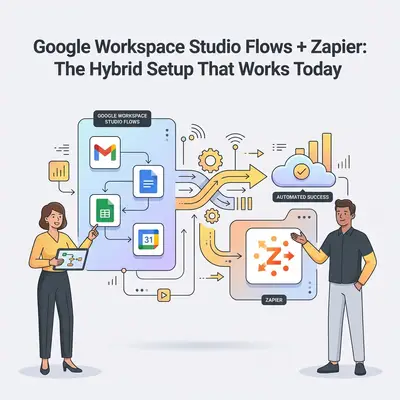
That’s where the hybrid approach wins: use Google Workspace Studio (Flows) for Google-native steps with Gemini, then use Zapier to bridge the third-party gap until broader integrations arrive.
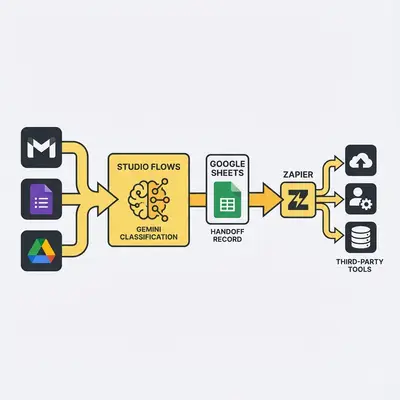
The clear rule: Flows does the thinking, Zapier does the shipping
Studio Flows (when available to you) is best at:
- Working inside Gmail/Drive/Sheets/Calendar/Chat
- Doing “Gemini work”: summarize, classify, extract fields, draft responses
- Notifying you (not a colleague or a shared Chat space - notify steps only ever notify yourself) and routing work with labels
Zapier is best at:
- Connecting to a large catalog of third‑party apps
- Moving structured data across tools
- Running “business plumbing” that spans your stack
The simplest mental model:
- Flows decides what should happen.
- Zapier delivers it to the app that actually needs the update.
Before you build: confirm Studio/Flows access (or you’ll waste hours)
Flows access can be gated by licensing, admin settings, and Google rollout status. If you’re not sure whether you actually have Studio/Flows, start here:
- Is Google Workspace Studio (Flows) included in your Gemini license?
- Google’s own guide: Create a flow with Gemini AI
If Flows isn’t available yet, you can still use the architecture in this post by swapping “Flows” for lightweight Apps Script or a Gemini API step. But if you do have Flows, this hybrid pattern is the fastest path to value.
Quick Win: Don’t start by automating everything. Start with one high-volume workflow (inbox triage, lead routing, invoice intake) and get it stable end-to-end before you expand.
The hybrid architecture (3 patterns that don’t break)
When teams struggle with hybrid automation, it’s usually because they pass messy payloads between systems. The fix is to define a clean “handoff”.
Pattern A: Flows → Handoff record → Zapier (most common)
Use this when the workflow starts in Google (Gmail, Forms, Sheets).
- Flows triggers from Gmail/Forms/Drive.
- Flows uses Gemini to classify/extract fields.
- Flows writes a handoff record to a Google Sheet row (or Drive file) with:
- Unique ID
- Status
- A short summary
- Links to the source artifact (email thread, Drive doc)
- Zapier triggers on the new/updated row and pushes into your third-party tools.
Why this works:
- Sheets is a reliable “buffer” and audit trail.
- Zapier is happiest when it reads structured fields.
- You can re-run safely because the record can be updated, not duplicated.
If you want to see how Zapier positions Google Sheets as an integration hub, their Google Sheets integrations page is a helpful reference: Google Sheets integrations on Zapier.
Pattern B: Zapier → Google artifact → Flows (when third-party starts the workflow)
Use this when the trigger is outside Google (CRM, helpdesk, payments).
- Zapier triggers from the third-party app event.
- Zapier creates/updates a Google artifact (Sheet row, Drive doc, Chat message).
- Flows reads the artifact and uses Gemini for summarization, classification, and routing inside Workspace.
This is powerful for “human-in-the-loop” operations: Zapier moves data; Flows turns it into a decision or message the team can act on.
Pattern C: Webhooks as the bridge (only when needed)
Sometimes you need a direct call. If you do, keep the payload small and pass references:
- IDs
- URLs
- status flags
Avoid sending entire email bodies or documents between tools if you can store them in Drive and pass a link.
If you do need webhooks, use Zapier’s official Webhooks by Zapier documentation as the source of truth for the “Catch Hook” / “POST data” patterns: Webhooks by Zapier (official).
Reality Check: The more data you pass between tools, the less reliable the workflow becomes. Make your handoff contract boring, small, and consistent.
The “handoff record” template (copy/paste)
If you use Google Sheets as the handoff buffer, aim for a row schema like this:
handoff_id(unique)source_type(gmail, form, drive)source_url(link)summary(short)classification(enum like: lead, support, invoice, spam)priority(low/med/high)owner(optional)status(new → sent_to_zapier → completed / failed)last_updated_at
This one row becomes your audit trail, retry mechanism, and migration layer later.
Mid‑post CTA: Want us to map your exact “handoff record” fields and build the first hybrid workflow with your stack? Book a demo with Evalics.
Use case 1: Inbox triage → CRM task + Slack/Teams ping
Goal: You stop missing important emails and you stop manually creating follow-ups.
Flows does:
- Detect new emails (or a label/folder you use as “inbox triage”)
- Gemini classifies: lead/support/vendor/billing
- Gemini extracts: company, intent, urgency
- Writes a row to Sheets (handoff record)
Zapier does:
- If classification = lead, create a CRM task and attach the email thread link
- If classification = support, create a helpdesk ticket
- Post a message to Slack/Teams with the summary and link
Mid‑post CTA: Want a ready-to-use handoff sheet template and a 30-minute setup walkthrough? Book a free automation audit.
Use case 2: Google Forms lead capture → enrichment → sales pipeline
Goal: Every form submission becomes a qualified lead, not an ignored spreadsheet row.
Flows does:
- Trigger on a new form response
- Gemini normalizes the company name, extracts the “real ask”, and tags priority
- Writes the handoff row (including the response link)
Zapier does:
- Enrich in third‑party tools (if you have them)
- Create/update the CRM contact and deal
- Notify a Chat space or Slack channel
Use case 3: Contract/invoice intake → extract fields → route to accounting + project tool
Goal: You stop manually copying invoice data into multiple systems.
Flows does:
- Trigger on new Drive file in “Invoices” folder
- Gemini extracts key fields (vendor, amount, due date) and flags anomalies
- Writes a handoff record with the Drive link
Zapier does:
- Create a bill/invoice in your accounting tool
- Create a project task with the due date
- Notify the owner
Reliability guardrails (plain English)
Hybrid setups fail for predictable reasons. Use these guardrails to avoid the pain.
- Keep payloads small: links + IDs beat copying full content into 5 systems.
- Use a unique ID: one record should represent one business event.
- Design for retries: assume things will fail sometimes and replays should be safe.
- Make double-processing impossible: use status fields to prevent duplicates.
- Keep an audit trail: the handoff record is your “what happened?” log.
If you’ve already seen performance issues from big payloads, you’ll recognize the pattern: boring, small payloads scale better.
When hybrid is worth it (and when it’s not)
Hybrid is worth it when:
- You need Gemini intelligence inside Google Workspace
- You also need real third‑party coverage today
- Your team can maintain one “handoff record” table and a few Zaps
Hybrid is not worth it when:
- Everything you do is Google-only (Flows alone is simpler)
- Your workflows are low volume and manual is fine
- You don’t have someone to own basic automation hygiene (status fields, retries)
If you’re still choosing between tools, this comparison can help you decide where to start:
Migration path: how to prepare for new integrations without rebuilding
The mistake teams make is building “one-off” Zaps with messy data. If you keep your handoff contract stable, migration becomes a swap, not a rewrite:
- Keep the handoff row schema stable.
- Replace Zapier steps one-by-one as native integrations arrive.
- Keep the same audit trail so troubleshooting doesn’t change.
Next steps (do this this week)
- Pick one workflow with clear ROI (inbox triage, lead routing, invoice intake).
- Create a handoff record (Sheet) and agree on the fields.
- Build Flows to classify/extract and write the row.
- Build Zapier to trigger from the row and push to third-party tools.
- Add a simple status field so retries don’t create duplicates.
If you want help designing the “handoff contract” and building the first flow end-to-end, Book a demo with Evalics.
By Kevin Michael Schindler, AI Automation Specialist at Evalics.