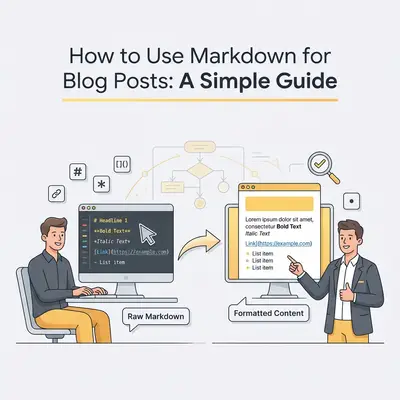
You spend hours writing a great blog post in a document editor. The spelling is perfect, the flow is right, and the headers look crisp.
Then you copy and paste it into your website’s CMS (Content Management System).
Disaster strikes. The spacing is wrong. The fonts change size randomly. Your bullet points turn into weird symbols. You spend the next 30 minutes fighting with the "bold" button just to make it look readable.
There is a better way. It’s called Markdown.
Markdown is the secret weapon of efficient content creators. It allows you to format your writing as you type, without touching a mouse or worrying about hidden formatting code. More importantly, if you are using AI to help generate content, Markdown is the native language of automation.
Here is how to master it in under 10 minutes.
What is Markdown?
Markdown is a lightweight way to format text using plain characters. Instead of highlighting a word and clicking a "B" button to make it bold, you simply wrap it in asterisks.
Think of it as shorthand for the web.
When you write in a standard processor (like Word or Google Docs), the software adds layers of invisible code to handle the styling. When you move that text to your blog, that invisible code often clashes with your website’s design.
Markdown is just text. It carries no hidden baggage. It tells your website exactly what to do—"make this a header," "make this a list"—and your website renders it perfectly according to its own style rules.
Key Insight: Markdown separates content from design. You focus on the words and structure; your website handles the colors and fonts.
Why You Should Care (Especially in 2025)
You might think, "I have a toolbar in WordPress, why learn a new syntax?"
- Speed: You never have to lift your hands from the keyboard.
- Portability: You can write in a simple notes app, move it to Notion, then to WordPress, and finally to an email newsletter. The formatting stays identical everywhere.
- Automation Compatibility: This is the big one. If you are automating blog post writing with AI and n8n, you will notice that tools like ChatGPT and Claude output text in Markdown by default. Understanding this format allows you to build workflows that publish content automatically without manual cleanup.
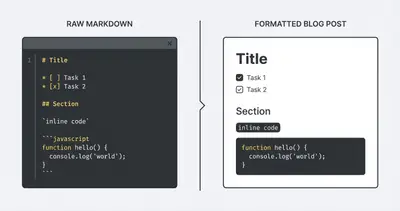
The 60-Second Cheat Sheet
You only need to learn about six key elements to write a full blog post. Here are the essentials.
1. Headings
Headings are created using hashtags (#). The number of hashtags corresponds to the heading level.
#= H1 (Main Title - usually handled by your CMS title field)##= H2 (Main Section)###= H3 (Subsection)
You type:
## Why Marketing Matters
The reader sees:
Why Marketing Matters
2. Emphasis (Bold and Italic)
Use asterisks (*) or underscores (_) for emphasis.
- Bold: Double asterisks.
**This is bold** - Italic: Single asterisk.
*This is italic*
You type:
Make sure to **test your automations** before launching.
The reader sees: Make sure to test your automations before launching.
3. Lists
Lists are where Markdown shines. No more fighting with indentation.
Bulleted Lists: Use a dash (-), asterisk (*), or plus sign (+).
- Research
- Draft
- Publish
Numbered Lists: Just type the number and a period.
1. Open editor
2. Write content
3. Save file
Quick Win: You don't even need to get the numbers right. If you type
1.,1.,1., Markdown is smart enough to render it as1.,2.,3.automatically.
4. Links
Links use a specific bracket combo. It looks like this: [Text to display](URL).
You type:
Check out our guide on [n8n workflow documentation](/blog/n8n-workflow-documentation-best-practices-complete-guide).
The reader sees: Check out our guide on n8n workflow documentation.
5. Images
Images look exactly like links, but with an exclamation mark ! at the start.

6. Blockquotes
Want to highlight a quote or a key takeaway? Use the greater-than symbol (>).
You type:
> Consistency is key to SEO success.
The reader sees:
Consistency is key to SEO success.
Writing for AI and Automation
If you are using AI tools to assist your writing, you are likely already seeing Markdown.
When you ask ChatGPT to "write a blog post," it structures the output using these symbols. If you try to copy that text directly into a visual editor (like a classic email builder) without converting it, your readers will see hashtags and asterisks instead of headers and bold text.
However, modern CMS platforms (Ghost, Strapi, and newer WordPress editors) support Markdown natively.
Pro Tip: If you are building an automation pipeline, tell your AI model to "Format the output in strict Markdown." This ensures consistent structure that your website can interpret programmatically.
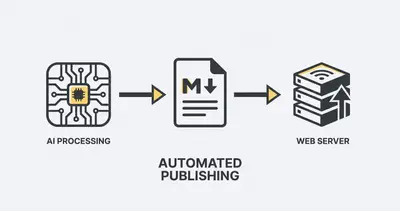
For example, when building your AI platform tech stack, choosing a CMS that supports Markdown allows you to connect an AI agent directly to your blog. The AI generates the text with Markdown headers, and your site publishes it perfectly formatted—zero human editing required.
Tools to Start Writing
You don't need expensive software. In fact, the simpler, the better.
- Obsidian: A free, powerful note-taking app that stores everything as local Markdown files. excellent for drafting.
- VS Code: If you are technically inclined, this is the industry standard.
- Google Docs (with settings): Google Docs now supports basic Markdown shortcuts. Go to Tools > Preferences > Automatically detect Markdown to turn it on.
- Ghost / WordPress: Both platforms now allow you to type Markdown directly into their editors, and they convert it to rich text instantly.
Common Pitfalls to Avoid
- Spaces Matter: Always put a space after the hashtag in a header.
##Headerwon't work;## Headerwill. - Line Breaks: In some strict Markdown flavors, you need a blank line between paragraphs. If your text looks like a wall of text, hit "Enter" one more time.
- Mixing HTML: You can use HTML inside Markdown (like
<br>for a break), but try to avoid it. It defeats the purpose of keeping your content clean and portable.
Final Thoughts
Markdown isn't code; it's just structured writing.
By switching to Markdown, you stop worrying about how your document looks while you write, and focus entirely on what it says. Plus, you future-proof your content. Ten years from now, a proprietary Word document might be hard to open, but a Markdown file will always be readable plain text.
Start small. Next time you draft a post, try using ## for your headers and ** for your bold text. You’ll be surprised how much faster you write when you stop clicking buttons.
Related Resources
- Automating Blog Post Writing with AI and n8n
- Prompt Engineering Step-by-Step Checklist
- N8n Workflow Documentation Best Practices
- Building Your AI Platform Tech Stack