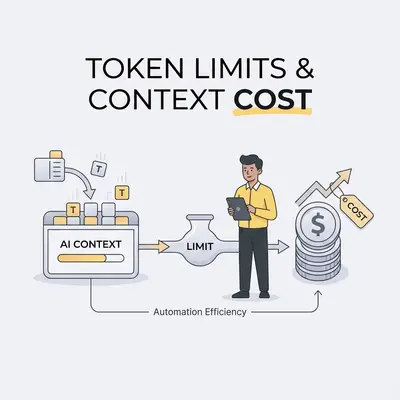
Your AI automation bill arrived. You expected $500. You got $2,300.
The difference isn't a billing error—it's the hidden cost mechanics most teams don't understand until the invoice arrives. Context windows that seem "free" because you're not hitting limits. Retries that multiply costs silently. Output tokens that cost 5-10x more than input tokens. Long prompts that inflate every request.
Understanding how token limits and context size drive costs isn't just about budgeting—it's about making automation sustainable at scale. This guide breaks down the cost mechanics that surprise teams, with worked scenarios and optimization strategies to cut your AI spending.
Quick Win: The biggest cost drivers are output tokens and context you send but do not need. Limiting output length and trimming prompts lowers the bill on every call.
How context windows drive cost
Context windows determine how much data you can process in a single API call. They also determine how much you pay, because you're charged for every input token you send—even if you're not using the full window capacity.
What context windows are and how they work
A context window is the maximum number of tokens an AI model can process in one request. Tokens are pieces of text (roughly 4 characters or 0.75 words per token). When you send a prompt, every token in that prompt counts toward your input token cost.
Key point: You pay for all input tokens you send, regardless of the model's maximum capacity. If a model supports 1 million tokens but you only send 50,000, you pay for those 50,000 tokens and nothing for the rest of the window.
The cost implications of oversized context windows
Using a larger context window than you need doesn't just waste capacity—it can drive unnecessary costs through several mechanisms:
1. Filling the window because you can: A larger window makes it easy to send whole documents and full chat histories instead of the parts you need. Every extra token is billed.
2. Prompt inflation: Larger context windows encourage longer prompts. Teams add more examples, more instructions, more context "just in case." This inflates input token costs without improving results.
3. Model tier selection: The per-token rate differs by tier, and that is what changes the bill. Gemini 3 Pro and Gemini 3 Flash have the same 1,048,576-token window, but Flash costs a quarter as much per token.
Cost comparison
Scenario: Processing 50K token documents
A marketing agency processes customer research documents (average 50,000 tokens) through an AI analysis workflow.
Option 1: Using 1M token context window (Gemini 3 Pro)
- Input tokens per request: 50,000
- Input cost: $2.00 per 1M tokens
- Cost per document: (50,000 / 1,000,000) × $2.00 = $0.10
- Monthly (1,000 documents): $100
Option 2: Using 128K token context window (GPT-4 Turbo)
- Input tokens per request: 50,000
- Input cost: $10.00 per 1M tokens
- Cost per document: (50,000 / 1,000,000) × $10.00 = $0.50
- Monthly (1,000 documents): $500
In this case, the model with the larger window (Gemini 3 Pro) is cheaper because its per-token rate is lower. The window size is not what drives the cost.
Better comparison: Same window, different tier
Scenario: 50K token document, two price tiers
Strategy 1: Premium tier
- Sending 50K tokens to Gemini 3 Pro
- Premium tier pricing: $2.00/1M input
- Cost: $0.10 per document
Strategy 2: Budget tier, same window size
- Sending the same 50K tokens to Gemini 3 Flash (also a 1,048,576-token window)
- Budget tier: $0.50/1M input
- Cost: $0.025 per document
- Savings: 75%
When larger context windows are worth the cost
Larger context windows justify their cost when you actually need the capacity:
Use 1M+ token windows when:
- Analyzing entire codebases with full repository context
- Processing complete book-length documents with detailed queries
- Maintaining extensive conversation histories without summarization
- Document intelligence platforms ingesting large collections
Use 128K-400K windows when:
- Most business automation workflows
- Customer support ticket analysis
- Email processing and response generation
- Standard document analysis and summarization
Use 50K-128K windows when:
- Simple classification tasks
- Short document processing
- Basic content generation
- High-volume, low-complexity workflows
Key Insight: Window size does not change the price of a token. Pick the cheapest model whose window fits your largest request and whose quality holds up on your task.
For more on calculating token costs, see our complete guide to AI token cost calculation.
Hidden cost multipliers: Where your budget disappears
Base token pricing tells part of the story. Retries, long prompts, long outputs, and rate limits add to the bill in ways a per-token price does not show.
Retries and failures: The silent cost multiplier
When workflows fail, you pay for retries. Format errors, timeouts, rate limits, and validation failures all trigger retries—and each retry charges you again for the same request.
How retries multiply costs:
Scenario: Customer support automation with 5% retry rate
A support team processes 1,000 tickets per day through an AI classification workflow.
Base costs (no retries):
- Input: 5,000 tokens per request × 1,000 requests = 5M tokens
- Output: 1,000 tokens per request × 1,000 requests = 1M tokens
- Input cost: (5M / 1M) × $2.00 = $10.00
- Output cost: (1M / 1M) × $12.00 = $12.00
- Daily total: $22.00
- Monthly total: $660
With 5% retry rate:
- Failed requests: 1,000 × 5% = 50 retries per day
- Retry costs: 50 requests × $0.022 = $1.10 per day
- Monthly retry cost: $33
- Total monthly cost: $693 (5% increase)
With 20% retry rate:
- Failed requests: 1,000 × 20% = 200 retries per day
- Retry costs: 200 requests × $0.022 = $4.40 per day
- Monthly retry cost: $132
- Total monthly cost: $792 (20% increase)
Common retry causes:
- Format errors: JSON parsing failures, structure mismatches
- Timeouts: Requests exceeding time limits
- Rate limits: Hitting API request limits
- Validation failures: Outputs failing business logic checks
Strategies to reduce retry costs:
- Implement strict JSON schema validation before sending requests
- Add timeout handling and retry logic with exponential backoff
- Monitor rate limits and implement request queuing
- Validate outputs before processing to catch errors early
- Use fallback mechanisms instead of retries when possible
Long prompts: How prompt length drives input costs
Every token in your prompt costs money. System prompts, user prompts, examples, and context all add to input token costs. Prompt bloat—adding unnecessary context "just in case"—can inflate costs significantly.
System prompts vs user prompts:
System prompt (sent with every request):
- Defines model behavior, constraints, and output format
- Typically 500-2,000 tokens
- Charged on every request
- Example: "You are a customer support assistant. Return JSON only. Never confirm payments without verification."
User prompt (request-specific):
- Contains the actual task and data
- Varies by request
- Example: "Classify this support ticket: [ticket content]"
Cost impact of prompt length:
Scenario: Support ticket classification
Short prompt (500 tokens system + 1,000 tokens user = 1,500 total):
- Cost per request: (1,500 / 1,000,000) × $2.00 = $0.003
- Monthly (1,000 requests): $3.00
Long prompt (2,000 tokens system + 5,000 tokens user = 7,000 total):
- Cost per request: (7,000 / 1,000,000) × $2.00 = $0.014
- Monthly (1,000 requests): $14.00
- Cost increase: 367%
Prompt optimization strategies:
- Remove redundant instructions from system prompts
- Use concise examples instead of verbose explanations
- Eliminate unnecessary context that doesn't improve results
- Template prompts to avoid repetition
- Use few-shot examples strategically (3-5 examples often sufficient)
Output token costs: Why response length multiplies costs
Output tokens cost more than input tokens: 3x on GPT-4 Turbo, 5x on Claude Opus 5.5, 6x on Gemini 3, and 8x on GPT-5.2. This makes response length a major cost driver.
Why output tokens cost more:
GPT-4 Turbo pricing example:
- Input tokens: $10.00 per 1M tokens
- Output tokens: $30.00 per 1M tokens (3x more expensive)
Claude Opus 5.5 pricing example:
- Input tokens: $4.00 per 1M tokens
- Output tokens: $20.00 per 1M tokens (5x more expensive)
Cost impact of response length:
Scenario: Content generation workflow
Short response (500 tokens):
- Output cost: (500 / 1,000,000) × $20.00 = $0.01 per request
- Monthly (1,000 requests): $10.00
Long response (2,000 tokens):
- Output cost: (2,000 / 1,000,000) × $20.00 = $0.04 per request
- Monthly (1,000 requests): $40.00
- Cost increase: 300%
Strategies to reduce output token costs:
- Limit response length with
max_tokensparameters - Use structured outputs (JSON) instead of verbose text
- Request concise summaries instead of full explanations
- Use templates to format responses efficiently
- Implement response caching for repeated queries
Rate limit costs: When limits force tier upgrades
Rate limits determine how many requests you can make per minute, hour, or day. Hitting rate limits forces you to either wait (delaying workflows) or upgrade tiers (increasing costs).
How rate limits drive costs:
Scenario: High-volume workflow hitting free tier limits
A marketing agency processes 10,000 leads per day through an AI qualification workflow.
Free tier limits:
- 1,000 requests per hour
- Processing time: 10 hours (with delays)
- Workflow delays: 6+ hours daily
- Impact: Delayed lead responses, missed opportunities
Paid tier upgrade:
- 10,000 requests per hour
- Processing time: 1 hour
- Additional cost: a higher monthly tier
- Tradeoff: Higher cost but faster processing, no missed opportunities
Hidden costs of rate limits:
- Queue delays that slow workflows
- Retry costs from hitting limits
- Forced tier upgrades when limits are too restrictive
- Opportunity costs from delayed processing
Strategies to manage rate limits:
- Test expected volume against platform limits before committing
- Implement request queuing and batching
- Use batch processing APIs when available (often 50% cheaper)
- Consider multiple API keys for higher limits
- Monitor rate limit usage and adjust workflows accordingly
Reality Check: Retries, long prompts, and rate limits add up. A workflow with a 20% retry rate pays 20% more for the same work, before you count anything else. Budget for these from the start.
Tradeoffs between "smarter" and "cheaper" models
The choice between premium and budget AI models isn't just about capability—it's about cost-benefit analysis. Understanding when cheaper models are sufficient and when premium models justify higher costs helps you optimize spending without sacrificing quality.
Cost vs capability analysis
Budget tier models (GPT-4o Mini, Gemini 3 Flash):
- Input: $0.15-$0.50 per 1M tokens
- Output: $0.60-$3.00 per 1M tokens
- Capability: Good for simple tasks, classification, basic generation
- Best for: High-volume, low-complexity workflows
Premium tier models (GPT-5.2, Claude Opus 5.5):
- Input: $1.75-$4.00 per 1M tokens
- Output: $14.00-$20.00 per 1M tokens
- Capability: Advanced reasoning, coding, complex analysis
- Best for: Complex tasks where accuracy failures are expensive
When cheaper models are sufficient
Use budget tiers when:
- Simple classification tasks (email routing, lead qualification)
- Basic content generation (templates, summaries)
- High-volume workflows where cost per request matters
- Tasks where occasional errors are acceptable
- Prototyping and testing
Worked example: A lead qualification run that costs $45 a month on GPT-4o Mini ($0.15/1M input, $0.60/1M output) would cost roughly 12-23x more on GPT-5.2, because GPT-5.2's input rate is about 12x higher and its output rate about 23x higher. Check whether the budget model's answers are good enough before you pay for that.
When premium models justify higher costs
Use premium tiers when:
- Complex reasoning tasks (financial analysis, strategic planning)
- Coding and development automation (where errors are costly)
- Compliance-critical workflows (where failures create risk)
- Tasks where accuracy improvements justify 10x cost
- Low-volume, high-value workflows
When premium pays: For contract analysis, one missed clause can cost more than a year of API calls. That is when the higher per-token rate is worth testing against a budget model.
Token efficiency differences
Some models achieve similar results with fewer tokens, which can offset higher per-token costs:
Token efficiency:
- Some models use fewer tokens than others for the same task
- A higher per-token rate ($4/$20 for Claude Opus 5.5 vs $1.75/$14 for GPT-5.2) can still mean a lower bill if fewer tokens are needed
- Measure tokens per task on your own workload before you compare
Decision framework:
| Factor | Budget Tier | Premium Tier |
|---|---|---|
| Best for | High volume, simple tasks | Complex reasoning, coding |
| When to use | Cost-sensitive workflows | Accuracy-critical workflows |
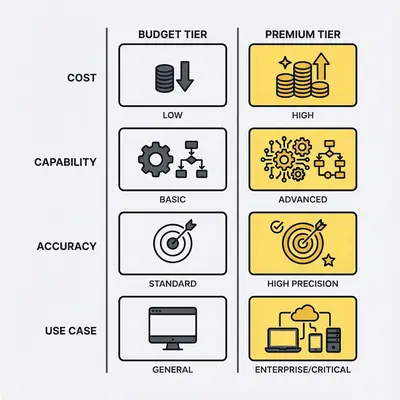
Pro Tip: Use tiered routing. Send simple, high-volume tasks to a budget tier, which costs a fraction of the premium rate, and complex, accuracy-critical tasks to a premium tier.
Optimization strategies to cut costs
Cost optimization isn't about choosing the cheapest model. It's about right-sizing every component of your automation workflow.
Context window optimization
Right-size to actual needs:
- Send only the parts of a document the task needs
- Choose budget tiers with adequate context windows
- Don't pay for capacity you won't use
Chunking strategies for long documents:
- Break 200K token documents into 4×50K chunks
- Process chunks separately and combine results
- Chunking does not reduce the tokens you send. It lets you skip sections that are not relevant, and it lets documents larger than the window be processed at all.
When to use larger vs smaller windows:
- Use larger windows when context relationships matter (codebases, long conversations)
- Use smaller windows when documents are independent (batch processing, classification)
Prompt optimization
Reduce prompt length without losing quality:
- Remove redundant instructions
- Use concise examples (3-5 few-shot examples often sufficient)
- Eliminate unnecessary context
- Template prompts to avoid repetition
System prompt efficiency:
- Keep system prompts under 1,000 tokens when possible
- Remove instructions that don't improve results
- Use structured formats to reduce verbosity
Template optimization:
- Create reusable prompt templates
- Parameterize variable content
- Avoid repeating static instructions
Example savings:
- Reducing prompt from 7,000 to 1,500 tokens saves 79% on input costs
- Monthly savings: $11 on 1,000 requests (from $14 to $3)
Output optimization
Limit response length:
- Use
max_tokensparameters to cap responses - Request concise summaries instead of full explanations
- Specify exact output formats
Structured outputs to reduce tokens:
- Use JSON instead of verbose text
- Request specific fields only
- Avoid explanatory text when data suffices
Response formatting strategies:
- Use templates for consistent, efficient formatting
- Request bullet points instead of paragraphs
- Specify character limits for each field
Example savings:
- Limiting responses from 2,000 to 500 tokens saves 75% on output costs
- Monthly savings: $30 on 1,000 requests (from $40 to $10 at Claude Opus 5.5 rates)
Model selection optimization
Tiered routing:
- Simple tasks → budget tier (GPT-4o Mini, Gemini 3 Flash)
- Complex tasks → premium tier (GPT-5.2, Claude Opus)
- Route based on task complexity, not volume alone
Hybrid approaches:
- Use budget tier for high-volume, simple workflows
- Use premium tier for low-volume, complex workflows
- Optimize routing based on actual cost-benefit analysis
Cost monitoring and adjustment:
- Track costs by model tier and workflow
- Identify opportunities to downgrade or upgrade tiers
- Adjust routing based on performance and cost data
Retry and failure reduction
Validation strategies:
- Validate inputs before sending to API
- Implement JSON schema validation
- Check for required fields and formats
Error handling to prevent retries:
- Implement exponential backoff for retries
- Set maximum retry limits
- Use fallback mechanisms instead of infinite retries
Fallback mechanisms:
- Route to alternative models on failure
- Use cached responses for repeated queries
- Implement human-in-the-loop for edge cases
Example savings:
- Reducing retry rate from 20% to 5% saves $99/month on 1,000 requests/day workflow
Pro Tip: Optimization is iterative. Start with the biggest cost drivers (output tokens, context windows) and measure impact. Then optimize prompts, reduce retries, and fine-tune model selection. Most teams can achieve 50-70% cost reduction with these strategies.
If you want help optimizing your AI automation costs, we can analyze your workflows and identify savings opportunities in under 30 minutes. Book a free cost analysis.
Worked cost scenarios
These scenarios show how context windows, hidden costs, and optimization strategies affect real automation workflows.
Scenario 1: High-volume lead processing
Workload: Marketing agency processes 5,000 leads per day through AI qualification workflow.
Initial setup (unoptimized):
- Prompt length: 5,000 tokens per request (verbose system prompt + examples)
- Output length: 2,000 tokens per response (verbose JSON with explanations)
- Retry rate: 15% (format errors, timeouts)
- Model: GPT-5.2 ($1.75/1M input, $14/1M output)
Monthly costs:
- Input: (5,000 × 30 × 5,000 / 1,000,000) × $1.75 = $1,312.50
- Output: (5,000 × 30 × 2,000 / 1,000,000) × $14.00 = $4,200.00
- Retries (15%): ($1,312.50 + $4,200.00) × 15% = $826.88
- Total: $6,339.38/month
Optimized setup:
- Prompt length: 1,500 tokens (optimized system prompt, concise examples)
- Output length: 500 tokens (structured JSON, no explanations)
- Retry rate: 3% (validation, error handling)
- Model: GPT-4o Mini ($0.15/1M input, $0.60/1M output)
Monthly costs:
- Input: (5,000 × 30 × 1,500 / 1,000,000) × $0.15 = $33.75
- Output: (5,000 × 30 × 500 / 1,000,000) × $0.60 = $45.00
- Retries (3%): ($33.75 + $45.00) × 3% = $2.36
- Total: $81.11/month
- Savings: $6,258.27/month (98.7% reduction)
Scenario 2: Document analysis workflow
Workload: Legal firm analyzes 500 contracts per month (average 100K tokens each).
Strategy 1: Premium model
- Using Claude Opus 5.5 (1M token window)
- Sending full 100K token documents in single requests
- Cost: (500 × 100,000 / 1,000,000) × $4.00 = $200/month
Strategy 2: Budget model, same full context
- Using Gemini 3 Flash (1,048,576-token window)
- Each 100K document still fits in one request
- Cost: (500 × 100,000 / 1,000,000) × $0.50 = $25/month
- Savings: $175/month (87.5% reduction vs Strategy 1)
Note: An older premium model like GPT-4 Turbo ($10/1M input) would cost $500/month for the same documents. The per-token rate drives the bill, not the window size.
Tradeoff: Chunking requires combining results, but the cost savings justify the additional processing step for most use cases.
Scenario 3: Customer support automation
Workload: Support team handles 2,000 tickets per day through AI triage and response generation.
Unoptimized costs:
- Long prompts: 7,000 tokens per request
- Verbose outputs: 2,000 tokens per response
- High retry rate: 20% (format errors)
- Model: Claude Opus 5.5 ($4/1M input, $20/1M output)
Monthly costs:
- Input: (2,000 × 30 × 7,000 / 1,000,000) × $4.00 = $1,680.00
- Output: (2,000 × 30 × 2,000 / 1,000,000) × $20.00 = $2,400.00
- Retries (20%): ($1,680 + $2,400) × 20% = $816.00
- Total: $4,896.00/month
Optimized costs:
- Optimized prompts: 1,500 tokens per request
- Structured outputs: 500 tokens per response
- Low retry rate: 3% (validation, error handling)
- Model: GPT-4o Mini ($0.15/1M input, $0.60/1M output)
Monthly costs:
- Input: (2,000 × 30 × 1,500 / 1,000,000) × $0.15 = $13.50
- Output: (2,000 × 30 × 500 / 1,000,000) × $0.60 = $18.00
- Retries (3%): ($13.50 + $18.00) × 3% = $0.95
- Total: $32.45/month
- Savings: $4,863.55/month (99.3% reduction)
Scenario 4: Code generation workflow
Workload: Development team generates 200 code files per month through AI assistance.
Requirements:
- Need full codebase context (500K tokens)
- Require high code quality (premium model)
- Output: 5,000 tokens per file
Using Claude Opus 5.5 (premium tier):
- Input: (200 × 500,000 / 1,000,000) × $4.00 = $400.00
- Output: (200 × 5,000 / 1,000,000) × $20.00 = $20.00
- Total: $420.00/month
Optimization strategies:
- Use prompt caching for the repeated codebase context (cache reads cost 5% of the base input price on Claude Opus 5.5)
- Limit output to essential code (reduce from 5,000 to 3,000 tokens)
- Implement validation to reduce retries
Optimized costs:
- Input with caching: about $20.00 plus cache-write costs (100M tokens at $0.20 per million)
- Output optimized: $12.00 (3,000 tokens per file)
- Total: about $32.00/month plus cache writes
- Savings: about $388.00/month (about 92% reduction)
Note: For code generation, premium models are often justified because code quality failures are expensive. The optimization focuses on reducing token usage while maintaining quality.
Conclusion: Control costs by understanding mechanics
Token limits and context size drive AI automation costs in ways that surprise most teams. Understanding these mechanics—not just per-token pricing—helps you budget accurately and optimize effectively.
Key takeaways:
Pick models by per-token rate, not window size. A bigger window does not make a token more expensive. Choose the cheapest model whose window fits your largest request and whose quality holds up.
Hidden costs add up. Retries, long prompts, output tokens, and rate limits can increase costs well beyond base token pricing. Factor them into your budget from the start.
Optimization strategies cut costs. Trimming prompts and outputs, tiered routing, and fewer retries reduce the bill. The scenarios above show how far, depending on your starting point.
Next steps:
- Audit your current costs: Identify your biggest cost drivers (output tokens, context windows, retries, prompt length)
- Right-size context windows: Match window size to actual document/task size
- Optimize prompts and outputs: Reduce length without sacrificing quality
- Implement tiered routing: Route simple tasks to budget tiers, complex tasks to premium tiers
- Reduce retries: Add validation, error handling, and fallback mechanisms
- Monitor and adjust: Track costs by workflow and adjust strategies based on data
The difference between a $500 expected bill and a $2,300 actual bill isn't a mistake—it's the hidden cost mechanics most teams don't understand until the invoice arrives. Understanding these mechanics and implementing optimization strategies can make automation sustainable at scale.
Ready to optimize your AI automation costs? Book a demo with Evalics to get a personalized cost analysis and optimization plan for your specific workflows.
By Kevin Michael Schindler, AI Automation Expert at Evalics