
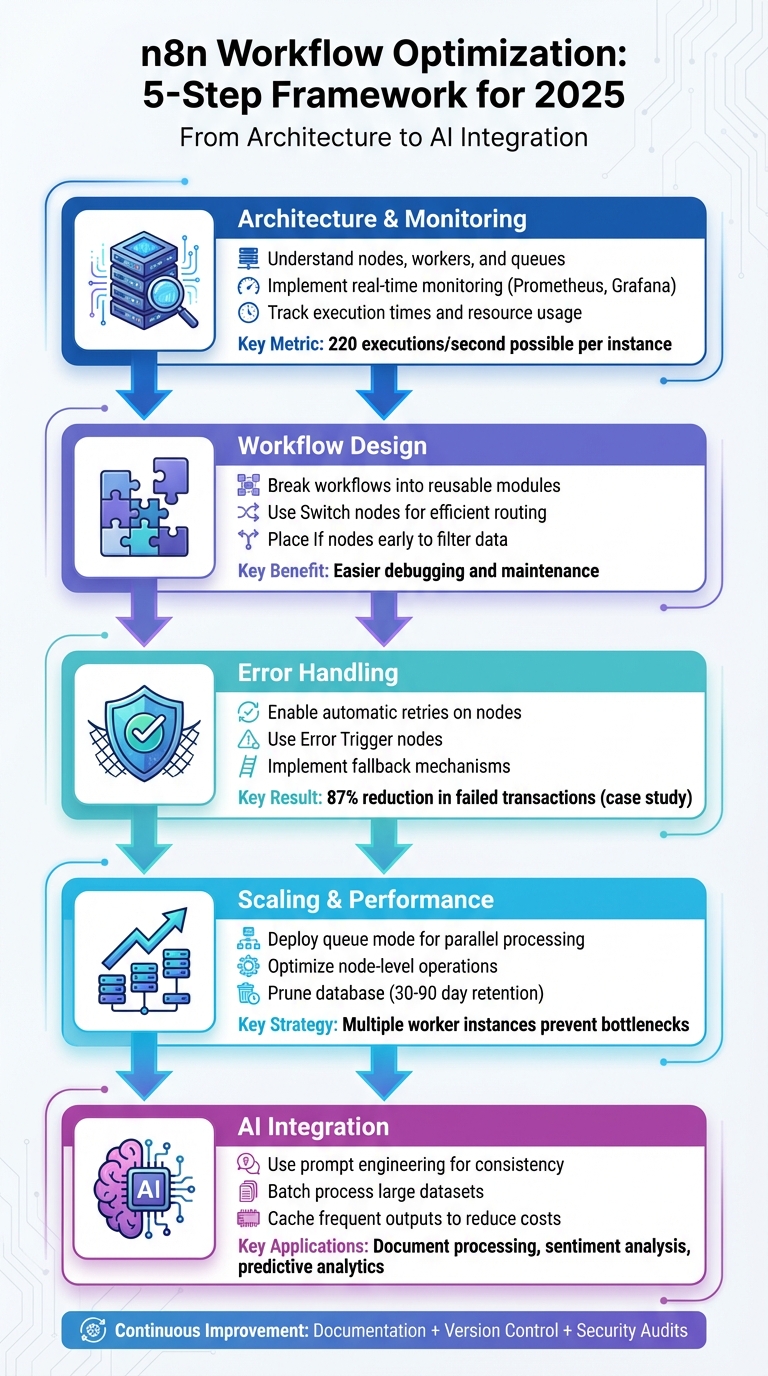
Automating workflows is no longer optional in 2025 - it's essential for staying competitive. This guide dives straight into advanced techniques to improve n8n workflows, helping businesses save time, reduce errors, and scale operations effectively.
Key takeaways include:
- Modular workflows: Break down complex processes into smaller, reusable parts for easier updates.
- Error handling: Use retries, fallback mechanisms, and error triggers to keep workflows running smoothly.
- Performance tuning: Optimize nodes, use queue mode for scaling, and clean up databases to avoid bottlenecks.
- AI integration: Leverage tools like OpenAI for smarter workflows while controlling costs.
How to Optimize Workflows in n8n - Faster & Scalable Automations | n8n Beginners Course Tutorial
Core Components of Efficient n8n Workflows
To build workflows that operate smoothly and scale effectively, it's essential to understand how n8n's architecture works. At its foundation, n8n relies on nodes as its primary building blocks. Each node represents a specific task, such as an action, an integration, or a logical operation. By connecting these nodes visually, you create workflows - task sequences triggered by schedules or specific events [3]. Key components like workers, queues, and database storage play vital roles in ensuring smooth operation. Workers handle task execution, queues manage high-volume tasks without delays, and database storage logs execution histories for monitoring and troubleshooting. When workflows run in queue mode, multiple worker instances can process tasks simultaneously, helping to avoid bottlenecks during busy periods. These components work together to influence the speed, reliability, and scalability of your workflows.
How n8n Architecture Works
n8n's modular design allows each node to perform a distinct function, such as making API calls, transforming data, or triggering other workflows. These nodes are orchestrated into workflows that can be activated by webhooks, scheduled intervals, or manual triggers. To execute these workflows, n8n uses workers - background processes that pick tasks from a queue and run them independently. This setup ensures scalability, as you can add more workers to handle increasing demand. Meanwhile, database storage keeps track of every execution, logging details and storing output data. This is invaluable for diagnosing issues and monitoring performance. By understanding how nodes interact and identifying potential slowdowns, you can allocate resources more effectively and maintain optimal performance.
Finding and Fixing Common Performance Problems
When workflows slow down, the root cause often falls into a few common categories. Slow API responses from external services can hold up workflows, as nodes wait for third-party systems to respond. Similarly, large data payloads moving between nodes can strain memory and processing power, while inefficient nodes performing redundant tasks waste CPU resources. Another common issue is resource contention, where multiple workflows vie for limited memory or processing power, leading to delays during peak usage [1][2][6]. To identify these bottlenecks, review execution logs and timestamps to pinpoint nodes with unusually long durations. Monitor external API response times and track CPU and memory usage during high-traffic periods. Once you've identified the problem, you can apply fixes like caching API responses, splitting large payloads into smaller chunks, optimizing node logic, or scaling your infrastructure to handle concurrent workflows more effectively [1][2]. Regular monitoring ensures that these optimizations remain effective over time.
How to Monitor and Profile Workflows
While n8n's execution history provides basic metrics like timestamps and success rates, deeper insights are necessary for serious performance tuning [2]. For instance, a retail analytics company reduced its issue resolution time from hours to minutes by implementing real-time monitoring dashboards for their n8n workflows, achieving a 99.7% improvement in system reliability [2]. To replicate such results, you can integrate n8n with external monitoring tools like Prometheus, Grafana, or the ELK Stack. These platforms provide detailed metrics such as node execution durations, success and failure rates, API call volumes, queue lengths, and resource usage during workflow runs [2]. You can also create custom monitoring workflows within n8n itself by using Function nodes to format execution data and HTTP Request nodes to send metrics to your monitoring system. Set up alerts for key performance indicators and establish baseline metrics during normal operations to quickly detect anomalies. For self-hosted setups, enabling data pruning through environment variables helps keep your database lean and ensures efficient query performance [4].
Workflow Design Strategies for Speed and Reliability
The way you structure workflows directly impacts their efficiency and ability to handle high demand. By focusing on modular design, optimized control-flow, and robust error handling, you can create workflows that not only perform well but also recover gracefully when things go wrong. Let’s break down the key strategies for each of these areas.
Modular Workflow Design and Reusability
Breaking down complex workflows into smaller, reusable modules is a game-changer. A single workflow crammed with over 50 nodes can quickly spiral into a debugging nightmare, especially when you’re copying and pasting logic across projects[4]. Instead, leverage the Execute Workflow node to divide functionality into focused micro-workflows. This not only keeps execution logs clean but also makes future updates easier to manage. Even for seemingly simple tasks, modular design pays off when you anticipate scaling up later[4].
In enterprise settings, modular workflows are essential. They simplify collaboration across teams and ensure that your automation library remains manageable as it grows[2][7]. Tools like n8n’s credential and environment variable features allow you to centralize shared configurations, enhancing security while eliminating redundant logic spread across multiple nodes[8]. When optimizing or migrating workflows, replacing long, tangled chains with reusable sub-workflows can save time and effort across projects[9]. Once your workflows are modular, the next step is to refine their logic with smart control-flow patterns.
Optimizing Logic with Control-Flow Patterns
Efficient control-flow patterns are the backbone of well-structured workflows. Switch nodes simplify routing logic, making workflows easier to read, faster to execute, and less of a headache to maintain compared to deeply nested If statements. For better efficiency, place If nodes early in the workflow to filter out invalid or irrelevant data, ensuring downstream nodes only process what’s necessary.
When working with large datasets, the SplitInBatches node (or Loop Over Items) is your go-to tool. It breaks data into smaller chunks that can be processed simultaneously, reducing memory strain and speeding up execution. If you’re dealing with APIs, Wait nodes help enforce rate limits, preventing workflow failures caused by exceeding external API restrictions.
For complex conditions or transformations, consider consolidating them into a single Function node using custom JavaScript. This reduces node overhead and streamlines processing. With these control-flow strategies in place, your workflows will run more efficiently, setting the stage for resilient error handling.
Error Handling and Recovery Patterns
Failures are inevitable - whether it’s a network glitch, a temporary API outage, or an issue with an external service. The goal is to design workflows that handle these failures intelligently and recover automatically. For instance, a financial services company managed to reduce failed transaction processing by 87% and cut manual interventions by 94% in payment reconciliation workflows by implementing tiered error handling in n8n[2].
Start by enabling automatic retries on individual nodes to handle transient issues like server overloads[2]. For batch processes, use the "Continue on Error (using Error Output)" setting to ensure a single problematic item doesn’t derail the entire workflow[10]. Incorporate an Error Trigger node at the end of workflows to capture failures, log them centrally, and send notifications based on the severity of the error[10].
For critical operations, fallback mechanisms are a must. These provide alternative paths or services when the primary option isn’t available, ensuring your workflows maintain business continuity[2]. By combining these error-handling techniques, you can minimize disruptions and keep your workflows running smoothly, even under challenging conditions.
Scaling and Performance Optimization Techniques
When your workflows process thousands of executions daily, performance bottlenecks can quickly turn into major hurdles. For context, a single n8n instance can manage up to 220 workflow executions per second[11]. But hitting that number requires careful tuning of node performance, scaling strategies, and database management.
Optimizing Node-Level Performance
Start by trimming unnecessary tasks. Remove duplicate operations and combine transformations wherever possible. For large datasets, use the Set node to extract only the fields you need - this minimizes memory usage and speeds up data transfers.
Fine-tune timeout settings to strike a balance: avoid premature failures for long-running processes, but also prevent workflows from hanging indefinitely when external APIs are unreliable. For handling large files or extensive API responses, streaming data can help keep resource usage predictable and manageable.
Scaling Workflows with Queue Mode and Multiple Instances
Once your nodes are optimized, the next step is to scale workflow execution by spreading tasks across multiple instances. Queue mode is the go-to solution for scaling n8n beyond a single instance[12]. In this setup, workflows are distributed across multiple worker nodes, preventing any single server from becoming a bottleneck[1]. This approach not only speeds up execution through parallel processing but also ensures better resource isolation - workflows run independently without interfering with one another[2].
Using Docker for containerized deployments makes this process easier by providing consistent environments across development, testing, and production. For more advanced scaling, platforms like Kubernetes can handle deployment, scaling, and failover automatically, improving the system’s reliability[1][2]. A centralized database is used to maintain workflow states and configurations across all instances, ensuring consistency. Meanwhile, message queues coordinate task distribution, assigning each execution to an available instance.
Database and Storage Tuning
With node and instance scaling in place, your database becomes the next critical component to optimize. Databases can easily turn into bottlenecks, especially with write-heavy workloads from thousands of workflow executions. One way to ease this load is by adjusting execution save modes. Only save full execution data when absolutely necessary. For high-frequency or low-priority workflows, consider saving only error executions - or even disabling execution history altogether - to significantly cut down on database writes.
To prevent database bloating, set up automated cleanup jobs to remove old execution data. Most businesses find that retaining data for 30 to 90 days is sufficient for compliance and debugging needs. For databases handling heavy n8n traffic, further optimizations include tuning connection pool sizes, adjusting cache settings, and ensuring indexes are properly configured for execution-related tables. These tweaks can keep query times fast, even as your automation workload grows.
AI-Driven Workflow Automation Patterns
By combining optimized database and node performance with AI capabilities, workflows evolve into intelligent systems capable of analyzing data, making decisions, and adapting on the fly. In 2025, integrating n8n with AI services like OpenAI, Google AI, and Microsoft Azure AI has become simpler than ever, thanks to custom nodes and API configurations[2]. However, the real challenge lies in designing workflows that use AI effectively while keeping costs manageable and ensuring reliable performance.
Using AI Models and Agents in Workflows
n8n seamlessly integrates with major AI providers to enable natural language processing, image recognition, sentiment analysis, content generation, and predictive analytics[2][13]. The key to successful AI integration starts with prompt engineering - crafting precise and clear instructions to achieve consistent results. You can also chain multiple AI calls, where the output of one model becomes the input for the next, creating advanced pipelines.
Multi-agent workflows take this a step further, coordinating different AI models to handle specific tasks. For more tailored results, retrieval-augmented generation connects AI outputs to your business data, improving accuracy for domain-specific needs. This approach is particularly valuable in reducing errors or hallucinations, making it an excellent complement to earlier optimization strategies by adding a layer of intelligent decision-making.
Optimizing AI Workflow Costs and Performance
AI API calls come with costs and usage limits, so optimizing their use is critical. Poorly designed prompts or inappropriate model choices can waste tokens and increase expenses. To avoid unnecessary costs, validate inputs before initiating AI calls.
When dealing with large datasets, process them in smaller batches to stay within rate limits and prevent timeouts. Conditional logic can also help by triggering AI steps only when needed, while caching frequently requested outputs reduces redundant calls, saving both time and money.
Business Use Cases for AI and n8n
AI-powered workflows can significantly reduce manual effort and enhance accuracy in tasks like document processing by automatically extracting data from invoices, contracts, and forms[2][13]. Beyond that, these workflows can turn raw business data into actionable insights, enabling trend analysis, anomaly detection, and the creation of concise summaries that support better decision-making.
Governance, Maintenance, and Long-Term Optimization
Once you've fine-tuned performance and scalability, the next step is ensuring your workflows remain effective over time. This requires solid governance to keep workflows secure, manageable, and aligned with your business objectives.
Workflow Documentation and Naming Conventions
Clear and descriptive naming conventions are essential for minimizing confusion and making onboarding smoother [20, 26, 27]. A good practice is to use a consistent format like [Department]_[Process]_[Action] for naming workflows - for example, Finance_Invoice_Processing or Sales_Lead_Enrichment. Apply the same logic to individual nodes, avoiding generic labels like "HTTP Request 1."
In addition to naming, document every workflow thoroughly. This includes its purpose, trigger conditions, expected inputs and outputs, and any dependencies on external systems. Storing this documentation alongside workflow files ensures that anyone - whether a new team member or an external collaborator - can quickly understand how the automation operates without needing to analyze node configurations.
Version Control and Testing Practices
Modern automation workflows are treated much like code: they require versioning, reviews, testing, and controlled deployment [28, 29]. Since n8n workflows can be exported as JSON, integrating them with Git is straightforward. This allows teams to track changes, collaborate effectively, and maintain consistency across different environments [2, 27, 30, 31].
For a smooth development process, use separate instances for development and production environments. Conduct peer reviews for critical nodes to catch potential issues before deployment [35, 36]. These practices ensure precision while maintaining operational reliability.
Security and Data Privacy in Workflow Design
Protecting your workflows goes beyond functionality - it requires a strong focus on security and data privacy. A layered security approach should cover deployment, user access, data storage, network setup, and workflow logic [33, 35].
For example, in 2025, a healthcare technology company successfully maintained HIPAA compliance by implementing end-to-end encryption, strict access controls, and detailed audit logging for workflows processing patient data in n8n [2]. This showcases how adhering to regulations like GDPR and HIPAA is non-negotiable; mishandling sensitive data can lead to severe consequences [33, 35].
"Securing n8n isn't about a single setting; it's about a holistic strategy across deployment, credential handling, access control, and workflow design." - Soraia [14]
To enhance security in n8n workflows, follow these best practices:
- Use n8n's credential management to securely store API keys and tokens with encryption at rest [33, 35].
- Set the
N8N_ENCRYPTION_KEYsecurely to avoid exposing credentials in plain text [33, 35]. - Enforce role-based access control (RBAC) and multi-factor authentication (MFA) for all accounts, especially admin accounts [35, 36].
- Serve workflows over HTTPS with strong TLS certificates.
- Deploy behind a secure reverse proxy with authentication [32, 33, 35, 36].
Security is not a one-time task - it requires regular audits, active monitoring, and a well-structured incident response plan [16]. n8n aligns its security measures with SOC 2 standards, undergoing continuous evaluations and annual audits [15]. For n8n Cloud users, customer instances are logically isolated, and data is encrypted at rest using Azure server-side encryption (AES256, FIPS-140-2 compliant) [15]. Additionally, the platform performs third-party vulnerability scans every 90 days and annual penetration tests to identify and address potential risks [15].
Conclusion: Achieving Automation Success with n8n
Streamlining workflows is an ongoing process that demands consistent monitoring and fine-tuning. The strategies outlined in this guide - ranging from modular design and error management to AI integration and security measures - lay the groundwork for creating automation systems that deliver real, measurable results. For instance, businesses applying these practices have dramatically reduced processing times and slashed the hours spent on manual tasks [2].
Looking ahead, success hinges on a metrics-focused mindset. Keep tabs on execution times, error rates, resource consumption, and cost savings to uncover bottlenecks before they escalate. Tools like Prometheus and Grafana offer real-time monitoring, making it easier to spot and address failures in intricate workflows [2][4]. This level of insight becomes even more crucial as automation demands grow, especially in AI-driven workflows where frequent API calls can quickly inflate expenses. By adopting this metrics-driven strategy, businesses can turn insights into tangible improvements.
The benefits are clear: well-designed workflows, strong error management, and ongoing performance optimization lead to noticeable financial and operational advantages [2].
When implementing these methods, focus on balancing efficiency, scalability, and compliance. For companies seeking tailored solutions, Evalics offers AI-driven automation services, from quick-start implementations (ranging from $1,000 to $10,000) to comprehensive AI Accelerator Partnerships (starting at $40,000) with ongoing ROI tracking.
To get started, begin with one well-optimized workflow. Measure its impact, refine it, and expand step by step. While the journey to automation excellence takes time, n8n provides the tools to transform your business processes and deliver meaningful results.
FAQs
1. What are the benefits of using modular design in n8n workflows?
Breaking down complex processes into smaller, reusable sub-workflows is at the heart of modular design in n8n. This approach not only streamlines workflow efficiency but also makes tasks more manageable by reducing system strain, simplifying troubleshooting, and paving the way for smoother scalability.
Reusing these modular components across various workflows offers multiple benefits. It saves time, ensures consistency, and makes updates far easier to roll out. This method keeps workflows performing at their best while staying flexible enough to meet evolving business demands.
2. What are the best ways to incorporate AI into n8n workflows?
To get the most out of AI in your n8n workflows, start by connecting AI tools through custom nodes or APIs. Use Function nodes to refine and prepare your data, ensuring cleaner inputs for better results. Incorporate conditional logic to make your workflows smarter and more responsive to different scenarios. To manage costs, you can cache responses for AI outputs that are frequently reused. Additionally, build reusable subworkflows to ensure consistency and improve efficiency across various tasks. These approaches can help you maximize AI's capabilities in n8n while keeping your workflows efficient and scalable.
3. What are the best ways to monitor and troubleshoot performance issues in n8n workflows?
To keep an eye on and address performance issues in n8n workflows, start by leveraging tools like Grafana or Prometheus. These platforms provide real-time metrics, making it easier to spot and address bottlenecks as they arise.
Another key step is reviewing execution logs. These logs can help you zero in on specific errors or delays within your workflows. To minimize disruptions, consider setting up automatic retries with fallback options to handle temporary hiccups. Lastly, take advantage of the Migration Report tool to identify and resolve potential problems before they escalate and affect your workflows.