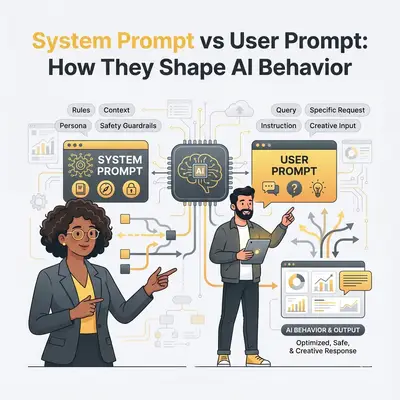
System Prompt vs User Prompt: How They Shape AI Behavior
AI behavior is shaped by two types of instructions: system prompts and user prompts. Here's what you need to know:
- System prompts: These act as the AI's "job description", defining its role, tone, and ethical boundaries across all tasks. They're persistent and ensure consistent behavior.
- User prompts: These are task-specific instructions that guide the AI on what to do in a particular moment, such as drafting an email or analyzing data.
Both are essential for effective AI performance. System prompts provide a stable framework, while user prompts customize the AI's output for specific needs. Together, they enable businesses to automate tasks, maintain consistency, and improve efficiency.
Quick Comparison
| Aspect | System Prompts | User Prompts |
|---|---|---|
| Purpose | Define role and behavior | Task-specific instructions |
| Scope | Global, across all interactions | Local, for a single task |
| Control | Set by developers/administrators | Created by end-users |
| Permanence | Persistent | Changes with each request |
| Content | Role, tone, compliance rules | Specific tasks, format requests |
Why It Matters for Businesses
- Consistency: System prompts ensure uniform responses and adherence to guidelines.
- Task Precision: User prompts fine-tune AI for immediate goals.
- Efficiency Gains: Clear prompts reduce errors and save time.
Businesses using AI tools like Microsoft 365 Copilot or Evalics report improved workflows and reduced oversight needs. By mastering prompt design, companies can optimize AI for tasks like customer service, compliance, and sales automation.
::: @figure
{System Prompts vs User Prompts: Key Differences in AI Behavior}
:::
3 keys differences in system prompts versus user prompts
::: @iframe https://www.youtube.com/embed/sxPg_ZmbPlc :::
System Prompts: Setting AI Behavior at Scale
System prompts act as the permanent playbook for AI systems, defining how they operate across every interaction. They dictate the AI's role, tone, ethical boundaries, and decision-making framework, ensuring consistent behavior at scale. This consistency is essential for building reliable, scalable AI automation.
Key Characteristics of System Prompts
System prompts stand out for their persistence, standardization, and compliance enforcement. Standardization ensures the AI delivers uniform responses across tasks, while compliance rules are baked into the AI's logic to automatically flag potential risks [10].
An effective system prompt includes several critical components. First, the identity statement defines the AI's role and expertise, such as: "You are a customer service agent for a financial services company specializing in retirement accounts." Next, the knowledge base definition specifies what the AI can and cannot access, setting clear boundaries. Behavioral guidelines outline how the AI should respond, while constraints and disclaimers ensure the AI operates within safe limits. For instance, a legal document analyst might follow strict instructions like: "Never interpret law or provide legal advice" and "Maintain strict confidentiality" [11].
Applications of System Prompts in Business Workflows
System prompts are the backbone of consistent performance across various business operations. In customer service, they ensure a uniform brand voice and adherence to escalation protocols. For compliance monitoring, they enable continuous auditing by flagging risks before they become issues [10]. In sales automation, system prompts standardize how AI handles customer data and generates proposals, ensuring consistency across teams.
The results are impressive. Nearly 70% of Fortune 500 companies use Microsoft 365 Copilot to handle repetitive tasks, leveraging system prompts to maintain operational standards [5]. Additionally, 90% of businesses report saving time and money by reducing the need for constant human oversight [7]. A great example is Fujitsu’s 2025 initiative, where Azure AI Agent Service powered an AI solution to streamline sales proposal creation. With robust system prompts, their sales teams could focus on engaging customers while the AI handled standardized tasks [10].
How Evalics Optimizes System Prompts

This is where Evalics excels - helping businesses design system prompts that align with US-specific needs and operational standards. Evalics integrates formatting rules, such as USD currency, MM/DD/YYYY dates, and imperial measurements, directly into the AI's responses. Beyond formatting, Evalics ensures system prompts meet regulatory requirements like HIPAA for healthcare, SOX for finance, or other industry-specific standards.
The process begins with identifying key automation opportunities and crafting prompts that encode your company’s policies, tone, and decision-making framework. This tailored approach minimizes errors, reinforces knowledge boundaries, and ensures proper citation practices, resulting in outputs that are accurate and auditable.
User Prompts: Handling Task-Specific AI Interactions
While system prompts set the overall framework, user prompts are where the action happens - guiding the AI to tackle specific tasks. Let’s dive into what makes user prompts effective, especially in the context of business automation.
Key Characteristics of User Prompts
User prompts are tailored to each interaction, making them task-specific and outcome-driven. Research analyzing 425 AI conversations found that effective prompts typically include four key components: a clear request, relevant context, a defined format, and supporting references [13]. These elements directly shape the relevance and precision of the AI’s responses. As IBM's AI Advocate Vrunda Gadesha explains:
"A well-crafted prompt helps ensure that the AI comprehends the user's intent and produces meaningful responses, minimizing the need for extensive postprocessing" [12].
What’s more, iterative follow-up instructions refine the AI’s output step by step, turning the interaction into a dynamic, conversational workflow where each prompt builds on the last.
Examples of User Prompts in Business Tools
User prompts shine in various business tools, streamlining workflows and boosting efficiency. Here are a few real-world examples:
-
CRM Systems: Sales teams rely on user prompts to create personalized communications. A marketer might ask the AI, "Draft an executive summary email based on key program details in bullet points."
-
Customer Support: For managing support tickets, user prompts help automate tasks. In Microsoft Copilot Studio, for instance, you can set up a prompt like, "Extract action items from company emails", and integrate it into a Power Automate flow, allowing the AI to handle the unique details of each ticket.
-
Analytics Dashboards: AI-driven insights are just a prompt away. Blue J, a tax research platform, upgraded from GPT-4o to OpenAI's o1 model and saw a "4x improvement in end-to-end performance" due to o1’s ability to reason across multiple documents [14]. Similarly, during an acquisition analysis, Endex used o1 to comb through extensive company documents, uncovering a critical change-of-control clause that triggered a $75 million loan repayment upon sale [14].
These examples highlight how user prompts fit seamlessly into automated workflows, delivering practical and impactful results.
How Evalics Structures User Prompts
Evalics has mastered the art of user prompt design with templates that simplify the process. Each template integrates the proven building blocks - request, context, format, and references - so teams can skip the guesswork and start with clear, actionable instructions.
What sets Evalics apart is its ability to enrich prompts with contextual data. By pulling in real-time business information, Evalics ensures that the AI works with the most current and relevant data, adapting effortlessly to evolving conditions without requiring manual updates.
Clarity is another cornerstone of Evalics’ approach. By enforcing clear instructions and avoiding conflicting guidance, Evalics ensures that user prompts align perfectly with system-level rules. This synergy reduces errors, maintains consistency, and delivers outputs that are reliable and ready to use - saving busy teams from time-consuming revisions.
With Evalics, user prompts become a powerful tool for creating efficient, cohesive workflows that keep productivity on track.
sbb-itb-7cd44dd
System Prompts vs User Prompts: A Direct Comparison
Let’s dive deeper into the roles of system and user prompts. While system prompts establish the groundwork, user prompts adapt AI behavior to specific tasks. Together, they shape how AI responds, each playing a unique but complementary role. Here's a closer look at how they differ and work together.
Comparison of Purpose, Scope, and Control
Think of system prompts as the blueprint for your AI - defining its role, expertise, and tone consistently across all interactions [2][4][3]. These are set once and provide a stable foundation. On the other hand, user prompts are more like task-specific instructions, tailored to individual interactions [2][1][4][3].
| Aspect | System Prompts | User Prompts |
|---|---|---|
| Purpose | Define AI's role, behavior, and rules | Provide specific task instructions |
| Scope | Global - applies to all interactions | Local - focused on a single task |
| Control | Set by administrators or developers | Created by end-users or workflows |
| Permanence | Persistent across sessions | Changes with each new request |
| Typical Content | Role definition, tone, compliance guidelines | Questions, data requests, formatting |
This layered structure ensures the AI maintains consistency while adapting to specific tasks. System prompts keep the AI aligned with broader goals, while user prompts allow it to tackle unique challenges without losing focus [8][6]. Together, they create a dynamic yet stable framework for AI functionality.
How Prompt Layers Work Together in Business Automation
When system and user prompts work together, they enable AI to deliver reliable and adaptable behavior tailored to your business needs. System prompts set the AI’s persona and expertise [8][6], while user prompts leverage this foundation to handle specific tasks - whether it’s analyzing sales trends, drafting emails, or summarizing reports.
In many cases, AI tools integrate system-level context, such as access to business data and workflows. This implicit layer allows user prompts to be more concise, focusing directly on the task at hand [6]. The result? Streamlined interactions that deliver actionable insights, helping your organization make faster, better decisions.
Best Practices for Designing Effective Prompts
Crafting effective prompts is key to ensuring AI delivers consistent, accurate, and efficient responses in every interaction.
Crafting Strong System Prompts
Start by assigning a specific role to the AI, such as "coding expert", "math tutor", or "customer service specialist." This clarity helps the AI understand and respond accurately to subsequent requests.
Set clear parameters at the beginning of your system prompt. These might include compliance guidelines, word limits, tone, or formatting rules. For instance, in a customer support scenario, you could specify: "Limit responses to 200 words. Use simple language. Escalate billing disputes to human agents." Focus on stating what the AI should do rather than listing what to avoid - this approach yields better outcomes.
Use clear delimiters like XML tags or Markdown headings to organize instructions, especially for complex tasks. When providing extensive background information, place the context first and specific instructions at the end to maintain clarity.
Incorporate a few well-chosen examples, often called "few-shot examples", to demonstrate the desired output, tone, or structure. Instead of covering every possible scenario, select two or three examples that clearly represent your expectations.
With a solid foundation in system prompts, precise user prompts can further refine the AI's responses for specific tasks.
Structuring Clear and Contextual User Prompts
User prompts are most effective when they clearly outline the "what, why, and how" of a task. For example, instead of saying, "Summarize this report", you could specify: "Summarize this 20-page churn report in three bullet points. Identify the top churn drivers, at-risk segments, and two potential solutions. Limit the summary to 60 words." This level of detail eliminates guesswork and ensures precise results.
Provide all necessary context directly in the prompt, such as relevant data, timeframes, or definitions. The more context you include, the less the AI has to infer, leading to more accurate and relevant outputs.
Lastly, explicitly define the desired response format. Indicate whether you need the output as JSON, a table, Markdown, a bulleted list, or an executive summary. If the content is meant for different audiences, specify the tone and level of technical detail required. These practices help seamlessly align system and user prompts, making them a powerful tool for effective business automation.
Conclusion: Key Takeaways on System and User Prompts
The Role of Prompts in AI Success
The quality of AI output hinges heavily on the quality of the prompts provided [17]. System prompts lay the groundwork by defining the AI's behavior, role, and operational boundaries across all interactions. Meanwhile, user prompts serve as the task-specific instructions that guide the AI toward achieving immediate objectives. Together, these two types of prompts create a structure that supports reliable and scalable AI performance.
Effective prompt design helps prevent inconsistent or unreliable AI behavior [15]. Clear and well-thought-out prompts lead to consistent and predictable results, which businesses can rely on for critical tasks like customer service and data analysis. With 91% of companies using AI reporting increased revenues [15], aligning system and user prompts strategically has become a key factor in staying ahead in a competitive market.
These insights highlight actionable steps businesses can take to improve their AI-driven processes.
Next Steps for Businesses
Start by auditing your current AI workflows to identify areas where system prompts can streamline operations and where user prompts could benefit from greater clarity or specificity. Use techniques like constraint-based and deliverable-focused prompting to steer AI toward producing structured and professional results [9].
Companies like Evalics specialize in refining prompt strategies for business automation. With 40% of small business owners already leveraging generative AI tools [6] and 71% of marketers planning to integrate both generative and predictive AI in the next 18 months [16], fine-tuning your prompt design can unlock even greater potential. Mastering the art of prompt creation is a critical step toward gaining a competitive edge.
FAQs
::: faq
How do system prompts help maintain consistent AI behavior across tasks?
System prompts are essential for maintaining consistent AI behavior. They define the AI's role, objectives, and the context for each interaction, serving as a guiding framework for its responses.
By providing this structure, system prompts enable businesses to standardize AI-driven workflows. This reduces inconsistencies, enhances reliability, and ensures the AI delivers results aligned with specific goals - even when managing a variety of tasks or intricate situations. :::
::: faq
What are some tips for creating effective user prompts for AI?
To create prompts that get the best results from AI, aim to be clear, specific, and concise. Write in plain, natural language that's easy to follow, and provide enough context to steer the AI toward the outcome you want. If necessary, include details like formatting instructions or constraints to ensure the response aligns with your needs.
Here are a few tips to keep in mind:
- Define the task or question with precision.
- Use straightforward language to avoid any confusion.
- Mention the desired format for the response, such as bullet points, a summary, or a step-by-step explanation.
Using these strategies makes it easier for the AI to deliver accurate and relevant responses tailored to your objectives. :::
::: faq
How can businesses use prompts to enhance AI workflows?
Businesses can improve AI-driven workflows by creating clear, specific prompts that align with their goals. Thoughtfully crafted prompts guide AI systems to produce more accurate and consistent results, making operations smoother and more dependable.
Here are a few ways to fine-tune workflows:
- Set the context clearly: Provide enough relevant details so the AI can fully grasp the task at hand. The more precise the input, the better the output.
- Iterate and improve: Regularly test and tweak prompts to ensure they yield the best possible performance.
- Divide tasks into smaller steps: Use modular prompts to simplify complex processes, making them easier for AI to handle effectively.
When businesses apply these methods, they can refine automation, make smarter decisions, and enhance customer experiences - all while tapping into the full potential of their AI tools. :::
