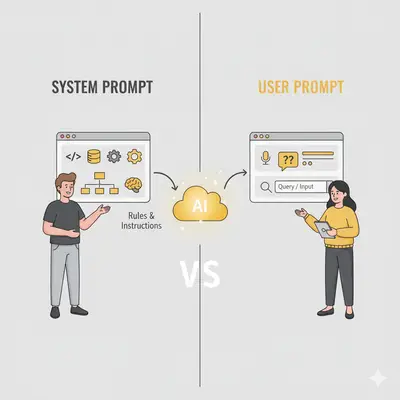
Mastering the difference between a system prompt vs user prompt is the most critical step in moving your LLM application from a fragile prototype to a production-ready agent. Conflating these two roles is a common source of prompt injection vulnerabilities and erratic model behavior. While the user prompt provides dynamic, task-specific input, the system prompt carries higher-priority instructions: safety guardrails, the persona, and the output schema you want. Models are trained to favor it over user input, but they do not always follow it, and prompt injection remains an unsolved problem. Separating the two roles reduces failures like persona shifts or broken JSON responses; anything that must hold, such as authorization or a strict output format, still needs to be enforced in your application code. This guide breaks down the technical architecture of both prompt types and provides templates you can adapt to maintain strict output control in production.
What Are the Key Differences Between System Prompts and User Prompts?
| Aspect | System Prompt | User Prompt |
|---|---|---|
| Purpose | Defines the AI's long-term behavior, role, and constraints | Provides the specific task or question for a single interaction |
| Who Sets It | Developers or system administrators | End users or application code |
| When It Changes | Rarely—updated when refining AI behavior or adding new capabilities | Every interaction—varies with each user request |
| Example | "You are a customer support agent for a SaaS company. Always be polite, never guess answers, and escalate to human agents when uncertain." | "A customer is asking about our refund policy. Provide a clear explanation based on our terms of service." |
What Are the Best System and User Prompt Templates to Copy?
System Prompt Template
Use this template as a starting point for your system prompts:
You are [ROLE/PERSONA]. Your goal is [PRIMARY OBJECTIVE].

Rules and constraints:
- [Rule 1: e.g., "Always cite sources with links"]
- [Rule 2: e.g., "Keep responses under 300 words"]
- [Rule 3: e.g., "Never use jargon or technical terms without explanation"]

Output format:
- [Format requirement: e.g., "Use bullet points for lists"]
- [Structure: e.g., "Start with a summary, then provide details"]

When uncertain or asked about topics outside your expertise:
- [Refusal behavior: e.g., "Politely decline and suggest consulting a specialist"]
Example System Prompt:
You are a marketing strategist with 15 years of experience in B2B SaaS. Your goal is to provide actionable, data-driven advice to help small business owners grow their online presence.

Rules and constraints:
- Always cite credible sources with links
- Keep responses under 300 words
- Never use marketing jargon without explanation
- Focus on practical, implementable strategies

Output format:
- Use bullet points for actionable steps
- Start with a brief summary, then provide detailed recommendations

When uncertain or asked about topics outside your expertise:
- Acknowledge the limitation and suggest consulting a specialist in that area
User Prompt Template
Use this template for your user prompts:
[SPECIFIC TASK OR QUESTION]

Context:
- [Relevant background information]
- [Target audience or use case]
- [Any constraints or requirements]

Data/Input:
- [Raw material the AI needs: e.g., product description, customer query, data points]

Output format:
- [Desired structure: e.g., "JSON array with keys 'subject_line' and 'tone'"]
- [Example of desired output if helpful]
Example User Prompt:
Write three email subject lines for a webinar about AI automation for small businesses.

Context:
- Target audience: Non-technical founders of 10-50 person companies
- Goal: Drive registrations for a free 30-minute webinar
- Tone: Professional but approachable

Data/Input:
- Webinar title: "AI Automation for Small Business: Save 10 Hours Per Week"
- Key benefits: No coding required, real case studies, free consultation included

Output format:
- Provide a JSON array with keys 'subject_line' and 'tone'
- Example: [{"subject_line": "Save 10 Hours Weekly with AI Automation", "tone": "benefit-focused"}]
Why Is Separating System and User Prompts Important for AI Performance?
Here's the same task handled two ways—without and with a system prompt:
Without System Prompt (Inefficient):
User: "You are a marketing expert. Write in a friendly, professional tone.
Always cite sources. Write three email subject lines for a webinar about
AI automation. The audience is non-technical founders. Keep it under 50
characters. Use a JSON format."
With System Prompt (Efficient):
System Prompt: "You are a senior marketing strategist with 15 years of
B2B SaaS experience. Always write in a friendly, professional tone. Cite
credible sources with links. Keep responses under 300 words. Use JSON
format when requested."

User Prompt: "Write three email subject lines for a webinar about AI
automation. Target audience: non-technical founders. Keep under 50
characters. Format as JSON array with 'subject_line' and 'tone' keys."
Why the second approach wins:
- Shorter user prompts: You don't repeat persona, tone, and format rules every time
- Consistent behavior: The AI maintains the same persona across all interactions
- Lower token costs: System prompt is set once; user prompts are shorter
- Easier updates: Change the persona or rules in one place (system prompt) instead of updating every user prompt
What Are the Primary Benefits of Effective Prompt Engineering?
Mastering the interplay between system and user prompts transforms AI from a simple tool into a strategic partner. System prompts act as the AI's constitution, setting its core identity, rules, and boundaries. User prompts are the specific, in-the-moment commands. This separation allows for unprecedented control and efficiency.
Consistency A well-defined system prompt ensures the AI maintains a consistent persona, tone, and quality standard across thousands of interactions, protecting your brand voice.
Accuracy By providing high-level context and constraints at the system level, you reduce the risk of the AI misinterpreting a user's intent, leading to more reliable and factual outputs.
Efficiency Instead of repeating core instructions in every user prompt (e.g., "act as a marketing expert," "write in a friendly tone"), you set them once in the system prompt. This makes user prompts shorter, saves tokens, and speeds up workflows.
Safety and Guardrails System prompts are crucial for implementing safety measures, defining what the AI should not do, preventing it from discussing sensitive topics, or generating inappropriate content.
How Do You Craft Effective AI Prompts Step-by-Step?
Implementing a structured approach to prompts is key. Here's a simple framework to get started.
Step 1: Define the AI's Core Identity (The System Prompt)
Assign a Persona Who is the AI? (e.g., "You are a senior marketing strategist with 15 years of experience in B2B SaaS."). Be specific.
Set the Rules What are the constraints? (e.g., "Do not use jargon," "All responses must be under 300 words," "Cite credible sources with links.").
Establish the Goal What is the primary objective? (e.g., "Your goal is to provide actionable, data-driven advice to help small business owners grow their online presence.").
Step 2: Audit Your Current Workflows
Identify repetitive tasks where AI could assist. What instructions do you give your team for these tasks? These instructions are the foundation of your future prompts.
Step 3: Craft the Specific Task (The User Prompt)
Provide Clear Instructions State the task directly (e.g., "Write three email subject lines for a webinar about AI in marketing.").
Include Context and Data Give the AI the raw material it needs (e.g., "The target audience is non-technical founders. Here is the webinar description: [paste description].").
Specify the Format Define the desired output structure (e.g., "Provide the answer in a JSON array with the keys 'subject_line' and 'tone'.").
Step 4: Integrate and Test
Start by testing your system and user prompts in a tool like the OpenAI Playground. Observe the results. Are they consistent? Accurate?
Step 5: Measure, Refine, and Iterate
Use an observability tool like Langfuse to track performance. Look for patterns in failed or poor-quality responses. Refine your system prompt based on this data to address recurring issues. For example, if the AI is too verbose, add a rule like "Be concise and direct" to the system prompt.
Which Businesses Are Successfully Scaling With Prompt Engineering?
Case Study 1: E-commerce Content Scalability
Challenge: A leading e‑commerce furniture distributor managing 1,500+ SKUs across 50+ collections needed unique, marketplace‑specific product descriptions for retailers like Wayfair and Amazon. A manual workflow (materials, colors, assembly, hardware → copywriting) created a scale bottleneck for a lean team.
Solution: The team implemented “system‑prompt” style content rules in Describely—persona as an expert home‑decor copywriter, SEO keyword and tone constraints, marketplace‑ready formatting, and structured ingestion of product data. Custom prompts + brand guidelines eliminated redundancies while preserving key selling points.
Results:
- 75% reduction in content creation time
- 2× unit sales at similar traffic, attributed to richer descriptions
- Higher conversion rates and improved buyer engagement
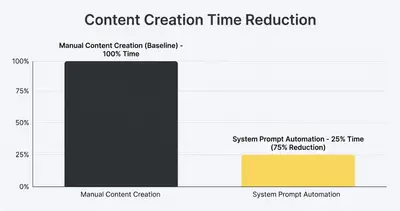
Note: Results are vendor‑reported from the cited case study and may vary by implementation.
Example: Customer Support Chatbot Accuracy
Challenge: A support chatbot gives generic or incorrect answers, which frustrates customers and pushes tickets back to human agents.
Solution: A detailed system prompt carrying the product's features, the common troubleshooting steps, and a persona of a "friendly and patient support agent." Critically, it explicitly forbids the AI from guessing.
Why this changes the output: A support model without product facts in its system prompt has nothing to answer from, so it produces plausible-sounding filler. Putting the troubleshooting steps in the system prompt gives it something true to say, and the no-guessing rule converts the remaining unknowns into an honest handoff rather than a confident wrong answer. An escalation the model admits to is cheaper than one the customer discovers.
What Are the Most Common AI Prompting Mistakes to Avoid?
These are the most critical mistakes to avoid when working with system and user prompts:
-
Vague System Prompts: "Be helpful" is not a good system prompt. "You are a support agent for a bike shop named 'Cycle Central.' You are friendly, knowledgeable about bikes, and your goal is to help customers find the perfect bike or accessory" is much better.
-
Putting System-Level Instructions in the User Prompt: Don't tell the AI its persona in every user prompt. This is inefficient and can lead to inconsistent behavior. Set it once at the system level.
-
Forgetting to Specify Format: If you need a specific output like a list, table, or JSON, you must ask for it. The AI won't guess.
-
Lack of Iteration: Your first prompt will rarely be your best. Continuously test and refine based on the AI's performance.
-
Ignoring Context Windows: With newer models supporting 200K+ tokens, many teams still write prompts as if they're limited to 4K tokens. Use the expanded context to provide richer examples and more detailed instructions.
-
Not Testing Edge Cases: Always test your prompts with unusual inputs, edge cases, and potential failure scenarios to ensure robust performance.
Which Tools Are Best for Scaling Prompt Management?
Once you've mastered the basics of system and user prompts, you may want to scale your prompt engineering with dedicated tools. These platforms help teams develop, test, and manage prompts at scale:
Langfuse: An open-source observability platform for LLM applications. It tracks and analyzes your prompts, responses, and model performance, providing detailed traces and analytics to identify and debug issues. Best for debugging complex AI chains and understanding cost and latency. Evalics can help integrate Langfuse into your production environment for seamless monitoring.
Vellum.ai: A comprehensive platform for building and managing production-ready LLM features. Provides a full toolkit for prompt engineering, including A/B testing different prompts, evaluating output quality, and deploying changes without code. Great for collaborative teams, though it can be expensive for small-scale use.
OpenAI Playground: The official development environment from OpenAI. Offers a direct interface to experiment with different models, adjust parameters, and craft both system and user prompts to see immediate results. Free to use for experimentation (API costs apply for usage), great for rapid prototyping. A practical first stop for prompt design before you move to more robust tools.
Frequently Asked Questions About System and User Prompts
The distinction between system and user prompts is more than a technical detail—it's the foundation of a mature AI strategy. A powerful system prompt creates a reliable, consistent, and safe AI assistant, while a clear user prompt ensures that assistant performs the right task, right now. By investing time in crafting both, you can dramatically improve the efficiency and quality of your AI-powered workflows.
Ready to automate your prompting strategy and unlock your team's full potential? Book a demo with Evalics today and let's build your AI-powered future.