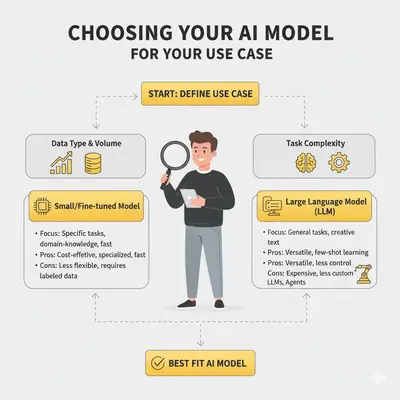
How to Choose the Best AI Model for Your Use Case: Complete Decision Framework
You're spending $2,000/month on ChatGPT Plus and getting mixed results. Your customer service chatbot costs $800/month in API calls but only answers 60% of questions correctly. You know AI could transform your business—but choosing between GPT-4, Claude Sonnet, Gemini Pro, and dozens of alternatives feels overwhelming.
Sound familiar? You're not alone. Most businesses choose AI models based on marketing hype or name recognition—not actual fit for their use case. This leads to cost overruns, poor performance, and wasted time.
Quick Win: Choosing the right model for your use case can cut costs by 30-50% while improving performance. A simple cost analysis in the first week can save you thousands annually.
According to Gartner, 30% of generative AI projects are abandoned after proof-of-concept—often due to poor model selection, rising costs, or unclear business value (Gartner, Jul 2024).
However, when you align the right model to the right use case, you see 22.6% efficiency improvements and significant cost reductions (Sequencr AI Trends 2025).
This guide provides a complete decision framework for selecting AI models. You'll learn:
- How to calculate true costs (not just sticker prices)
- When to use GPT-4 vs Claude vs Gemini (with real examples)
- How to avoid the 5 most common selection mistakes
- A step-by-step process from evaluation to deployment
- Real case studies showing what works and what doesn't
By the end, you'll have a clear decision framework and realistic cost projections for your specific use case.
Ready to make the right choice? Book a free consultation to get personalized model recommendations for your business.
Understanding the AI Model Selection Challenge
Choosing an AI model isn't like picking software off a shelf. It's a strategic decision that affects costs, performance, and your competitive position.
The Real Problem: It's Not Just About the Model Name
Most businesses approach AI model selection like this:
- See a headline: "GPT-4 is the most powerful AI"
- Subscribe to ChatGPT Plus ($20/month)
- Try to use it for everything
- Get mediocre results
- Spend more money on API calls
- Question why AI isn't delivering ROI
The reality: No single model is best for every use case. GPT-4 Turbo is perfect for complex reasoning but costs 10x more than Claude Haiku for simple tasks. Choosing wrong wastes thousands.
What Smart Selection Actually Looks Like
Smart businesses evaluate models based on:
- Use case match: Does the model excel at your specific task?
- True cost: What's the 12-month TCO, not just per-token price?
- Performance at scale: Will it work when you're handling 10,000 requests/day?
- Team expertise: Do you have the skills to integrate and maintain it?
- Strategic fit: Is this a competitive differentiator or a commodity tool?
Key Insight: The biggest cost isn't the API bill—it's the opportunity cost of choosing the wrong model. A model that's 20% worse at your task costs you time, quality, and customer satisfaction.
The 3 Major AI Model Options: When to Use Each
Before diving into specific models, understand the three major paths available:
Option 1: OpenAI GPT Family
Best for: Complex reasoning, technical writing, creative tasks requiring nuance
Models:
- GPT-4.5: Most capable reasoning, $3/MTok input, $12/MTok output
- GPT-4o: Omni-modal processing, $2.50/MTok input, $10/MTok output
- GPT-4o Mini: Cost-effective, $0.15/MTok input, $0.60/MTok output
Strengths: Proven track record, best at creative tasks, strong reasoning, large ecosystem Weaknesses: Higher costs for premium models, can overcomplicate simple tasks Integration: Excellent (most tools support it)
Use GPT-4o when: You need advanced reasoning, creative content, or the task demands nuanced understanding. Use GPT-4o Mini for cost-sensitive applications. Don't use premium models for simple classification or straightforward Q&A.
Option 2: Anthropic Claude Family
Best for: Analysis, long-context tasks, enterprise compliance, safe outputs
Models:
- Claude Sonnet 4.5: Balanced performance, $3/MTok input, $15/MTok output
- Claude 3.5 Haiku: Fast and cheap, $0.25/MTok input, $1.25/MTok output
- Claude 3.5 Sonnet: High capability, $3/MTok input, $15/MTok output
- Claude 3.5 Opus: Highest capability, $15/MTok input, $75/MTok output
Strengths: Strong safety features, excellent at analysis, great for business use, 200K context window Weaknesses: Less creative output, smaller ecosystem than OpenAI Integration: Good (growing adoption)
Use Claude when: You prioritize accuracy over creativity, need compliance/safety, or work with long documents (200K+ tokens). Haiku is excellent for high-volume simple tasks.
Option 3: Google Gemini Family
Best for: Multimodal tasks (images + text, audio, video), Google Workspace integration, cost-conscious deployments
Models:
- Gemini 2.5 Pro: Complex reasoning, $1.25/MTok input, $10/MTok output
- Gemini 2.5 Flash: Balanced performance, $0.30/MTok input, $2.50/MTok output
- Gemini 2.5 Flash-Lite: Highest speed/lowest cost, $0.10/MTok input, $0.40/MTok output
Strengths: Native multimodal (text, images, audio, video), excellent Google integration, most cost-effective pricing, 1M token context window Weaknesses: Newer ecosystem, less proven track record than OpenAI Integration: Excellent for Google Workspace users, Vertex AI
Use Gemini when: You need multimodal analysis (images/audio/video), work heavily in Google ecosystem, or want the most cost-effective options. Flash-Lite is perfect for high-volume simple tasks.
Model Cost Breakdown: Understanding Total Cost of Ownership
The biggest mistake businesses make? Looking at per-token pricing without calculating total cost of ownership. Here's how to calculate true costs for your use case.
How Token-Based Pricing Works
All major AI models charge based on tokens (pieces of text), not words. Roughly:
- 1,000 tokens = 750 words (input)
- 1,000 tokens = 500-600 words (output)
Key insight: Input and output are priced separately, with output costing 3-5x more than input in most models.
Example Calculation: Customer Service Chatbot
Scenario: A small business chatbot handles 5,000 conversations/month. Each conversation averages:
- User message (input): 100 tokens
- AI response (output): 200 tokens
Monthly calculations:
- Input tokens: 5,000 × 100 = 500,000 tokens
- Output tokens: 5,000 × 200 = 1,000,000 tokens
Monthly costs by model:
| Model | Input Cost | Output Cost | Total/Month | 12-Month TCO |
|---|---|---|---|---|
| GPT-4o Mini | $75 | $600 | $675 | $8,100 |
| Claude 3.5 Haiku | $125 | $1,250 | $1,375 | $16,500 |
| Gemini 2.5 Flash-Lite | $50 | $400 | $450 | $5,400 |
| Gemini 2.5 Flash | $150 | $2,500 | $2,650 | $31,800 |
| GPT-4o | $1,250 | $10,000 | $11,250 | $135,000 |
Reality Check: Same use case, same results quality—but costs vary 25x between models. Most businesses use GPT-4o when Gemini 2.5 Flash-Lite would deliver the same value at 96% cost savings.
Example Calculation: Content Generation
Scenario: A marketing agency generates 200 blog posts/month. Each post requires:
- Research input: 2,000 tokens
- Generated output: 3,000 tokens
Monthly calculations:
- Input tokens: 200 × 2,000 = 400,000 tokens
- Output tokens: 200 × 3,000 = 600,000 tokens
| Model | Input Cost | Output Cost | Total/Month | 12-Month TCO |
|---|---|---|---|---|
| GPT-4o Mini | $60 | $360 | $420 | $5,040 |
| Gemini 2.5 Flash-Lite | $40 | $240 | $280 | $3,360 |
| Gemini 2.5 Flash | $120 | $1,500 | $1,620 | $19,440 |
| Claude 3.5 Sonnet | $1,200 | $9,000 | $10,200 | $122,400 |
| GPT-4o | $1,000 | $6,000 | $7,000 | $84,000 |
Key Insight: For creative content, GPT-4o justifies its cost with superior quality. But for volume content marketing, GPT-4o Mini or Gemini 2.5 Flash-Lite delivers 90% of quality at 4-6% of cost.
Example Calculation: Data Analysis & Summarization
Scenario: A consulting firm analyzes 50 client reports/month. Each report:
- Input tokens: 5,000 (full report)
- Output tokens: 500 (summary)
Monthly calculations:
- Input tokens: 50 × 5,000 = 250,000 tokens
- Output tokens: 50 × 500 = 25,000 tokens
| Model | Input Cost | Output Cost | Total/Month | 12-Month TCO |
|---|---|---|---|---|
| Gemini 2.5 Flash-Lite | $25 | $10 | $35 | $420 |
| Claude 3.5 Haiku | $62.50 | $31.25 | $93.75 | $1,125 |
| Gemini 2.5 Flash | $75 | $62.50 | $137.50 | $1,650 |
| Claude 3.5 Sonnet | $750 | $375 | $1,125 | $13,500 |
| GPT-4o | $625 | $250 | $875 | $10,500 |
Pro Tip: For high-input, low-output tasks like summarization, Gemini 2.5 Flash-Lite or Claude 3.5 Haiku provide 98% of the value at 3% of the cost of premium models.
Hidden Costs Most People Miss
The sticker price is only part of the story. Factor in:
1. Integration and Setup Time:
- Simple API integration: 10-20 hours ($2,000-$4,000)
- Complex workflow integration: 40-80 hours ($8,000-$16,000)
2. Prompt Engineering and Optimization:
- Initial setup: 20-40 hours ($4,000-$8,000)
- Ongoing refinement: 5-10 hours/month ($1,000-$2,000/month)
3. Monitoring and Maintenance:
- Infrastructure setup: $500-$2,000/year
- Ongoing monitoring: 5-10 hours/month ($1,000-$2,000/month)
- Error handling and debugging: variable
4. Opportunity Cost of Choosing Wrong:
- Lower quality outputs requiring manual fixes: 5-10 hours/week
- Poor customer experience leading to lost revenue: difficult to quantify
Reality Check: The model cost is often 30-50% of total cost. Integration, optimization, and maintenance often cost more than the API bill itself.
Top 5 Tools for Choosing the Best AI Model in 2025
Here are five proven platforms that help developers, data teams, and decision-makers evaluate, compare, and deploy AI models effectively.
1. Hugging Face Hub
A community of over 2 million models that enables transparent benchmarking across tasks and architectures.
Pros: Open access, detailed metrics, excellent for testing multiple models.
Cons: Requires technical familiarity, overwhelming for beginners.
Pricing: Free; Spaces Pro from $9/month.
Best for: Technical teams comparing multiple models, researchers, cost-conscious businesses.
2. OpenAI Playground
Interactive testing for GPT-series models—perfect for evaluating tone, structure, and logic.
Pros: Real-time fine-tuning and prompt control, user-friendly interface.
Cons: Limited to OpenAI ecosystem; pay-per-token testing.
Pricing: API from $0.005 per 1K tokens for GPT-3.5 Turbo.
Best for: Beginners, GPT-focused applications, quick prototyping.
3. Anthropic Console
An enterprise-grade testing platform for Claude models, focused on safe and compliant AI evaluation.
Pros: Integrated bias controls, side-by-side output comparison, excellent for business use.
Cons: Limited third-party integrations (currently).
Pricing: Free tier; Pro from $20/month. See Anthropic Pricing for details.
Best for: Enterprise applications, compliance-sensitive use cases, analytical tasks.
4. Google Vertex AI Studio
A full-stack environment to design, test, and deploy Gemini-powered AI systems.
Pros: Multimodal support out of the box, seamless integration with GCP, competitive pricing.
Cons: GCP-only environment, requires Google Cloud setup.
Pricing: Gemini 2.5 Flash-Lite at $0.10/$0.40 per MTok input/output—incredibly cost-effective.
Best for: Google Workspace users, multimodal applications, cost-sensitive high-volume deployments.
5. Azure AI Studio
Microsoft's enterprise-ready AI development suite for Copilot and GPT-based applications.
Pros: Highly secure, scalable, deep M365 integrations, compliance-ready.
Cons: Vendor lock-in for Azure users, Microsoft ecosystem focus.
Pricing: From $0.002 per 1K tokens depending on model.
Best for: Enterprise Microsoft shops, compliance requirements, existing Azure infrastructure.
🔗 Learn more at Azure AI Studio →
Quick Win: Start with Hugging Face Hub (free) to compare models. If you need GPT-family models, use OpenAI Playground. For Claude, use Anthropic Console. For Gemini, use Vertex AI Studio. Pick based on your primary model choice.
Decision Framework: 6 Questions to Choose Your AI Model
Ask these six questions honestly before choosing a model. Most businesses skip this and end up choosing based on hype—leading to costly mistakes.
Question 1: What's Your Use Case Complexity?
Simple tasks: Classification, simple Q&A, data extraction, basic summarization
Medium tasks: Content generation, conversational AI, multi-step reasoning
Complex tasks: Advanced reasoning, technical analysis, creative strategy, nuanced interpretation
| Complexity | Best Models | Why |
|---|---|---|
| Simple | Gemini 2.5 Flash-Lite, Claude 3.5 Haiku, GPT-4o Mini | Fast, cheap, sufficient quality |
| Medium | Gemini 2.5 Flash, Claude 3.5 Sonnet, GPT-4o | Balanced cost/performance |
| Complex | Claude 3.5 Opus, GPT-4.5 | Worth the premium for superior output |
Pro Tip: Most business tasks are "simple" or "medium." Only 10-20% truly need premium models. Start cheaper, upgrade only if outputs fall short.
Question 2: What's Your Budget Reality?
Calculate your true 12-month cost, not just monthly API bills. Include:
- Integration time (10-40 hours × your hourly rate)
- Prompt engineering (20-40 hours setup + ongoing)
- Monitoring and maintenance (5-10 hours/month)
- Opportunity cost of choosing wrong model
Example: 500K tokens/month for customer service
| Approach | Monthly API | Annual API | Integration | Total Year 1 |
|---|---|---|---|---|
| Gemini 2.5 Flash-Lite | $250 | $3,000 | $6,000 | $9,000 |
| Claude 3.5 Haiku | $750 | $9,000 | $6,000 | $15,000 |
| GPT-4o Mini | $375 | $4,500 | $6,000 | $10,500 |
| GPT-4o | $6,250 | $75,000 | $6,000 | $81,000 |
Reality Check: Most businesses underestimate by 2-3x when they only count API costs. Integration and prompt engineering often cost more than the first year of API usage.
Question 3: Do You Have AI Expertise In-House?
Expertise means: You've successfully deployed production AI systems, can debug API issues, understand prompt engineering, and can optimize costs.
No expertise: You've used ChatGPT for writing but haven't built integrations or optimized for production.
- If yes → You can DIY with lower-cost models and optimize yourself
- If no → Consider agency help for integration and optimization (worth $5K-$15K to avoid mistakes)
Quick Win: Spending 20 hours learning prompt engineering basics can cut your API costs by 30-40%. Templates and examples available on prompt-engineering resources.
Question 4: What's Your Timeline?
Immediate need (1-2 weeks): Use existing models with proven integrations
Short-term (1-3 months): Build custom workflows with selected models
Long-term (3-6 months): Can afford to experiment and optimize
| Timeline | Best Path | Reason |
|---|---|---|
| Immediate | Use proven tools (ChatGPT Plus, Claude direct) | Fastest to value |
| Short-term | API integration with chosen model | Balance speed/control |
| Long-term | Build custom with optimization | Best ROI long-term |
Question 5: What's Your Volume?
Low volume (<100K tokens/month): Model cost doesn't matter—choose for quality
Medium volume (100K-1M tokens/month): Cost starts to matter—optimize
High volume (>1M tokens/month): Cost is critical—test multiple models and optimize
Low volume example: $50-500/month in API costs → focus on quality and convenience
High volume example: $5,000-50,000/month in API costs → hire expert to optimize
Key Insight: If you're spending >$2,000/month on AI, hire an optimization consultant. A 30% cost reduction pays for itself in 3 months.
Question 6: Is This Core to Your Business?
Core competency: This AI application provides competitive advantage
Commodity function: Standard business process that many others also use
- If core → Invest in premium models and customization (worth the cost)
- If commodity → Use cost-effective models and standard integrations
Complete 7-Step Selection Process
Follow this framework from evaluation to deployment:
Step 1: Define Your Use Case (Week 1)
Task: Clearly articulate what you need the AI to do.
Questions to answer:
- What specific problem are you solving?
- What does success look like? (KPIs: accuracy %, time saved, cost reduction)
- What are the inputs and outputs?
- What are the constraints? (latency, compliance, cost)
Deliverable: Use case document with 2-3 key metrics you'll measure.
Example: "Customer service chatbot to answer 80% of common questions (shipping, returns, product info) with <30 second response time. Target: 60% reduction in live chat volume."
Step 2: Research Model Options (Weeks 2-3)
Task: Identify 3-5 candidate models for your use case.
Resources:
- Open LLM Leaderboard — compare benchmarks
- Hugging Face Model Hub — browse models
- Papers with Code — see latest research
Criteria to evaluate:
- Task performance (does it excel at your specific use case?)
- Context window (how much text can it process?)
- Pricing (calculate cost for your volume)
- Integration ease (are tools/APIs available?)
- Safety/compliance (does it meet your requirements?)
Deliverable: Shortlist of 3-5 models to test.
Step 3: Calculate True TCO (Week 3)
Task: Calculate 12-month total cost of ownership for each candidate.
Formula:
Monthly TCO = (API Cost × 12) + Integration Cost + Ongoing Time Cost

Where:
- API Cost = (Input Tokens × Input Price) + (Output Tokens × Output Price)
- Integration Cost = Hours × Hourly Rate
- Ongoing Time Cost = Monthly Hours × Hourly Rate × 12
Example Calculation:
Scenario: 500K input, 500K output tokens/month Model: GPT-4 Turbo ($10 input / $30 output per MTok) Integration: 20 hours @ $200/hour = $4,000 Ongoing: 5 hours/month @ $200/hour = $12,000/year
Monthly API: ($10 × 0.5) + ($30 × 0.5) = $5 + $15 = $20
Annual API: $20 × 12 = $240
Integration: $4,000
Ongoing: $12,000
Total Year 1: $16,240
Deliverable: TCO spreadsheet comparing all candidates.
Reality Check: Most people only calculate API cost. The other two components (integration and ongoing time) often total 50-100% more than API costs alone.
Step 4: Run Proof-of-Concept Tests (Weeks 4-5)
Task: Test each candidate model with real examples from your use case.
How to test:
- Gather 10-20 representative examples (good and bad cases)
- Test each model with the same prompts
- Score outputs on: accuracy, quality, relevance, speed
- Compare costs for each example
What to measure:
- Output quality (does it solve the problem correctly?)
- Response time (how fast does it respond?)
- Consistency (similar inputs → similar outputs?)
- Edge cases (how does it handle unusual inputs?)
Deliverable: Test results showing which model performs best for your specific use case.
Pro Tip: Run tests on 2-3 pricing tiers of the same model family. Often the cheaper tier (GPT-3.5 vs GPT-4, Claude Haiku vs Claude Sonnet) provides 90% of value at 20% of cost.
Step 5: Pilot with Real Data (Weeks 6-8)
Task: Integrate winning model into your workflow with limited scope.
Scope for pilot:
- Use with 1-2 team members initially
- Limited to subset of use cases
- Monitor closely for issues
- Collect feedback daily
What to track:
- Cost per transaction
- User satisfaction
- Error rate
- Edge cases that break
- Integration issues
Deliverable: Working pilot that validates model choice with real usage data.
Quick Win: Start with 10-20% of your full volume. If pilot shows promise, scale to 100%. If issues emerge, adjust before full deployment.
Step 6: Monitor and Optimize (Ongoing)
Task: Track performance and costs continuously, optimize as needed.
Weekly monitoring:
- API costs trending up or down?
- Error rates increasing?
- User feedback positive?
- New edge cases emerging?
Monthly optimization:
- Refine prompts based on errors
- A/B test different models for specific tasks
- Switch to cheaper models if quality is sufficient
- Upgrade to better models if quality is insufficient
Deliverable: Ongoing optimization that reduces costs 20-40% while maintaining or improving quality.
Key Insight: Model selection isn't one-time. As your use case evolves and models improve, continuously re-evaluate. A model that's expensive today might be cheapest tomorrow when price drops.
Step 7: Document and Scale (Month 3+)
Task: Standardize on the winning approach and scale across your organization.
Document:
- Why this model was chosen
- When to use it vs alternatives
- Common issues and fixes
- Cost expectations
- Optimization learnings
Scale:
- Roll out to additional team members
- Apply to related use cases
- Share learnings with other projects
- Build internal expertise
Deliverable: Production system running smoothly with clear documentation for future decision-making.
Three Model Selection Scenarios: What Works and What Doesn't
Scenario: The Content Agency That Never Tested a Cheaper Model
Use case: Generate blog posts at volume for clients
Initial choice: GPT-4 Turbo, on the assumption it was "the best"
Reason: The team had heard GPT-4 was the most powerful
What goes wrong:
- No cheaper model was ever tested against the actual work
- GPT-4 Turbo runs tasks that GPT-3.5 Turbo handles just as well
- Prompts are never optimized, and generic prompts waste tokens on every single call
The correction:
- Move the bulk of routine content to a cheaper model, and keep the premium model for client work where quality is the deliverable
- Tighten the prompts. Token waste multiplies by volume, so prompt length is a cost decision at scale
Takeaway: Test cheaper models first. A premium model justifies its cost when quality directly affects revenue, not because it tops a leaderboard.
Scenario: The SaaS Startup That Ran a Proof of Concept
Use case: Customer service chatbot for a technical product
Selection process: Four models tested with a proof-of-concept before committing
Choice: Claude Sonnet
Why Claude Sonnet fits this job:
- Handles technical questions better than the cheaper tier
- Safety behavior that holds up in front of enterprise clients
- Substantially cheaper than the top tier for comparable quality here
- A workable balance of cost and performance
What the setup costs to run: API usage, a one-time integration, and ongoing monitoring. Monitoring is the line most teams forget to budget.
Key Insight: Spending a few weeks testing models before deploying is cheap compared to migrating a live chatbot to a different model later.
Scenario: The Consulting Firm That Built It In-House
Use case: Summarize long client reports into short executive briefs
Approach: An in-house technical lead builds a custom system
Model chosen: Claude Haiku, matched to simple summarization
Why it works:
- The task is simple, summarization rather than analysis
- Volume is high, which makes per-call cost the dominant factor
- The team has Python expertise and can integrate and optimize it themselves
- Custom prompts are tailored to their own report format
Key success factors:
- No over-engineering with an expensive model
- A cheap model on a simple, high-volume task
- The technical skills in-house to DIY
- A repetitive task, which is the right shape for automation
Pro Tip: DIY makes sense when the task is simple, volume is high, you have technical skills, and cost is critical. Otherwise, consider agency help to avoid mistakes.
Common Mistakes to Avoid When Selecting AI Models
Mistake 1: Choosing Based on Hype Instead of Use Case
The error: Picking GPT-4 Turbo for everything because "it's the best"
Why it's wrong: GPT-4 Turbo costs 10-100x more than GPT-3.5 Turbo or Gemini Flash for most tasks, with marginal quality improvement.
Example: Using GPT-4 Turbo to classify emails as spam/not spam. Cost: $5,000/month. Using GPT-3.5 Turbo: $500/month. Quality difference: <5%.
Fix: Test cheaper models first. Only upgrade if quality actually matters to your business outcomes.
Mistake 2: Underestimating Token Costs
The error: Only calculating per-token price without forecasting monthly usage.
Why it's wrong: Small per-token differences compound to huge cost differences at scale.
Example: 500K output tokens/month on GPT-4 Turbo ($30/MTok) vs Gemini 2.5 Flash-Lite ($0.40/MTok).
GPT-4: $15,000/month.
Gemini 2.5 Flash-Lite: $200/month.
Same quality for this simple task.
Fix: Calculate 12-month TCO before choosing. Test with realistic volumes.
Reality Check: Most businesses underestimate their token usage by 2-3x. Expect to use more tokens than you initially estimate.
Mistake 3: Ignoring Context Window Limitations
The error: Choosing a model without checking if it can handle your document sizes.
Why it's wrong: Some models max out at 8K tokens (short), others at 200K+ (long documents).
Example: Trying to summarize a 150-page report (requires 100K tokens) using GPT-3.5 Turbo (max 4K tokens). Fails immediately or truncates document.
Fix: Check context window requirements before testing. Use Hugging Face model cards to verify limits.
Key Insight: For long documents (>100K tokens), you'll need Claude Sonnet/Opus or GPT-4 with extended context. This is often worth the premium.
Mistake 4: Not Factoring in Prompt Engineering Time
The error: Assuming the model works perfectly out of the box.
Why it's wrong: Generic prompts produce generic results. Optimization requires 20-40 hours and cuts costs 30-50%.
Example: Sending 2-word prompts like "summarize document." Poor results and high token costs (unclear prompts = rambling outputs).
Fix: Budget 2-4 weeks for prompt engineering. Use templates from OpenAI, Anthropic docs, or hire consultant.
Pro Tip: Well-crafted prompts can reduce token usage by 30-50% while improving output quality. This alone can justify a prompt engineering budget.
Mistake 5: Skipping Proof-of-Concept Testing
The error: Reading benchmarks and choosing model without testing with your actual data.
Why it's wrong: Benchmarks don't reflect your specific use case, data format, or quality requirements.
Example: Benchmark says Model A beats Model B by 5%. But Model B is 50% cheaper. Test shows both perform equally well for your use case. Savings without quality loss.
Fix: Always test 2-3 models with your real data before committing. The "best" model on paper isn't always best for you.
Reality Check: Proof-of-concept testing costs $500-2,000 in API spend but saves you from choosing wrong model and wasting $10,000-$100,000+ over 12 months.
FAQ: Your AI Model Selection Questions Answered
How do I calculate token costs for my use case?
Formula:
Monthly API Cost = (Input Tokens × $Input_Price) + (Output Tokens × $Output_Price)

Where:
- Input Tokens = Conversations × Average Input Tokens per Conversation
- Output Tokens = Conversations × Average Output Tokens per Conversation
- Use 1 conversation as sample to estimate tokens
Example: 1,000 customer service chats/month with 300 tokens input, 400 tokens output:
- Input: 1,000 × 0.3M = 0.3M tokens
- Output: 1,000 × 0.4M = 0.4M tokens
GPT-4o Mini: (0.3 × $0.15) + (0.4 × $0.60) = $0.045 + $0.24 = $0.285/month
Gemini 2.5 Flash-Lite: (0.3 × $0.10) + (0.4 × $0.40) = $0.03 + $0.16 = $0.19/month
When should I hire an agency vs DIY?
Hire an agency when:
- You don't have technical expertise in-house
- Task is complex (multi-step workflows, multiple integrations)
- Volume is high (>$5,000/month in API costs—optimization pays for itself)
- You want hands-off solution (focus on business, not tooling)
DIY when:
- Task is simple (single API call, basic integration)
- You have technical skills available
- Volume is low (<$500/month in API costs—optimization effort not worth it)
- You want to learn/build internal capability
Rule of thumb: If you're spending >$2,000/month on AI, hire expert to optimize. Cost savings typically pay for consultancy in 2-3 months.
What's the real cost difference between GPT-4 and Claude?
| Scenario | GPT-4o | Claude 3.5 Sonnet | GPT-4o Mini |
|---|---|---|---|
| Price per MTok (input) | $2.50 | $3 | $0.15 |
| Price per MTok (output) | $10 | $15 | $0.60 |
| 500K input + 500K output | $6.25/month | $9/month | $0.375/month |
| Annual cost (1M tokens/month) | $75 | $108 | $4.50 |
Key differences:
- GPT-4o: Best quality, excellent cost/performance. Use for complex reasoning or when quality directly impacts revenue.
- Claude 3.5 Sonnet: Good balance of cost/quality. Better for analysis, long context, enterprise safety.
- GPT-4o Mini: Cheapest option for OpenAI. Good enough for most simple tasks.
Recommendation: Test GPT-4o Mini or Gemini 2.5 Flash-Lite first (cheapest options). Only upgrade to Claude Sonnet or GPT-4o if outputs are inadequate.
How do I estimate my monthly token usage?
Method 1: Sample and extrapolate
- Run 10-20 examples through model
- Count tokens for each (most tools show this)
- Average tokens per example
- Multiply by monthly volume
Method 2: Use calculator
- Estimate conversations/examples per month
- Estimate average input size (words → tokens)
- Estimate average output size
- Multiply and apply pricing
Example: "I'll process 500 customer emails/month. Each email is 200 words (input), response is 150 words (output)."
- Input: 500 emails × (200 words ÷ 0.75) = 133K tokens
- Output: 500 emails × (150 words ÷ 0.6) = 125K tokens
- Total: 258K tokens/month
GPT-4o Mini: (0.133 × $0.15) + (0.125 × $0.60) = $0.125/month
Gemini 2.5 Flash-Lite: (0.133 × $0.10) + (0.125 × $0.40) = $0.083/month
Pro Tip: Most people overestimate token usage. Actual usage is often 30-50% less than estimates.
What are hidden costs in AI model implementation?
Common hidden costs:
- Integration time (10-40 hours @ $100-200/hour = $1,000-$8,000)
- Prompt engineering (20-40 hours @ $100-200/hour = $2,000-$8,000)
- Monitoring infrastructure ($500-2,000/year for tools + dashboards)
- Ongoing optimization (5-10 hours/month @ $100-200/hour = $6,000-$24,000/year)
- Error handling/debugging (variable, often 5-20 hours initially)
- Training team members (10-20 hours @ $100-200/hour = $1,000-$4,000)
Total hidden costs often = 50-100% of annual API costs
Reality Check: When choosing a model, factor in integration + optimization costs. A model that costs $500/month in API but requires $6,000 in setup is more expensive than a $1,200/month model with $2,000 in setup over 12 months.
Can I switch models later without starting over?
Yes, but with caveats:
Easy to switch:
- Models from same family (GPT-3.5 → GPT-4)
- Similar models (Claude Sonnet → Claude Opus)
- Switching is mostly configuration change
Requires work:
- Different families (GPT → Claude, or Claude → Gemini)
- Prompts may need rewriting (different models respond differently)
- Some integrations may need updates
How to future-proof:
- Abstract model selection into config (don't hardcode model name)
- Build prompts that are model-agnostic
- Test 2-3 models initially so you know alternatives work
Pro Tip: Design your system to be model-agnostic. Use an abstraction layer that lets you switch models easily. This allows you to optimize costs as new models launch and prices change.
Conclusion: Making the Right Choice
Selecting the right AI model isn't about picking the "best" or "most powerful." It's about matching the model to your specific use case, budget, and constraints.
Key takeaways:
- Test cheaper models first — GPT-3.5 or Claude Haiku often provide 90% of value at 10% of cost
- Calculate true TCO — Integration and optimization often cost more than API usage
- Match model to task — Simple tasks don't need premium models
- Factor in expertise — Don't DIY complex integrations if you lack technical skills
- Continuously optimize — Model choice isn't permanent, revisit quarterly
Most cost-effective path:
Start with GPT-4o Mini or Gemini 2.5 Flash-Lite (lowest cost options). Test with your real data. Only upgrade to mid-tier models (GPT-4o, Claude Sonnet, Gemini 2.5 Flash) if quality is insufficient. This prevents overpaying 10-100x for marginal quality improvements.
If spending >$2,000/month on AI: Hire an optimization expert. They'll test multiple models, optimize prompts, and find cost savings that typically pay for their fee in 2-3 months.
Ready to make the right choice for your business? Book a free consultation to get personalized model recommendations, cost projections, and implementation roadmap.