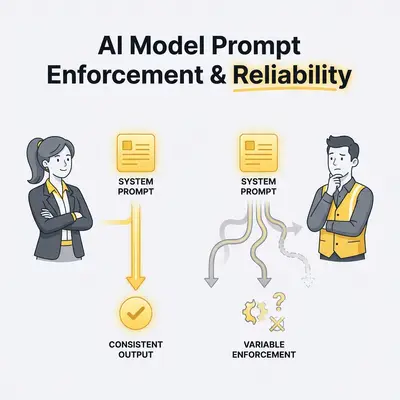
Your automation breaks in the most frustrating way: nothing “crashes,” but your AI quietly stops following your rules.
One week the system prompt holds the line (“always return valid JSON,” “never ask for passwords,” “don’t invent facts”). The next week, a different model—or the same model behind a different product—starts bending the rules, over-refusing, or doing “helpful” extras that blow up downstream steps.
This isn’t you being bad at prompting. It’s a reality of how modern LLM products are built.
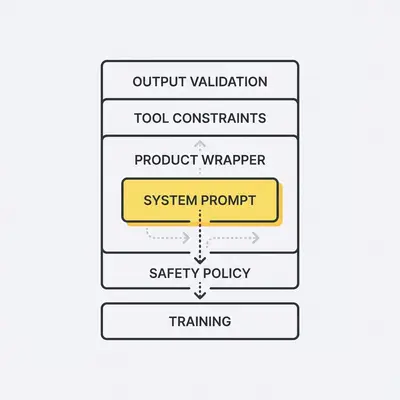
Key Insight: A “system prompt” is not a magic override. It’s one control lever inside a bigger stack: model training, safety policies, product guardrails, tool restrictions, and output validation.
This post explains why enforcement differs across AI models and what that means for reliability in small-business workflows like support triage, lead qualification, document processing, and internal agents. You’ll leave with a practical framework you can apply even if you never care about model internals.
The intent (so you know what you’ll get)
You want to build AI automations where the same input leads to predictably “safe enough” output. That means understanding:
- Where system prompt authority actually comes from
- Why it varies by vendor/model/product
- Which failure modes matter in production
- What to do when prompts aren’t enough
If you want a fundamentals refresher first, this is the companion piece: System Prompt vs User Prompt: How They Shape AI Behavior.
A simple mental model: 5 layers that shape “obedience”
When people say “Model A respects system prompts more than Model B,” they’re usually describing the combined effect of five layers:
- Training and instruction-tuning (what the base model learned to optimize)
- Safety policy enforcement (vendor-level non-negotiables)
- Product wrapper rules (chat UI vs API vs agent framework)
- Tooling constraints (function calling, allowed tools, retrieval boundaries)
- Post-processing and validation (schemas, filters, retries, human-in-the-loop)
Different vendors weight these layers differently. Even within one vendor, the weights can change based on the interface you’re using.
Why this matters for small businesses
If you run an automation that emails customers, updates a CRM, or generates invoices, you don’t care why the model ignored a rule. You care that:
- A single bad output can create customer-facing damage
- Failures are intermittent (hard to reproduce)
- You’ll pay for retries, manual cleanup, or lost trust
So the goal isn’t “find the most obedient model.” The goal is “build a system that stays reliable when behavior shifts.”
Why AI models enforce system prompts differently (the real reasons)
1) Instruction-following is a training objective, not a law of physics
Most consumer-facing LLMs are trained to be helpful, safe, and broadly correct. That creates a built-in tension:
- Your system prompt might say “answer with only JSON.”
- The model’s training might push it toward adding an explanation “to be helpful.”
Some models are tuned to be more literal. Others are tuned to be more conversational. Neither is “wrong,” but they behave differently under pressure.
Reality Check: If your automation requires strict structure, you can’t rely on “please” and “always.” You need constraints the system can check (schema + validation), not vibes.
2) Vendor policies can override your system prompt (silently)
Every major provider has safety and policy enforcement that sits above user content and often above your app’s instructions.
That means two important things:
- The model might refuse even if your system prompt asks it to comply.
- The model might comply in one environment but refuse in another because safety settings differ.
In other words: “system prompt” is the highest-priority instruction you control, not the highest-priority instruction in the entire stack.
Source: OpenAI API Docs — “Safety best practices”
3) “System prompt” isn’t standardized across products
The industry uses similar language (system/user/developer messages), but implementations vary:
- Some products treat system instructions as a privileged message role.
- Some merge multiple instruction sources (system + developer + hidden safety text).
- Some agent frameworks generate extra hidden instructions per tool call.
So you can copy-paste the same text and see different results because it’s being interpreted in a different shape.
Source: OpenAI API Docs — “Prompting”
4) Tool use changes the game (and can make models look “more obedient”)
A model that has access to tools (search, retrieval, function calling) can be made reliable in ways a pure text model cannot.
Example: “Always return valid JSON.”
- Without tooling: you’re asking the model to self-police format.
- With tooling: you can force outputs through a JSON schema, reject invalid output, and retry.
When people praise a model for “following the rules,” they’re often praising the system built around it.
5) Context length and recency effects create “prompt drift”
Even when the system prompt is present, long conversations and big context windows can cause the model to “drift”:
- It may over-weight the most recent user instructions
- It may pick up patterns from untrusted text in the context
- It may hallucinate missing details to stay helpful
That’s why prompt behavior can look stable in a short test, then fail in production after 20 messages, 6 tool calls, and a pasted PDF.
What “different enforcement” looks like in production (failure modes)
These are the failure modes that show up most in real automations.
Failure mode 1: Format slippage (the JSON rule breaks)
What you see: the model returns Markdown fences, adds commentary, or outputs JSON-like text that fails parsing.
Why it happens: the model is trying to be helpful, or it “learned” that explanations are preferred.
How to handle it:
- Define an explicit schema for outputs (fields, types, constraints)
- Validate output and retry with a corrective prompt
- Fail closed: if validation fails twice, route to human review
Pro Tip: If your automation depends on structure, treat “prompt-only JSON” as a prototype. Production needs schema validation.
Failure mode 2: Policy mismatch (refusals and over-refusals)
What you see: one model answers normally; another refuses; a third refuses on some phrasings only.
Why it happens: vendors tune refusals differently, and product safety layers can vary by interface.
How to handle it:
- Design the workflow to accept a refusal as a normal output path
- Provide “safe alternative” instructions (“If you must refuse, suggest X instead”)
- Decide upfront which tasks are “must comply” vs “must refuse”
Failure mode 3: Prompt injection (untrusted text becomes instruction)
What you see: the model follows instructions embedded in an email, a PDF, a website, or a customer message (“Ignore previous instructions…”).
Why it happens: the model can’t inherently know which text is “trusted policy” vs “untrusted data.” Some stacks isolate content better than others.
How to handle it:
- Clearly delimit untrusted text and label it as data
- Use allowlists for actions (what can be emailed, what can be written to CRM)
- Add a policy-check step (“Is the output compliant with rules X, Y, Z?”)
Source: OWASP Top 10 for LLM Applications — Prompt Injection (LLM01)
Failure mode 4: Hidden instruction collisions (your rules vs the product’s rules)
What you see: the model ignores your tone/format, or adds disclaimers you didn’t ask for.
Why it happens: chat products and agent frameworks often include hidden “house style” or safety instructions that compete with yours.
How to handle it:
- Test in the same environment you’ll deploy (API vs UI matters)
- Keep system prompts short and unambiguous
- Move complexity out of the system prompt and into code-enforced checks
Failure mode 5: Tool boundary leakage (the model “does too much”)
What you see: the model calls tools in unexpected ways, or makes assumptions to complete a task.
Why it happens: tool-using models are optimized to solve tasks end-to-end. If the tool boundary isn’t constrained, they’ll “help.”
How to handle it:
- Constrain tool access (allow only required tools)
- Require justification fields for high-risk actions
- Add a “confirmation gate” before external side effects (send email, update CRM)
A decision framework: how strict do you need your “system prompt” to be?
For small businesses, the right question is not “Which model is best?” It’s:
What’s the cost of a single bad output in this workflow?
Use this simple framework:
Step 1: Classify the workflow by blast radius
- Low blast radius: internal drafts, summaries for a human to review
- Medium blast radius: CRM updates, tagging, internal routing
- High blast radius: customer-facing messages, financial actions, compliance-related output
Step 2: Match guardrails to risk
| Workflow risk | Prompt-only acceptable? | Minimum guardrails |
|---|---|---|
| Low | Often yes | Clear system prompt + basic formatting checks |
| Medium | Sometimes | Schema validation + retries + action allowlist |
| High | Rarely | Validation + approvals + logging + red-team tests |
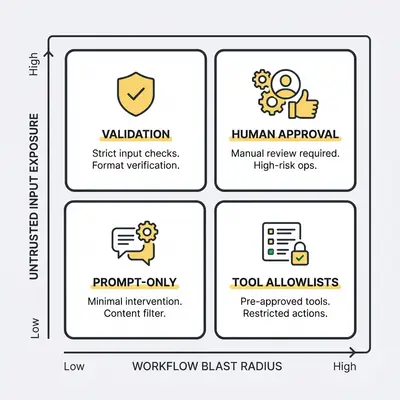
Quick Win: If your workflow touches customers or money, don’t debate prompts. Add a validator + retry loop and a human approval step for edge cases.
Step 3: Decide what “reliability” means in measurable terms
Pick 2–3 metrics you can track:
- Valid output rate (e.g., JSON parses and passes schema)
- Refusal correctness (refuse when it should, comply when it should)
- Action safety (no disallowed actions triggered)
- Variance across retries (how often you need a second attempt)
This is where a small test harness becomes more valuable than another prompt rewrite.
Practical patterns that make system prompts reliably “work”
These patterns are model-agnostic. They’re how you stop relying on obedience and start relying on engineering.
Pattern 1: Keep the system prompt short, specific, and testable
Good system prompts read like policy:
- “Return only JSON matching this schema.”
- “If you are missing required data, return
needs_human: true.” - “Never request or store passwords. If asked, refuse and offer secure alternatives.”
Avoid huge role-play blocks. Avoid conflicting goals (“be creative” + “be strictly structured”). If a rule matters, make it testable.
Pattern 2: Separate instructions from data (especially for untrusted inputs)
If you paste an email thread, web page, or PDF into the same channel as instructions, you’re increasing injection risk.
Safer structure:
- System: rules + output schema
- Developer: task template
- User: a structured request (fields)
- Data: quoted/untrusted text with clear delimiters
If your tooling doesn’t give you multiple channels, you can still emulate this with clear labeling and fences.
Pattern 3: Fail closed with validators, not open with best-effort output
If JSON is required, validate it. If policy compliance matters, check it.
Typical loop:
- Generate output
- Validate output (schema + business rules)
- If invalid: retry with corrective prompt referencing the failure
- If invalid again: route to human review
This turns intermittent failures into managed exceptions instead of silent corruption.
Pattern 4: Constrain actions with allowlists
Don’t let the model decide arbitrary actions. Give it a menu:
- Allowed categories/tags
- Allowed email templates
- Allowed CRM fields to update
- Allowed tools to call
The model can choose within the allowlist, but it can’t invent.
Pattern 5: Build a tiny regression suite (and rerun it monthly)
Take 10–20 real (sanitized) examples from your workflow. Score pass/fail on your metrics. Save the test set.
Whenever you change any of these, rerun the suite:
- model/version
- prompt wording
- tools
- safety settings
- output schema
If you already have a prompt test suite, this post pairs well with: How ChatGPT, Claude, and Gemini Interpret System vs User Prompts (Same Tests).
Example: A 10-person agency runs lead qualification with AI. Their regression suite includes 15 leads: spam, real leads, edge cases, and one injection attempt. Any model update that increases “invalid JSON” above 2/15 triggers a rollback or a prompt/validator adjustment.
Pattern 6: Design for “safe degradation”
The best reliability strategy is making the failure mode safe:
- If uncertain: label as uncertain and route to a human
- If refusal: provide a safe alternative path
- If missing data: request the minimum required fields, then stop
This is how you prevent “one weird output” from becoming a customer incident.
Where to place your effort (so you don’t waste weeks)
If you’re a small business, you don’t want a months-long prompt rewrite project. You want the 80/20.
Put your time here first:
- Output contracts: schemas + validators
- Action boundaries: allowlists + confirmation gates
- Test harness: small regression suite
Then improve prompts:
- reduce ambiguity
- remove conflicts
- make rules measurable
Reality Check: Teams often spend most of their time trying to “perfect the system prompt,” when validators and workflow design do more for reliability.
Want a reliability review?
If you’re building an AI workflow that touches customers or revenue, a quick reliability review saves a lot of rework. Book a free automation audit and we’ll map the right guardrails to your workflow risk.
Conclusion: system prompts are necessary, but they’re not sufficient
AI models enforce system prompts differently because “system prompt obedience” is the outcome of an entire stack: training, policy, product wrappers, tool constraints, and validation.
For reliable automation, stop betting everything on the prompt. Use prompts to express intent, then use engineering to enforce outcomes:
- Validate structure (schemas)
- Constrain actions (allowlists)
- Isolate untrusted inputs (anti-injection patterns)
- Measure reliability (a small test harness)
If you want help turning this into a repeatable process (prompt library + test suite + guardrails), Book a demo with Evalics.
FAQs
Why do different AI models treat system prompts differently?
Because “system prompt” is implemented as a mix of training, product rules, and runtime safety layers. Different vendors prioritize helpfulness, policy, and tool constraints differently, so enforcement varies.
Are system prompts guaranteed to override user prompts?
No. System prompts are the highest-priority instruction channel you control, but they still compete with safety policies, model incentives, and ambiguous or conflicting wording. Design with validation and fallbacks.
What is the most common reason a system prompt fails in production?
Untrusted input getting mixed into the instruction space (prompt injection), plus missing output validation. Treat external text as data, not instructions, and verify outputs before acting on them.
How can I make system prompts more reliable for business automation?
Keep the system prompt short and testable, constrain outputs with a schema, validate and retry, isolate untrusted content, and use a small automated test suite to catch drift after updates.
Should small businesses standardize on one model for reliability?
Often yes. Standardizing reduces prompt maintenance and makes behavior easier to test. If you run multiple models, do it intentionally: one for strict workflows and another for creative drafting.
How often should I re-test prompts after changing models or providers?
Re-test whenever you change model/version, prompting, tools, or safety settings. Also schedule periodic regression tests because vendors update behavior over time—even when your code doesn’t change.
About the Author
Kevin Michael Schindler is an AI Automation Expert at Evalics, helping small businesses and teams implement practical automation systems that save time and reduce operational drag.