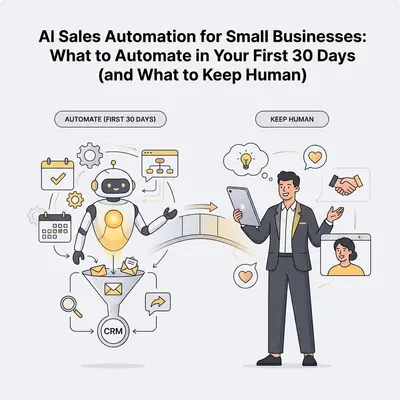
You run a small business with 1-3 sales reps, and leads are slipping through the cracks. AI sales automation can handle the repetitive stuff, but jumping in blindly risks more chaos. Here's a straightforward 30-day plan to automate safely, focusing on quick wins that save time without losing the human touch.
This guide prioritizes revenue-tied tasks like lead handling, drawing from proven workflows that small teams use to save 10+ hours per week. For basics on what sales AI is, check our What Is Sales Automation AI?. If you're scaling, see How AI Sales Automation Helps Small Businesses Scale Without Hiring.
Quick Win: Automate lead capture first—it keeps your CRM clean and ensures no inquiry goes unanswered, often saving 60-120 minutes weekly for a solo founder.
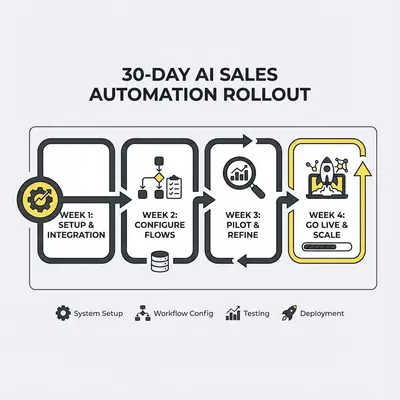
Your 30-Day AI Sales Automation Rollout Plan
Roll out in phases to test and tweak without overwhelming your team. Aim for 3-5 workflows total, keeping them stable for 2-4 weeks before adding more. This builds confidence and measurable wins.
Week 1: Assess and Prep
Focus on foundations. Measure your current baseline (e.g., time spent on manual lead entry) and map your "happy path" for a successful sale.
- Run an automation readiness checklist (see below).
- Set up basic tools: Connect your CRM (like HubSpot or Salesforce) to email/forms via no-code platforms like Zapier or Make.
- Test a dummy workflow: Route a fake lead to Slack for notification.
By week's end, you'll have clean data and one test flow running.
Week 2: Automate Lead Capture
Start here—it's low-risk and high-impact.
- Trigger: New form submission or inbound email.
- Actions: Create CRM record, assign owner, tag source, notify team.
- Example for Small Teams: A 2-person agency gets a "Request Quote" form; AI pulls details into CRM and slacks the rep: "New lead from Jane—needs SEO, budget $5k."
This cuts manual entry from 10 minutes per lead to zero.
Week 3: Add Instant Follow-Ups and Triage
Layer on response speed.
- Instant Follow-Up Emails: Trigger on new lead; send personalized reply with scheduling links.
- Example: "Thanks for your inquiry about web design. Available Tuesday at 10am? Book here."
- AI Lead Triage: Classify intent (sales vs. support) and route accordingly.
- Example: "Pricing question?" → Sales pipeline; "Billing issue?" → Support queue.
For a 3-rep team, this saves 45-180 minutes weekly by prioritizing hot leads.
Week 4: Review and Optimize
Monitor what works.
- Check logs: Did 90% of leads route correctly? Adjust for edge cases.
- Measure savings: Track hours freed up and conversion lift.
- Add one more: Basic CRM hygiene, like deduping contacts.
If stable, you've automated core intake—now humans focus on closing.
Reality Check: Expect 10-20% of automations to need tweaks in week 4—escalate unclear leads to humans via confidence rules.
The First 3-5 Tasks to Automate (Safest Quick Wins)
Prioritize high-frequency, low-complexity tasks tied to revenue. These use simple rules first, adding AI for smarts later.
- Lead Capture to CRM: Auto-create records from forms/emails. (Saves 60-120 min/week)
- Instant Follow-Up Emails: Send quick, personalized acknowledgments. (Saves 45-120 min/week)
- Lead Triage/Routing: Classify and assign based on intent. (Saves 60-180 min/week)
- Calendar Booking with Prep: Generate one-page briefs for calls. (Saves 60-150 min/week)
- Basic CRM Hygiene: Dedupe contacts and update statuses. (Saves 30-90 min/week)
For a 1-person operation, start with 1-2; scale to all five if you have reps.
Pro Tip: Use free tiers of tools like Zapier for basics—upgrade only after proving value with real data.
Tasks to Keep Human (Don't Automate These Yet)
AI excels at scale but falters on nuance. Protect these to maintain trust:
- Complex Negotiations: Custom deals need empathy and real-time adaptation.
- Pricing Exceptions: Discounts or bundles require judgment on margins.
- Relationship Repair: Apologies or win-backs demand personal touch.
- High-Stakes Closes: Final pitches benefit from human rapport.
Rule: If it involves emotion, context, or big money, keep a human in the loop. Escalate 10-20% of cases automatically.
Automation Readiness Checklist
Before day 1, verify these to avoid glitches:
- Data Quality: CRM has clean, standardized fields (e.g., no duplicates).
- Integrations: API keys set for email, forms, calendar.
- Response SLAs: Define "fast" (e.g., follow-up in 5 min).
- Guardrails: Confidence thresholds to flag unsure cases.
- Test Volume: Run 10-20% of real leads through new flows first.
- Backup Plan: Manual override for downtime.
Tick these off, and you're set for smooth rollout.
If you're ready to map this to your CRM, book a quick audit.
About the Author
Kevin Michael Schindler is an AI Automation Expert at Evalics, helping small businesses and teams implement practical automation systems that save time and reduce operational drag.