OpenAI has been building toward this for two years. In mid-2025, they shipped it: a unified agent that can research anything on the internet, interact with any website, run code, manage files, and connect to your business tools — all in one continuous workflow, without you babysitting every step.
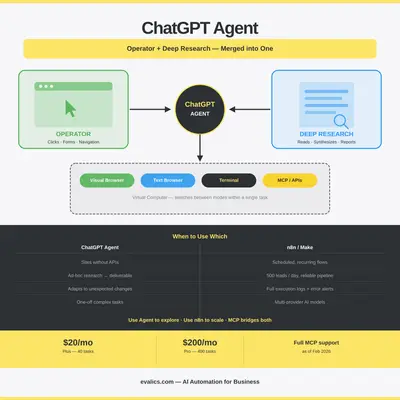
The product is called ChatGPT Agent, and it is the result of merging two previously separate capabilities: Operator (visual browser control) and Deep Research (multi-step analytical research).
If you use ChatGPT Plus or Pro, you already have access to it. The question is whether it changes anything for how you automate your business — and how it fits alongside tools like n8n or Make that you might already be running.
This post gives you a straight answer.
What ChatGPT Agent Actually Is
Before the merger, Operator and Deep Research were solving slightly different problems.
Operator could see a web page like a human, clicking buttons, filling forms, scrolling, and navigating. It was useful for tasks that lack APIs — booking travel, submitting forms, scraping tables from authenticated dashboards. But it could not deeply analyze or synthesize what it found.
Deep Research could conduct hours of multi-step web research, reading hundreds of sources and producing a comprehensive cited report at a level comparable to a research analyst. But it could not interact with pages — it could not log in, fill forms, or take actions.
ChatGPT Agent combines both. It runs on a virtual computer with:
- A visual browser — the Operator-style GUI interaction layer
- A text browser — the efficient information-retrieval layer
- A terminal — for running code and scripts
- API access — for direct tool integrations
- File manipulation — reading and writing documents, spreadsheets, CSVs
The agent switches between these capabilities fluidly within a single task. It can look up something, log into a tool to verify details, run a calculation, write a report, and drop the result into a Google Doc — all in one go, working autonomously for 10 minutes or more.
The shift in plain terms: Old ChatGPT was a calculator you pressed buttons on. ChatGPT Agent is closer to a junior analyst you give a brief to — it figures out the steps, executes them, and hands you the output.
🔌 alt text: Diagram showing ChatGPT Agent's architecture — visual browser, text browser, terminal, and API layer all feeding into a single agent that can research, interact, and act
What Changed in February 2026
The February 2026 update to Deep Research inside ChatGPT Agent added several business-relevant improvements:
MCP support — Full Model Context Protocol integration. You can now connect ChatGPT Agent to any tool with an MCP server with read/write permissions. This means the agent can update your CRM, create Jira tickets, post to Slack, or trigger n8n workflows — not just browse the web.
Trusted source scoping — You can now restrict Deep Research to specific websites or authenticated sources, making it suitable for industry-specific or compliance-sensitive research rather than open-internet crawling.
Research plan editing — Before the agent begins a long task, it shows you a plan. You can review and edit the steps before it starts executing, and redirect it mid-run if priorities change.
Connectors for Gmail and GitHub — Native integrations that let the agent read your actual emails, draft replies, and interact with code repositories as part of workflows.
What ChatGPT Agent Does Well
Tasks That Lack APIs
A lot of the world's business software has no API. Legacy CRMs, government portals, supplier order systems, old intranets — if you want to automate interaction with these, you have historically had two options: expensive RPA (Robotic Process Automation) software or a human doing it manually.
ChatGPT Agent is a third option. It can visually navigate these systems the way a human would, filling forms, clicking through multi-step processes, and extracting data. One company, Luminai, used the underlying CUA (Computer-Using Agent) technology to automate a complex enrollment process for a large public services organization in days — something traditional RPA had failed to deliver after months of effort.
Multi-Step Research Into Deliverables
The old Deep Research tool could produce reports. The merged agent can now take those reports and act on them. Ask it to "research our top five competitors, find their pricing pages, extract the tiers, and put them in a Google Sheet" — and it does exactly that, including the web navigation required to find the pages, log in if needed, and write the output.
This kind of task previously required either a research assistant or a custom scraper. Neither is cheap.
Adapting to the Unexpected
Traditional automation — n8n flows, Make scenarios — breaks when a website layout changes, a page takes longer to load, or an unexpected error appears. ChatGPT Agent can reason about what it sees and adapt. It reads error messages, tries alternative approaches, and flags issues to you rather than silently failing or producing garbage output.
This adaptability is a genuine strength for anything touching external websites or dynamic content.
One-Off and Exploratory Work
If you only need something done once, building an n8n workflow is overkill. ChatGPT Agent is ideal for tasks that are complex but infrequent: setting up a new vendor comparison, running a one-time data cleanup, or building a first-draft analysis you will refine manually.
What ChatGPT Agent Does Not Do Well
Structured, Repeatable Automation at Scale
For automation that needs to run every hour, every day, triggered by specific events — ChatGPT Agent is not the right tool. It is not designed for reliability at scale, parallel execution, or the kind of deterministic behavior you need in production workflows.
n8n, Make, or Zapier are built for this. They run on schedulers, handle retries, log executions, and alert you when things fail. ChatGPT Agent has none of this infrastructure.
Observability
When an n8n workflow fails, you get an execution log showing exactly which node failed, what data was present, and what error occurred. When ChatGPT Agent does something unexpected, it is harder to trace. It is, as one practitioner put it, "more of a black box." For anything running your core business operations, that opacity is a problem.
Non-OpenAI Models
ChatGPT Agent is locked to OpenAI models. If you are building workflows that benefit from Claude's instruction-following or Gemini's Workspace integration, you need a different orchestration layer. n8n supports all major providers; ChatGPT Agent does not.
Regulatory Availability
ChatGPT Agent is currently unavailable in the European Economic Area (EEA) and Switzerland. If your business operates under GDPR and you process data in those regions, check your compliance situation carefully before building workflows that depend on it.
How ChatGPT Agent Fits Alongside n8n
The clearest mental model: ChatGPT Agent for exploring and experimenting; n8n for running and scaling.
| Scenario | Recommended Tool |
|---|---|
| Automate a new website that has no API | ChatGPT Agent |
| Run a competitor research report once per quarter | ChatGPT Agent |
| Process 500 leads daily through a qualification flow | n8n |
| Send automated follow-up emails on a schedule | n8n |
| Summarize a complex PDF and draft a response | ChatGPT Agent |
| Sync data between CRM and spreadsheet every hour | n8n |
| Build an ad-hoc analysis from five different sources | ChatGPT Agent |
| Trigger a workflow when a form is submitted | n8n |
Many practical stacks use both. An n8n workflow might detect a trigger event (new lead, new invoice, new support ticket), call the ChatGPT Agent API for tasks that require reasoning or web interaction, then handle the structured downstream steps (updating the CRM, sending an email, logging to a sheet) back in n8n.
With MCP now available on both sides, these handoffs are cleaner than ever.
A Realistic Workflow Example
Situation: A small consulting firm wants to research potential clients before sales calls.
Old process: An analyst spends 30–45 minutes per prospect manually looking up LinkedIn, company website, recent news, and Crunchbase before each call.
With ChatGPT Agent:
- Sales rep pastes a company name and LinkedIn URL into a prepared ChatGPT prompt
- Agent browses the company website, LinkedIn, recent press coverage, and funding databases
- Agent synthesizes a one-page pre-call brief: company overview, recent news, key people, likely pain points, relevant case studies to mention
- Brief is written to a Google Doc via the Drive connector
- Agent posts a Slack notification to the sales rep with the doc link
Total time: 4–6 minutes unattended. Sales rep gets to focus on call strategy rather than data gathering.
Caveat: The output quality needs checking. ChatGPT Agent can hallucinate details, miss private information, or present outdated data as current. The human still needs to scan the brief before using it.
What This Means for Your Automation Stack
If you are running a business that currently relies on:
- Manual research workflows — ChatGPT Agent is worth evaluating immediately
- Tasks on tools without APIs — Operator-style browser control solves a real problem here
- n8n or Make for structured automation — Keep using them; ChatGPT Agent complements, not replaces
If you are not yet running any AI automation:
- ChatGPT Agent is one of the lowest-friction entry points — it requires no setup, no API keys, no workflow builder
- Start with a single high-value research or data-gathering task to understand what it can do
- Build toward n8n or Make once you have validated which workflows are worth automating at scale
For more on building structured automation alongside AI agents, see our guides on agentic AI in n8n and what MCP means for your stack.
The Honest Assessment
ChatGPT Agent is genuinely useful — more useful than any previous version of AI-assisted automation for non-technical business owners. The merger of Operator and Deep Research removes real friction. MCP support makes it composable with the rest of your stack in ways that matter.
But it is not a replacement for structured automation. It is a capable, flexible, occasionally unreliable collaborator that works best on tasks that are too dynamic or one-off to script — and that benefits from human review of its outputs before anything consequential happens.
The teams that will get the most from it are those who already understand their automation stack well enough to know which tasks benefit from adaptability versus reliability. If you are still figuring out your first automations, start simpler. If you are a practitioner with n8n or Make already running, add ChatGPT Agent for the edge cases it handles better.
Key Takeaway: ChatGPT Agent (Operator + Deep Research merged) is your best tool for tasks involving web interaction without APIs, multi-step research into deliverables, and one-off complex work. n8n is still your backbone for structured, reliable, observable automation at scale. They work better together than either does alone — and MCP makes that combination practical today.
Official Sources
- Introducing ChatGPT Agent — OpenAI
- Introducing Operator — OpenAI
- Introducing Deep Research — OpenAI
- New Tools for Building Agents — OpenAI
By Kevin Michael Schindler, AI Automation Expert at Evalics