Every week a new AI buzzword appears. Most of them do not matter much in practice.
MCP is different. It is the piece of infrastructure that makes AI agents actually useful for real business operations — and in 2026, it is becoming the standard that every automation stack will need to understand.
This guide explains what MCP is, why it exists, how it works, and what it means for the way you automate your business today.
Why MCP Exists: The Problem It Solves
Before MCP, connecting an AI model to your business tools was painful.
Every integration was custom. Want your AI to read from your CRM? Build a connector. Want it to update a Google Sheet? Build another connector. Want it to send a Slack message based on what it found? Yet another connector.
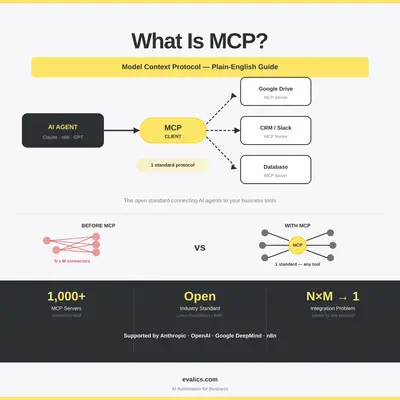
Anthropic described this as the "N×M problem" — if you have N AI models and M tools, you need N×M custom integrations. A business with 5 AI tools and 10 apps would need up to 50 separate connectors, each maintained independently.
MCP solves this by introducing a single open standard. Instead of N×M connections, you now have:
- Each AI model connects to MCP once
- Each tool or app exposes an MCP server once
- Any agent can now talk to any tool through the same protocol
Think of it like USB replacing a dozen different proprietary cables. The same plug works everywhere.
What MCP Actually Is
The Model Context Protocol (MCP) is an open standard that defines how AI agents discover, access, and interact with external tools and data sources.
It has three core components:
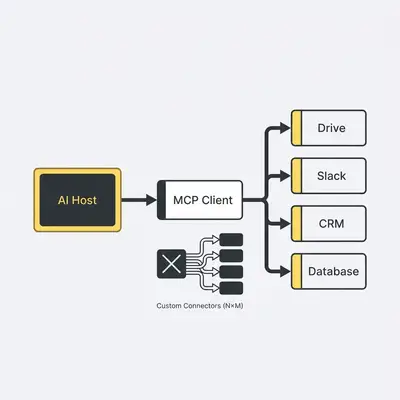
MCP Hosts — The AI-powered applications that connect to tools. This could be Claude, an n8n agent node, a custom AI assistant, or any agent platform that speaks MCP.
MCP Servers — Lightweight programs that expose the capabilities of a specific tool or data source. A Google Drive MCP server, for example, lets agents list files, read documents, and upload content. Over 1,000 community-built MCP servers now exist for tools including Slack, Notion, GitHub, databases, Salesforce, and dozens more.
MCP Clients — The connectors built into AI hosts that manage the communication between the agent and the server.
When an AI agent wants to take an action — say, "find all invoices from last month and summarize them" — it:
- Queries the available MCP servers to find what tools are accessible
- Calls the relevant server (e.g., a Google Drive or accounting MCP server)
- Receives data back in a standardized format
- Takes action based on what it finds
MCP vs. Traditional APIs: What Is the Real Difference?
You may already use APIs in your automations. MCP is not a replacement — it is a layer built on top.
Here is the practical difference:
| Feature | Traditional API | MCP |
|---|---|---|
| Direction | One-way: you call, it responds | Two-way: agent can read, write, and act |
| Discovery | Manual — you must know what endpoints exist | Automatic — agent discovers available tools at runtime |
| Context | Stateless by default | Designed to carry conversation and task context |
| Agent compatibility | Requires custom wrappers | Native support in MCP-compatible agents |
| Setup complexity | High (custom code per integration) | Low once an MCP server exists for the tool |
For automations that chain multiple tools together — read data from one source, analyze it, update another source — MCP is significantly simpler than stitching together raw API calls.
Who Supports MCP in 2026?
MCP was introduced by Anthropic in November 2024 and donated to the Agentic AI Foundation (AAIF) under the Linux Foundation in late 2025. It is now an open industry standard, not a proprietary product.
Major adopters include:
- Anthropic — Claude natively supports MCP in agent workflows
- OpenAI — Official MCP support added in 2025
- Google DeepMind — MCP support across Gemini agent tooling
- n8n — MCP integration available for workflow automation nodes
- Figma — Native MCP server integration for design-to-code workflows
- Cursor, VS Code, Windsurf — Developer tool integrations via MCP
For business owners, this cross-vendor adoption means the MCP servers you build or deploy today will work across multiple AI platforms — you are not locked in.
Practical Business Use Cases for MCP
1. AI That Can Actually Update Your Systems
Without MCP, AI assistants could read information and suggest actions. With MCP, agents can execute those actions directly — within defined permission boundaries.
Example: An AI agent connected to your CRM via MCP can:
- Pull all open deals with no activity in the last 14 days
- Summarize the deal status
- Draft and send a follow-up email for each via Gmail
- Update the CRM record with a "follow-up sent" note
The entire sequence happens autonomously. You define the rules; the agent handles the execution.
2. Cross-System Workflows Without Custom Code
Before MCP, connecting a new tool to your AI workflow meant custom development. With pre-built MCP servers, non-technical teams can extend their AI agents to new tools by simply installing and configuring a server.
Example stack a small team uses today:
- Claude or n8n as the agent platform
- MCP server for Google Workspace (Gmail, Sheets, Drive)
- MCP server for Notion (knowledge base)
- MCP server for Slack (notifications and updates)
The agent can move information between all four without any custom connectors.
3. Multi-Step Research and Reporting
AI agents with MCP access can conduct proper research workflows — not just retrieving static data but querying, filtering, comparing, and synthesizing across multiple sources.
Example: A weekly competitor analysis agent that:
- Queries a web search MCP server for recent mentions of each competitor
- Pulls relevant internal notes from a Notion MCP server
- Compares this week's findings with last week's data from a Sheets MCP server
- Writes a summary report to a Drive document
- Posts the report link to a Slack channel
This kind of multi-tool, multi-step work was possible before, but it required significant engineering. With MCP, it becomes configuration, not code.
4. Enterprise Data Access with Governance
For larger organizations, MCP enables controlled AI access to sensitive internal systems. Because MCP uses OAuth 2.1 and scoped permissions, you can grant agents access to specific data without exposing entire databases.
Goldman Sachs, for example, has deployed Claude-powered agents for accounting and client vetting — the kind of regulated use case where access control matters enormously. MCP's permission model makes this practical.
MCP and n8n: How They Work Together
If you already use n8n for workflow automation, MCP slots in as an agent capability layer.
In n8n, you can:
- Build an AI agent node that uses MCP to discover and call external tools
- Connect pre-built MCP servers to extend what your agents can do
- Use n8n's existing workflow logic (triggers, conditions, error handling) alongside MCP-powered agent steps
A practical example: an n8n workflow that triggers on a new support ticket, uses an AI agent node with MCP access to your knowledge base and CRM, drafts a personalized response, and logs the action — all within one n8n canvas.
For more on building AI agent workflows in n8n, see our guide to agentic AI in n8n.
What MCP Is Not
Understanding the limits is as important as understanding the capabilities.
MCP is not magic AI access to everything. Every tool requires a working MCP server. If a server does not exist for your tool, you still need to build or wait for one.
MCP does not remove the need for governance. Security researchers have identified prompt injection risks and overly broad tool permissions as concerns. Businesses should apply least-privilege access: grant agents only the permissions they actually need.
MCP is not a replacement for RAG. MCP handles agent-to-tool interaction. Retrieval-Augmented Generation (RAG) handles feeding relevant knowledge into an AI model before it responds. Best-practice systems use both: MCP for orchestration, RAG for knowledge enrichment.
MCP does not make bad processes good. If your underlying workflow is broken or your data is unreliable, an MCP-connected agent will automate the problem faster. Fix the process first. For guidance on this, see our article on why your automation is only as good as your data.
How to Get Started with MCP in 2026
Getting started does not require rebuilding your entire stack.
Step 1: Identify your highest-value connection point Where does your current AI workflow require the most manual intervention? That is usually where an MCP server would deliver the most value. Common starting points: CRM updates, email actions, and reading from spreadsheets.
Step 2: Find an existing MCP server for that tool Check the MCP server directory at modelcontextprotocol.io or search GitHub. Hundreds of community-built servers exist for popular tools.
Step 3: Connect it to your agent platform Whether you use Claude, n8n, or another MCP-compatible platform, connection typically takes minutes once a server is available. Configure the permission scopes, test with sample inputs, and verify the agent can read and write what it needs.
Step 4: Start narrow, then expand Begin with one tool, one workflow, one clear use case. Measure the output for a week before adding more connections. The risk of agent errors scales with complexity, so validate each step before layering in the next.
Pro Tip: When testing an MCP-connected agent for the first time, run it in read-only mode first. Let it demonstrate what it would do before giving it write permissions. This catches unexpected behavior before it affects real data.
The Bigger Picture: Why MCP Matters in 2026
The AI landscape is shifting from isolated assistants — tools that answer questions — to connected agents that operate across your business stack.
MCP is the infrastructure that makes this shift possible at scale. Without a common protocol, every new AI use case requires new engineering work. With MCP, the incremental cost of connecting a new agent to a new tool drops dramatically.
Deloitte's 2026 tech trends analysis notes that leading organizations are no longer just "layering agents onto old workflows" — they are redesigning operations around agent-compatible architectures. MCP is a foundational piece of that architecture.
For business owners who are not engineers, the practical implication is simple: the tools your AI can access determine what your AI can do. MCP expands that access in a structured, secure, and scalable way.
The teams that understand and adopt MCP now will have a significant operational advantage as agent capabilities continue to advance through 2026 and beyond.
Conclusion
MCP is not a product you buy or a feature you toggle on. It is a protocol — a standard that makes AI agents genuinely useful across the full complexity of a real business.
The core idea is simple: one universal way for AI agents to connect to any tool, read any data, and take any action — within the boundaries you define.
If you are building automation workflows today, understanding MCP will help you make better decisions about your stack, avoid expensive custom integrations, and position your team to take full advantage of agent capabilities as they mature.
Key Takeaway: MCP solves the N×M integration problem — instead of building custom connectors for every AI-to-tool combination, one open standard lets any agent work with any tool that has an MCP server. Start with one high-value connection and expand from there.
Related Resources
- What Are AI Agents? A Practical Explanation for Businesses — Understand the foundation before adding MCP
- Agentic AI in n8n: How to Build Multi-Agent Workflows for Complex Tasks — Practical guide to building agent workflows in n8n
- Data Quality Matters: Why Your Automation Is Only as Good as Your Data — Essential reading before deploying any agent with data access
- n8n Workflow Design Patterns: Error Handling and Production Setup — Production readiness for agent workflows
Official Sources
- Model Context Protocol — Official Site — Specification, server directory, and documentation
- Anthropic MCP Announcement — Original introduction and design rationale
- MCP on Wikipedia — Background and ecosystem overview
By Kevin Michael Schindler, AI Automation Expert at Evalics