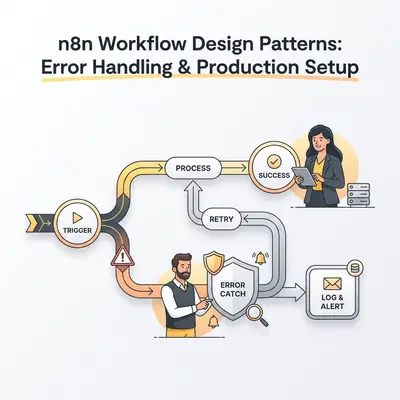
A payment processing workflow fails silently at 2 AM. Customers can't complete orders. The team discovers the issue 8 hours later when support tickets flood in. Revenue lost: $12,000 in missed transactions. Recovery time: 4 hours of manual processing.
Production workflows need robust error handling and careful design. Without proper patterns, failures cascade. Single API timeouts stop entire workflows. Missing error monitoring means problems go undetected for hours. Poor modular design makes workflows impossible to maintain.
This guide shows you how to design n8n workflows that handle errors gracefully, scale reliably, and operate securely in production. You'll learn modular design patterns, error handling strategies, security best practices, and governance frameworks. By the end, you'll build workflows that recover from failures automatically and maintain business continuity.
Quick Win: Implementing proper error handling and modular design reduces production workflow failures by 70-80%. A 20-person team saves 15-20 hours monthly on debugging and incident response.
Modular Workflow Design
Large, monolithic workflows become maintenance nightmares. They're hard to debug, difficult to test, and impossible to reuse. Modular design breaks workflows into smaller, focused components that work together.
Why Modular Design Matters
Maintainability: Small workflows are easier to understand and modify. When a payment API changes, you update one sub-workflow instead of hunting through 50 nodes.
Reusability: Common tasks like data validation or email formatting can be shared across multiple workflows. One change benefits all workflows using that module.
Testability: You can test sub-workflows independently with sample data. This catches issues before they reach production.
Collaboration: Multiple team members can work on different modules simultaneously without conflicts.
Performance: Modular workflows often execute faster because n8n can optimize sub-workflow execution independently.
Execute Workflow Node Patterns
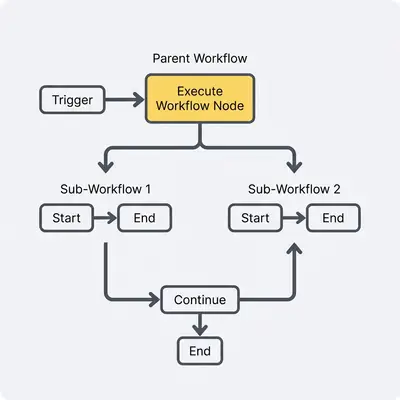
The Execute Workflow node calls other workflows as sub-workflows. This enables modular design.
Pattern 1: Reusable Logic Module
Create sub-workflows for common tasks used across multiple parent workflows.
Example: Data Validation Sub-Workflow
Parent workflow calls validation sub-workflow before processing:
- Parent workflow receives data
- Calls "Validate Customer Data" sub-workflow
- Sub-workflow checks: email format, required fields, data types
- Returns validation result (valid/invalid + error details)
- Parent workflow routes based on validation result
Benefits:
- Validation logic defined once, used everywhere
- Changes to validation rules update all workflows automatically
- Easy to test validation independently
Pattern 2: Parallel Processing
Execute multiple sub-workflows in parallel, then merge results.
Example: Customer Enrichment
Parent workflow enriches customer data from multiple sources:
- Split customer list
- Execute "Enrich from CRM" sub-workflow (parallel)
- Execute "Enrich from Email Service" sub-workflow (parallel)
- Execute "Enrich from Analytics" sub-workflow (parallel)
- Merge all enrichment results
- Combine into complete customer profile
Benefits:
- Faster execution through parallelism
- Each enrichment source can be updated independently
- Failed enrichments don't block others
Pattern 3: Nested Processing
Use sub-workflows to handle nested data structures.
Example: Order Processing
Parent workflow processes orders, sub-workflow processes line items:
- Parent receives order with multiple line items
- For each order, calls "Process Line Items" sub-workflow
- Sub-workflow handles inventory checks, pricing, shipping for each item
- Returns processed line items to parent
- Parent completes order processing
Benefits:
- Clean separation of order-level vs item-level logic
- Easier to handle complex nested data
- Sub-workflow can be tested with sample line items
Sub-Workflow Design Principles
Single Responsibility: Each sub-workflow should do one thing well. A validation sub-workflow validates. A formatting sub-workflow formats. Don't mix concerns.
Clear Input/Output: Define explicit input fields when possible. Document expected output structure. This prevents surprises when integrating.
Error Handling: Decide whether sub-workflows should handle errors internally or propagate them to parent. Document this decision.
Versioning: When changing sub-workflow inputs/outputs, consider creating a new versioned copy to avoid breaking existing parent workflows.
Naming Conventions: Use prefixes like "Sub -" or "Module -" to identify sub-workflows. Example: "Sub - Validate Email" or "Module - Format Date".
When to Modularize vs Keep Monolithic
Modularize when:
- Logic is reused across multiple workflows
- Workflow exceeds 30-40 nodes
- Different team members work on different parts
- You need to test components independently
- Workflow handles multiple distinct concerns
Keep monolithic when:
- Workflow is simple (under 15 nodes)
- Logic is specific to one use case
- All steps must execute sequentially with tight coupling
- Performance requires minimal overhead
Pro Tip: Start monolithic for simple workflows. Refactor to modular when you find yourself copying logic or when workflows exceed 30 nodes. Don't over-engineer early.
Error Handling Patterns
Errors are inevitable in production. APIs timeout. Services go down. Data arrives malformed. Good error handling keeps workflows running and surfaces issues immediately.
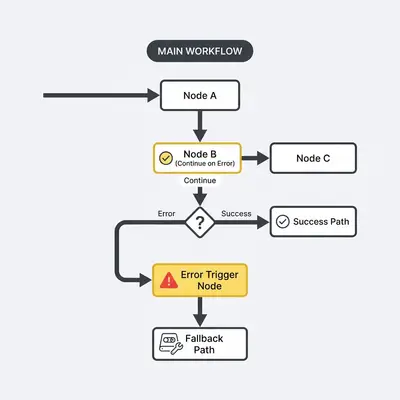
Continue on Error vs Continue (using error output)
n8n offers two ways to handle node errors without stopping the workflow.
Continue on Error:
The workflow continues after a node fails. The error is logged but not routed to a separate path.
When to use:
- Non-critical operations that can fail silently
- Batch processing where some items can fail
- Operations with built-in fallbacks
Limitations:
- You lose visibility into what failed
- No way to handle errors specifically
- Errors might go unnoticed
Continue (using error output):
The node splits into two paths: success output and error output. Successful items continue normally. Failed items route to error handling logic.
When to use:
- You need to handle errors explicitly
- Batch processing where failures need logging
- Critical operations requiring fallback paths
- When error visibility is important
Example:
A workflow processes 100 customer records. One record has invalid data. With Continue (using error output):
- 99 successful records continue to processing
- 1 failed record routes to error path
- Error path logs failure and sends alert
- Workflow completes successfully
Without error handling, the entire workflow stops at the first failure.
Error Trigger Nodes for Centralized Monitoring
Error Trigger nodes catch failures from any workflow. They provide centralized error monitoring and alerting.
How It Works:
- Create a dedicated "Error Monitoring" workflow
- Add Error Trigger node as the starter
- Configure to catch errors from specific workflows or all workflows
- Add notification nodes (Slack, email, PagerDuty)
- Include error details: workflow name, node, error message, timestamp
Error Trigger Configuration:
- Workflow Filter: Catch errors from specific workflows or all workflows
- Error Types: Filter by error type if needed
- Error Context: Include execution data, node information, error stack
Notification Setup:
Send alerts with actionable information:
- Workflow name and ID
- Failed node name and type
- Error message and stack trace
- Execution timestamp
- Input data that caused the error (if safe to log)
Example Error Alert:
Workflow: Order Processing
Node: Update Inventory API
Error: Connection timeout after 30 seconds
Time: 2026-01-15 14:32:15
Execution ID: 12345
This gives your team everything needed to debug quickly.
Retry Logic and Backoff Strategies
Transient failures (network timeouts, temporary API issues) often succeed on retry. Configure automatic retries for these scenarios.
Node-Level Retries:
Most n8n nodes support "Retry On Fail" settings:
- Max Retries: Number of attempts (typically 3-5)
- Retry Interval: Time between retries (e.g., 5 seconds)
- Retry On: Which error types to retry (timeouts, 5xx errors)
When to Retry:
- Network timeouts
- 5xx server errors (temporary)
- Rate limit errors (429)
- Connection errors
When NOT to Retry:
- 4xx client errors (bad data, invalid credentials)
- Validation failures
- Business logic errors
Exponential Backoff:
For rate-limited APIs, use exponential backoff:
- First retry: Wait 1 second
- Second retry: Wait 2 seconds
- Third retry: Wait 4 seconds
This prevents overwhelming already-stressed APIs.
Implementation:
Use Wait nodes with increasing delays, or configure retry intervals in node settings. Some nodes support exponential backoff natively.
Fallback Mechanisms and Alternative Paths
When primary operations fail, fallback mechanisms provide alternative paths to maintain business continuity.
Pattern 1: Alternative API
If primary API fails, try backup API:
- Call Primary API
- If error, route to error output
- Error output calls Backup API
- If backup succeeds, continue workflow
- If backup fails, send critical alert
Pattern 2: Cached Data
Use cached data when live API fails:
- Call Live API
- If error, route to error output
- Error output retrieves from cache
- Continue with cached data
- Log that cached data was used
Pattern 3: Manual Review Queue
Route failed items to manual review:
- Process item automatically
- If error, route to error output
- Error output creates ticket in support system
- Sends notification to team
- Workflow continues with other items
Pattern 4: Default Values
Use safe defaults when data processing fails:
- Process and enrich data
- If enrichment fails, use default values
- Log that defaults were used
- Continue workflow
Error Logging and Observability
Comprehensive error logging helps you understand failures and improve workflows over time.
What to Log:
- Error message and stack trace
- Workflow name and execution ID
- Failed node name and configuration
- Input data that caused the error (sanitized)
- Timestamp and execution context
- Retry attempts and outcomes
Where to Log:
- Centralized logging system (ELK, Splunk, Datadog)
- Database table for error tracking
- Monitoring dashboards (Grafana, custom)
- Error tracking service (Sentry, Rollbar)
Logging Best Practices:
- Sanitize sensitive data before logging
- Include enough context to debug
- Structure logs for easy querying
- Set up alerts for error patterns
- Review logs regularly to identify trends
Error Metrics to Track:
- Error rate per workflow
- Error rate per node type
- Most common error messages
- Error trends over time
- Mean time to resolution
Key Insight: Proper error handling reduces production incidents by 70-80%. The time spent implementing error patterns pays off in reduced downtime and faster recovery.
Trigger-Based Patterns and Performance
Different trigger types have different performance characteristics. Understanding these helps you choose the right pattern for your use case.
Webhook Trigger Optimization
Webhook triggers receive HTTP requests and start workflows immediately. They're ideal for real-time processing.
Performance Considerations:
- Webhooks handle requests synchronously by default
- Response time depends on workflow execution time
- Long-running workflows can timeout webhook requests
- High-volume webhooks need rate limiting
Optimization Strategies:
1. Fast Response Pattern:
Return HTTP 200 immediately, process asynchronously:
- Webhook receives request
- Validate request (quick checks)
- Return 200 OK immediately
- Continue processing in background
- Use Execute Once to prevent duplicates
2. Request Validation:
Validate webhook requests early to reject invalid data quickly:
- Webhook receives request
- Validate authentication (HMAC, token)
- Validate data structure
- If invalid, return 400 immediately
- If valid, continue processing
3. Rate Limiting:
Prevent webhook abuse with rate limiting:
- Use n8n's built-in rate limiting
- Implement custom rate limiting logic
- Reject requests exceeding limits
- Log rate limit violations
4. Webhook Security:
Protect webhook endpoints:
- Use authentication tokens
- Implement HMAC signature verification
- Validate request origin
- Use HTTPS only
Schedule Trigger Best Practices
Schedule triggers run workflows at specified times. They're perfect for batch processing and periodic tasks.
Performance Considerations:
- Schedule triggers run at exact times
- Multiple schedules can overlap
- Long-running scheduled workflows can delay subsequent runs
- Queue mode helps parallelize scheduled executions
Best Practices:
1. Stagger Schedules:
Don't schedule all workflows at the same time:
- Spread high-load workflows across different times
- Avoid scheduling during peak hours
- Use off-peak hours for resource-intensive tasks
2. Execution Time Awareness:
Monitor how long scheduled workflows take:
- If workflow takes 30 minutes, don't schedule every 15 minutes
- Account for execution time in scheduling
- Use completion triggers instead of fixed schedules when possible
3. Timezone Handling:
Be explicit about timezones:
- Use UTC for consistency
- Convert to local timezones in workflow if needed
- Document timezone assumptions
4. Schedule Validation:
Validate schedule configurations:
- Ensure schedules don't conflict
- Check for daylight saving time issues
- Verify schedule times are correct
Manual Trigger Patterns
Manual triggers let users start workflows on demand. They're useful for testing and ad-hoc operations.
Use Cases:
- Testing workflows during development
- One-off data processing tasks
- Administrative operations
- User-initiated automations
Best Practices:
- Provide clear workflow descriptions
- Document required inputs
- Validate inputs before processing
- Show progress for long-running workflows
- Return clear success/error messages
Performance Considerations for Different Trigger Types
Webhook Triggers:
- Pros: Real-time, immediate response
- Cons: Synchronous, can timeout
- Best for: Event-driven workflows, API integrations
- Scaling: Use queue mode for high volume
Schedule Triggers:
- Pros: Predictable timing, batch processing
- Cons: Fixed schedule, can overlap
- Best for: Periodic tasks, reports, data syncs
- Scaling: Queue mode enables parallel execution
Manual Triggers:
- Pros: User control, flexible
- Cons: Requires user action
- Best for: Testing, ad-hoc tasks
- Scaling: Not applicable
Rate Limiting and Throttling Strategies
Rate limiting prevents workflows from overwhelming APIs or systems.
API Rate Limiting:
When calling external APIs with rate limits:
- Track API call frequency
- Use Wait nodes between calls
- Implement exponential backoff
- Batch requests when possible
- Monitor rate limit headers
Workflow Rate Limiting:
Limit how often workflows execute:
- Use Execute Once to prevent duplicates
- Implement custom rate limiting logic
- Use queues to smooth out spikes
- Monitor execution frequency
Throttling Patterns:
Pattern 1: Fixed Delay
Add fixed wait time between operations:
- Simple and predictable
- Works for consistent rate limits
- Easy to implement
Pattern 2: Adaptive Throttling
Adjust delay based on API responses:
- Monitor rate limit headers
- Increase delay when approaching limits
- Decrease delay when under limits
Pattern 3: Token Bucket
Use token bucket algorithm for complex rate limiting:
- Allocate tokens per time period
- Consume tokens for each operation
- Wait when tokens exhausted
Reality Check: Rate limiting is critical for production workflows. One workflow hitting API rate limits can block all other workflows using the same API. Always implement rate limiting for external API calls.
Credentials, Permissions, and Security
Production workflows handle sensitive data and access critical systems. Security is non-negotiable.
Environment Variables for Credentials
Never hardcode credentials in workflows. Use environment variables for deployment-specific configuration.
What to Store in Environment Variables:
- API keys and tokens
- Database connection strings
- Service URLs and endpoints
- Feature flags and configuration
- Encryption keys
What NOT to Store:
- Workflow logic
- Business rules
- Data transformations
Setting Environment Variables:
Self-Hosted n8n:
Set in .env file or system environment:
N8N_ENCRYPTION_KEY=your-encryption-key
DATABASE_URL=postgresql://user:pass@host/db
API_KEY=your-api-key
Docker Deployment:
Use Docker secrets or environment files:
environment:
  - N8N_ENCRYPTION_KEY=${ENCRYPTION_KEY}
  - DATABASE_URL=${DATABASE_URL}
Kubernetes Deployment:
Use Kubernetes secrets:
env:
  - name: N8N_ENCRYPTION_KEY
    valueFrom:
      secretKeyRef:
        name: n8n-secrets
        key: encryption-key
Credential Management Best Practices
n8n's credential store encrypts credentials at rest. Use it for all sensitive data.
Best Practices:
1. Use Credential Store:
Always use n8n's credential management instead of hardcoding:
- Credentials are encrypted
- Can be shared across workflows safely
- Easy to rotate without changing workflows
- Access can be controlled via RBAC
2. Separate Credentials by Environment:
Use different credentials for dev, staging, and production:
- Prevents accidental production changes from dev
- Allows testing without affecting production
- Enables proper access control
3. Principle of Least Privilege:
Grant minimal permissions needed:
- Don't use admin credentials for read-only operations
- Create service accounts with specific permissions
- Rotate credentials regularly
4. Credential Naming:
Use clear, descriptive names:
- Include environment: "Production - Stripe API"
- Include purpose: "Read-Only - Database Access"
- Include service: "Gmail - Notifications"
5. Regular Rotation:
Rotate credentials on a schedule:
- Quarterly for API keys
- Immediately upon suspected compromise
- When team members leave
- Document rotation process
Permission Models in n8n
n8n supports different permission levels for users and workflows.
User Roles:
Owner: Full access to all workflows and credentials. Can manage users and instance settings.
Member: Can create and edit workflows. Limited access to credentials (use but not view secrets).
Viewer: Read-only access to workflows. Cannot make changes.
Best Practices:
- Use Member role for most users
- Reserve Owner role for admins
- Use Viewer role for stakeholders who need visibility
- Review permissions regularly
Credential Sharing:
- Share credentials only with workflows that need them
- Use credential templates for common patterns
- Document which workflows use which credentials
- Audit credential access periodically
Security Considerations for Production
Production environments require additional security measures.
1. Encryption:
- Set strong
N8N_ENCRYPTION_KEY(32+ characters, random) - Use HTTPS for all connections
- Enable secure cookies (
N8N_SECURE_COOKIE=true) - Encrypt database connections
2. Access Control:
- Enable authentication (never leave instance open)
- Use SSO/MFA for enterprise deployments
- Implement IP whitelisting for web UI
- Use VPN for remote access
3. Network Security:
- Place n8n behind reverse proxy (Nginx, Traefik)
- Use firewall rules to restrict access
- Isolate n8n instance from public internet
- Use private networks for database connections
4. Code Node Security:
- Set
N8N_BLOCK_ENV_ACCESS_IN_NODE=trueto prevent Code nodes from reading environment variables - Review custom code in Code nodes
- Limit Code node usage when possible
- Keep n8n updated to patch security vulnerabilities
5. Webhook Security:
- Use authentication tokens for webhooks
- Implement HMAC signature verification
- Validate request origins
- Rate limit webhook endpoints
- Use HTTPS only
Secrets Management
For enterprise deployments, integrate with external secrets management.
Options:
- AWS Secrets Manager
- HashiCorp Vault
- Kubernetes Secrets
- Azure Key Vault
- Google Secret Manager
Benefits:
- Centralized secret management
- Automatic rotation
- Audit logging
- Integration with existing security infrastructure
Implementation:
Use environment variables to reference secrets from external systems. Never store secrets in workflow JSON or code.
Reality Check: A single compromised credential can expose your entire system. One team lost access to their CRM when an API key was exposed in a workflow export. Always use credential store and never commit secrets to version control.
Workflow Governance in Production
Governance ensures workflows remain maintainable, secure, and aligned with business goals as your automation grows.
Workflow Approval Processes
Establish clear processes for workflow changes in production.
Approval Workflow:
- Developer creates workflow in development environment
- Peer review of workflow logic and security
- Testing in staging environment
- Approval from workflow owner or team lead
- Deployment to production
- Monitoring and validation
Who Approves:
- Workflow owner (business stakeholder)
- Technical lead (architecture review)
- Security team (for sensitive workflows)
- Compliance team (for regulated data)
What to Review:
- Workflow logic and business rules
- Error handling and fallback mechanisms
- Security and credential usage
- Performance and scalability
- Documentation completeness
Change Management Procedures
Track and manage workflow changes systematically.
Version Control:
- Export workflows as JSON before changes
- Commit changes to Git with clear messages
- Use semantic versioning for workflow versions
- Tag production-ready versions
Change Documentation:
Document every change:
- What changed and why
- Who made the change
- When the change was made
- Impact assessment
- Rollback plan
Testing Requirements:
- Test in staging before production
- Validate with sample data
- Test error scenarios
- Verify performance under load
- Check integration points
Deployment Process:
- Export current production workflow
- Test new version in staging
- Get approval from stakeholders
- Deploy during maintenance window (if needed)
- Monitor first few executions closely
- Keep previous version as backup for 30 days
Monitoring and Alerting Strategies
Comprehensive monitoring catches issues before they impact users.
What to Monitor:
Workflow Health:
- Success/failure rates
- Execution times
- Error frequencies
- Queue depths
System Health:
- n8n instance availability
- Database performance
- Worker availability
- Resource usage (CPU, memory)
Business Metrics:
- Records processed
- API call volumes
- Cost tracking
- SLA compliance
Monitoring Tools:
- n8n execution history
- Prometheus + Grafana dashboards
- Custom monitoring workflows
- External APM tools (Datadog, New Relic)
Alerting Strategy:
Critical Alerts (Immediate):
- Workflow failures in production
- System downtime
- Security incidents
- Data loss or corruption
Warning Alerts (Review):
- Increased error rates
- Performance degradation
- Approaching rate limits
- Unusual execution patterns
Alert Channels:
- Slack/Teams for team notifications
- Email for non-urgent alerts
- PagerDuty/Opsgenie for critical incidents
- SMS for on-call escalations
Alert Fatigue Prevention:
- Filter minor errors
- Group related alerts
- Use severity-based routing
- Implement alert deduplication
- Review and tune alert thresholds
Performance Monitoring
Track workflow performance to identify bottlenecks and optimization opportunities.
Key Metrics:
- Average execution time per workflow
- P95/P99 execution times
- Node-level performance breakdown
- API response times
- Database query performance
Performance Baselines:
Establish baseline metrics during normal operation:
- Document typical execution times
- Track performance trends
- Set performance targets
- Alert when performance degrades
Optimization Opportunities:
- Identify slow nodes
- Find bottlenecks in workflows
- Optimize API calls
- Improve data processing efficiency
- Scale infrastructure when needed
Deprecation and Cleanup Policies
Remove unused workflows and keep your automation library clean.
Deprecation Process:
- Identify unused or obsolete workflows
- Notify workflow owners
- Document deprecation reason
- Set deprecation date (30-90 days notice)
- Export workflow JSON for archive
- Deactivate workflow
- Remove after grace period
Cleanup Policies:
- Archive workflows unused for 6+ months
- Remove test workflows from production
- Clean up duplicate workflows
- Consolidate similar workflows
- Remove deprecated credentials
Documentation:
Maintain a workflow inventory:
- Active workflows with owners
- Deprecated workflows and dates
- Archived workflows and locations
- Cleanup schedule and procedures
Pro Tip: Regular governance reviews prevent technical debt from accumulating. Schedule quarterly reviews to audit workflows, update documentation, and clean up unused automations.
Real-World Examples
Here are three complete examples showing production-ready workflow patterns.
Example 1: E-Commerce Order Processing with Error Handling
A mid-size e-commerce company processes 500+ orders daily. Orders must update inventory, send confirmations, and sync with shipping systems.
Challenge: API failures stop order processing. Inventory updates fail silently. Customers don't receive confirmations.
Solution: Modular Design with Error Handling
Main Workflow: Process New Order
- Trigger: Webhook receives new order
- Validate Order: Call "Sub - Validate Order Data" sub-workflow
- Checks required fields, data types, business rules
- Returns validation result
- Route Based on Validation:
- If valid: Continue to processing
- If invalid: Route to error path → Create support ticket
- Process Order: Call "Sub - Process Order" sub-workflow
- Updates inventory (with retry and fallback)
- Creates shipping label (with error handling)
- Sends confirmation email (with retry)
- Error Handling: Error Trigger catches any failures
- Logs to database
- Sends Slack alert
- Creates support ticket
Sub-Workflow: Process Order
- Update Inventory API:
- Retry on fail: 3 attempts, 5-second intervals
- Continue (using error output)
- Success: Continue to next step
- Error: Route to fallback (manual review queue)
- Create Shipping Label:
- Retry on fail: 2 attempts
- Continue (using error output)
- Success: Continue
- Error: Route to manual processing queue
- Send Confirmation Email:
- Retry on fail: 3 attempts
- Continue (using error output)
- Success: Log success
- Error: Route to email retry queue
Results:
- 99.5% order processing success rate (up from 85%)
- Zero silent failures (all errors logged and alerted)
- 90% reduction in manual intervention
- Average processing time: 2.3 seconds per order
Example 2: API Integration with Retry and Fallback
A SaaS company integrates with multiple third-party APIs for customer data enrichment.
Challenge: APIs are unreliable. Timeouts and rate limits cause workflow failures. No fallback when primary API is down.
Solution: Retry Logic with Fallback APIs
Workflow: Enrich Customer Data
- Trigger: New customer record in database
- Try Primary API:
- Call Primary Enrichment API
- Retry on fail: 3 attempts with exponential backoff
- Continue (using error output)
- Route Based on Result:
- Success: Use enriched data, continue workflow
- Error (transient): Retry with longer backoff
- Error (permanent): Route to fallback
- Fallback Path:
- Try Backup Enrichment API
- If backup succeeds: Use backup data, log that backup was used
- If backup fails: Use cached data from last successful enrichment
- If no cache: Route to manual enrichment queue
- Error Monitoring:
- Error Trigger workflow monitors all failures
- Tracks API reliability metrics
- Alerts when error rates exceed thresholds
- Suggests API provider changes if needed
Results:
- 95% success rate (up from 60% with single API)
- Zero workflow failures due to API issues
- Automatic fallback maintains business continuity
- API reliability metrics inform provider decisions
Example 3: Enterprise Workflow with Modular Design
A large enterprise runs 200+ workflows across multiple departments. Workflows share common logic and need consistent error handling.
Challenge: Duplicate logic across workflows. Inconsistent error handling. Difficult to maintain and update.
Solution: Modular Library with Shared Sub-Workflows
Shared Sub-Workflow Library:
Sub - Validate Email:
- Validates email format
- Checks against blocklist
- Returns validation result
- Used by 50+ workflows
Sub - Format Customer Data:
- Standardizes name format
- Validates phone numbers
- Normalizes addresses
- Used by 30+ workflows
Sub - Send Notification:
- Handles Slack, email, SMS notifications
- Retry logic built-in
- Error logging included
- Used by 40+ workflows
Sub - Log to Database:
- Standardized database logging
- Error handling included
- Used by 60+ workflows
Parent Workflow Example: Customer Onboarding
- Trigger: New customer signup
- Validate: Call "Sub - Validate Email"
- Format: Call "Sub - Format Customer Data"
- Process: Business-specific onboarding logic
- Notify: Call "Sub - Send Notification"
- Log: Call "Sub - Log to Database"
Governance:
- Sub-workflows owned by platform team
- Changes require approval from multiple stakeholders
- Versioned sub-workflows prevent breaking changes
- Documentation for each sub-workflow
- Regular audits of sub-workflow usage
Results:
- 80% reduction in duplicate code
- Consistent error handling across all workflows
- 70% faster development of new workflows
- Easier maintenance and updates
- Better collaboration across teams
Conclusion
Production n8n workflows require careful design, robust error handling, and proper governance. Modular design makes workflows maintainable. Error handling patterns keep workflows running when things go wrong. Security best practices protect sensitive data. Governance ensures workflows remain effective over time.
Key takeaways:
-
Design modularly: Break complex workflows into reusable sub-workflows. This improves maintainability, testability, and collaboration. Start simple, refactor when workflows exceed 30 nodes.
-
Handle errors explicitly: Use Continue (using error output) for visibility, Error Trigger nodes for monitoring, and fallback mechanisms for business continuity. Proper error handling reduces production incidents by 70-80%.
-
Secure everything: Use credential store, environment variables, and proper access controls. Never hardcode secrets. Regular credential rotation and security audits prevent breaches.
-
Govern systematically: Establish approval processes, change management, monitoring, and cleanup policies. Good governance prevents technical debt and ensures workflows remain effective.
Next steps:
Review your production workflows this week. Identify one workflow that needs better error handling. Add Error Trigger monitoring to your most critical workflows. Start modularizing workflows that exceed 30 nodes.
Remember: production workflows are investments. The time spent on proper design and error handling pays off in reduced downtime, faster recovery, and easier maintenance.
Ready to build production-ready n8n workflows? Book a demo with Evalics to get personalized recommendations for error handling, modular design, and governance strategies for your automation needs.
zation Techniques 2025](/blog/ultimate-n8n-tips-and-tricks-2025) — Production best practices including error handling and optimization
- n8n Workflow Optimization Techniques Full Guide — Advanced techniques for modular design and performance
- n8n Workflow Documentation & Best Practices — Complete guide to documenting and organizing workflows
Official Sources
- n8n Workflows Documentation — Official guide to building n8n workflows
- n8n Workflow Templates — Template library and reference examples
- AI Workflow Builder Best Practices — Tips for iterative workflow design
- Awesome n8n Templates — Community-curated workflow examples
About the Author
Kevin Michael Schindler is an AI Automation Expert at Evalics, helping small businesses and teams implement intelligent automation solutions.