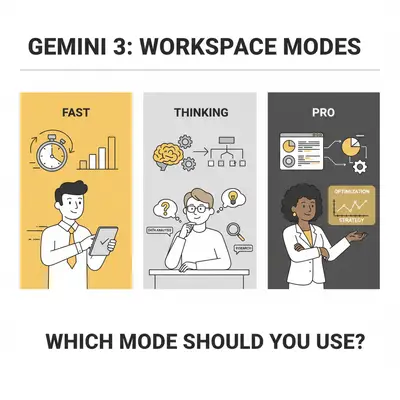
You open Gemini and see three options in the model picker: Fast, Thinking, and Pro. Google describes them as Gemini 3 Flash for quick answers, Gemini 3 Flash with thinking for complex problems, and Gemini 3 Pro. The menu in Gemini's side panel in Docs, Gmail or Sheets can be labelled differently, but the same choice applies. You need to summarize a meeting transcript, but you're not sure which mode to choose. Fast sounds quick, but will it miss important details? Pro sounds powerful, but do you need it for a simple summary?
A common mistake is to default to the wrong mode: using Pro for everything because it sounds "best" and waiting longer than needed, or using Fast for complex tasks and getting shallow answers that don't help.
The three modes aren't about "better" or "worse." They're about matching the mode to your task complexity and speed requirements. Fast handles simple tasks instantly. Thinking balances speed with reasoning. Pro delivers deep analysis when you need it.
This guide shows you exactly when to use each mode, how they differ in practice, and how mode choice impacts your automation workflows.
Quick Win: Default to Fast mode for most tasks. Switch to Thinking when you need balanced reasoning. Reserve Pro for complex strategic work where depth matters more than speed.
Update, October 23, 2026: This guide describes the Fast, Thinking and Pro picker from Gemini 3's launch. Google's current Gemini Apps Help page "About Gemini models" lists a different picker: Flash-Lite, Flash and Pro (plus a higher-tier model on some plans), with a separate thinking level of Low, Medium or High. Low is the default, and which models you can pick depends on your Google AI plan. Google says access is subject to change without notice, so check the picker in your own account. The advice below still applies as a rule of thumb: use a faster, lower thinking level for simple tasks, and a stronger model or higher level for multi-step work.
Understanding the Three Modes
Before choosing a mode, understand what each one is designed for and how they differ in architecture.
Fast Mode (Gemini 3 Flash)
Fast mode is Gemini 3 Flash optimized for speed. It reads your prompt and generates a response immediately based on training patterns. No reasoning step. No deep analysis. Just fast, direct answers.
Key characteristics:
- Speed: Near-instant responses
- Reasoning: Surface-level, pattern-based
- Best for: Quick summaries, brainstorming, simple Q&A, basic tasks
- Cost: Lowest compute resources
- Limitations: May miss nuance, less accurate on complex logic
Fast mode is your "workhorse" for high-volume simple tasks. It's perfect when you need speed and the task doesn't require deep reasoning.
Thinking Mode (Gemini 3 Flash with Thinking)
Thinking mode adds a reasoning layer to Flash. It analyzes your request, breaks it down, and critiques its own assumptions before answering. This "thinking" step slows responses but improves accuracy and depth.
Key characteristics:
- Speed: Moderate
- Reasoning: Balanced depth with structured thought
- Best for: Problem-solving, logical analysis, data interpretation, strategic planning
- Cost: Moderate compute resources
- Limitations: Slower than Fast, less deep than Pro
Thinking mode is your "consultant" for tasks that need reasoning but don't require Pro's full depth. It balances speed and capability.
Pro Mode (Gemini 3 Pro)
Pro mode uses the full Gemini 3 Pro model with advanced reasoning capabilities. It handles complex multi-step problems, deep analysis, and nuanced understanding. It's the most capable but also the slowest.
Key characteristics:
- Speed: Slow
- Reasoning: Deep analytical reasoning with comprehensive context
- Best for: Complex strategic planning, detailed analysis, high-stakes decisions, multi-step logic
- Cost: Highest compute resources
- Limitations: Slowest response times, may be overkill for simple tasks
Pro mode is your "senior advisor" for critical tasks where accuracy and depth matter more than speed.
Key Insight: Fast and Thinking use the same Gemini 3 Flash model; Thinking adds a reasoning step before it answers. Pro switches to the larger Gemini 3 Pro model. So the choice is between more reasoning time and a bigger model, not just between speeds.
Speed vs Capability Tradeoffs
Here's how the three modes compare across key dimensions:
| Feature | Fast Mode | Thinking Mode | Pro Mode |
|---|---|---|---|
| Response Speed | Instant | Moderate | Slow |
| Reasoning Depth | Surface/Pattern-based | Balanced/Structured | Deep/Analytical |
| Best For | Quick tasks, summaries, simple Q&A | Problem-solving, analysis, planning | Complex strategy, deep analysis |
| Accuracy on Simple Tasks | High | High | High (overkill) |
| Accuracy on Complex Tasks | Low-Medium | Medium-High | High |
| Prompt Adherence | Good | Very Good | Excellent |
| Cost/Resource Usage | Lowest | Moderate | Highest |
| Throughput Capacity | Highest | Moderate | Lowest |
Key tradeoffs:
- Speed vs Depth: Fast prioritizes speed. Thinking balances both. Pro prioritizes depth.
- Simple vs Complex: Fast excels on simple tasks. Thinking handles moderate complexity. Pro tackles complex problems.
- Volume vs Quality: Fast handles high volume. Thinking balances volume and quality. Pro focuses on quality over volume.
Task-Based Recommendations
Here are specific recommendations for common Google Workspace tasks:
Summarization: Fast for quick summaries of short documents. Thinking for complex documents with multiple themes. Pro for dense technical materials where nuance matters.
Logic reasoning: Fast not recommended. Thinking for logic puzzles and conditional reasoning. Pro for complex multi-step problems with multiple variables.
Spreadsheet analysis: Fast for simple formula generation. Thinking for data interpretation and pattern identification. Pro for complex strategic analysis.
Email and communication: Fast for quick replies. Thinking for emails requiring tone consideration. Pro for high-stakes negotiations where every word matters.
Strategic planning: Fast not recommended. Thinking for moderate planning and outlining. Pro for complex strategic work with multi-factor analysis.
Pro Tip: Start with Fast for simple tasks. Upgrade to Thinking when you need reasoning. Reserve Pro for complex strategic work where depth matters more than speed.
Task Examples Quick Reference
| Task Type | Fast Mode | Thinking Mode | Pro Mode |
|---|---|---|---|
| Quick email reply | ✅ Best | ⚠️ Overkill | ⚠️ Overkill |
| Simple document summary | ✅ Best | ✅ Good | ⚠️ Overkill |
| Complex document analysis | ❌ Insufficient | ✅ Good | ✅ Best |
| Basic spreadsheet formula | ✅ Best | ⚠️ Overkill | ⚠️ Overkill |
| Data pattern identification | ❌ Insufficient | ✅ Best | ✅ Good |
| Strategic planning | ❌ Insufficient | ✅ Good | ✅ Best |
| Logic problem solving | ❌ Insufficient | ✅ Best | ✅ Good |
| High-stakes negotiation | ❌ Insufficient | ⚠️ Risky | ✅ Best |
| Brainstorming | ✅ Best | ✅ Good | ⚠️ Overkill |
| Multi-step analysis | ❌ Insufficient | ✅ Good | ✅ Best |
Mode Choice Impact on Automation
Mode choice directly impacts automation performance, costs, and outcomes.
Response time: Fast mode works best for real-time automations. Thinking mode suits backend workflows. Pro mode is only for low-frequency critical analysis.
Prompt adherence: Fast mode has good adherence for simple instructions but may skip complex rules. Thinking mode follows most requirements reliably. Pro mode follows complex, multi-part instructions most strictly.
Cost and throughput: Fast mode has lowest costs and highest throughput. Thinking mode balances cost and capability. Pro mode has highest costs and lowest throughput.
Reality Check: For high-volume automations, Fast mode is usually best on cost - it uses the least compute per request. Reserve Pro for low-volume critical analysis where depth matters more than cost.
Cost/Performance Considerations
In Google Workspace, all three modes may be included, but they consume different resources. Fast mode has lowest usage and highest quota limits. Thinking mode has moderate usage and limits. Pro mode has highest usage and lower limits.
Use Fast mode when: Processing high volumes, cost matters, or speed is priority.
Use Thinking mode when: Need balanced cost and capability, moderate volume, or tasks require reasoning but not Pro's depth.
Use Pro mode when: Low volume but high impact, quality impacts revenue, or tasks are too complex for Thinking.
Key Insight: Most teams overuse Pro mode. Start with Fast for everything, then upgrade to Thinking or Pro only when Fast gives insufficient results.
Decision Framework: Choosing the Right Mode
Use this simple framework to choose the right mode:
Step 1: Assess complexity. Simple tasks → Fast. Moderate complexity → Thinking. Complex tasks → Pro.
Step 2: Assess speed needs. Near-instant response required → Fast. Some wait is acceptable → Thinking. Speed not critical → Pro.
Step 3: Assess business impact. Low impact → Fast. Medium impact → Thinking. High impact → Pro.
Quick rules: Default to Fast for most tasks. Upgrade to Thinking when Fast gives generic answers. Upgrade to Pro when Thinking is insufficient. Never use Pro for simple tasks or Fast for complex strategic work.
Common Mistakes: What to Avoid
Using Pro for everything: Assumes Pro is "best" but wastes time and resources on simple tasks. Fix: Default to Fast, upgrade only when needed.
Using Fast for complex tasks: Produces shallow answers and poor decisions. Fix: Assess complexity first, use Thinking or Pro for complex work.
Ignoring speed requirements: Using Pro for real-time automations causes poor user experience. Fix: Match mode to speed needs.
Not testing differences: Assumptions lead to suboptimal choices. Fix: Test the same task with different modes and compare results.
Reality Check: Most teams default to Pro mode, but Fast delivers comparable quality in a fraction of the time for most everyday tasks. Test both modes on your actual tasks.
Conclusion: Making the Right Choice
Choosing between Fast, Thinking, and Pro modes isn't about finding the "best" option. It's about matching the mode to your specific task requirements, speed needs, and business impact.
Key takeaways:
-
Default to Fast mode for most tasks. It's fast, cost-effective, and sufficient for the bulk of daily work.
-
Upgrade to Thinking mode when tasks require reasoning but don't need Pro's full depth. It balances speed and capability effectively.
-
Reserve Pro mode for complex strategic work where depth and accuracy matter more than speed. Use it selectively for high-impact tasks.
-
Match mode to automation needs. Fast for real-time, Thinking for balanced workflows, Pro for critical analysis.
-
Test mode differences on your actual tasks. Don't assume—verify which mode delivers the best results for your specific use cases.
The power of Gemini 3 isn't just having three modes. It's knowing when to use each one. Start with Fast, upgrade when needed, and reserve Pro for the tasks where depth truly matters.
Most teams benefit from a hybrid approach: Fast for speed, Thinking for balance, Pro for depth. Match the mode to the task, not the task to the mode.
Ready to optimize your Gemini 3 mode selection for your workflows? Book a demo with Evalics to discuss how mode choice impacts your automation strategy.
Related Resources
- Gemini 3 Thinking vs Pro: What's the Difference in Google Workspace - Detailed comparison of Thinking and Pro modes
- Do You Really Need Gemini Pro? Flash vs Pro for Daily Tasks - Cost and performance analysis for Flash vs Pro
- Google Gemini 3 Pricing Explained: What You Pay and What Actually Scales - Complete pricing breakdown and cost optimization strategies
Official Sources
- Gemini 3 Model Capabilities - Google DeepMind - Official model documentation and capabilities
- Gemini for Google Workspace Updates - Workspace integration details and updates
- Gemini API Documentation - Technical specifications and mode parameters
By Kevin Michael Schindler, AI Automation Expert at Evalics