
Google Gemini cost is not one number. The Gemini app, Google AI Studio, and the Gemini API each bill differently. Start with Google's live Gemini API pricing page, then use this guide to see which product you are actually on and which architecture choices move the bill.
Default API setups are the expensive path for document-heavy work: every request re-sends the same context and you pay input tokens for it each time. Context caching bills that repeated prefix at a lower rate, which is why design, not the headline price per million tokens, is the primary driver of the final invoice.
Update (October 2026): Gemini 3 Pro Preview is shut down in the Gemini API. Its replacement, Gemini 3.1 Pro Preview, has the same per-token rates, so the Pro figures and worked examples below use those rates. Google has since added newer models, including Gemini 4 Argon and Gemini 3.8 Flash, with introductory prices that rise on announced dates. Check the pricing page for them.
How Does Google Gemini 3 Pricing Work?
Free tier: Available for testing and light usage through Google AI Studio and the Gemini app. Has rate limits and may not be sufficient for production.
Consumer plans: Google AI Pro (approximately $20/month) includes access to Google's Pro model in the Gemini app. Google AI Ultra (approximately $250/month) includes Gemini 3 DeepThink for advanced reasoning.
API pricing (pay-as-you-go):
- Gemini 3 Flash: Approximately $0.25-0.50 per million input tokens, $1.50-3.00 per million output tokens
- Gemini 3.1 Pro: Approximately $2-4 per million input tokens, $12-18 per million output tokens (varies by context length)
Enterprise/Workspace: Pricing varies by plan and user count. Contact Google for custom pricing.
Source: Google AI Studio Pricing, Google One Plans
Reality Check: Pricing changes frequently. Always verify current rates on official pricing pages before making budget decisions. The numbers above were checked against Google's pricing page in October 2026 and may vary by region.
What Are the Google Gemini 3 Pricing Tiers and Model Options?
Gemini 3 pricing splits into four main categories: free tier, consumer subscriptions, API pay-as-you-go, and enterprise plans. Understanding which tier fits your use case prevents overpaying or hitting unexpected limits.
Free tier: Testing and light usage
The free tier gives you access to Gemini 3 through Google AI Studio and the Gemini app without a subscription. It's designed for experimentation, not production.
What you get:
- Access to Gemini in the web app and mobile
- Basic rate limits (sufficient for testing and light usage)
- Standard context windows
- No credit card required
Limitations:
- Rate limits can throttle high-volume usage
- May experience slower response times during peak hours
- Limited access to advanced features
- Not suitable for production automations processing thousands of requests daily
When free tier is enough:
- Learning the model and testing prompts
- Prototyping small workflows
- One-off tasks and personal projects
- Low-volume usage (under 100 requests per day)
When to upgrade:
- Production automations that need consistent access
- High-volume workflows (1,000+ requests per day)
- Need for guaranteed response times
- Enterprise features like admin controls and compliance
Consumer plans: Google AI Pro and Ultra
For personal use and small teams, Google offers subscription plans bundled with Google One storage.
Google AI Pro (approximately $20/month):
- Higher limits for Google's Pro model in the Gemini app
- Priority access and faster response times
- Longer context windows than free tier
- Early access to new features
- Includes Google One storage benefits
Google AI Ultra (approximately $250/month):
- Access to Gemini 3 DeepThink (advanced reasoning mode)
- All Pro features plus extended reasoning capabilities
- Best for complex analysis and research tasks
- Includes premium Google One storage
Who these plans fit:
- Individual creators and professionals
- Small teams (1-5 people) using Gemini for content, research, or analysis
- Users who want predictable monthly costs vs pay-as-you-go
- Teams that don't need enterprise features or custom integrations
When API pricing is better:
- Building custom applications or automations
- Need for programmatic access
- Variable usage that doesn't justify monthly subscriptions
- Integration with existing tools and workflows
Source: Google One AI Plans
API pricing: Pay-as-you-go for developers
If you're building applications or automations, API pricing gives you programmatic access with costs that scale with usage. This is where most small business automations fall.
Gemini 3 Flash Preview (Budget tier for simple tasks):
Standard usage:
- Input: Approximately $0.50 per million tokens (text, image, video), $1.00 per million tokens (audio)
- Output: Approximately $3.00 per million tokens
- Context caching: Approximately $0.05 per million tokens (text, image, video), $0.10 per million tokens (audio)
- Grounding with Google Search: 5,000 prompts/month free, then approximately $14 per 1,000 queries
Batch processing:
- Input: Approximately $0.25 per million tokens (text, image, video), $0.50 per million tokens (audio)
- Output: Approximately $1.50 per million tokens
- Context caching: Same as standard
- Grounding with Google Search: 5,000 requests/month free (shared across Gemini 3 and newer models), then approximately $14 per 1,000 queries
Gemini 3.1 Pro Preview (Balanced performance; replaced Gemini 3 Pro Preview):
For prompts ≤200K tokens:
- Input: Approximately $2.00 per million tokens
- Output: Approximately $12.00 per million tokens
For prompts >200K tokens:
- Input: Approximately $4.00 per million tokens
- Output: Approximately $18.00 per million tokens
Context window: 1,048,576 input tokens for both Pro and Flash (Gemini 3 Flash model card)
Best use cases:
- Flash: High-volume simple tasks, cost-sensitive applications, text processing
- Pro: Complex reasoning, multimodal tasks, production applications requiring advanced capabilities
Source: Google Gemini API Pricing
Key Insight: Batch processing can cut Flash costs in half, but it requires queuing requests and accepting longer latency. Use batch for non-real-time workflows where cost matters more than speed.
Enterprise/Workspace plans: Teams and compliance
For larger organizations, Google offers Gemini through Workspace plans with admin controls, compliance features, and custom pricing.
What enterprise plans include:
- Admin controls and user management
- Data governance and compliance features
- Integration with Google Workspace (Docs, Sheets, Gmail)
- Custom pricing based on user count and usage
- Support SLAs and dedicated support
Who needs enterprise plans:
- Teams of 10+ users
- Organizations with compliance requirements
- Companies needing admin controls and audit trails
- Businesses requiring custom integrations
Contact Google Workspace sales for custom pricing based on your organization's needs.
What Are the Primary Cost Drivers for Google Gemini 3 API Usage?
Your Gemini 3 bill depends on four main factors. Understanding which factors affect your specific workflows helps you optimize costs effectively.
Output tokens: The biggest cost driver
On Google's current rates, an output token costs 6x as much as an input token, for both Pro and Flash. If your workflows generate long responses, this drives most of your costs.
Example cost breakdown:
- Input: 10,000 tokens at $2/1M = $0.02
- Output: 5,000 tokens at $12/1M = $0.06
- Total: $0.08 (output is 3x the input cost despite being half the tokens)
What this means:
- Summarization workflows (short output) cost less than generation workflows (long output)
- Chatbots that generate verbose responses cost more than concise ones
- Code generation (long outputs) can be expensive compared to classification (short outputs)
Optimization strategies:
- Request shorter outputs when possible ("summarize in 3 sentences" vs "summarize")
- Use Flash for simple tasks that don't need long responses
- Cache responses for repeated queries
- Set max_tokens limits to cap output length
Context window usage: Paying for capacity you don't use
Gemini 3 offers a 1 million token context window, but you pay for the tokens you send, not the capacity available. However, larger contexts mean more input tokens, which increases costs.
The tradeoff:
- Small context (50K tokens): Lower input costs, may require multiple API calls
- Large context (500K tokens): Higher input costs, but single call processes everything
When large context saves money:
- Processing entire documents in one call vs chunking
- Maintaining long conversation histories without summarization
- Analyzing complete codebases with full context
When large context wastes money:
- Sending 50K tokens when you only need 10K
- Including unnecessary context in every request
- Not using context caching for repeated base content
Pro Tip: Use context caching for content that appears in multiple requests (like system prompts, style guides, or base documents). Cached input tokens on Pro cost $0.20 per million instead of $2.00, plus an hourly storage fee.
Multimodal inputs: Images, video, and audio add up
Gemini 3 processes text, images, video, and audio. Multimodal inputs cost more than text-only.
Pricing differences:
- Text: Standard rates apply
- Images: Counted as tokens (varies by resolution)
- Video: Higher token counts, may have additional processing costs
- Audio: Higher rates ($1.00/1M tokens for Flash, varies for Pro)
Cost implications:
- Image-heavy workflows (document analysis, visual content) cost more than text-only
- Video processing can be significantly more expensive
- Audio transcription and analysis adds to costs
Optimization:
- Compress images before sending when possible
- Use text descriptions instead of images when sufficient
- Batch multimodal requests to reduce overhead
- Consider if multimodal is necessary for each use case
Rate limits: When free isn't free
Free tier and lower-cost plans have rate limits that can force upgrades even if per-token costs are acceptable.
Common rate limit scenarios:
- Free tier caps requests per hour/day
- Lower API tiers may throttle during peak hours
- High-volume workflows hit limits and require tier upgrades
Impact on costs:
- Hitting rate limits forces upgrades to higher tiers
- Throttling during peak hours slows workflows
- May need to implement queuing or fallback strategies
Solutions:
- Test expected volume against rate limits before committing
- Implement retry logic with exponential backoff
- Use batch processing to reduce request count
- Consider hybrid approaches (Flash for high-volume, Pro for complex)
How Do Scaling Patterns Impact Your Google Gemini 3 Monthly Bill?
Understanding how costs scale helps you budget accurately and identify optimization opportunities. Here are realistic scenarios for different usage levels.
Low volume: 100-1,000 requests per month
Scenario: Small business processing customer support tickets or generating weekly reports.
Assumptions:
- 5,000 input tokens per request
- 2,000 output tokens per request
- Using Gemini 3.1 Pro (standard pricing)
Monthly costs:
- 100 requests: ~$1.00 input + $2.40 output = $3.40/month
- 1,000 requests: ~$10 input + $24 output = $34/month
Optimization opportunities:
- Free tier may be sufficient for very low volume
- Consider Flash for simple tasks: it costs a quarter of Pro per token, so those tasks cost 75% less
- Cache responses for repeated queries
Reality Check: A consumer subscription does not include API usage. At this volume the API bill stays small: about $34 a month on Pro for 1,000 requests, or about $8.50 on Flash.
Medium volume: 10,000-100,000 requests per month
Scenario: Growing business automating lead qualification, content generation, or data processing.
Assumptions:
- 10,000 input tokens per request
- 3,000 output tokens per request
- Using Gemini 3.1 Pro (standard pricing)
Monthly costs:
- 10,000 requests: ~$200 input + $360 output = $560/month
- 100,000 requests: ~$2,000 input + $3,600 output = $5,600/month
Optimization opportunities:
- Switch everything to Flash: $140-1,400/month (75% savings)
- Use batch processing for non-real-time workflows: a further 50% off Flash rates
- Implement caching for repeated queries: cached answers cost nothing to serve again
- Hybrid approach (Flash for 80%, Pro for 20%): $224-2,240/month (60% savings)
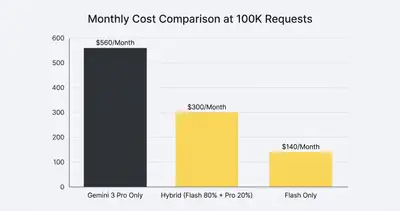
High volume: 1M+ requests per month
Scenario: Enterprise automation processing large-scale data, content generation, or customer interactions.
Assumptions:
- 15,000 input tokens per request
- 4,000 output tokens per request
- Mix of simple (80%) and complex (20%) tasks
Monthly costs (Pro only):
- 1M requests: ~$30,000 input + $48,000 output = $78,000/month
Optimization strategies:
- Hybrid approach (Flash 80%, Pro 20%): ~$15,600 Flash + $15,600 Pro = $31,200/month (60% savings)
- Batch processing on the Flash share: ~$7,800 Flash + $15,600 Pro = $23,400/month (70% savings)
- Context caching: cuts the input side further, by how much depends on how much of each prompt repeats
Key takeaway: On these assumptions, routing and batching cut the bill by 60-70%. Your result depends on how many of your tasks Flash can handle.
Key Insight: The biggest cost savings come from using the right model tier for each task. The examples above assume Flash can handle 80% of requests. Test that share on your own tasks before you budget on it.
What Are the Common Misconceptions About Google Gemini 3 Pricing?
Several misconceptions can lead to overpaying or choosing the wrong pricing model.
"Free tier is enough for production"
Reality: Free tier has rate limits and may throttle during peak hours. For production automations processing hundreds or thousands of requests daily, you'll likely need paid plans or API pricing.
When free works:
- Testing and prototyping
- Personal projects with low volume
- Learning and experimentation
When to upgrade:
- Production workflows that need consistent access
- High-volume usage (1,000+ requests per day)
- Need for guaranteed response times
- Enterprise features or compliance requirements
"API pricing is the same as consumer plans"
Reality: API pricing is pay-as-you-go and scales with usage. Consumer plans are flat-rate subscriptions for people using the Gemini app. A subscription does not include API usage, so the two only compete when a person in the app could do the job instead of an automation.
Decision framework:
- Calculate your expected API costs based on usage
- Compare to subscription plan costs
- Factor in other Google One benefits if relevant
- Test with actual usage before committing long-term
"Bigger context window always saves money"
Reality: You pay for tokens you send, not capacity available. A 1M token context window doesn't cost more than a 128K window if you only send 50K tokens. However, larger contexts can enable single-call processing that saves money vs multiple calls.
When large context saves money:
- Processing entire documents in one call vs chunking
- Maintaining long conversation histories
- Analyzing complete codebases with full context
When large context wastes money:
- Sending unnecessary context in every request
- Not using context caching for repeated content
- Including irrelevant data that increases token count
Optimization:
- Only include necessary context
- Use context caching for repeated base content
- Chunk large documents when single-call processing isn't needed
How Can You Optimize and Control Your Google Gemini 3 Spending?
These strategies can significantly reduce Gemini 3 costs without sacrificing capability for most workflows.
Strategy 1: Use the right model tier for each task
The approach: Use Gemini 3 Flash for simple tasks and Gemini 3.1 Pro only for complex reasoning or multimodal tasks.
Cost impact:
- Flash costs a quarter of Pro for both input and output ($0.50 vs $2.00 and $3.00 vs $12.00 per million tokens)
- Tasks moved to Flash cost 75% less
- Pro still available for tasks that need it
Implementation:
- Route simple queries (classification, extraction, basic generation) to Flash
- Route complex queries (reasoning, analysis, multimodal) to Pro
- Use a simple rule: "If it doesn't need advanced reasoning, use Flash"
Strategy 2: Batch processing for non-real-time workflows
The approach: Queue requests and process them in batches to get batch pricing (50% discount on Flash).
Cost impact:
- 50% reduction on Flash input/output costs
- Best for workflows that don't need immediate responses
When to use:
- Report generation
- Data processing jobs
- Content generation that can be queued
- Any workflow with acceptable latency (minutes to hours)
Tradeoffs:
- Longer latency (requests queued and processed together)
- May require infrastructure for queuing
- Not suitable for real-time applications
Strategy 3: Cache responses for repeated queries
The approach: Store responses for queries that are likely to be repeated, and serve cached results instead of making new API calls.
Cost impact:
- A cached answer costs nothing to serve again
- Total savings depend on how often queries repeat, so measure your cache hit rate
When to use:
- Frequently asked questions
- Repeated data lookups
- Static content generation
- Any query pattern with repetition
Implementation:
- Identify queries that are likely to repeat
- Implement caching layer (Redis, database, or file-based)
- Set appropriate cache expiration based on data freshness needs
- Monitor cache hit rates to measure effectiveness
Strategy 4: Optimize prompt length
The approach: Remove unnecessary context, use concise prompts, and leverage context caching for repeated base content.
Cost impact:
- Reduces input token costs directly
- Context caching bills repeated input at $0.20 per million tokens on Pro instead of $2.00, plus storage
Optimization techniques:
- Remove irrelevant context from prompts
- Use concise, focused prompts
- Leverage context caching for system prompts, style guides, or base documents
- Chunk large documents when full context isn't needed
Strategy 5: Set output length limits
The approach: Use max_tokens parameters to cap output length and prevent unnecessarily long responses.
Cost impact:
- Reduces output token costs (the biggest cost driver)
- Every output token you cut saves 6x what an input token would
Implementation:
- Set max_tokens based on actual needs
- Test different limits to find optimal balance
- Use shorter limits for simple tasks, longer for complex analysis
- Monitor output quality to ensure limits don't hurt results
Strategy 6: Hybrid approach: Flash + Pro
The approach: Use Flash for simple queries and Pro for complex reasoning or multimodal work. The example below assumes an 80/20 split.
Cost impact:
- About 60% cheaper than Pro-only at an 80/20 split
- Maintains capability for complex tasks
- Best of both worlds: cost efficiency + advanced features
Example savings:
- Pro-only (100K requests): ~$5,600/month
- Hybrid (80K Flash + 20K Pro): ~$2,240/month (60% savings)
- Hybrid + batch processing on the Flash share: ~$1,680/month (70% savings)
When Does Google Gemini 3 Provide the Best Value for Your Business?
Gemini 3 pricing makes the most sense for specific use cases where its strengths align with your needs.
Multimodal workloads (images, video, audio)
Why Gemini 3 wins:
- Native multimodal processing in a single model
- Competitive pricing for multimodal inputs
- No need for separate image/video processing services
Cost comparison:
- Gemini 3 processes text + images in one call
- Alternatives may require separate API calls for each modality
- Can reduce complexity and latency vs multi-service approaches
Best for:
- Document analysis with images
- Video content analysis
- Audio transcription and analysis
- Content generation with mixed media
Large context needs (1M tokens)
Why Gemini 3 wins:
- 1,048,576-token input window on both Pro and Flash
- Competitive pricing even with large contexts
- Single-call processing for entire codebases or long documents
Cost comparison:
- May require chunking and multiple API calls
- Gemini 3's large context can reduce total API calls
Best for:
- Codebase analysis
- Long document processing
- Extensive conversation histories
- Document intelligence platforms
Google ecosystem integration
Why Gemini 3 wins:
- Native integration with Google Workspace (Docs, Sheets, Gmail)
- Seamless authentication and access
- No additional integration costs
Cost comparison:
- Alternatives may require custom integrations
- Additional middleware or API gateway costs
- More complex setup and maintenance
Best for:
- Teams already using Google Workspace
- Workflows that integrate with Google services
- Organizations with Google Cloud infrastructure
High-volume simple tasks
Why Gemini 3 Flash wins:
- Very competitive pricing for simple tasks ($0.25-0.50/1M input, $1.50-3.00/1M output)
- Batch processing offers 50% additional discount
- Can handle high volume efficiently
Cost comparison:
- Flash is often cheaper than alternatives for simple tasks
- Batch processing makes it even more cost-effective
- Good fit for classification, extraction, basic generation
Best for:
- High-volume text processing
- Simple classification and extraction
- Cost-sensitive applications
- Non-real-time batch workflows
How Do You Align Google Gemini 3 Costs With Your Specific Usage Needs?
Gemini 3 pricing offers flexibility across free, consumer, API, and enterprise tiers. The right choice depends on your usage patterns, volume, and specific needs.
Key takeaways:
- Output tokens drive most costs—optimize response length
- Use Flash for simple tasks, Pro for complex reasoning
- Batch processing halves Flash rates, and cached input on Pro costs 90% less
- Large context windows only save money if you use them effectively
- Test with actual usage before committing to long-term plans
For detailed token cost calculations, see our AI Token Cost Calculator. For comparison with other models, see Gemini 3 vs OpenAI: Cost, Limits, and Tradeoffs.
If you're building automations and need help optimizing Gemini 3 costs, contact us to discuss how we can help you choose the right pricing tier and implement cost-control strategies that scale with your business.