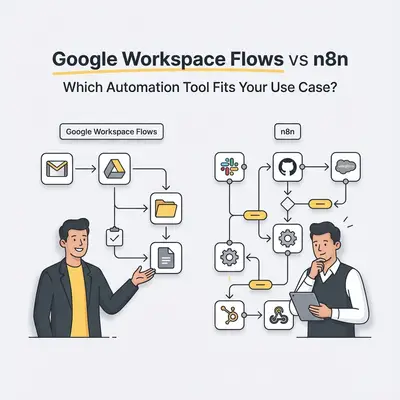
Choosing between Google Workspace Studio and n8n isn't about finding the "best" automation tool. It's about matching the tool to your actual workflow needs, team skills, and business constraints.
A 12-person marketing agency needs to automate lead capture from Google Forms into Sheets, then notify itself in Chat when a lead needs attention. A 25-person SaaS company needs to sync customer data between Salesforce, QuickBooks, and Slack. Both are automation problems, but they require different solutions.
Google Workspace Studio excels at Google-to-Google automation with built-in AI intelligence. n8n shines when you need multi-platform integrations, self-hosting control, or complex workflow logic. Understanding when to choose each tool prevents the most common mistake: picking based on hype instead of fit.
Quick Win: If your workflows live entirely within Google Workspace (Gmail, Drive, Sheets, Calendar, Chat), start with Studio. If you need connections to CRM, accounting, project management, or custom APIs, n8n is the better choice.
The 30-Second Answer (Pick This If...)
Choose Google Workspace Studio when:
- Your workflows primarily use Google Workspace apps
- You want AI-powered features (sentiment analysis, content generation) built into automation
- You need a solution that works immediately without setup or maintenance
- Your team prefers natural language over visual workflow builders
- You're already paying for Gemini for Google Workspace
Choose n8n when:
- You need integrations with non-Google apps (Slack, Salesforce, Shopify, etc.)
- You require self-hosting for data control or compliance
- You need advanced workflow logic, error handling, or custom code nodes
- You want to connect to custom APIs or internal systems
- Your workflows span multiple platforms outside Google Workspace
The reality: Most small businesses need both. Studio handles Google-to-Google automation with AI, while n8n manages everything else. The question isn't "which one?"—it's "which one first?"
Decision Framework: 6 Factors That Matter
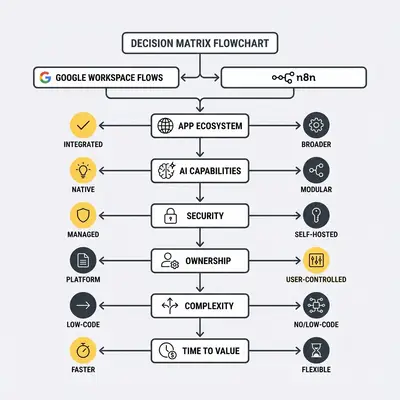
Use these six factors to avoid choosing the wrong tool for your situation.
Factor 1: App Ecosystem
Google Workspace Studio: Built around Google Workspace (Gmail, Drive, Sheets, Docs, Calendar, Chat), with a limited-preview set of third-party steps (Asana, Jira, Mailchimp, Salesforce, HubSpot, monday) via webhooks or Apps Script - some requiring an admin-installed helper app. It's optimized for Google-to-Google workflows first.
n8n: Connects to 400+ apps including Slack, Salesforce, HubSpot, Trello, Shopify, and thousands more via custom API nodes. If your workflow needs data from outside Google Workspace, n8n is the only viable option today.
Decision rule: If your automation involves any non-Google app, choose n8n. If everything happens within Google Workspace, Studio is the simpler build.
Factor 2: AI Capability Placement
Google Workspace Studio: Gemini AI is deeply integrated into the platform. You can ask Gemini to summarize emails, analyze sentiment, extract data, generate content, and route workflows based on context—all without separate AI integrations. This is Studio's biggest differentiator.
n8n: Supports AI through integrations with OpenAI, Anthropic, Google AI, and other providers. You can build complex agent workflows, chain multiple AI models, and use custom code for advanced logic. More flexible, but requires more setup and technical knowledge.
Decision rule: If you want AI-powered automation that "just works" within Google Workspace, Studio wins. If you need multi-model AI workflows, custom AI logic, or AI outside the Google ecosystem, n8n is better.
Factor 3: Governance, Security, and Compliance
Google Workspace Studio: Data lives in Google's cloud infrastructure. Google handles security, compliance (SOC 2, GDPR), and infrastructure management. You get enterprise-grade security without managing it yourself, but you have less control over data residency or custom compliance requirements.
n8n: Offers three deployment options with different security profiles:
- n8n Cloud: Managed by n8n team, SOC 2 compliant, data encrypted at rest (n8n Security)
- n8n Self-Hosted: Full control over data, infrastructure, and compliance. Ideal for regulated industries or data residency requirements
Decision rule: For most businesses, both options meet compliance needs. If you need data to stay on-premises or have strict regulatory requirements, n8n Self-Hosted is the only choice.
Factor 4: Ownership and Maintenance
Google Workspace Studio: Fully managed by Google. Zero setup, zero maintenance, zero infrastructure to manage. You pay for the Workspace subscription, and Google handles everything else. The trade-off: less control over updates, features, and availability.
n8n:
- n8n Cloud: Managed by n8n team, similar to Studio but with more customization options
- n8n Self-Hosted: You own the infrastructure, updates, and maintenance. Free Community Edition available, but requires technical expertise to manage
Decision rule: If you want hands-off automation, choose Studio or n8n Cloud. If you need full control and have technical resources, n8n Self-Hosted offers maximum flexibility.
Factor 5: Complexity and Reliability Patterns
Google Workspace Studio: Designed for straightforward workflows with built-in error handling. Great for simple to medium-complexity automations like "when email arrives, summarize it, log to Sheet, alert in Chat." Less suitable for complex branching logic, retry strategies, or custom error handling.
n8n: Supports advanced workflow patterns including:
- Complex conditional logic and branching
- Retry strategies with exponential backoff
- Error workflows and dead-letter queues
- Queue mode for high-volume processing
- Custom JavaScript/Python code nodes
Decision rule: For simple workflows, both tools work. For complex logic, error handling, or high-volume processing, n8n provides more control and reliability options.
Factor 6: Time to Value
Google Workspace Studio: You can build your first flow in minutes by describing it to Gemini in plain language. Templates and AI assistance make it accessible to non-technical users. The barrier is licensing tier (Business or Enterprise with Gemini for Google Workspace), not a rollout wait.
n8n: Visual workflow builder requires learning curve (1-2 weeks for basic proficiency). More powerful, but takes longer to master. Self-hosting adds setup time (hours to days depending on infrastructure).
Decision rule: If you need automation working today and your workflow is Google-only, Studio is faster. If you need multi-platform integrations or can invest in learning, n8n pays off long-term.
Real-World Scenarios: What We Recommend
Here are four common small business scenarios and which tool fits best.
Scenario 1: Inbox Triage → Sheet Logging → Chat Alert
The workflow: When a high-priority email arrives, summarize it, log details to a Google Sheet, and notify yourself in Google Chat so nothing sits unread.
Best pick: Google Workspace Studio
Why: This is pure Google-to-Google automation with AI intelligence. Studio can use Gemini to analyze email sentiment, extract key information, and route based on context—all without custom code or complex setup. Note that "Notify me in Chat" only ever reaches the flow's owner; there's no step that posts to a shared Chat space, so a team-wide alert still needs a human to relay it or a shared Sheet the team watches.
Fallback: If your team needs a message posted directly into a shared Chat space or Slack channel, n8n can handle that piece; you'll need to set up Gmail, Sheets, and Chat integrations separately, and add an AI service (OpenAI, Anthropic) for summarization.
Scenario 2: CRM Sync → Accounting → Slack Notifications
The workflow: When a new customer signs up in Salesforce, create an invoice in QuickBooks, update a project in Asana, and notify the team in Slack.
Best pick: n8n
Why: This workflow spans four different platforms (Salesforce, QuickBooks, Asana, Slack), none of which are Google Workspace apps. Studio's third-party reach stops at a limited-preview set of steps for a handful of apps (Salesforce and Asana are on that list, QuickBooks and Slack aren't), so it can't orchestrate this end to end. n8n has native integrations for all four and can run the entire workflow.
Alternative: You could use Studio for the Google Workspace parts (like logging to Sheets) and n8n for the rest, but that adds complexity. For multi-platform workflows, n8n is the better single solution.
Scenario 3: Regulated Data Processing with Compliance Requirements
The workflow: A healthcare company needs to process patient data, sync it between systems, and ensure all data stays on-premises for HIPAA compliance.
Best pick: n8n Self-Hosted
Why: Studio runs on Google's cloud infrastructure, which may not meet strict data residency requirements. n8n Self-Hosted gives you full control over where data lives, how it's encrypted, and who has access. You can deploy it on your own servers or private cloud.
Reality check: Self-hosting requires technical expertise. If you don't have DevOps resources, consider n8n Cloud with a Business Associate Agreement, or evaluate whether cloud-based solutions meet your compliance needs.
Scenario 4: High-Volume Webhook Processing
The workflow: An e-commerce business receives 5,000+ webhook events daily from Shopify, Stripe, and shipping providers. Each event needs processing, validation, error handling, and retry logic.
Best pick: n8n
Why: n8n supports queue mode, advanced error handling, and high-volume processing patterns. Studio is designed for lower-volume, user-triggered workflows. For high-throughput automation, n8n's architecture is better suited.
Consideration: n8n Cloud Enterprise or self-hosted with proper infrastructure scaling is required for this volume.
Cost Comparison
Understanding where the cost actually lands prevents sticker shock later.
Google Workspace Studio
Direct costs:
- Included in Business and Enterprise Workspace plans with Gemini for Google Workspace - there's no separate line item or per-flow charge for Studio itself
- Cost is dominated by your Workspace license tier and Gemini add-on, not by anything Studio-specific
Hidden costs:
- Learning curve: minimal (natural language interface)
- Maintenance: low (fully managed by Google)
n8n
Direct costs:
- Self-Hosted Community Edition: free, unlimited executions, but you run and secure the infrastructure yourself
- n8n Cloud: priced by monthly executions, with plans scaling from a Starter tier up through Business and Enterprise; see n8n's current pricing for exact numbers, since tiers and limits change
- Self-Hosted Business/Enterprise: license fee plus your own infrastructure, with RBAC and environments included
Hidden costs:
- Self-Hosted: server or Kubernetes costs, plus ongoing time to run updates, monitoring, and security patches
- Cloud: a real learning curve (expect 1-2 weeks to reach basic proficiency) and ongoing workflow management time
Reality Check: For teams already paying for Google Workspace, Studio adds no incremental license cost. n8n's cost depends entirely on deployment choice and execution volume - check current pricing before committing rather than budgeting from a rule of thumb.
The Hybrid Approach: Using Both Tools
Many successful teams use Studio and n8n together, not as competitors but as complementary tools.
Use Studio for:
- Google-to-Google automation (Gmail → Sheets → Chat)
- AI-powered tasks within Workspace (sentiment analysis, content generation)
- Quick wins that don't require external integrations
Use n8n for:
- Multi-platform workflows (CRM → Accounting → Project Management)
- Custom API integrations
- Complex logic and error handling
- Self-hosted requirements
Example hybrid workflow:
- Studio monitors Gmail for customer support emails
- Studio uses Gemini to analyze sentiment and extract key details
- Studio logs high-priority issues to Google Sheets
- n8n watches the Sheet for new high-priority rows
- n8n creates tickets in Zendesk, updates Salesforce, and notifies Slack
This approach leverages each tool's strengths: Studio for Google-native AI automation, n8n for everything else.
Common Mistakes to Avoid
These patterns lead to wasted time and money.
Mistake 1: Assuming Studio Replaces All Automation Tools
The mistake: "We have Google Workspace, so we only need Studio."
The reality: Studio works within Google Workspace only. If your business uses Salesforce, QuickBooks, Shopify, or any non-Google tool, you'll still need n8n, Make.com, or Zapier for those integrations.
How to avoid: Map your workflows first. If any step involves a non-Google app, plan for a hybrid approach or choose n8n as your primary tool.
Mistake 2: Choosing n8n Self-Hosted Without Technical Resources
The mistake: "n8n is free, so we'll self-host it."
The reality: Self-hosting requires server management, updates, monitoring, and troubleshooting. If you don't have DevOps expertise, the "free" option costs more in time than paying for Cloud.
How to avoid: Start with n8n Cloud or Studio. Only self-host if you have technical resources and specific requirements (compliance, data residency, cost at scale).
Mistake 3: Skipping the Licensing Check
The mistake: "We'll use Studio for everything."
The reality: Studio requires a Business or Enterprise Workspace plan with Gemini for Google Workspace. Teams on Starter plans or personal Google accounts don't have access.
How to avoid: Confirm your plan tier first using our eligibility guide. If you're not on a qualifying plan, n8n is your immediate option.
Pro Tip: Don't let perfect be the enemy of good. If your plan doesn't include Studio, start with n8n. You can always add Studio later for Google-to-Google workflows once you upgrade.
Migration Path: Starting with Studio, Growing with n8n
A smart approach for many teams:
Phase 1: Start with Studio
- Automate simple Google-to-Google workflows
- Learn automation patterns with low risk
- Build team confidence with quick wins
Phase 2: Add n8n for External Integrations
- Keep Studio for Google Workspace automation
- Use n8n for CRM, accounting, project management connections
- Build hybrid workflows that leverage both tools
Phase 3: Optimize Based on Needs
- Evaluate which tool handles each workflow better
- Consolidate where it makes sense
- Scale what's working
This phased approach reduces risk, builds expertise gradually, and lets you optimize based on real experience rather than assumptions.
Conclusion: Choose Based on Your Actual Needs
There's no universal winner. The right tool depends on your workflows, team skills, and business constraints.
Choose Google Workspace Studio if:
- Your automation lives within Google Workspace
- You want AI-powered features without separate integrations
- You need quick setup with minimal learning curve
- You're on a Workspace plan that includes Studio
Choose n8n if:
- You need integrations with non-Google apps
- You require self-hosting for compliance or control
- You need advanced workflow logic and error handling
- Your workflows span multiple platforms
Use both if:
- You have Google Workspace workflows and external integrations
- You want to leverage each tool's strengths
- You're building a comprehensive automation strategy
The most successful teams don't pick one tool and stick with it. They choose the right tool for each workflow, often using Studio for Google-native automation and n8n for everything else.
Ready to build your automation strategy? Start by mapping your workflows, then choose the tool that fits each use case. If you need help deciding, book a free automation audit and we'll help you build a roadmap that leverages the right tools for your needs.
Related Resources
- Google Workspace Studio: What It Is + How It Works - Learn the basics of Studio before comparing
- Is Google Workspace Studio (Flows) Included in Your Gemini License? - Check if Studio is included in your plan
- Google Workspace Studio Use Cases & Implementation Guide - See practical examples of Studio in action
- Make vs n8n 2025: In-Depth Comparison - Compare n8n with another popular automation platform
About the Author
Kevin Michael Schindler is an AI Automation Expert at Evalics, helping small businesses and teams implement practical automation systems that save time and reduce operational drag.