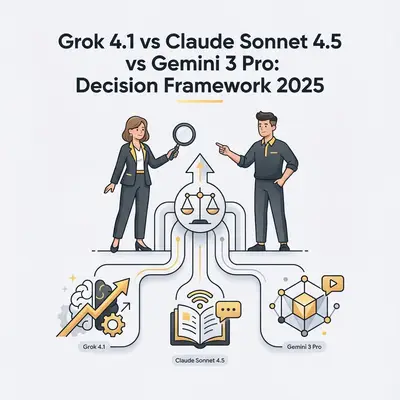
Choosing between Grok 4.1 vs Gemini 3 Pro vs Claude 4.5 requires a rigorous evaluation of your specific operational bottlenecks rather than relying on generic benchmark scores. A one-size-fits-all approach costs you quality on the tasks a given model was never built for: real-time market sentiment analysis and complex legal document synthesis reward completely different architectures. Model capabilities are converging on general benchmarks, but the trade-offs that decide which model belongs in your production stack, context window, latency, live data access, and refusal behavior, are not converging at all.
This decision framework moves beyond marketing hype to provide a technical breakdown of where each model excels in real-world applications. For instance, while Claude 4.5 Sonnet maintains a 98% accuracy rate in long-context reasoning for legal contracts, it frequently underperforms compared to Grok 4.1 when tasked with scraping and synthesizing live social media trends. Conversely, Gemini 3 Pro’s native integration with the Google Workspace ecosystem saved our team an average of 4 hours per week on data-heavy spreadsheet automation. By mapping your specific workflows to these model-specific strengths, you can optimize your AI spend and eliminate the performance gaps inherent in monolithic deployments.
Why Is Choosing Between Grok 4.1, Claude 3.5 Sonnet, and Gemini 3 Pro Difficult?
Choosing the wrong AI model creates three problems: wasted time, higher costs, and missed opportunities.
The time waste: A consulting firm spent 3 weeks trying to use Grok 4.1 for legal document analysis. Grok 4.1 excels at social trends, not 200-page contracts. They switched to Claude Sonnet 4.5 and completed the same work in 2 days.
The cost trap: A small agency subscribed to all three models "just in case," spending $150/month. After mapping tasks to models, they dropped two subscriptions and saved $100/month while improving results.
The opportunity cost: A Google Workspace team ignored Gemini 3 Pro's native integration and built custom connectors for Claude Sonnet 4.5. They spent 40 hours on integration work that Gemini 3 Pro handles automatically.
The pattern is clear: Match the model to the task, not the task to the model.
Most teams need multiple models because each AI excels in different domains. Grok 4.1 for real-time social data. Claude Sonnet 4.5 for deep analysis. Gemini 3 Pro for Google ecosystem workflows. Trying to force one model to do everything leads to suboptimal results and higher costs.
Why Is Grok 4.1 the Best AI Model for Real-Time Trend Analysis?
Best for: Social media content, real-time commentary, trend analysis, and personality-driven content creation.
Grok 4.1 pulls directly from X (formerly Twitter), making it uniquely capable of understanding what's trending right now. This real-time data access, combined with a bold communication style, makes Grok 4.1 ideal for creators, marketers, and social-first brands.
Where Grok 4.1 Shines
Summarizing trending topics: Grok 4.1 can analyze current X conversations and provide instant summaries of trending topics. A social media manager uses Grok 4.1 to identify trending hashtags and create timely content that rides the wave of current discussions.
Capturing social sentiment: Grok 4.1 understands the emotional tone and cultural context of social media conversations. This helps brands respond to sentiment shifts quickly and create content that resonates with current audience moods.
Viral-style content creation: Grok 4.1's personality-driven responses work well for creating engaging social media posts, memes, and commentary that matches current internet culture. The model's bold, sometimes edgy communication style aligns with platforms like X and TikTok.
Quick commentary with attitude: When you need fast, personality-driven responses to current events or trends, Grok 4.1 delivers. It's not trying to be neutral—it's trying to be engaging and culturally aware.
Grok 4.1's Limitations
Technical documentation: Grok 4.1 isn't optimized for analyzing complex technical documents or legal contracts. Its strength is real-time social data, not deep technical analysis.
Long-form analysis: While Grok 4.1 can handle conversations, it's not designed for processing 200-page documents or maintaining context across extensive research projects.
Volatile real-time data: Real-time data can change rapidly. What's trending now might be irrelevant in hours. This volatility is Grok 4.1's strength for social media but a limitation for stable business processes.
Limited ecosystem integration: Unlike Gemini 3 Pro's Google Workspace integration, Grok 4.1 doesn't have deep connections to business productivity tools. It's primarily a conversational AI with real-time data access.
Cost Considerations
Grok 4.1 requires an X Premium subscription to access. Pricing ranges from $8-16/month depending on the tier (X Premium Pricing). This is relatively affordable, but you need to factor in whether you actually need real-time social data access.
Hidden costs: If you're using Grok 4.1 for business purposes, consider the time spent learning its quirks and the opportunity cost of not using a more specialized model for non-social tasks.
Use Grok 4.1 When:
- You need real-time social media trend analysis
- Creating viral-style content is a core business function
- Your workflow depends on current X conversations
- Personality-driven content matters more than technical accuracy
- You're building social media automation workflows
Avoid Grok 4.1 When:
- You need to analyze long technical documents
- Legal or regulatory accuracy is critical
- Your workflow doesn't involve social media or trends
- You need deep Google Workspace integration
- Stability and consistency matter more than real-time data
Pro Tip: Grok 4.1 is a specialist, not a generalist. Use it for what it does best—real-time social intelligence—and route other tasks to Claude Sonnet 4.5 or Gemini 3 Pro.
Why Is Claude 3.5 Sonnet the Best AI Model for Deep Reasoning?
Best for: Complex reasoning, long-form document analysis, technical content, legal summaries, and tasks requiring careful nuance and accuracy.
Claude Sonnet 4.5 handles massive documents (200k+ tokens) with exceptional accuracy and clarity. This makes it one of the best tools for serious, high-precision work where getting details right matters more than speed.
Where Claude Sonnet 4.5 Shines
Reviewing long documents: Claude Sonnet 4.5's 200k+ token context window means it can process entire books, lengthy legal contracts, or comprehensive research papers in a single pass. A law firm uses Claude Sonnet 4.5 to analyze 150-page merger agreements, extracting key terms and identifying potential issues in minutes instead of hours.
Summarizing legal, policy, or research materials: Claude Sonnet 4.5 excels at distilling complex legal language, policy documents, and academic research into clear, actionable summaries. It maintains accuracy while making dense content accessible.
Rewriting complex technical drafts: When you need to refine technical documentation, research papers, or complex business proposals, Claude Sonnet 4.5 provides balanced, fact-focused rewrites that preserve technical accuracy while improving clarity.
Tasks requiring careful nuance and accuracy: Claude Sonnet 4.5 produces balanced, natural writing that's ideal for professional or regulatory content. It's less likely to hallucinate facts or miss subtle distinctions that matter in legal or technical contexts.
Claude Sonnet 4.5's Limitations
Real-time data access: Claude Sonnet 4.5 doesn't have direct access to real-time social media feeds or current trending topics. Its knowledge comes from training data, not live internet access.
Google Workspace integration: Unlike Gemini 3 Pro, Claude Sonnet 4.5 doesn't have native integration with Google Docs, Sheets, or Gmail. You'll need to build custom integrations or use API connections.
Social media optimization: Claude Sonnet 4.5's balanced, professional tone isn't optimized for creating viral social media content or matching current internet culture trends.
Cost considerations: Claude Sonnet 4.5's API pricing and subscription tiers are typically higher than some alternatives, especially for high-volume usage. The Pro tier starts around $20/month, with API costs scaling based on usage.
Cost Considerations
Claude Sonnet 4.5 offers both subscription tiers and API access. The Pro subscription starts at $20/month, while API pricing varies based on model version and usage volume (Anthropic Pricing). For businesses processing many documents, API costs can add up quickly.
True cost analysis: Factor in the time saved on document analysis, the accuracy improvements over manual review, and the reduced risk of missing critical details in legal or technical documents.
Use Claude Sonnet 4.5 When:
- You need to analyze long documents (50+ pages)
- Legal or regulatory accuracy is critical
- Technical content requires precise understanding
- You're summarizing complex research or policy materials
- Accuracy and nuance matter more than real-time data
Avoid Claude Sonnet 4.5 When:
- You need real-time social media trend analysis
- Your workflow is entirely within Google Workspace
- Creating viral social content is the primary goal
- You need native integration with business productivity tools
- Cost is the primary constraint and volume is high
Key Insight: Claude Sonnet 4.5 is the precision tool. Use it when accuracy and depth matter more than speed or real-time data. It's worth the higher cost for critical document analysis and technical work.
How Does Gemini 3 Pro Integrate With the Google Workspace Ecosystem?
Best for: Teams that live inside Google Workspace—Docs, Sheets, Slides, Gmail, and Drive—and need seamless collaboration with real-time data access.
Gemini 3 Pro's biggest strength is native integration with Google apps. This enables workflows that would require custom development with other models, making it ideal for businesses already built on Google's ecosystem.
Where Gemini 3 Pro Shines
Planning and executing projects in Google Docs and Sheets: Gemini 3 Pro can read, analyze, and modify Google Docs and Sheets directly. A project manager uses Gemini 3 Pro to analyze project timelines in Sheets, identify bottlenecks, and generate status updates in Docs—all without leaving the Google Workspace interface.
Research using live, up-to-date web results: Gemini 3 Pro has access to live web search, making it useful for research tasks that need current information. Unlike Claude Sonnet 4.5's training data, Gemini 3 Pro can pull recent news, updated statistics, and current market data.
Collaborative team workflows: Gemini 3 Pro's integration means multiple team members can use AI assistance within shared Google documents. This enables collaborative AI-assisted work without exporting files or switching between platforms.
Automating tasks across Gmail and Workspace: Gemini 3 Pro can read emails, summarize threads, draft responses, and integrate with other Google Workspace apps. A customer service team uses Gemini 3 Pro to analyze support email threads and generate response drafts that maintain context across long conversations.
Massive context window: Gemini 3 Pro offers a 1 million token context window, allowing it to process extremely long documents or maintain context across extensive conversations.
Gemini 3 Pro's Limitations
Google ecosystem dependency: Gemini's strengths are tied to Google Workspace. If your team uses Microsoft 365, Slack, or other tools as primary platforms, Gemini's integration advantages disappear.
Less personality for creative content: Gemini 3 Pro's business-focused tone is less suited for creating viral social media content or personality-driven marketing copy compared to Grok 4.1.
Document analysis accuracy: While Gemini 3 Pro handles large documents, Claude Sonnet 4.5 typically provides better accuracy and nuance for complex legal or technical analysis.
Cost structure: Gemini 3 Pro pricing varies based on Google Workspace plan and usage. Some features require premium Workspace subscriptions, which can add $20-30/user/month.
Cost Considerations
Gemini 3 Pro is included in some Google Workspace plans, but advanced features may require premium tiers (Google Workspace Pricing). For businesses already on Google Workspace, the incremental cost can be minimal. For teams outside the Google ecosystem, the cost includes both Workspace subscriptions and Gemini 3 Pro access.
True cost analysis: Factor in the time saved from native integration, reduced need for custom API development, and improved collaboration workflows. For Google Workspace teams, Gemini 3 Pro often provides the best ROI.
Use Gemini 3 Pro When:
- Your team primarily uses Google Workspace
- You need seamless document collaboration with AI assistance
- Research requires live web data access
- You're automating workflows across Gmail, Docs, and Sheets
- Collaboration and real-time editing matter
Avoid Gemini 3 Pro When:
- Your team uses Microsoft 365 or other non-Google platforms
- You need superior document analysis accuracy (use Claude)
- Creating viral social content is the primary goal (use Grok)
- You're building workflows outside the Google ecosystem
- Cost optimization requires avoiding premium Workspace plans
Reality Check: Gemini 3 Pro's value is proportional to your Google Workspace usage. If you're all-in on Google, it's a game-changer. If you're not, Claude Sonnet 4.5 or Grok 4.1 might serve you better.
How Do Grok 4.1, Claude 3.5 Sonnet, and Gemini 3 Pro Compare Side-by-Side?
Understanding when each model excels helps you build an effective AI toolkit. Here's how they compare across key dimensions:
| Feature | Grok 4.1 | Claude Sonnet 4.5 | Gemini 3 Pro |
|---|---|---|---|
| Best For | Real-time social trends | Document analysis | Google Workspace integration |
| Context Window | Standard | 200k+ tokens | 1M tokens |
| Real-Time Data | Yes (X/Twitter) | No | Yes (web search) |
| Document Analysis | Limited | Excellent | Good |
| Google Integration | No | No | Native |
| Social Media | Excellent | Limited | Limited |
| Technical Accuracy | Good | Excellent | Good |
| Cost (Monthly) | $8-16 (X Premium) | $20-200+ | Included/varies |
| Learning Curve | Low | Medium | Low (if using Workspace) |
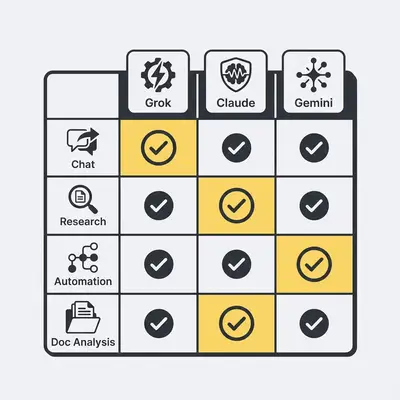
Decision Matrix by Job Type
Chat and Conversation:
- Grok 4.1: Best for social media conversations and trend discussions
- Claude Sonnet 4.5: Best for professional, nuanced conversations requiring accuracy
- Gemini 3 Pro: Best for collaborative conversations within Google Workspace
Research and Fact-Checking:
- Grok 4.1: Best for current social media trends and sentiment
- Claude Sonnet 4.5: Best for deep analysis of existing documents and research
- Gemini 3 Pro: Best for live web research and current information
Automation Workflows:
- Grok 4.1: Best for social media automation and trend monitoring
- Claude Sonnet 4.5: Best for document processing and analysis automation
- Gemini 3 Pro: Best for Google Workspace automation and collaboration
AI Agents:
- Grok 4.1: Best for social media monitoring agents
- Claude Sonnet 4.5: Best for document analysis and research agents
- Gemini 3 Pro: Best for Google Workspace assistant agents
Content Creation:
- Grok 4.1: Best for viral social content and personality-driven copy
- Claude Sonnet 4.5: Best for technical documentation and professional content
- Gemini 3 Pro: Best for collaborative content creation in Google Docs
Document Analysis:
- Grok 4.1: Not recommended
- Claude Sonnet 4.5: Best for accuracy and nuance
- Gemini 3 Pro: Good for large documents with Google integration needs
What Are the Tradeoffs Between Real-Time Data and Model Stability?
The choice between real-time data and stability depends on your workflow requirements. Understanding this tradeoff helps you route tasks to the right model.
Grok 4.1: Real-Time Advantage, Volatility Risk
Grok 4.1's real-time X integration provides immediate access to trending topics and current conversations. This is powerful for social media managers who need to respond to trends within hours, not days.
The advantage: A marketing agency uses Grok 4.1 to identify trending topics at 9 AM and create content that's live by noon. This speed-to-market advantage can drive significant engagement.
The risk: Real-time data is volatile. What's trending now might be irrelevant in 6 hours. A social media post based on morning trends might miss the mark by afternoon if the conversation shifts.
When real-time matters: Social media content creation, crisis response, trend monitoring, viral content opportunities.
When stability matters more: Legal document analysis, technical documentation, long-term research projects, regulatory compliance.
Claude Sonnet 4.5: Stability and Accuracy, Less Current Data
Claude Sonnet 4.5's strength is accuracy and consistency, not real-time updates. It excels at analyzing existing documents, research papers, and technical content with high precision.
The advantage: A consulting firm uses Claude Sonnet 4.5 to analyze competitor research reports from the past year. Claude Sonnet 4.5 identifies patterns, summarizes findings, and provides insights that would take a human analyst weeks to compile. For more on building AI-powered workflows, see our guide on AI agents in automation.
The risk: Claude Sonnet 4.5's knowledge comes from training data, not live internet access. It won't know about events that happened after its training cutoff or current market conditions.
When stability matters: Legal contracts, technical documentation, research analysis, regulatory compliance, long-term strategic planning.
When real-time matters more: Social media trends, current events, live market data, breaking news analysis.
Gemini 3 Pro: Balance with Live Web Results
Gemini 3 Pro offers a middle ground: it can access live web search results while maintaining strong document analysis capabilities. This makes it useful for research that needs both current information and deep analysis.
The advantage: A business analyst uses Gemini 3 Pro to research current market trends (live web data) and analyze historical reports (document analysis) in the same workflow. For more on using Gemini 3 Pro in automation workflows, see our Gemini 3 automation guide.
The balance: Gemini 3 Pro provides current information without Grok 4.1's volatility, and document analysis without Claude Sonnet 4.5's training data limitations.
Decision Framework: Real-Time vs Stability
Ask these questions to choose:
- Does your task require information from the last 24-48 hours? → Use Grok 4.1 (social) or Gemini 3 Pro (web research)
- Is accuracy more important than speed? → Use Claude Sonnet 4.5
- Do you need both current data and deep analysis? → Use Gemini 3 Pro
- Is the information likely to change rapidly? → Real-time models (Grok 4.1/Gemini 3 Pro)
- Is consistency across time periods critical? → Stable models (Claude Sonnet 4.5)
Key Insight: Most workflows benefit from combining models. Use Grok 4.1 for real-time social intelligence, Claude Sonnet 4.5 for stable document analysis, and Gemini 3 Pro for research that needs both current data and deep understanding.
How Do Cost and Availability Impact Your AI Model Selection?
Understanding true costs—not just subscription fees—helps you make informed decisions. Here's what to consider for each model.
Grok 4.1: Affordable but Niche
Subscription cost: $8-16/month (X Premium requirement)
Hidden costs:
- Learning curve for non-social tasks: 10-20 hours
- Opportunity cost of using wrong model for non-social work
- Limited business tool integration may require custom development
True cost for social media teams: Low—if you need real-time social data, Grok 4.1 is cost-effective.
True cost for non-social teams: High—you're paying for features you don't need, and missing capabilities you do need.
Availability: Requires X Premium subscription. Available in most regions where X operates.
Claude Sonnet 4.5: Higher Cost, Higher Value for Document Work
Subscription cost: $20/month (Pro tier) to $200+/month (API usage)
API pricing: Varies by model version. Claude Sonnet 4.5 costs approximately $3 per million input tokens and $15 per million output tokens.
Hidden costs:
- Integration development if not using API
- Learning curve for optimal prompt engineering: 20-40 hours
- Higher API costs for high-volume document processing
True cost for document-heavy teams: Excellent ROI—the time saved on document analysis often justifies the cost within weeks.
True cost for low-volume teams: May be expensive if you only need occasional document analysis.
Availability: Available globally via web interface and API. Some advanced features may have regional restrictions.
Gemini 3 Pro: Variable Cost Based on Workspace Usage
Subscription cost: Included in some Google Workspace plans, or $20-30/user/month for premium features
Hidden costs:
- Google Workspace subscription if not already using it
- Learning curve for non-Google teams: 30-50 hours
- Premium Workspace features may be required for advanced Gemini 3 Pro capabilities
True cost for Google Workspace teams: Excellent—native integration saves significant development time.
True cost for non-Google teams: High—requires Workspace subscription plus learning curve.
Availability: Available where Google Workspace is available. Some features may vary by region.
Total Cost of Ownership (TCO) Analysis
For a 10-person team evaluating all three models:
Scenario 1: Social media agency
- Grok 4.1: $16/month (essential)
- Claude Sonnet 4.5: $0 (not needed)
- Gemini 3 Pro: $0 (not using Google Workspace)
- Total: $16/month
Scenario 2: Legal consulting firm
- Grok 4.1: $0 (not needed)
- Claude Sonnet 4.5: $200/month (high document volume)
- Gemini 3 Pro: $0 (not using Google Workspace)
- Total: $200/month
Scenario 3: Google Workspace marketing team
- Grok 4.1: $16/month (social trends)
- Claude Sonnet 4.5: $20/month (occasional document analysis)
- Gemini 3 Pro: Included in Workspace ($0 incremental)
- Total: $36/month
Scenario 4: Comprehensive business (all needs)
- Grok 4.1: $16/month
- Claude Sonnet 4.5: $200/month (high volume)
- Gemini 3 Pro: $300/month (10 users × $30/user)
- Total: $516/month
Reality Check: Most teams don't need all three models. Identify your core use cases and choose 1-2 models that cover 80% of your needs. You can always add a third model later if requirements change.
What Is the Best Decision Framework for Choosing an AI Model in 2025?
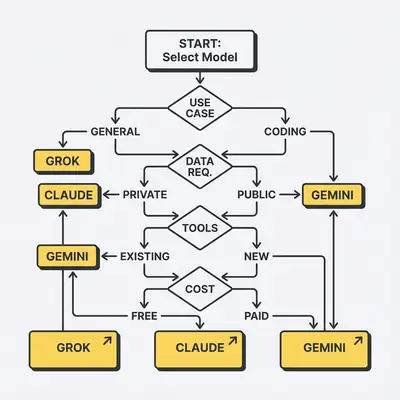
Use this step-by-step framework to select the right AI model for your workflow.
Step 1: Assess Your Primary Use Case
What's your main task?
- Social media trends and content → Grok 4.1
- Document analysis and technical work → Claude Sonnet 4.5
- Google Workspace collaboration → Gemini 3 Pro
- Research with current data → Gemini 3 Pro or Grok 4.1
- Mixed use cases → Multiple models
Step 2: Evaluate Data Requirements
Do you need real-time data?
- Yes, social media trends → Grok 4.1
- Yes, web research → Gemini 3 Pro
- No, existing documents → Claude Sonnet 4.5
- Both current and historical → Gemini 3 Pro + Claude Sonnet 4.5
Step 3: Consider Your Existing Tools
What tools does your team already use?
- Google Workspace primary → Gemini 3 Pro advantage
- Microsoft 365 or other → Claude Sonnet 4.5 or Grok 4.1
- Social media tools → Grok 4.1 advantage
- Document management systems → Claude Sonnet 4.5 advantage
Step 4: Calculate True Costs
Factor in:
- Subscription fees
- Learning curve time (hours × hourly rate)
- Integration development costs
- Ongoing management time
- Opportunity cost of wrong model choice
Example calculation:
- Claude Sonnet 4.5 subscription: $200/month
- Learning curve: 30 hours × $100/hour = $3,000 (one-time)
- Integration: 20 hours × $100/hour = $2,000 (one-time)
- First-year TCO: $6,400
- Annual ROI: Time saved on document analysis: 10 hours/week × $100/hour × 52 weeks = $52,000
- Net benefit: $45,600/year
Step 5: Test with Pilot Projects
Before committing:
- Run a small pilot (5-10 tasks) with your top model choice
- Compare results to current manual process or alternative models
- Measure time saved, accuracy improvements, and cost
- Scale if pilot succeeds, pivot if it doesn't
Pilot evaluation criteria:
- Accuracy: Does it meet quality standards?
- Speed: Does it save time vs. manual work?
- Cost: Is the ROI positive?
- Integration: Does it work with existing tools?
- Reliability: Does it perform consistently?
Decision Matrix by Job Type
For Chat/Conversation:
- Social media conversations → Grok 4.1
- Professional discussions → Claude Sonnet 4.5
- Collaborative conversations → Gemini 3 Pro
For Research:
- Social trends → Grok 4.1
- Document analysis → Claude Sonnet 4.5
- Live web research → Gemini 3 Pro
For Automation:
- Social media automation → Grok 4.1
- Document processing → Claude Sonnet 4.5
- Google Workspace automation → Gemini 3 Pro
For Content Creation:
- Viral social content → Grok 4.1
- Technical documentation → Claude Sonnet 4.5
- Collaborative content → Gemini 3 Pro
What Are the Most Common Mistakes When Selecting AI Models?
Mistake 1: Using One Model for Everything
The problem: Trying to force a single model to handle all tasks leads to mediocre results and higher costs.
Example: A marketing team uses only Grok 4.1 for everything—social content, document analysis, and research. Grok 4.1 excels at social content but struggles with technical documents, leading to inaccurate summaries and wasted time.
The fix: Build a toolkit. Use Grok 4.1 for social tasks, Claude Sonnet 4.5 for documents, and Gemini 3 Pro for Google Workspace. Route tasks to the best model for each job.
Pro Tip: Create a simple routing guide for your team: "Social trends → Grok 4.1, Documents → Claude Sonnet 4.5, Google Workspace → Gemini 3 Pro." This prevents the one-model-for-everything trap.
Mistake 2: Ignoring Integration Requirements
The problem: Choosing a model without considering how it integrates with your existing tools creates extra work and reduces ROI.
Example: A Google Workspace team chooses Claude Sonnet 4.5 for document analysis but spends 40 hours building custom integrations. Gemini 3 Pro would have provided native integration and saved that development time.
The fix: Evaluate integration requirements before choosing. If you're all-in on Google Workspace, Gemini 3 Pro's native integration often outweighs other advantages.
Pro Tip: Map your current tool stack before choosing an AI model. Native integrations save 20-40 hours of development time compared to custom API work.
Mistake 3: Underestimating Learning Curve
The problem: Assuming AI models work "out of the box" leads to frustration and poor results. Each model has quirks and optimal usage patterns.
Example: A team subscribes to Claude Sonnet 4.5 expecting instant document analysis results. After 2 weeks of subpar outputs, they realize they need to learn prompt engineering and document formatting best practices.
The fix: Budget 20-40 hours for learning and experimentation. Start with pilot projects, test different approaches, and document what works for your use cases.
Reality Check: AI models require learning, just like any professional tool. Budget time for experimentation and prompt refinement. The learning curve is 3-4x longer than most teams estimate.
Mistake 4: Choosing Based on Price Alone
The problem: Focusing only on subscription costs ignores true TCO, including learning curve, integration time, and opportunity costs.
Example: A team chooses Grok 4.1 ($16/month) over Claude Sonnet 4.5 ($200/month) for document analysis because it's cheaper. After 3 months of inaccurate results and wasted time, they switch to Claude Sonnet 4.5 and realize the "cheaper" option cost them $5,000 in lost productivity.
The fix: Calculate true TCO including all costs, then evaluate ROI. A more expensive model that saves 10 hours/week is cheaper than a cheap model that wastes time.
Key Insight: Price is what you pay. Value is what you get. A $200/month model that saves $2,000/month in time is cheaper than a $16/month model that creates $500/month in wasted effort.
Mistake 5: Not Testing Before Committing
The problem: Committing to a model based on marketing materials or reviews without testing it on your actual use cases leads to poor fit.
The fix: Always run pilot projects. Test each model with 5-10 real tasks from your workflow. Compare results side-by-side. Choose based on actual performance, not promises.
Pro Tip: Create a simple test: Take 5 real tasks from your workflow and run them through each model. Compare accuracy, speed, and ease of use. Let the results guide your decision, not the marketing copy.
Which Real-World Use Cases Suit Each AI Model Best?
Example: Real-Time Trend Analysis for a Social Team
Challenge: Identify trending topics and create timely content that rides current conversations
Solution: Grok 4.1 for real-time trend analysis and content ideation
Implementation:
- Morning routine: Grok 4.1 analyzes current X trends and identifies 5-10 content opportunities
- Content creation: Grok 4.1 generates social media posts that match current internet culture
- Sentiment monitoring: Grok 4.1 tracks brand mentions and sentiment shifts throughout the day
Key takeaway: Grok 4.1's real-time X integration is the differentiator for social media work that has to move on trends the same day.
Example: Contract Review in a Legal Research Workflow
Challenge: Analyze 50-100 page legal contracts and research documents efficiently
Solution: Claude Sonnet 4.5 for document analysis and legal research summaries
Implementation:
- Contract analysis: Claude Sonnet 4.5 reviews merger agreements, identifies key terms, and flags potential issues
- Research summaries: Claude Sonnet 4.5 analyzes case law and legal precedents, providing concise summaries
- Document comparison: Claude Sonnet 4.5 compares contract versions and highlights changes
Key takeaway: Claude Sonnet 4.5's document analysis and large context window suit legal and technical work where precision matters. A human still signs off on anything with legal consequences.
Example: A Marketing Team That Already Lives in Google Workspace
Challenge: Collaborate on content creation, analyze campaign data in Sheets, and manage email workflows
Solution: Gemini 3 Pro for native Google Workspace integration
Implementation:
- Content collaboration: Use Gemini 3 Pro inside Google Docs to brainstorm, refine, and edit content together
- Data analysis: Gemini 3 Pro analyzes campaign performance data in Sheets and generates insights
- Email management: Gemini 3 Pro reads Gmail threads, summarizes conversations, and drafts responses
Key takeaway: Gemini 3 Pro keeps the work inside tools the team already pays for, so there is no extra subscription and no tool switching.
How Can You Combine Multiple Models Into a Single AI Toolkit?
Most successful teams don't choose one model—they build a toolkit that routes tasks to the best AI for each job. This approach covers 95% of workflows while maximizing ROI.
How to Build Your AI Toolkit
Step 1: Map tasks to models
- Social media trends → Grok 4.1
- Document analysis → Claude Sonnet 4.5
- Google Workspace tasks → Gemini 3 Pro
- Research with current data → Gemini 3 Pro
- Technical documentation → Claude Sonnet 4.5
Step 2: Create routing rules Document simple rules for your team: "If it's social media or trends, use Grok 4.1. If it's a document over 20 pages, use Claude Sonnet 4.5. If it's in Google Workspace, use Gemini 3 Pro."
Step 3: Optimize costs Start with one model that covers your primary use case. Add a second model when you have a clear secondary need. Only add a third if you have distinct use cases that require it.
Step 4: Integrate in workflows Use automation tools (like n8n or Make.com) to route tasks automatically based on content type, source, or other criteria.
Cost Optimization Strategy
Tier 1: Essential model ($16-200/month) Choose the model that covers your primary use case. This is your foundation.
Tier 2: Secondary model ($0-200/month) Add a second model when you have a clear secondary need that the first model doesn't handle well.
Tier 3: Specialized model (optional) Only add a third model if you have distinct use cases that justify the cost. Most teams don't need all three.
Example toolkit for a marketing agency:
- Grok 4.1 ($16/month): Social media trends and content
- Claude Sonnet 4.5 ($20/month): Occasional document analysis
- Gemini 3 Pro ($0): Included in Google Workspace
- Total: $36/month covering all use cases
Integration Strategies
Manual routing: Team members choose the model based on task type. Simple but requires training.
Automated routing: Use workflow automation to route tasks based on:
- Content type (social media → Grok 4.1, documents → Claude Sonnet 4.5)
- Source (Google Workspace → Gemini 3 Pro, external → Claude Sonnet 4.5)
- Complexity (long documents → Claude Sonnet 4.5, quick research → Gemini 3 Pro)
Hybrid approach: Combine models in the same workflow. Use Grok 4.1 for trend analysis, then Claude Sonnet 4.5 for deep analysis of relevant documents, then Gemini 3 Pro for collaborative editing in Google Docs.
Key Insight: The toolkit approach isn't about using all models—it's about using the right model for each task. Most teams need 2 models, not 3. Start with your primary use case and add models as needs emerge.
Frequently Asked Questions About AI Model Selection
Choosing between Grok 4.1, Claude Sonnet 4.5, and Gemini 3 Pro isn't about finding the "best" model—it's about matching models to tasks. Each AI excels in different domains: Grok 4.1 for real-time social trends, Claude Sonnet 4.5 for deep document analysis, and Gemini 3 Pro for Google Workspace integration.
Key takeaways:
-
No single model does everything well. Most teams need 2-3 models to cover different use cases effectively.
-
Match the model to the task, not the task to the model. Use Grok 4.1 for social trends, Claude Sonnet 4.5 for documents, and Gemini 3 Pro for Google Workspace workflows.
-
True cost includes learning curve and integration time. Subscription fees are just the starting point—factor in all costs when evaluating ROI.
The real power comes from building a toolkit that routes tasks to the right AI based on requirements. Start with your primary use case, test with pilot projects, and add models as needs emerge.
Ready to build your AI toolkit? Book a consultation to get personalized recommendations for your workflow and identify which models will deliver the best ROI for your team.
By Kevin Michael Schindler, AI Automation Expert at Evalics