
You ask Google Gemini to write a simple script to connect your CRM to Google Sheets. It confidently spits out 50 lines of clean-looking JavaScript. You paste it into your automation platform, click run, and get an immediate syntax error.
You tell Gemini about the error. It apologizes, gives you a "fixed" version, and that one fails too.
The cycle of endless debugging begins. If this sounds familiar, you are not alone. AI models are incredibly smart, but they are eager to please. When they do not have enough context, they guess. They invent libraries that do not exist. They mix and match coding languages.
Getting functional, bug-free code from Gemini does not require a computer science degree. It requires a specific framework for telling the AI exactly what you need.
Here is how to force Gemini to write code that actually runs on the first try.
Why Gemini Writes Broken Code
Before you can fix the output, you must understand why the input fails. Gemini processes billions of lines of code during its training. This massive dataset is both a strength and a weakness.
When you ask for "a Python script to parse emails," Gemini pulls from a massive blender of Python 2, Python 3, specialized enterprise frameworks, and outdated tutorials.
Reality Check: Gemini does not inherently know where your code will live. Code written for a local computer will instantly fail if pasted into a cloud automation tool like Make or n8n.
The primary reasons AI code fails include:
- Missing Environment Context: It assumes you have certain software installed.
- Hallucinated Libraries: It invents a tool to solve a complex problem quickly.
- Outdated APIs: It uses the 2021 version of an API that changed in 2024.
- Logic Jumps: It skips necessary authentication steps.
To stop these errors, you must build a "context box" that Gemini cannot escape.
Step 1: Build the Inescapable Context Box
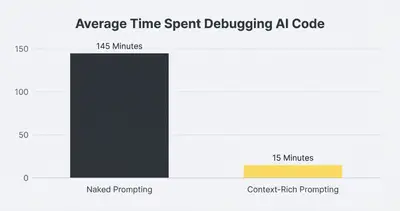
The biggest mistake business owners make is using a "naked prompt." A naked prompt simply asks for the end result.
Naked Prompt (Guaranteed to fail): "Write a script to pull new Stripe customers and put them in Google Sheets."
To get code that runs, you must replace the naked prompt with a strict System Prompt. You need to define the exact environment, the language, and the constraints.
Context-Rich Prompt (Guaranteed to run): "You are an expert Google Apps Script developer. Write a script to fetch new customers from the Stripe API and append them to a Google Sheet. Constraints:
- Use ONLY native Google Apps Script libraries (
UrlFetchApp). - Do NOT use Node.js packages.
- The Stripe API version is 2024-06-20.
- Include robust error handling and console logs for every step."
Notice the difference? The second prompt locks Gemini into a specific language and bans it from using unsupported tools. For a deeper dive into controlling AI behavior, read our guide on system prompt vs user prompt dynamics.
Step 2: The "Think First, Code Second" Rule
Gemini often makes mistakes because it starts generating code before it fully plans the logic. You can force the model to slow down and think by requiring a pseudo-code outline first.
Instead of asking for the final code immediately, ask Gemini to explain its approach.
Use this addition to your prompt: "Before writing any code, outline your step-by-step logic in plain English. Wait for my approval before you begin coding."
Pro Tip: This technique forces Gemini into an active reasoning state. You can review the steps and catch obvious flaws—like missing a step to authenticate a password—before a single line of code is written.
Once you approve the logic, the model has a clear roadmap to follow. This dramatically reduces syntax errors and logic loops. This strategy is especially critical if you are comparing different models, like Gemini 3 Thinking vs Pro.
Step 3: Provide Working Reference Material
AI models learn best by example. If you want Gemini to write a custom node for your automation tool, do not expect it to know the exact formatting requirements from memory.
Give it a template.
If you want code that integrates with a specific software, go to that software's official API documentation. Copy a small snippet of their official example code and paste it into your prompt.
Example Prompt Addition: "Here is an example of how the target software expects the data to be formatted: [Paste example JSON or code snippet here] Ensure your code outputs data in this exact structure."
By providing the exact structure, you remove Gemini's need to guess. The model acts as a translator rather than an inventor. This is the exact same method professionals use when building prompt engineering checklists for internal teams.
Step 4: The Iterative Debugging Loop
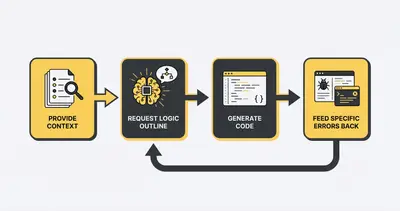
Even with the perfect prompt, you will occasionally hit an error. How you handle that error determines if you solve the problem in two minutes or two hours.
When code fails, do not just tell Gemini "it didn't work."
Do exactly this:
- Copy the entire error message.
- Copy the specific line of code that triggered the error.
- Paste both into Gemini.
- Add the phrase: "Explain why this error occurred, then provide the corrected code block."
Quick Win: Asking the AI to explain the error forces it to diagnose the root cause rather than just blindly guessing a new solution.
If Gemini gives you a solution that introduces a new error, you are trapped in a hallucination loop. Stop the generation immediately. Start a brand new chat. Paste your original prompt, the code you have so far, and the new error. Starting a fresh chat clears the model's memory of its bad guesses.
Step 5: Ask for "Defensive Code"
Most AI-generated code assumes everything will go perfectly. It assumes the API will respond instantly. It assumes the data will always be formatted correctly.
In the real business world, APIs timeout and data arrives missing key fields. If Gemini's code does not account for this, your automation will crash.
Always instruct Gemini to write defensive code.
Tell the model: "Wrap all API calls in try/catch blocks. If a variable is empty, log a clear error message instead of failing silently. Add a 5-second retry if the server times out."
This simple addition turns a fragile script into a production-ready asset. It ensures that when things break, your system tells you exactly why, making it incredibly easy to fix. If you want to see how this applies across different models, review our breakdown of how ChatGPT, Claude, and Gemini interpret instructions.
Ready to Scale Your AI Development?
Forcing Gemini to write code that actually runs is about shifting your mindset. You are not treating the AI like a magical vending machine. You are treating it like a junior developer who needs strict instructions, clear boundaries, and step-by-step supervision.
When you master the art of the "context box" and the iterative debugging loop, you unlock the ability to build custom automations in a fraction of the usual time. You stop debugging and start deploying.
If you are ready to stop wrestling with broken scripts and start building reliable, scalable automated systems, we can help. Book a demo with Evalics today to see how we implement bulletproof AI workflows for growing businesses.
Related Resources
- Prompt Engineering Step by Step Checklist
- System Prompt vs User Prompt
- Gemini 3 Thinking vs Gemini 3 Pro: What's the Difference in Google Workspace
- How ChatGPT Claude and Gemini Interpret System vs User Prompts
Official Sources
- Google AI for Developers Documentation
- Google Apps Script Reference Guide
- Stack Overflow Developer Survey
By Kevin Michael Schindler, AI Automation Expert at Evalics