You stare at the "Tasks Remaining" counter on your Zapier dashboard. It’s the 20th of the month, and you’ve already used 90% of your quota.
For agency owners, this is a monthly ritual. You built your business on automation to save time, but now you're paying a "success tax." Every new client means more leads to sync, more reports to generate, and a higher Zapier bill.
Zapier is fantastic for starting out. It’s intuitive and connects everything. But for growing agencies, the linear pricing model—where every single action costs money—punishes efficiency.
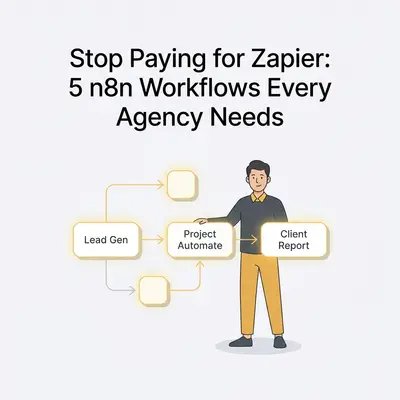
The solution isn’t to stop automating. It’s to switch to a tool built for scale: n8n.
n8n offers a node-based architecture that handles complex logic, loops, and data transformation far better than Zapier, often at a fraction of the cost.
Here are five specific workflows every agency should migrate from Zapier to n8n immediately to stop burning cash and start scaling logic.
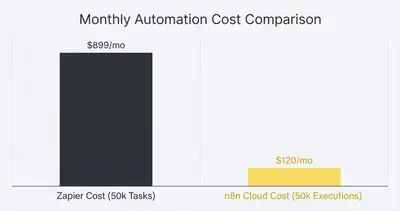
Reality Check: Migrating isn't just about saving $500 a month. It's about removing the "mental cap" on your automation. When you stop worrying about task limits, you start automating processes you previously thought were "too expensive" to run.
Why Agencies Outgrow Zapier
Before we dive into the workflows, let’s clarify why the switch happens.
Zapier charges per "task." If you have a workflow that pulls 100 leads from Facebook Ads, formats them, and sends them to a Google Sheet, Zapier counts that as 200+ tasks (1 trigger + 100 format actions + 100 write actions).
n8n works differently. In the self-hosted version, you pay for the server (which is fixed), not the executions. Even in their cloud version, the pricing model is far more generous with execution steps. This difference becomes critical when you start dealing with arrays of data—like lists of leads, line items on an invoice, or social media metrics.
Workflow 1: The "Heavy Lifter" Client Report
The Scenario: Every Monday, you need to pull performance data from Facebook Ads, Google Ads, and LinkedIn Ads, format it into a nice summary, and Slack it to your client (or update a master Google Sheet).
The Zapier Problem: Zapier hates loops. If you want to pull yesterday's campaign data, you often have to trigger a Zap for every single campaign. If a client has 50 active campaigns across three platforms, running a daily report can consume 4,500+ tasks per month just for one client.
The n8n Solution: n8n treats data as JSON objects from the start. You can pull all campaign data in a single API call, use a "Merge" node to combine datasets from Facebook and Google based on campaign names, and then write the entire batch to Google Sheets in one go.
The Setup:
- Schedule Trigger: Runs every Monday at 8:00 AM.
- HTTP Request / Native Nodes: Pulls data from FB, Google, LinkedIn.
- Merge Node: Combines the data into a single table.
- Google Sheets Node: Uses the "Update" operation to overwrite the reporting tab.
- Slack Node: Sends a message: "Weekly report updated for [Client Name]. ROI is [Calculated Value]."
Quick Win: n8n allows you to perform calculations (like calculating ROAS) directly inside the workflow using a simple "Code" node or expression, eliminating the need for complex spreadsheet formulas that break easily.
Workflow 2: Advanced Lead Enrichment & Routing
The Scenario: A lead fills out a form on your website. You want to enrich their data (find their LinkedIn URL, company size), score them, and route them to the right salesperson.
The Zapier Problem: This requires branching logic (Paths). Zapier Paths are great, but they can get messy fast. Plus, every lookup step (Clearbit, Hunter.io, HubSpot search) burns a task. If you get spam leads, you're paying to process junk.
The n8n Solution: n8n’s "Switch" and "If" nodes allow for visual, multi-step branching without the visual clutter or cost penalty.
The Setup:
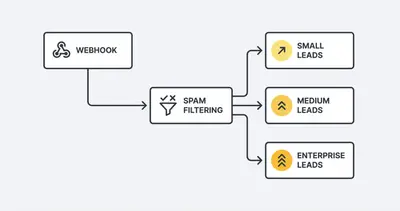
- Webhook Trigger: Receives form data.
- If Node: Checks if the email is a generic domain (gmail.com, yahoo.com). If yes, route to "Low Priority" flow.
- HTTP Request (Clearbit/Apollo): If corporate email, query an enrichment API.
- Switch Node: Route based on Company Size (Small -> Automated Email Sequence; Enterprise -> Slack Alert to VP of Sales).
- CRM Update: Create the deal in HubSpot/Pipedrive with all enriched data fields mapped.
By filtering out spam before the expensive enrichment step, you save money on both automation execution and API credits for your enrichment tools.
Workflow 3: The "All-in-One" Client Onboarding
The Scenario: A client signs a proposal. You need to create a Google Drive folder, a Slack channel, a ClickUp/Asana project, and send a welcome email.
The Zapier Problem: Reliability. If the Slack step fails (e.g., the channel name already exists), the whole Zap might stop, and the ClickUp project never gets created. Debugging which step failed in a 10-step Zapier chain is frustrating.
The n8n Solution: Error handling. n8n allows you to set "Continue On Fail" for specific nodes or route errors to a separate error-handling workflow.
The Setup:
- SignRequest/DocuSign Trigger: Document status changes to "Signed".
- Google Drive Node: Create a folder structure (Client Name > Assets, Contracts, Reports).
- Slack Node: Create a channel
#client-[name].- Error Path: If channel creation fails (duplicate name), append the current year to the name and try again.
- Project Management Node: Create a project from a template.
- Email Node: Send a "Kickoff Call" booking link.
This robustness ensures your onboarding process looks professional and flawless, even if an API hiccups in the background.
Key Insight: You can build a "Global Error Handler" workflow in n8n. If any workflow fails, it triggers this separate workflow to alert your ops team via Slack with the exact error message and execution link.
Workflow 4: Content Distribution Engine
The Scenario: Your marketing team writes a blog post. You want it shared on LinkedIn, Twitter, and Facebook, but with different captions and image formats for each.
The Zapier Problem: Zapier handles "one-to-one" well, but "one-to-many" with variations is tedious. You often end up creating three separate Zaps (one for each platform), tripling your maintenance effort.
The n8n Solution: A single workflow with parallel branches.
The Setup:
- RSS/Webflow/WordPress Trigger: New post published.
- OpenAI/Claude Node: "Read this blog title and summary. Write 3 LinkedIn variations, 3 Tweets, and 1 Facebook caption."
- Split In Batches (Optional): Or just run parallel branches.
- Branch A (LinkedIn): Post the best LinkedIn caption + image.
- Branch B (Twitter): Post a thread (n8n can handle threading easily by referencing the ID of the previous tweet node).
- Branch C (Facebook): Post standard update.
- Airtable Node: Log all social posts with their direct URLs for tracking.
You maintain one workflow. If you want to add Instagram later, you just add a fourth branch.
Workflow 5: Automated Invoice Reconciliation
The Scenario: You get a Stripe payment. You need to generate an invoice in Xero/QuickBooks, calculate the commission for the sales rep, and update your internal finance tracker.
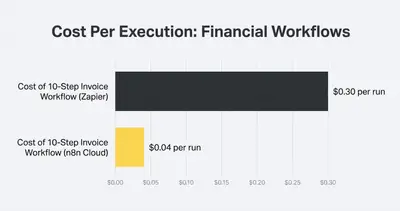
The Zapier Problem: Math and conditional tax logic. Calculating commissions based on tiers (e.g., "10% if under $5k, 15% if over $5k") requires a "Formatter" step or a complex Python step in Zapier.
The n8n Solution: Native Javascript support. You can write simple logic directly in any node to handle calculations.
The Setup:
- Stripe Trigger: Payment succeeded.
- Code Node: Calculate commission, strip fees, separate tax.
// Example pseudo-code inside n8n const amount = items[0].json.amount; const commission = amount > 5000 ? amount * 0.15 : amount * 0.10; return { json: { commission, net_revenue: amount - commission } }; - Xero/QuickBooks Node: Create invoice and reconcile payment.
- Slack Node: Private message to the Sales Rep: "Boom! Deal closed. Your commission: $[Amount]."
This transparency motivates your team and keeps your books pristine without manual data entry.
Making the Switch: A Migration Strategy
Moving from Zapier to n8n doesn't have to be a "rip and replace" nightmare. Start gradually.
- Audit Your Zaps: Sort your Zapier dashboard by "Tasks Usage." Identify the top 3 Zaps eating 80% of your budget. These are usually the ones with loops or high-volume triggers.
- Rebuild the "Task Hogs": Move only those top 3 workflows to n8n first.
- Keep the "Long Tail" on Zapier (for now): If you have a simple Zap that runs once a month (like "New Google Form to Slack"), leave it. It’s not costing you much, and it’s not worth the migration time yet.
- Test in Parallel: Run the n8n workflow alongside the Zapier one (outputting to a test sheet) for a week to ensure data integrity.
Pro Tip: Use the "Import from Curl" feature in n8n. If you can find the API documentation for a tool you use, you can often copy a
curlcommand and paste it directly into n8n to configure a node instantly.
Conclusion
Zapier is the toll booth on the highway of automation. It’s convenient for the first few miles, but as your agency’s traffic grows, the tolls begin to eat into your profits.
n8n is the open road. It requires a bit more navigation skills to start, but once you’re driving, there are no speed limits and no toll booths every hundred yards.
By migrating just these five workflows—reporting, lead enrichment, onboarding, content distribution, and invoicing—you can likely cut your automation bill by 50-80% while increasing the reliability of your operations.
Ready to stop paying the success tax?
Related Resources
- N8n Vs Make Why Small Businesses Are Switching 2025
- 4 Ways N8n Workflows Cut Software Bill
- 5 High Impact Ai Automations N8n Under One Hour
- True Cost Of Ai Automation 2025
Official Sources
- n8n Official Pricing Page
- Zapier Pricing & Plans
- n8n Documentation: Looping & Branching
Author Bio: By Kevin Michael Schindler, AI Automation Expert at Evalics. Kevin helps agencies and businesses scale their operations by transitioning from restrictive tools to flexible, high-performance automation architectures.