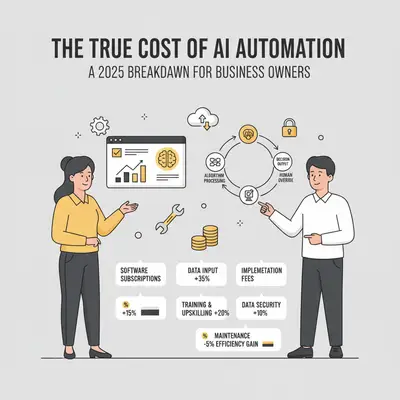
That $29/month subscription for your new AI automation tool looks like a steal. But a month later, you get a surprise $400 bill for API usage and data storage. Suddenly, the math doesn't add up.
This scenario is becoming increasingly common. While SaaS platforms offer incredible value, the subscription fee is just the tip of the iceberg. The true cost of running AI automation is a mix of visible and hidden expenses, from API calls and database hosting to the most valuable asset of all: your time.
Quick Win: Based on typical usage patterns, a small business can easily spend 10-20x its base subscription fee on associated AI costs (API usage, data storage, and infrastructure). Understanding the full cost stack—platforms, APIs, storage, and time—before you start is the key to creating a realistic budget and ensuring a positive ROI.
This guide provides a transparent, no-hype breakdown of every cost component. We'll give you the framework to calculate your total investment and show you how to manage it effectively, so you can avoid budget blowouts and make your automation projects profitable from day one.
Understanding the Complete Cost Picture
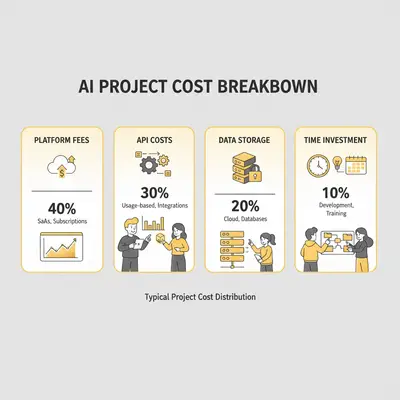
To build a realistic budget, you need to break down the four core components of AI automation costs.
Platform Fees (Make/n8n)
This is your monthly subscription for the automation platform itself. It's the most predictable cost.
- Make.com: Starts with a free tier, but businesses quickly move to paid plans. The
Coreplan at $9/month is suitable for simple tasks, while theProplan at $16-$29/month is better for multi-step workflows. A small agency might spend $50-$200/month as they scale. - n8n: Offers a self-hosted option where the software is free, but you pay for your own server ($10-$50/month for a capable VPS). The
n8n Cloudoption provides managed hosting, with plans typically ranging from $20-$120/month for small to medium usage.
API Usage Costs (OpenAI/Gemini/Anthropic)
This is the most variable and often surprising cost. You pay for every piece of data your AI model processes, measured in tokens (roughly 0.75 words).
- Pricing Tiers: Models come in different tiers. For example, Anthropic's
Claude 3 Haikuor OpenAI'sGPT-4o miniare very cost-effective for simple tasks, while powerful models likeClaude 3 OpusorGPT-4ocan be 15-30x more expensive. - Real-World Example: A customer support chatbot handling 2,000 conversations a month, with each conversation averaging 1,500 tokens, would process 3 million tokens. On a mid-tier model like Claude 3.5 Sonnet, this could cost $15-$45/month. On a premium model, it could be $100-$300/month.
Reality Check: API costs can spike unexpectedly. A single complex workflow processing large documents or running in a loop can generate a massive bill overnight. Without monitoring, you're flying blind.
Data Storage (Supabase/Firebase)
Your automations need to store data—conversation logs, user information, and state management. While often inexpensive to start, these costs grow with usage.
- Database Hosting: Platforms like Supabase and Firebase offer generous free tiers. A paid plan typically starts at $25/month and scales with database size and usage.
- Storage Costs: Object storage for files or documents is also a factor. Expect to pay a few dollars per month for every 100GB of data. For most small businesses, this remains in the $10-$50/month range.
Hosting & Infrastructure
If you're self-hosting any part of your stack (like n8n), you're responsible for the server costs.
- Virtual Private Server (VPS): A reliable VPS to run n8n and a small database will cost between $20-$60/month from providers like DigitalOcean or Hetzner.
- Cloud Hosting: Using AWS or Google Cloud provides more power and scalability but also more complexity. Costs can be harder to predict but offer a pay-for-what-you-use model.
The Real Expense: Your Time
Software and infrastructure costs are predictable. The most significant, and often underestimated, expense in any automation project is the opportunity cost of your time.
Development Time
Building your first automation is rarely a one-day job. Even with no-code tools, you need to plan the logic, configure the steps, handle data mapping, and set up integrations.
- Initial Setup: A moderately complex workflow can easily take 20-40 hours to build correctly.
- Opportunity Cost: If your time is worth $100/hour, that 30-hour build represents a $3,000 investment. This is capital you could have spent on marketing, sales, or other revenue-generating activities.
Testing & Debugging
No automation works perfectly the first time. The "happy path" is easy, but handling edge cases and errors is where the real work begins.
- Realistic Estimates: Expect to spend an additional 20-30% of your initial development time on testing and debugging. That 30-hour build now requires another 6-9 hours to become reliable.
- Ongoing Bugs: New issues will appear. A reasonable estimate is 2-5 hours per month dedicated to troubleshooting unexpected failures or API changes.
Ongoing Maintenance
Automations are not "set it and forget it." They are systems that require regular attention to function correctly.
- Monitoring: You need to check that your workflows are running successfully, which can take 1-2 hours per week.
- Updates & Fixes: Platforms and APIs change. You'll need to update your workflows to stay compatible, averaging 2-4 hours per month.
- Learning Curve: Mastering a platform like Make.com or n8n takes time. Your first 10-20 hours are an investment in learning.
For a typical small business, the total annual time investment can easily reach 100-150 hours, representing a $10,000-$15,000 opportunity cost.
Pro Tip: Track the time you spend on automation development and maintenance for one month. The number will likely surprise you and provide a much clearer picture of your true investment.
How to Set Up Monitoring and Alerts to Avoid Surprise Bills
A lack of monitoring is the primary cause of budget blowouts. Setting up a simple but effective monitoring stack is non-negotiable.
API Usage Monitoring
Most API providers have built-in tools to help you control costs. Use them.
- Set Usage Alerts: In your OpenAI or Anthropic account dashboard, you can set "soft" and "hard" usage limits. A soft limit sends you an email notification when you hit a certain spending threshold (e.g., 80% of your monthly budget), while a hard limit stops all API calls to prevent further charges.
- Monitor by API Key: Create separate API keys for different automations. This allows you to track the exact cost of each workflow instead of seeing one confusing total.
Infrastructure Monitoring
If you're self-hosting, you need to watch your server's health to prevent downtime and overages.
- Cloud Provider Alerts: Services like AWS CloudWatch or DigitalOcean's monitoring tools can send you alerts when CPU usage is consistently high or you're running out of disk space. This is your first line of defense.
- Cost Tracking Dashboards: Use the cost management dashboard in your cloud provider's console to track spending in near real-time. This helps you spot anomalies before they become major issues.
Workflow Health Monitoring
Your automation platform itself can tell you when things go wrong.
- Failure Alerts: Both Make.com and n8n have built-in error handling. Configure your critical workflows to send an email or a Slack message a single time an error occurs. This is much better than discovering a failure three days later when a customer complains.
- Execution Logs: Regularly review the execution logs in your automation platform. Look for patterns of frequent, small errors that might indicate a deeper problem with an integration or data source.
Quick Win: You can set up essential API and workflow failure alerts in less than 30 minutes. Go to your OpenAI dashboard and your Make/n8n settings right now and configure email notifications. This simple action can save you thousands.
Calculating the True ROI: Balancing Total Cost Against Value
Once you understand your total cost, you can measure it against the value your automation creates. This is how you justify the investment.
Quantifying Hours Saved
This is the most direct benefit. Track the time a manual task used to take and compare it to the automated process.
- Example: An automation saves a team member 10 hours per week.
- Annual Savings: 10 hours/week * 52 weeks = 520 hours/year.
- Monetary Value: If that team member's effective hourly rate is $50, the value is 520 * $50 = $26,000 per year.
Error Reduction Value
Manual processes are prone to costly errors. Automation introduces consistency and accuracy.
- Example: A manual data entry process had a 5% error rate, and fixing each error cost the company $50 in staff time and customer issues. Automating the process reduced the error rate to near-zero.
- Monetary Value: If the process handled 200 entries a month, it was generating 10 errors, costing $500/month or $6,000 per year.
New Capabilities Gained
Some of the most significant benefits come from doing things that were previously impossible.
- Example: An e-commerce business implements a 24/7 AI customer support chatbot. It now captures leads and makes sales overnight when staff are offline.
- Monetary Value: The chatbot generates an average of $1,000 in additional sales each month, creating $12,000 in new annual revenue.
ROI Calculation Framework
With your costs and benefits quantified, you can calculate the return on investment.
Formula: ROI % = ((Total Value - Total Cost) / Total Cost) * 100
- Total Cost: Sum of all software, API, storage, hosting, and time costs.
- Total Value: Sum of all quantified benefits (time saved, errors reduced, new revenue).
Key Insight: Don't expect a massive ROI in the first month. Factoring in the initial time investment for development and learning, most AI automation projects take 3-6 months to reach their break-even point and start generating a clear positive return.

Real-World Cost Scenarios: Three Business Examples
Let's apply this framework to three common business scenarios.
Scenario 1: Small Marketing Agency (10 people)
A boutique marketing agency with 10 employees wants to automate client reporting, social media content generation, and lead qualification. They handle 20 active clients and generate approximately 50 leads per month.
Automation Setup:
- Platform: Make.com Pro plan ($29/month)
- Workflows: Client report generation (weekly), social media content creation (daily), lead scoring and routing
- API Usage: Content generation for 30 social posts/week + 20 client reports/month using Claude 3.5 Sonnet
- Storage: Supabase Pro plan for client data and conversation logs
Monthly Costs Breakdown:
- Platform Fee: $29/month (Make.com Pro)
- API Costs: ~2.5 million tokens/month for content generation = $75/month (Claude 3.5 Sonnet at $3/MTok input)
- Data Storage: Supabase Pro ($25/month) + 50GB storage = $30/month
- Total Software Costs: $134/month
Time Investment:
- Initial Development: 35 hours to build and test all three workflows
- Monthly Maintenance: 3 hours/month for monitoring, updates, and troubleshooting
- Annual Time Cost: (35 hours × $100/hour) + (3 hours × 12 months × $100/hour) = $3,500 + $3,600 = $7,100/year
Total First-Year Cost: ($134 × 12) + $7,100 = $1,608 + $7,100 = $8,708
Value Created:
- Time Saved: 8 hours/week on manual reporting and content creation = 416 hours/year
- Monetary Value: 416 hours × $50/hour (junior staff rate) = $20,800/year
- Error Reduction: Eliminated 2-3 reporting errors/month that cost $100 each to fix = $2,400/year
- Total Annual Value: $23,200
ROI: ((23,200 - 8,708) / 8,708) × 100 = 166% ROI in year one
Break-Even Point: 4.5 months (when cumulative value exceeds cumulative cost)
Scenario 2: E-commerce Business (15 people)
An online retailer selling consumer products wants to automate customer support, inventory alerts, and order processing. They process 500 orders/month and receive 200 customer inquiries/week.
Automation Setup:
- Platform: n8n Cloud Starter plan ($20/month) + self-hosted for high-volume workflows
- Workflows: AI chatbot for customer support, inventory monitoring, order status updates
- API Usage: Customer support chatbot handling 800 conversations/month using GPT-4o mini
- Storage: Firebase Blaze plan (pay-as-you-go) for order data and chat logs
Monthly Costs Breakdown:
- Platform Fee: $20/month (n8n Cloud) + $40/month (VPS for self-hosted) = $60/month
- API Costs: ~1.2 million tokens/month for chatbot conversations = $12/month (GPT-4o mini at $0.15/$0.60 per MTok)
- Data Storage: Firebase Blaze plan with 10GB database + 50GB storage = $35/month
- Total Software Costs: $107/month
Time Investment:
- Initial Development: 45 hours to build chatbot, integrate with e-commerce platform, and set up monitoring
- Monthly Maintenance: 4 hours/month for chatbot training updates and workflow optimization
- Annual Time Cost: (45 hours × $100/hour) + (4 hours × 12 months × $100/hour) = $4,500 + $4,800 = $9,300/year
Total First-Year Cost: ($107 × 12) + $9,300 = $1,284 + $9,300 = $10,584
Value Created:
- Time Saved: 15 hours/week on customer support = 780 hours/year
- Monetary Value: 780 hours × $25/hour (support staff rate) = $19,500/year
- New Revenue: Chatbot captures 5 additional sales/month that would have been missed = $200/sale = $12,000/year
- Error Reduction: Reduced order processing errors by 80% (saving $300/month in refunds) = $3,600/year
- Total Annual Value: $35,100
ROI: ((35,100 - 10,584) / 10,584) × 100 = 231% ROI in year one
Break-Even Point: 3.6 months
Scenario 3: Consulting Firm (8 people)
A management consulting firm wants to automate proposal generation, client research, and meeting scheduling. They create 15 proposals/month and conduct research for 10 new clients/month.
Automation Setup:
- Platform: Make.com Pro plan ($29/month)
- Workflows: Proposal generation from templates, competitive research summaries, calendar coordination
- API Usage: Research and proposal writing using Claude 3.5 Sonnet for 25 documents/month
- Storage: Supabase Pro plan for client data and proposal templates
Monthly Costs Breakdown:
- Platform Fee: $29/month (Make.com Pro)
- API Costs: ~1.8 million tokens/month for research and writing = $54/month (Claude 3.5 Sonnet)
- Data Storage: Supabase Pro ($25/month) + 30GB storage = $28/month
- Total Software Costs: $111/month
Time Investment:
- Initial Development: 40 hours to build proposal templates, research workflows, and calendar integrations
- Monthly Maintenance: 2.5 hours/month for template updates and workflow refinements
- Annual Time Cost: (40 hours × $150/hour consultant rate) + (2.5 hours × 12 months × $150/hour) = $6,000 + $4,500 = $10,500/year
Total First-Year Cost: ($111 × 12) + $10,500 = $1,332 + $10,500 = $11,832
Value Created:
- Time Saved: 12 hours/week on proposal writing and research = 624 hours/year
- Monetary Value: 624 hours × $150/hour (consultant billable rate) = $93,600/year
- Quality Improvement: Faster proposal turnaround increased win rate by 15% (2 additional wins/month at $5,000 average project value) = $120,000/year
- Total Annual Value: $213,600
ROI: ((213,600 - 11,832) / 11,832) × 100 = 1,704% ROI in year one
Break-Even Point: 0.7 months (less than 1 month)
Key Takeaway: For knowledge work where time savings translate directly to billable hours or increased capacity, automation delivers exceptional ROI. The consulting firm's high hourly rate makes even modest time savings extremely valuable.
How to Optimize Your AI Automation Costs
Once your automation is running, you can actively work to reduce its operational costs.
Choose the Right Model Tier
The single biggest lever for controlling API costs is selecting the appropriate model for the job.
- Cost Difference: A premium model like GPT-4o can be 15-30x more expensive than a highly capable but cheaper alternative like Claude 3.5 Sonnet or GPT-4o mini.
- Strategy: Don't default to the most powerful model. For simple tasks like classification, summarization, or standard text generation, a mid-tier model is often more than sufficient and dramatically cheaper. Reserve the premium models for complex reasoning and analysis.
- Example: Switching a high-volume workflow from GPT-4o to Sonnet could reduce your API bill from $300/month to $30/month with negligible impact on quality.
Implement Caching and Batching
Avoid reprocessing the same information repeatedly.
- Caching: Store the results of common API calls. If you frequently ask for the same piece of information, serve the stored result instead of making another API call. This is highly effective for things like summarizing popular articles or enriching common company names.
- Batching: Instead of sending 100 individual API requests, group them into a single, larger request. This reduces the overhead of multiple network calls and can sometimes be more cost-effective.
Monitor and Optimize Workflows
Treat your automations like any other business system: review and refine them.
- Remove Unused Workflows: Shut down any automations that are no longer providing value.
- Optimize Prompts: Shorter, more efficient prompts use fewer tokens and cost less.
- Use Webhooks: Whenever possible, use webhooks (which send data instantly) instead of polling (which checks for data every few minutes). Polling can consume thousands of unnecessary operations on your platform.
Pro Tip: Schedule a 30-minute cost review each month. Look at your API and platform dashboards to identify the most expensive workflows. This regular check-in is the best way to catch inefficiencies and keep your costs under control.
Conclusion
The attractive monthly fee for an AI automation platform is only the first step in a larger financial commitment. The true cost of running AI automation emerges from a combination of platform subscriptions, variable API usage, data storage, and the significant, often-overlooked investment of your own time.
By understanding these four cost pillars, you can move from a hopeful guess to a predictable, manageable budget. The key takeaways are:
- Budget for the Whole Stack: Your total monthly cost will be a sum of platforms, APIs, storage, and infrastructure. Don't get caught off guard.
- Your Time is the Biggest Expense: The opportunity cost of development, testing, and maintenance is often the largest part of your investment.
- Monitor Everything: Proactive alerts and regular cost reviews are the best defense against surprise bills and budget overruns.
With a clear view of the total cost of ownership, you can calculate a realistic ROI and build powerful, profitable automations that drive real growth for your business.
Ready to get a precise handle on your AI automation costs? Book a free consultation with Evalics and we'll help you build a cost-effective automation strategy.
Related Reads
- Building vs Buying an AI Automation Solution
- How to Calculate Token Costs for an AI Project
- Make.com vs n8n: Which Automation Tool is Right for You?
External Links
FAQ Section
What's the typical monthly cost for a small business AI automation? A typical all-in cost for a small business running a few key automations ranges from $200 to $800 per month. This includes platform fees, moderate API usage, data storage, and hosting. The biggest variable is API consumption.
How do I calculate the opportunity cost of my time? Estimate the number of hours you spend on an automation project (development, testing, maintenance) and multiply it by your effective hourly rate. For example, 40 hours spent at a rate of $100/hour represents a $4,000 opportunity cost.
What's the biggest hidden cost most people miss? The ongoing time commitment for maintenance and debugging. An automation is not a one-time setup; it's a system that requires 5-10 hours of attention per month to keep it running smoothly, which can add up to over $10,000 in opportunity cost annually.
How can I avoid surprise API bills? Set up usage alerts and hard limits in your API provider's dashboard (e.g., OpenAI, Anthropic). Create separate API keys for each automation to track costs individually. This is the most effective way to prevent a single workflow from causing a budget blowout.
When does AI automation become cost-effective? AI automation becomes cost-effective when the value it creates (in time saved, errors reduced, or new revenue) exceeds its total cost. Most projects reach a break-even point within 3 to 6 months after factoring in the initial time investment.
What's the break-even point for most automations? The break-even point is the moment the accumulated value of an automation equals its total accumulated cost. For a project with a $10,000 total first-year cost that saves $2,000 in value per month, the break-even point would be 5 months.
How do I track all these costs effectively? Use a simple spreadsheet. Create line items for each cost category (Platform, API, Storage, Time) and update it monthly. Review your API and cloud provider dashboards to get the exact numbers.