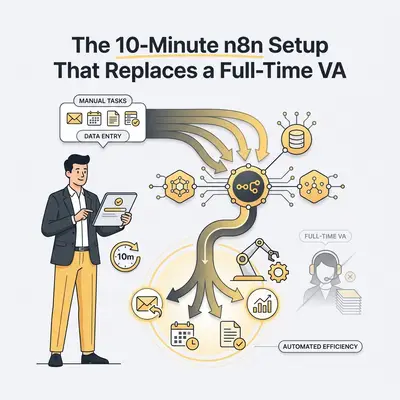
You hire a Virtual Assistant (VA) to buy back your time. But after onboarding, training, and management, you often find yourself working more just to keep them busy.
Most business owners fall into this trap. You pay $1,500 to $2,500 a month for someone to categorize emails, copy data from forms to spreadsheets, and schedule meetings.
These aren’t human tasks. They are robot tasks.
In 2025, you don't need a payroll for admin work. You need a workflow. Specifically, you need a "Super-VA" setup in n8n. It works 24/7, never sleeps, doesn't make typos, and costs less than a generic Netflix subscription.
Here is the exact framework to build an automated VA in n8n that handles 80% of your admin workload.
The "Super-VA" Architecture
The biggest mistake people make with automation is trying to replicate human chaos. They try to automate one tiny task at a time.
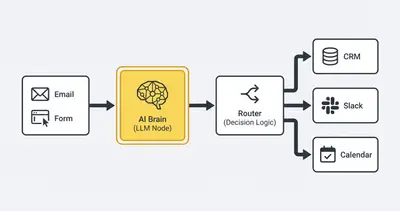
Instead, think of your n8n workflow as a digital employee with three core components:
- The Trigger (Ears): It listens for incoming information (Email, Webhook, Form submission).
- The Brain (AI): It processes intent, makes decisions, and formats data.
- The Action (Hands): It updates your CRM, Calendar, or Slack.
This single structure replaces hours of daily admin work.
Step 1: The "Inbox Zero" Triage Agent
The most time-consuming task for any VA is email management. A human reads an email, decides if it’s spam, a lead, or a support request, and then acts.
In n8n, you can build this logic in under 10 minutes.
How to set it up:
- Add an Email Trigger Node: Connect your Gmail or Outlook. Set it to trigger on "New Email."
- Add an AI Agent Node: This is where n8n beats standard tools like Zapier. Use an OpenAI or Anthropic node.
- The Prompt: Give the AI a strict role.
Pro Tip: Don't just ask the AI to "summarize." Give it a job description. "You are an executive assistant. Categorize this email as 'Urgent', 'Lead', 'Spam', or 'Newsletter'. Extract the sender's name and intent."
If you are unsure which AI model to use for this, read our guide on choosing between ChatGPT and Claude for automation.
Step 2: The Decision Router
Once the AI "reads" the email, the workflow needs to decide what to do. This replaces the human decision-making process.
Use a Switch Node in n8n. Route the workflow based on the category the AI assigned:
- If Lead: Create a deal in your CRM (HubSpot/Pipedrive) and draft a warm reply.
- If Support: Create a ticket in Jira/Zendesk and alert the support team in Slack.
- If Invoice: Save the attachment to Google Drive and log the amount in a spreadsheet.
- If Spam: Delete and ignore.
This logic runs in seconds. A human VA would take 5-10 minutes per email to do the same sequence.
The Cost Reality: Human vs. Workflow
Business owners often underestimate the true cost of manual labor. It's not just the hourly rate; it's the error rate, the delay, and the management overhead.
Let’s look at the numbers for a standard small business processing 50 leads and 200 emails a week.
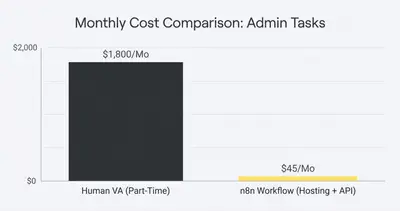
Reality Check: Even if you hire a low-cost overseas VA, you are paying for downtime. An n8n workflow only costs money when it's actually working (processing data).
Step 3: The "Context" Layer (The Secret Sauce)
A good VA remembers context. "Oh, this client emailed last week." A basic automation usually forgets.
To make your n8n setup truly replace a VA, you need memory.
- Connect a Database: Use a simple Google Sheet or a vector database like Pinecone.
- Check Before Acting: Before sending a reply, have n8n check the database. "Have we spoken to this person in the last 7 days?"
- Conditional Logic: If yes, alert me in Slack instead of sending an automated reply.
This simple check prevents robotic, embarrassing moments where you automate a "Nice to meet you" email to a long-time client.
What You Should NEVER Automate
While this setup is powerful, it is not a complete human replacement. There are specific areas where you should keep a human in the loop.
- Sensitive Client Disputes: If a client is angry, AI often lacks the nuance to de-escalate effectively.
- Complex Project Management: AI can update statuses, but it can't negotiate deadlines between conflicting departments.
- Creative Strategy: AI can execute steps, but it cannot invent the strategy.
For a deeper dive on this balance, check out what to automate vs. what to keep human.
Implementation: Getting This Live Today
You don't need a computer science degree to build this.
- Sign up for n8n: You can use their cloud version or self-host it.
- Load a Template: Search the n8n template library for "Email Classifier" or "CRM Sync."
- Connect Your Accounts: Auth into Gmail, OpenAI, and your CRM.
- Test with 5 Emails: Do not turn it on for everything immediately. Run a test batch to ensure the AI categorization is accurate.
Quick Win: Start with just the triage step. Have n8n label your emails and send you a digest in Slack every morning. This alone saves 30-60 minutes of inbox scrolling daily.
Conclusion
The goal isn't to fire everyone. The goal is to elevate your team.
When you replace the "data mover" role with an n8n workflow, you free up budget and mental bandwidth. You can take that $2,000/month you were saving for a VA and invest it in sales, marketing, or a higher-level human hire who can actually grow your business.
Automation doesn't just save time; it scales your ability to execute.
Ready to build this? Start small. Automate the inbox first. Then the calendar. Then the CRM. In 10 minutes of setup, you'll save 10 hours a month.
Related Resources
- n8n vs Make: Why Small Businesses Are Switching
- 5 Manual Tasks You Must Automate Before Hiring
- ChatGPT vs Claude for Automation
- Top 5 n8n Integrations for Marketing Agencies