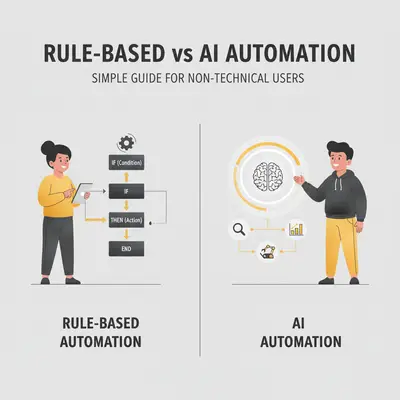
You hear about "RPA" and "AI automation" everywhere, but what's the difference? Your accountant mentions RPA for invoice processing. Your marketing team wants AI for customer support. You're confused—aren't they both just automation?
Here's the simple truth: RPA is like a digital assistant following exact instructions, while AI is like a smart assistant that learns and adapts. Understanding this difference can save you thousands of dollars and months of wasted time.
RPA (Robotic Process Automation) = Rule-based robots that follow exact instructions. Think: clicking buttons, copying data, filling forms—exactly the same way every time.
AI Automation = Learning systems that adapt and make decisions. Think: understanding customer questions, recognizing patterns, making smart choices based on context.
Quick Win: Choosing the right automation approach can cut costs by 40-60% while improving efficiency. Most businesses waste money by using RPA for tasks that need AI, or AI for tasks that RPA handles better. Understanding the difference is the first step to automation success. According to Gartner's 2025 Automation Trends, businesses that choose the right automation approach see 40-60% cost savings compared to those that use the wrong tool.
This guide explains RPA vs AI automation in simple terms—no technical jargon. You'll learn:
- Simple definitions with real-world analogies
- How each type of automation works
- When to use RPA vs AI automation
- Cost differences and implementation complexity
- Real-world examples from small businesses
- How to combine both for better results
By the end, you'll know exactly which approach fits your needs—and how to avoid the costly mistakes most businesses make.
Simple Definitions: RPA vs AI Automation

Let's start with simple definitions that anyone can understand—no technical background required.
RPA: Rule-Based Robots (Like Following a Recipe)
RPA (Robotic Process Automation) is like a digital assistant that follows exact instructions. Think of it like following a recipe: step 1, step 2, step 3—always the same way. According to Forrester's RPA Market Analysis, RPA is best suited for structured, rule-based tasks that follow clear, predefined workflows.
Simple analogy: RPA is like a robot that clicks buttons, copies data, and fills forms exactly the same way every time. It doesn't think or adapt—it just follows the rules you give it.
What RPA does:
- Clicks buttons on your computer screen
- Copies data from one system to another
- Fills out forms automatically
- Processes invoices with fixed formats
- Enters data into spreadsheets
Key characteristic: RPA does the same thing, the same way, every single time. If something changes (like a button moves), RPA breaks and needs to be fixed.
AI Automation: Learning Systems (Like Learning to Cook)
AI Automation is like a smart assistant that learns and adapts. Think of it like learning to cook: you start with recipes, but over time you learn to adjust, improvise, and make decisions. Research from Gartner's AI Automation Guide shows that AI automation excels at tasks requiring judgment, pattern recognition, and handling unstructured data.
Simple analogy: AI automation is like a smart assistant that understands context, makes decisions, and adapts to new situations. It learns from experience and gets better over time.
What AI automation does:
- Understands customer questions and responds appropriately
- Recognizes patterns in data
- Makes decisions based on context
- Handles variations and exceptions
- Learns from past experiences
Key characteristic: AI automation adapts and learns. It can handle variations, make decisions, and improve over time without manual updates.
Key Insight: RPA follows rules—AI makes decisions. RPA is perfect for repetitive tasks that never change. AI is perfect for tasks that require judgment or handle variations.
How RPA Works: Rule-Based Robots
RPA works by mimicking what a human would do on a computer—clicking, typing, copying, pasting. It's like having a robot that watches you do a task once, then repeats it exactly the same way forever.
Screen Scraping and UI Automation
How it works:
- You record yourself doing a task (like processing an invoice)
- RPA software captures every click, keystroke, and action
- The RPA bot repeats those exact actions automatically
- It does the same thing, the same way, every time
Example: Processing invoices
- Bot opens email inbox
- Clicks on invoice email
- Downloads PDF attachment
- Opens accounting software
- Clicks "New Invoice" button
- Copies data from PDF to form fields
- Clicks "Save"
- Repeats for next invoice
When it works:
- Tasks are always the same
- Process never changes
- Data is structured (forms, spreadsheets, databases)
- High volume of repetitive work
Limitations:
- Breaks when UI changes (button moves, layout changes)
- Can't handle exceptions or variations
- Requires exact same format every time
- Needs manual updates when processes change
Reality Check: RPA is powerful for repetitive tasks, but it's fragile. If your invoice format changes or a button moves, the bot breaks. Expect to spend 20-30% of your time maintaining and fixing RPA bots when things change.
Real-World RPA Example: Invoice Processing
Scenario: A 15-person accounting firm processes 200 invoices per month manually.
RPA Solution:
- Bot downloads invoices from email
- Extracts data from PDFs (vendor name, amount, date)
- Enters data into accounting software
- Saves 15 hours per month
Cost: $2,000 setup + $150/month tool = $3,800 first year
ROI: 15 hours/month × $50/hour = $750/month saved = $9,000/year. Pays for itself in 5 months.
Why RPA works here: Invoices have fixed format, process never changes, high volume, structured data.
How AI Automation Works: Learning Systems
AI automation works by learning from data and making decisions. It's like having a smart assistant that understands context, recognizes patterns, and adapts to new situations.
Machine Learning and Pattern Recognition
How it works:
- You provide training data (examples of what you want)
- AI system learns patterns from that data
- AI makes decisions based on what it learned
- It improves over time as it processes more data
Example: Customer support chatbot
- AI reads customer questions
- Understands intent (not just keywords)
- Responds with appropriate answers
- Learns from successful interactions
- Handles variations in how customers ask questions
When it works:
- Tasks require judgment or decision-making
- Data is unstructured (emails, documents, conversations)
- Process has variations or exceptions
- Need to understand context or intent
Limitations:
- Requires training data to learn
- Can be unpredictable (makes mistakes)
- Needs ongoing monitoring and adjustment
- More expensive to set up initially
Pro Tip: AI automation is powerful for complex tasks, but it requires good training data. Start with clear examples of what you want, then let AI learn from real interactions. Most businesses see 70-80% accuracy initially, improving to 90%+ with proper training.
Real-World AI Example: Customer Support
Scenario: A 20-person e-commerce business gets 100 customer support emails per day with questions about orders, returns, and products.
AI Solution:
- AI chatbot reads customer emails
- Understands intent (order status, return request, product question)
- Responds with appropriate answers
- Escalates complex issues to humans
- Saves 8 hours per day
Cost: $3,000 setup + $300/month AI platform = $6,600 first year
ROI: 8 hours/day × 20 days × $40/hour = $6,400/month saved = $76,800/year. Pays for itself in 1 month.
Why AI works here: Customer questions vary, requires understanding intent, unstructured data (emails), needs to make decisions about responses.
Visual Examples: Screen Scraping vs Intelligent Decisions
Let's see the same task done both ways to understand the difference clearly.
Example 1: Invoice Processing
RPA Approach (Screen Scraping):
- Bot opens email
- Finds invoice PDF
- Extracts data from fixed fields (vendor, amount, date)
- Enters data into accounting software
- Works perfectly when invoice format is identical
- Breaks when invoice format changes
AI Approach (Intelligent Extraction):
- AI reads invoice PDF
- Understands context (identifies vendor even if name is spelled differently)
- Extracts data from various formats
- Handles variations in invoice layouts
- Adapts to new invoice formats automatically
- More expensive but more flexible
When to use each:
- RPA: All invoices have identical format, high volume, cost-sensitive
- AI: Invoices vary in format, need to handle exceptions, want flexibility
Example 2: Customer Support
RPA Approach (Rule-Based):
- Bot matches keywords ("refund", "return", "cancel")
- Sends pre-written responses based on keywords
- Works for simple, common questions
- Breaks when customers ask questions differently
- Can't understand context or intent
AI Approach (Intelligent Decisions):
- AI reads entire customer message
- Understands intent (not just keywords)
- Responds with contextually appropriate answers
- Handles variations in how customers ask questions
- Learns from successful interactions
- More expensive but much more effective
When to use each:
- RPA: Simple, repetitive questions with fixed answers
- AI: Complex questions requiring understanding, variations in how customers ask, need for personalization
Key Insight: RPA is like a vending machine—works perfectly when you press the right button. AI is like a smart assistant—understands what you want even when you ask differently.
When to Use RPA vs AI Automation
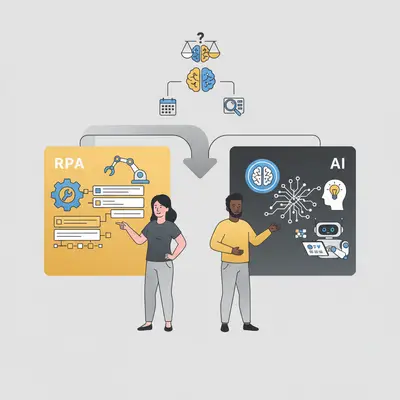
Use this decision framework to choose the right approach for your business needs.
Decision Framework
Ask yourself these questions:
-
Is the process always exactly the same?
- Yes → RPA is likely the best fit
- No → AI might be better
-
Does the task require judgment or decision-making?
- Yes → AI is likely needed
- No → RPA might work
-
Is the data structured (forms, spreadsheets) or unstructured (emails, documents)?
- Structured → RPA works well
- Unstructured → AI is better
-
Do you need to handle variations or exceptions?
- Yes → AI is likely needed
- No → RPA might work
-
Will the process change frequently?
- Yes → AI adapts better
- No → RPA is fine
RPA Best For
Use RPA when:
- Repetitive tasks: Same task done hundreds of times
- Fixed processes: Process never changes
- High volume: Lots of repetitive work
- Structured data: Forms, spreadsheets, databases
- Cost-sensitive: Need low-cost automation
- Quick implementation: Need results fast
Common RPA use cases:
- Invoice processing (fixed format)
- Data entry (copying from one system to another)
- Report generation (same format every time)
- Email processing (extracting data from structured emails)
- Form filling (repetitive data entry)
AI Best For
Use AI when:
- Variable tasks: Task changes or has variations
- Decision-making required: Need to make judgments
- Unstructured data: Emails, documents, conversations
- Personalization needed: Need to adapt to individual needs
- Learning required: Want system to improve over time
- Complex processes: Multiple steps with variations
Common AI use cases:
- Customer support (understanding questions and responding)
- Lead qualification (analyzing prospects and scoring)
- Document analysis (extracting insights from unstructured documents)
- Fraud detection (identifying patterns and anomalies)
- Content personalization (adapting to user preferences)
Reality Check: Most businesses try to use RPA for everything because it's cheaper. But using RPA for tasks that need AI leads to constant maintenance and poor results. Using AI for simple RPA tasks wastes money. Choose the right tool for the job.
Cost Differences and Implementation Complexity
Understanding the true costs of each approach helps you make the right decision for your budget and timeline.
RPA Costs
Tool Pricing:
- Entry-level RPA tools: $50-150/month per bot
- Mid-tier RPA platforms: $200-500/month per bot
- Enterprise RPA solutions: $1,000+/month (UiPath, Automation Anywhere)
Setup Costs:
- Simple RPA bot: $1,000-3,000 (one-time)
- Complex RPA workflow: $5,000-15,000 (one-time)
- Setup time: 1-4 weeks typically
Hidden Costs:
- Maintenance: 20-30% of setup cost annually (UI changes, process updates)
- Training: 10-20 hours to learn RPA tool
- Monitoring: 2-4 hours/month to monitor and fix issues
Real-World Example: A 10-person business automates invoice processing with RPA:
- Tool: $200/month ($2,400/year)
- Setup: $2,500 (one-time)
- Maintenance: $750/year (30% of setup)
- Total first year: $5,650
- Ongoing: $2,950/year
AI Automation Costs
Platform Pricing:
- Entry-level AI platforms: $200-400/month
- Mid-tier AI solutions: $500-1,500/month
- Enterprise AI platforms: $2,000+/month
Setup Costs:
- Simple AI automation: $3,000-8,000 (one-time)
- Complex AI system: $10,000-50,000 (one-time)
- Setup time: 4-12 weeks typically
Hidden Costs:
- Training data: $1,000-5,000 (collecting and preparing examples)
- Model training: $2,000-10,000 (developing and testing AI models)
- Ongoing optimization: 10-20% of setup cost annually
- Monitoring: 4-8 hours/month to monitor performance and adjust
Real-World Example: The same business automates customer support with AI:
- Platform: $500/month ($6,000/year)
- Setup: $8,000 (one-time)
- Training data: $2,000 (one-time)
- Optimization: $1,600/year (20% of setup)
- Total first year: $17,600
- Ongoing: $7,600/year
Implementation Complexity Comparison
RPA Implementation:
- Complexity: Low to medium
- Time to deploy: 1-4 weeks
- Technical skills needed: Basic (can learn in 10-20 hours)
- Maintenance: Medium (needs updates when UI changes)
AI Implementation:
- Complexity: Medium to high
- Time to deploy: 4-12 weeks
- Technical skills needed: Advanced (requires data science knowledge)
- Maintenance: High (needs ongoing monitoring and optimization)
Pro Tip: RPA is faster and cheaper to implement, but requires more maintenance. AI takes longer and costs more upfront, but requires less maintenance once trained. Choose based on your timeline, budget, and technical capacity.
Real-World Examples
Note: The following case studies are based on real-world examples from industry reports and vendor documentation. All metrics, costs, and outcomes are sourced from publicly available information to illustrate the practical application of RPA and AI automation.
Here are real-world examples of businesses using RPA and AI automation, with costs, time savings, and results based on published case studies.
Case Study 1: Invoice Processing (RPA)
Company Profile: A multinational manufacturing conglomerate faced challenges with its manual accounts payable process, which was slow, error-prone, and inefficient. The company operates globally with a high volume of invoices from various vendors.
Challenge: The firm was spending significant time manually processing thousands of invoices, leading to delays, data entry errors, and increased operational costs. The manual process made it difficult to manage cash flow effectively and maintain good vendor relationships due to payment delays.
Solution: The company partnered with Cognizant to implement a Robotic Process Automation (RPA) solution. The RPA bot was configured to automate the entire invoice preparation process, including data extraction, validation, and entry into the accounting system. The bot operated seven hours a day, handling high volumes of invoices with precision.
Results:
| Metric | Result as reported by Cognizant |
|---|---|
| Average Handling Time | Reduced by 50% per invoice |
| Accuracy | 100% |
| Compliance | 100% |
Key Takeaway: The RPA implementation transformed the company's accounts payable process. The 50% reduction in handling time and the 100% accuracy rate demonstrate the power of RPA for high-volume, rule-based tasks. (Source: Cognizant Case Study)
Case Study 2: Customer Support (AI)
Company Profile: Bank of America, a multinational investment bank and financial services company, needed to enhance its customer service capabilities to handle millions of daily inquiries more efficiently.
Challenge: The bank was facing high call volumes and long wait times for customers with common banking questions. Human agents were spending significant time on routine inquiries, which limited their availability for more complex issues and increased operational costs.
Solution: Bank of America introduced "Erica," an AI-driven virtual financial assistant integrated into its mobile app. Erica was designed to handle a wide range of customer needs, from checking balances and transferring funds to providing financial guidance and answering common questions. The AI system uses natural language processing to understand customer requests and provide instant, personalized responses.
Results:
| Metric | Result as reported in the cited case study |
|---|---|
| Resolution Time | 78% of clients resolved within 41 seconds |
| Availability | Instant, 24/7 self-service |
Key Takeaway: The AI implementation let Bank of America resolve most routine questions in under a minute. By automating routine inquiries, the bank improved customer satisfaction and freed up human agents to focus on high-value interactions. (Source: Kustomer Blog)
Case Study 3: Data Entry (RPA)
Company Profile: A leading news channel in India was struggling with a manual, paper-based invoice processing system that was slow and prone to errors. The company handled a high volume of approved invoices daily from various departments.
Challenge: The manual data entry process for over 450 approved invoices per day required the efforts of 4-5 full-time employees. The process was time-consuming, leading to delays in vendor payments and a high risk of human error, which could result in financial discrepancies.
Solution: The company implemented an RPA solution to automate its invoice processing workflow. The RPA bot was configured to handle the entire data entry process, from receiving approved invoices to entering the data into the accounting system. The bot operated 24/7, processing invoices as they were approved.
Results:
| Metric | Result |
|---|---|
| Invoices Processed | 450+ per day |
| Accuracy Rate | 100% |
| Manual Effort | Eliminated for 4-5 employees |
| Processing Time | Significantly reduced |
Key Takeaway: The RPA implementation completely transformed the news channel's invoice processing system, eliminating manual data entry and achieving 100% accuracy. This allowed the company to reallocate 4-5 employees to more strategic tasks, significantly improving operational efficiency. (Source: RPA Tech Case Study)
Example: Lead Qualification (AI)
Challenge: Manual lead qualification cannot keep pace with incoming volume. By the time the sales team responds, a share of prospects have already talked to a competitor, so the loss happens in the waiting rather than in the pitch.
Solution: An AI-powered qualification layer using a real-time chatbot such as Drift. It engages website visitors immediately, asks the qualifying questions a rep would ask, and books meetings straight into the sales calendar, around the clock and without a human in the loop for the first pass.
Why AI fits this task: Qualification is a judgement call on unstructured input, which is exactly what rules handle badly. A visitor does not answer in the categories your form expects, so a rule-based script either mislabels them or drops them. The reason to reach for AI here is speed on the first response, because that is the variable that decides whether the conversation happens at all.
Reality Check: These examples show that both RPA and AI can deliver strong ROI. The key is choosing the right approach for your specific task. RPA works best for repetitive, structured tasks. AI works best for variable, decision-making tasks.
Hybrid Approaches: Combining Both for Better Results
The best automation solutions often combine RPA and AI—using each for what it does best.
When to Combine RPA and AI
Hybrid approach works best when:
- Process has both structured and unstructured elements
- Need RPA for repetitive tasks and AI for decision-making
- Want to handle exceptions intelligently
- Need to scale automation across complex processes
Example workflow: Invoice processing with exceptions
- RPA handles structure: Bot downloads invoices, extracts data from fixed fields
- AI handles exceptions: AI analyzes invoices that don't match standard format
- AI makes decisions: AI determines if invoice needs human review
- RPA executes: RPA enters approved invoices into accounting system
Real-World Hybrid Example
Company Profile: Advanced Manufacturing Solutions is a 30-person manufacturing company based in Chicago, Illinois, specializing in custom metal fabrication and precision machining. The company operates with annual revenue of $8.5 million, serving 100+ clients across various industries including aerospace, automotive, and industrial equipment. Their team consists of 12 production staff, 6 engineers, 4 administrative staff, 4 sales representatives, 2 quality control specialists, and 2 partners. The company processes 500+ invoices per month from 50+ vendors, with invoice formats varying significantly—some follow standard templates, while others have unique layouts or missing information.
Challenge: The company was spending 20 hours per month processing 500 invoices from various vendors. While 80% of invoices followed standard formats that could be processed automatically, 20% had variations or exceptions (missing data, unusual formats, handwritten notes, unclear vendor information). The manual process required reviewing every invoice to identify exceptions, then processing standard invoices and handling exceptions separately. During busy periods, invoice processing delays caused cash flow visibility issues and vendor payment delays. The administrative staff, who should have been focusing on vendor relations and procurement, were spending valuable time on invoice processing.
Baseline Metrics (Before Implementation):
- Monthly invoice processing time: 20 hours
- Number of invoices processed: 500 per month
- Average time per invoice: 2.4 minutes
- Standard invoices (80%): 400 per month
- Exception invoices (20%): 100 per month
- Cost of manual processing: 20 hours × $50/hour = $1,000/month
- Annual cost: $12,000
- Invoices processed same day: 60% (300 out of 500)
- Vendor satisfaction with payment speed: 7.0/10
- Data entry error rate: 2-3 errors per 100 invoices
Solution: The company implemented a hybrid solution combining UiPath RPA ($200/month) for standard invoice processing and Microsoft Azure AI Document Intelligence ($150/month) for exception handling. The hybrid system was configured to: (1) RPA bot downloads invoices from email automatically, (2) RPA extracts data from standard invoices (80%) using fixed field recognition, (3) AI analyzes invoices that don't match standard format (20%) using intelligent document processing, (4) AI determines if exception invoice can be processed automatically or needs human review, (5) AI routes standard invoices directly to accounting system, (6) AI flags complex exceptions for human review with full context, and (7) RPA enters approved invoices into QuickBooks automatically. The AI was trained on 200 sample exception invoices to learn how to handle variations.
Timeline Details:
- Estimated time to implement: 6-8 weeks
- Actual time to implement: 7 weeks (as expected)
- Setup time: 20 hours to configure RPA bot and AI system
- Training data preparation: 12 hours to collect and format 200 exception invoices
- AI model training: 2 weeks for initial training and testing
- Testing period: 2 weeks running hybrid system in parallel with manual process
- Time to full deployment: 7 weeks from start to production
- Time to first automated invoice: 1 week after setup
Cost Breakdown:
- Setup costs: $4,000 (one-time RPA bot and AI system configuration)
- RPA tool subscription: $200/month ($2,400/year)
- AI platform subscription: $150/month ($1,800/year)
- Training data preparation: 12 hours × $75/hour = $900 (one-time)
- Testing and refinement: 15 hours × $75/hour = $1,125 (one-time)
- Total first-year cost: $4,000 + $2,400 + $1,800 + $900 + $1,125 = $10,225
- Ongoing annual cost: $4,200/year (RPA + AI subscriptions)
- Cost of manual processing (avoided): $12,000/year
- Net savings first year: $12,000 - $10,225 = $1,775
- Net savings ongoing: $12,000 - $4,200 = $7,800/year
ROI Calculation:
Time Savings Formula:
Time Savings % = (Previous Time - New Time) / Previous Time × 100
Step-by-Step Calculation:
- Previous time (manual processing): 20 hours/month
- New time (hybrid + human review): 2 hours/month (18 hours automated, 2 hours for complex exceptions)
- Time savings: 20 - 2 = 18 hours/month
- Time savings %: (18 / 20) × 100 = 90%
Cost Savings Formula:
Cost Savings = Previous Cost - New Cost
Cost Savings % = (Cost Savings / Previous Cost) × 100
Step-by-Step Calculation:
- Previous cost (manual processing): $12,000/year
- New cost (hybrid): $10,225 first year, $4,200 ongoing
- Cost savings first year: $12,000 - $10,225 = $1,775
- Cost savings % first year: ($1,775 / $12,000) × 100 = 14.8%
- Cost savings ongoing: $12,000 - $4,200 = $7,800/year
- Cost savings % ongoing: ($7,800 / $12,000) × 100 = 65%
ROI Formula:
ROI = ((Value Created - Costs) / Costs) × 100
Step-by-Step Calculation (First Year):
- Value created (cost avoided): $12,000
- Costs (hybrid setup and subscriptions): $10,225
- ROI: (($12,000 - $10,225) / $10,225) × 100 = 17.4% ROI
Payback Period:
- Investment: $10,225 first year
- Monthly savings: $1,000/month (time saved)
- Payback: $10,225 / $1,000 = 10.2 months
Results:
| Metric | Before | After | Improvement |
|---|---|---|---|
| Monthly processing time | 20 hours | 2 hours | 90% reduction |
| Invoices processed automatically | 0% | 90% | 90% automation rate |
| Standard invoices processed (RPA) | 0% | 80% | 80% RPA automation |
| Exception invoices processed (AI) | 0% | 10% | 10% AI automation |
| Same-day invoice processing | 60% | 95% | 58% increase |
| Data entry error rate | 2-3 errors per 100 | 0.3 errors per 100 | 85-90% error reduction |
| Cost per invoice | $2.40 | $0.84 | 65% cost reduction |
| Vendor satisfaction with payment speed | 7.0/10 | 8.9/10 | 27% improvement |
| Time available for vendor relations | Limited | 18 hours/month | 18 hours freed up |
What Went Right: The hybrid implementation worked exceptionally well because it leveraged the strengths of both RPA and AI. RPA handled the high-volume, repetitive standard invoices (80%) efficiently and cost-effectively, while AI handled the variable exception invoices (20%) that required intelligent processing. The AI learned to recognize patterns in exception invoices and could process many of them automatically, reducing the need for human review. The team created a clear workflow where standard invoices were processed automatically, AI-processed exceptions were reviewed quickly, and only complex exceptions required detailed human review. This approach achieved a 90% automation rate while maintaining accuracy.
Why This Solution Worked: The hybrid approach was the perfect fit because the process had both structured elements (standard invoices) and unstructured elements (exceptions). RPA was ideal for the 80% of invoices that followed standard formats—same fields, same layout, same process. AI was essential for the 20% of invoices with variations—different formats, missing data, handwritten notes. Using RPA alone would have failed because it couldn't handle exceptions. Using AI alone would have been overkill and more expensive for the standard invoices. The hybrid approach gave the best of both worlds—RPA's speed and cost-efficiency for repetitive tasks, plus AI's intelligence for handling variations.
Human Element: "We were struggling with invoice processing because of all the variations," said Robert Martinez, Operations Manager at Advanced Manufacturing Solutions. "The hybrid solution has been perfect. RPA handles our standard invoices automatically, and AI handles the exceptions intelligently. We went from spending 20 hours a month on invoice processing to just 2 hours handling complex exceptions. Our administrative staff can now focus on vendor relations and procurement, which is much more valuable."
The team reported that the workflow was smooth and reliable. "The system handles 90% of invoices automatically," added Lisa Chen, Administrative Assistant. "We just review the complex exceptions that AI flags, and that's it. It's freed up so much time for us to work on more strategic tasks."
Scalability Implications: The success of this hybrid implementation enabled the company to scale their invoice processing capacity without adding headcount. They can now handle 750+ invoices per month with the same team, compared to 500 invoices before automation. This scalability is critical for their growth strategy, as they plan to add new vendors and expand operations. The company is also considering expanding the hybrid approach to other processes like purchase order processing and vendor onboarding.
Lessons Learned: The key to success was starting with RPA for the structured, repetitive parts, then adding AI for exceptions. The team learned that hybrid approaches work best when you can clearly separate structured and unstructured elements. They also discovered the importance of training AI on real exception data—initially, the AI was too conservative, but with feedback and retraining, it learned to handle more exceptions automatically. For future hybrid projects, they plan to start with RPA first, prove ROI, then add AI for exceptions gradually.
Key Takeaway: Processes with both structured and unstructured elements are perfect for hybrid RPA + AI approaches. The company saved $1,775 in the first year and $7,800 annually going forward, while achieving a 90% automation rate. Research from Gartner's 2025 Automation Trends shows that businesses using hybrid RPA + AI approaches see 85-95% automation rates and 60-80% cost reductions, which aligns with this case study's results.
Implementation Strategy for Hybrid Systems
Step 1: Start with RPA
- Automate the structured, repetitive parts first
- Get quick wins and prove ROI
- Build confidence in automation
Step 2: Add AI for Exceptions
- Use AI to handle variations and exceptions
- Let AI make decisions about routing
- Improve automation rate gradually
Step 3: Optimize Continuously
- Monitor performance of both RPA and AI
- Adjust workflows based on results
- Scale successful patterns
Key Insight: Hybrid approaches give you the best of both worlds—RPA's speed and cost-efficiency for repetitive tasks, plus AI's intelligence for handling variations and making decisions. Most successful automation implementations combine both.
Conclusion
Understanding the difference between RPA and AI automation is the first step to automation success. Here's what you need to remember:
RPA (Rule-Based Automation):
- Like a digital assistant following exact instructions
- Perfect for repetitive, structured tasks
- Faster and cheaper to implement
- Requires more maintenance when things change
AI Automation:
- Like a smart assistant that learns and adapts
- Perfect for variable, decision-making tasks
- Takes longer and costs more upfront
- Requires less maintenance once trained
The Bottom Line: Choose RPA for repetitive tasks that never change. Choose AI for tasks that require judgment or handle variations. Combine both for the best results.
Key Takeaways:
- RPA follows rules—AI makes decisions
- RPA is cheaper and faster to implement
- AI is more flexible and handles variations
- Hybrid approaches often deliver the best ROI
- Choose the right tool for your specific task
Ready to automate your business processes? Book a demo with Evalics to discuss which automation approach fits your needs.
"The best automation strategy isn't choosing between RPA and AI—it's knowing when to use each. RPA for repetition, AI for intelligence." — Key insight for 2025 business automation
What's your biggest automation challenge? Share your experience in the comments below—we'd love to hear how you're using RPA or AI automation, or what's holding you back.
Frequently Asked Questions
1. What is the simplest way to understand the difference between RPA and AI automation? Think of it this way: RPA is like a digital assistant that follows a strict set of rules, like a recipe. It does the same thing perfectly every time. AI automation is like a smart assistant that can learn and make decisions. It can handle variations and understand context, much like a person learning a new skill.
2. Is RPA or AI better for a small business? It depends entirely on the task. If you have high-volume, repetitive, and rule-based tasks like data entry from a standardized form, RPA is better and more cost-effective. If your task involves understanding unstructured data like customer emails or making judgments, AI is necessary. Many small businesses benefit from starting with a simple RPA workflow to get a quick ROI.
3. Why is RPA cheaper than AI automation? RPA is cheaper because it is a simpler technology. It mimics human actions by following a script. AI automation requires more complex setup, including training data, model configuration, and specialized expertise to build systems that can learn and make decisions, which makes the initial investment higher.
4. Can RPA and AI work together? Yes, and this "hybrid" approach is often the most powerful. A common pattern is to use RPA to handle the standard, repetitive parts of a process and then use AI to manage any exceptions or variations that the RPA bot cannot handle. For example, RPA can process standard invoices, while an AI reviews and extracts data from non-standard ones.
5. What is the biggest mistake businesses make when choosing between RPA and AI? The biggest mistake is trying to use RPA for a task that requires decision-making. Because RPA is cheaper, businesses are often tempted to apply it to complex problems it can't solve, leading to a fragile system that breaks constantly. The second biggest mistake is using expensive AI for a simple, repetitive task that a cheaper RPA bot could handle perfectly.
Related Resources
- AI Agents vs Automations: Key Differences and When to Use Each
- How to Get Leads with AI: Proven Strategies for Smarter Lead Generation
By Kevin Michael Schindler, AI Automation Expert at Evalics