You spend three hours a day copying data from emails into your CRM. You finally snap. You sign up for Make or n8n. You build a workflow to handle the task automatically.
You turn it on and go to sleep. The next morning, you wake up to a disaster.
You find 400 duplicated CRM records. Important client emails were missed. A critical billing error was triggered because a required field was left blank. You now have to spend ten hours fixing a mess that would have taken three hours to do manually.
This is the reality of automating a broken process.
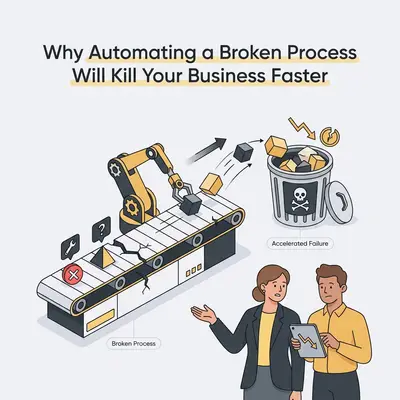
Technology does not fix bad operations. It acts as a magnifying glass. If you have a highly efficient process, automation scales your efficiency. If your process is chaotic, inconsistent, or broken, automation scales your chaos.
Here is why jumping straight into automation without fixing your underlying process is a massive risk for your business.
The Multiplication Effect of Automation
Manual processes have a built-in safety net: human friction.
When a human encounters a weird email, a missing invoice number, or a confusing client request, they pause. They ask a question. They use context to figure out the right next step. Human friction slows things down, but it prevents catastrophic errors.
Software has no friction. It does exactly what you tell it to do, as fast as possible.
If your lead qualification process accidentally sends a rejection email to 1 out of every 10 prospects manually, you lose one lead a week. If you automate that same broken logic, the system might reject 500 leads in five minutes.
Reality Check: Automation does not care about your business goals. It only cares about executing logic. If your logic is flawed, your results will be disastrous.
The True Cost of Automated Errors
When you automate a bad process, you incur "technical debt." This debt compounds quickly.
You do not just lose the time you spent building the workflow. You lose money on API calls. You lose customer trust through bad automated communications. Finally, you lose countless hours paying humans to untangle the mess the machine created.
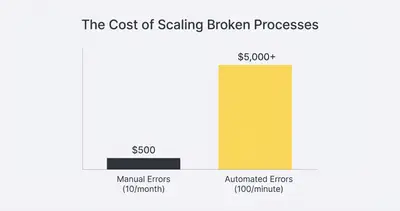
The graph above illustrates a real scenario for a small business. A manual error costs a few dollars to fix. An automated error running in a loop can cost thousands before anyone notices.
4 Signs Your Workflow Is Not Ready for Automation
Before you build anything, you need to audit your current operations. Look for these four warning signs. If any of these exist, your process is broken.
1. Heavy Reliance on "Tribal Knowledge"
Ask your team how a specific task gets done. If the answer starts with, "Well, usually we do X, but if Bob is working, we do Y," you have a problem.
Automation requires strict rules. If your process relies on the unwritten knowledge stored in one employee's head, an AI agent cannot replicate it.
2. Unpredictable Inputs
Where does the data for your task come from? If clients send information via text message, random emails, handwritten notes, and WhatsApp audio, your inputs are a mess.
You cannot automate a process if the starting point changes every day. You must standardize how information enters your system first.
3. Constant Exception Handling
Write down the steps of your process. Now, track how often you actually follow those exact steps.
If 60% of your work involves handling special cases, VIP clients, or unique scenarios, the process is too fragmented. Automating it will require a workflow so complex that it will constantly break.
4. Undefined Success Metrics
How do you know when the task is done correctly? If the answer is "It just looks right," you cannot automate it. Machines need concrete, measurable criteria for success. If you cannot define "done" with a checklist, the software will not know when to stop.
Pro Tip: Before buying any software, read our guide on Why Your First AI Automation Will Fail and How to Prevent It to understand common operational pitfalls.
The "Fix First, Automate Second" Framework
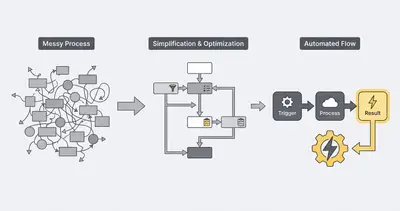
Do not touch Make, n8n, or Zapier yet. Fix the human process first using the ESSA framework: Eliminate, Simplify, Standardize, Automate.
Step 1: Eliminate
Look at every step in your current workflow. Why are you doing it?
Often, businesses automate steps that should not exist at all. Do you really need to copy client data from your CRM into a separate Google Sheet? Probably not. Delete the unnecessary steps. The fastest way to optimize a process is to stop doing it.
Step 2: Simplify
Take the remaining steps and remove complexity.
If your onboarding process requires seven different approvals from three different managers, change your company policy. Reduce the approvals to one. Simplify the decision tree. A simpler process requires a simpler, more stable automation.
Step 3: Standardize
Force your inputs into a single, structured format.
Stop letting clients email you random project requests. Create a strict, required intake form. If they do not use the form, the work does not start. Standardizing your inputs is the most critical step before introducing AI. Clean data makes automation easy.
Quick Win: Set up a simple tally or Typeform with required fields for your most common client requests. Refuse to accept requests through any other channel. You instantly fix your data input problem.
Step 4: Automate
Only now are you ready to build.
Take your eliminated, simplified, and standardized process and map it in your automation platform. Because the process is now clean, the workflow will be incredibly easy to build. It will require fewer nodes, consume fewer API credits, and run with near-perfect reliability.
Scenario: The Agency Reporting Disaster
Consider a small marketing agency. Every Friday, an account manager spends most of a day compiling performance reports for clients.
The owner wants that day back, so a consultant builds an automated reporting workflow. It pulls data from Facebook Ads, Google Analytics, and the agency's CRM, formats it with AI, and emails it to clients.
The result: Clients get reports showing zero conversions. Some get another client's data. The weekend goes on apologies.
The real problem: The automation worked perfectly. The underlying process was broken.
There were no standardized naming conventions for ad campaigns, and the CRM was full of duplicate accounts. The account manager used to catch those errors by eye and fix them in the spreadsheet before sending. That manual pass was never written down anywhere, so nobody counted it as part of the process. Automating the process bypassed the one step that was holding it together, and shipped the bad data instantly and at scale.
The fix: Pause the automation. Clean the CRM, enforce naming rules for every campaign, standardize the inputs. Then turn the automation back on, against data it can trust.
Example: You must understand your data quality before you scale. Read about how Data Quality Matters: Why Your Automation Is Only As Good As Your Data.
Stop Scaling Your Chaos
Automation is a multiplier. It is not a savior.
If your team is drowning in manual work, software might look like a life raft. But if the boat is leaking, adding an outboard motor just sinks you faster. You must plug the holes in your operations first.
Take a step back. Audit your messy processes. Force your team to use standardized forms. Document every step until a stranger could execute the task flawlessly. Test the logic manually.
Once the manual process is painfully boring but highly predictable, then you bring in the bots. That is when automation stops being a liability and starts printing time and money for your business.
Related Resources
- The 5 Minute Test to See if Your Business Process Can Be Automated
- Complete Guide to Business Process Automation
- 7 Common AI Automation Mistakes Beginners Make and How to Fix Them
- Data Quality Matters Why Your Automation is Only as Good as Your Data
Official Sources
- Harvard Business Review: Before You Automate, Redesign
- McKinsey: The Automation Imperative
- Gartner: Information Technology Glossary - Hyperautomation
Ready to stop scaling chaos and build workflows that actually drive results? Book a demo with Evalics today. We help small businesses optimize their processes before building rock-solid automations.
By Kevin Michael Schindler, AI Automation Expert at Evalics