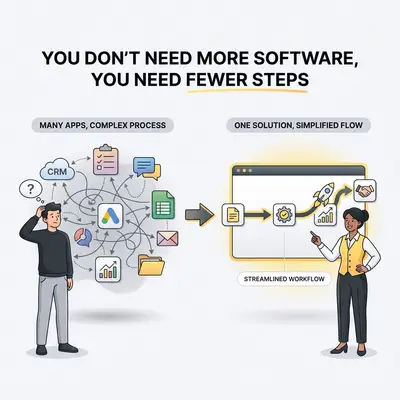
Your team misses a critical client follow-up. You panic, search the internet, and buy a specialized lead-tracking app to ensure it never happens again.
Six months later, you realize your team isn't using the new app. They still miss follow-ups. Now, they are also frustrated because they have to log into three different systems just to start their day. You are paying $200 a month for software that acts as an expensive digital paperweight.
Most small business owners try to solve organizational problems by buying software. But throwing a new SaaS subscription at a bad process doesn't fix the process. It just digitizes the chaos.
You don't need another dashboard. You don't need another app. You need fewer steps.
The SaaS Bloat Trap
Every time you hit a operational bottleneck, the temptation is to buy a targeted solution. Need to manage social media? Buy a scheduling tool. Need to onboard clients? Buy a client portal.
This creates a phenomenon known as SaaS bloat. You end up with a sprawling stack of 15 different applications. None of them talk to each other seamlessly.
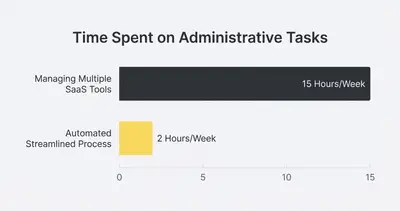
Reality Check: Every new tool you introduce requires training, maintenance, and data management. You think you are buying a shortcut, but you are actually buying an administrative burden.
When data lives in a dozen different places, your team spends their day bridging the gaps. They copy information from the CRM, paste it into the billing software, and retype it into a project management board.
You bought software to save time. Instead, your team became full-time data entry clerks.
The Illusion of "One-Click" Efficiency
Software vendors sell you on the dream of the "all-in-one" solution. They promise that their tool will handle your entire workflow.
The reality is quite different. Off-the-shelf software is built for the masses. To accommodate everyone, the software forces you into a rigid, predefined set of steps.
If your business process requires three simple actions, the new software might force you to complete seven mandatory fields across four screens just to save a record. You bought a tool to move faster, but it added friction to your daily operations.
Efficiency doesn't come from the tool. It comes from the underlying process. If you automate a bad process, you just do bad things faster.
The "Fewer Steps" Framework
Before you open another browser tab to research software, you need to audit your physical steps. In our experience helping over 50 small agencies optimize their operations, the biggest breakthroughs come from subtraction, not addition.
Here is how you actually simplify your business.
1. Count the Clicks
Pick one frustrating process. Have the person responsible for it record their screen using a tool like Loom. Ask them to narrate exactly what they are doing.
Watch the video and literally count the clicks. Count the tab switches. Count how many times they copy and paste. You will be shocked by the sheer volume of micro-tasks required to complete a seemingly simple job.
2. Kill the "Just in Case" Steps
Look closely at your process map. You will find steps that exist solely because someone made a mistake three years ago.
Are you asking for a client's fax number? Are you requiring a manager's approval on a zero-dollar invoice? Eliminate steps that don't directly contribute to the final outcome.
Pro Tip: Ask your team, "What would happen if we just stopped doing this step?" If the answer is "Nothing," cut it immediately.
3. Connect Systems, Don't Replace Them
Once you strip the process down to its bare essentials, look at the gaps. This is where most businesses buy a new tool.
Instead of buying a new frontend application, use centralized automation platforms like n8n or Make.com to connect the systems you already own. You want invisible workflows that run in the background, not new interfaces your team has to learn.
Real-World Case Study: The Client Onboarding Nightmare
Consider a 10-person marketing agency we recently analyzed. Their client onboarding was a disaster. It took them an average of four days to get a new client fully set up.
Their original process looked like this:
- Sales rep closes the deal and changes the CRM status.
- Rep manually emails the operations manager.
- Operations manager creates a Google Drive folder.
- Manager generates a contract in a specialized e-signature tool.
- Manager emails the contract to the client.
- Client signs.
- Manager downloads the signed PDF.
- Manager uploads the PDF to Google Drive.
- Manager manually creates a new project in Asana.
- Manager types out a welcome email with a link to an intake form.
- Client fills out the form.
- Manager copies form data into the CRM.
They tried to fix this by purchasing a $250/month "client portal" software. It failed. The portal didn't integrate well with Asana, and clients hated creating a new password just to sign a document. The software added a step instead of removing one.
The Simplified Solution
We applied the "Fewer Steps" framework. We cut out the manual emails and the specialized portal. We used n8n to connect their existing core tools: their CRM, Google Workspace, and Asana.
The new process requires zero new software and looks like this:
- Sales rep changes the CRM status to "Closed Won".
- Automation takes over: n8n automatically generates the contract, emails it to the client, creates the Google Drive folder, and sets up the Asana project.
- Client signs the contract and fills out an attached intake form, which automatically updates the CRM and alerts the team in Slack.
They dropped from 12 steps down to 3. They canceled the $250/month software. Onboarding now takes 15 minutes instead of four days.
How to Audit Your Workflows This Week
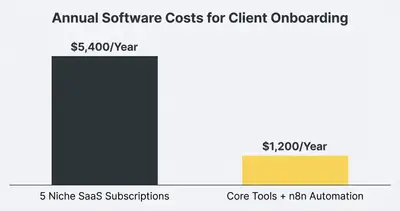
You can start stripping away unnecessary software right now. Follow this exact three-day plan.
Day 1: Find the Friction. Ask your team what task they dread the most. Usually, it's a task that requires them to move data between different systems. Focus on that specific bottleneck.
Day 2: Map the Reality. Document how the task is actually done today. Don't document how it should be done. Write down every single click, system log-in, and manual data transfer.
Day 3: Subtract and Connect. Cross out any step that doesn't add direct value to the client or ensure critical compliance. For the remaining steps, determine if a background automation can move the data instead of a human.
Quick Win: Identify tools that serve a single, narrow purpose (like a standalone app just for generating invoices). You can almost always replace these with an automated workflow connected to your main database.
When Should You Actually Buy New Software?
There is a time and place for purchasing new tools. The goal isn't to run your entire business on a legal pad. The goal is intentional architecture.
Buy Systems of Record. You absolutely need robust core systems. Invest in a strong CRM to hold your customer data. Buy reliable accounting software. Pay for a solid communication platform like Google Workspace or Slack. These are foundational databases.
Automate the Interstitial. Do not buy software just to move data from Point A to Point B. If a tool's primary pitch is "we sync your leads to your project board," do not buy it. Build that connection yourself using a platform like n8n.
When you build the connections yourself, you own the logic. You aren't held hostage by a vendor's pricing changes or feature limitations.
The Cost of Doing Nothing
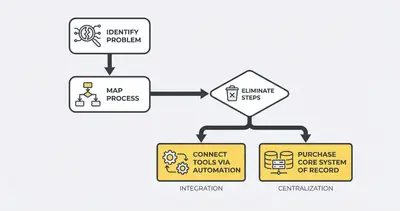
Ignoring SaaS bloat drains your profit margins twice. You bleed cash on monthly subscriptions for tools your team barely uses. Worse, you bleed time.
Every minute an employee spends wrestling with clunky software is a minute they aren't talking to clients, closing deals, or improving your product. Complex, multi-step processes also create a massive surface area for human error.
If it takes 15 manual steps to launch a marketing campaign, someone will eventually forget step number 8. Data gets lost. Clients get angry. You buy another software tool to make sure step 8 never gets missed again. The cycle repeats.
Break the cycle. Look at your operations objectively. You don't lack technology. You lack simplicity.
By aggressively mapping your processes, cutting out redundant actions, and using background automation to connect your core systems, you build a business that scales effortlessly.
Are you ready to stop paying for unnecessary software and start building streamlined, high-performance workflows? Book a demo with Evalics today. We will help you audit your current tech stack, eliminate the bloat, and automate the rest.
Related Resources
- Stop Paying for 10 Different SaaS Tools Build Them in n8n
- The 5 Minute Test to See If Your Business Process Can Be Automated
- Complete Guide Business Process Automation
- 80 20 Rule Business Automation What to Automate First
Official Sources
- Gartner: The Hidden Costs of Cloud and SaaS Sprawl
- Harvard Business Review: Why Adding Software Doesn't Always Add Productivity
- McKinsey: The Business Value of Process Simplification
By Kevin Michael Schindler, AI Automation Expert at Evalics