
You spend an hour crafting the perfect LinkedIn post. It is insightful, well-formatted, and engaging. Then, you spend another 20 minutes copying, pasting, trimming, and reformatting that exact same content into a thread for X (formerly Twitter).
If you publish five times a week, you lose nearly two hours just formatting text for a different platform.
Most business owners try to fix this by setting up a basic Zapier or Make connection. They link their LinkedIn account to their X account and hit save. A week later, their X account is a ghost town. Their impressions drop to zero. They have been shadowbanned.
Cross-posting sounds easy, but doing it blindly triggers spam filters. If you want to automate your content pipeline successfully, you have to build it like a native user. Here is how to automate your LinkedIn-to-X pipeline safely, without angering the algorithm.
Why Lazy Automation Gets You Shadowbanned
The X algorithm is highly sensitive to bot-like behavior. When you use a basic "If this, then that" automation, you leave massive digital footprints that scream "bot."
Here are the three main triggers that get automated accounts penalized:
- The Link Penalty: LinkedIn posts often contain external links to newsletters or blogs. If your automation blindly pushes a post with an external link directly to X, the algorithm suppresses it. X wants to keep users on X.
- Character Cutoffs: LinkedIn allows 3,000 characters. A standard X post allows 280. If your automation just chops off the text and adds "...", it looks terrible and signals automated spam.
- Timestamp Clustering: If your X post goes live the exact millisecond your LinkedIn post publishes, the platform knows a machine did it.
Reality Check: Social media platforms do not hate automation. They hate lazy automation. If your automated posts provide a native, high-quality experience, the algorithm will reward you.
The Tool Stack You Need
To build a safe pipeline, you need three components. You can build this in about an hour.
- The Workflow Engine: Make.com or n8n. These platforms manage the logic and connect the apps securely using official APIs.
- The Brain (AI): OpenAI (GPT-4o) or Anthropic (Claude 3.5 Sonnet). This reads your LinkedIn post and rewrites it perfectly for X.
- The Platforms: Your authenticated LinkedIn and X accounts.
Step 1: Set Up the Official Trigger
Never use third-party scraping tools to pull your own LinkedIn posts. Scraping violates terms of service and risks a ban on both platforms.
Instead, use the official modules inside your workflow tool. In n8n or Make, select the "LinkedIn" app and choose the "Watch Posts" or "Watch Organizational Posts" trigger.
Connect your account via official OAuth. This is 100% safe and approved by LinkedIn. Every time you publish a new post, this trigger grabs the text, the images, and the links.
Step 2: The AI Reformatting Layer
This is the most critical step. You cannot just pass the text straight to X. You must use an AI node to restructure the content.
Add an OpenAI or Anthropic node to your workflow. Pass the raw LinkedIn text into the prompt.
Here is a highly effective system prompt to get better results from your AI:
"You are an expert social media manager. I will provide a LinkedIn post. Your job is to convert this into an engaging X (Twitter) thread. Follow these strict rules: 1. Keep the exact same tone and message. 2. Break the content into a thread. No single post can exceed 270 characters. 3. Do not use cringe-worthy AI words like 'delve', 'unleash', or 'supercharge'. 4. Output the response as a JSON array where each item is a tweet in the thread."
By forcing the AI to output a JSON array, you make it incredibly easy for your workflow tool to process each tweet individually.
Pro Tip: If your LinkedIn post includes a link, tell the AI to remove it from the main thread text. We will handle the link safely in Step 5.
Step 3: Add the "Jitter" Delay
If your X thread goes live the exact second your LinkedIn post does, X flags it as automated.
Add a "Sleep" or "Delay" node immediately after the AI processing step. Do not set a fixed time. Instead, use a formula to generate a random delay between 15 and 45 minutes.
This is called "jitter." It mimics human behavior. A human might post on LinkedIn, go grab a coffee, and then write their X thread 23 minutes later. Your automation should act the same way.
Step 4: Publish the Thread
Now it is time to post. X handles threads differently than single posts. To create a thread via API, you must link each post to the one before it.
If you are using Make or n8n, this requires an "Iterator" node.
- The Iterator takes the JSON array of tweets from your AI model.
- It posts the first tweet.
- It grabs the unique "Tweet ID" of that newly published post.
- It posts the second tweet, using the "Reply to Tweet ID" field to attach it to the first one.
- It repeats this process until the thread is complete.
This ensures your long LinkedIn thoughts translate beautifully into an easily readable X thread, completely avoiding character limits.
Step 5: The "Link in Comments" Strategy
External links kill reach on X. The proven workaround is to post your thread without links, wait, and then add the link as the final reply to the thread.
You can automate this easily:
- After the Iterator finishes the main thread, add another Delay node (wait 5 minutes).
- Check if the original LinkedIn post contained a URL.
- If yes, create one final tweet attached to the thread: "Link to the full resource here: [URL]"
This satisfies the X algorithm by keeping the main thread link-free, while still driving traffic to your website or newsletter.
The Time and Cost Impact
Setting up this pipeline manually takes a few hours. Maintaining it costs pennies. Let's compare the traditional manual method versus this automated AI approach for a business owner posting 5 times a week.
Manual cross-posting takes about 20 minutes per post (trimming, rewriting, posting thread replies). That equals 86 hours a year.
Automated cross-posting processes instantly. The only cost is the API usage for the AI model to rewrite the text (about $0.02 per post).
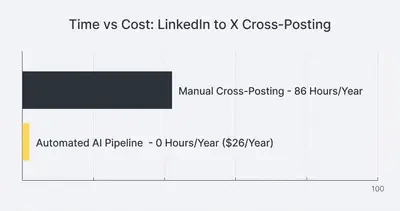
You trade 86 hours of tedious data entry for about $26 a year in AI token costs. That is one of the highest ROI automations you can build.
Handling Images and Media
Text is easy. Media is slightly harder but completely doable.
When your trigger pulls the LinkedIn post, it will also pull the image URL if you included one. You can pass this URL to the X node.
However, X's API requires you to upload the media first, get a "Media ID," and then attach that ID to your tweet. Both Make and n8n have built-in steps for this. Simply add an "Upload Media" step right before you publish the first tweet, and map that ID to the final post.
Quick Win: Always attach the image to the first tweet in your automated thread. This ensures it acts as the hook for users scrolling their feed.
Avoiding Automation Hallucinations
AI models occasionally make mistakes. They might misunderstand a technical term or add an emoji you hate.
If you want absolute control, you can add an approval step to your pipeline. Instead of posting directly to X, send the drafted thread to a private Slack or Discord channel.
Include two buttons: "Approve" and "Reject."
If you click approve, the workflow continues and posts to X. If you click reject, it stops. This human-in-the-loop system completely eliminates AI hallucinations while still doing 99% of the heavy lifting.
Summary: The Safe Cross-Posting Checklist
To keep your accounts safe and your reach high, review this checklist before turning your workflow on:
- Use official API triggers, never web scrapers.
- Use AI to reformat into threads; never abruptly truncate text.
- Add random time delays (15-45 minutes) between the LinkedIn post and the X post.
- Keep external links out of the main post; automate them into a reply.
- Add a human approval step if your brand voice requires strict oversight.
By treating the platform with respect and mimicking native behavior, you can reclaim hours of your week without sacrificing your social media growth.
Ready to stop manually copying and pasting your content? Book a demo with Evalics today, and we will help you build safe, reliable social media pipelines tailored to your business.
Related Resources
- N8n vs Make Why Small Businesses Are Switching 2025
- How Token Limits and Context Size Affect AI Automation Costs
- Understanding AI Hallucinations What They Are and How to Prevent Them
- Prompt Engineering Step by Step Checklist
Official Sources
- X Developer Platform Rate Limits
- LinkedIn API Documentation
- Make.com X (Twitter) Integration Guide
- n8n LinkedIn OAuth Setup
By Kevin Michael Schindler, AI Automation Expert at Evalics