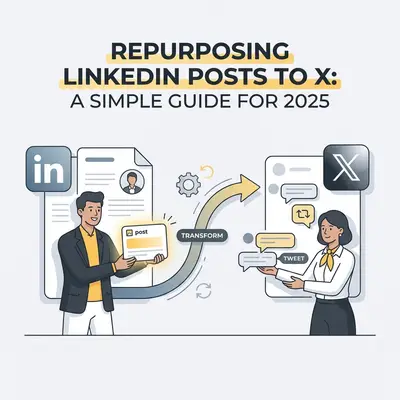
You spend 45 minutes crafting the perfect LinkedIn post. You nail the hook, format the bullet points, and check the spacing. It gets good engagement. Then, 24 hours later, it disappears into the feed, never to be seen again.
That is a waste of your time.
Most business owners and creators leave free impressions on the table by not repurposing their content. The easiest win? Taking that LinkedIn post and moving it to X (formerly Twitter).
But you cannot just copy-paste and walk away. The platforms are different. The audiences are different. The algorithms reward different behaviors.
Here is exactly how to repurpose your content effectively, what needs to change, and why you should stop writing everything twice.
Why Bother Repurposing?
It’s about ROI on your writing time.
If you spend an hour writing a thoughtful insight, that asset should work as hard as possible. The audience overlap between LinkedIn and X is smaller than you think. LinkedIn is your "office" persona—professional, polished, and positive. X is the "water cooler"—fast, opinionated, and concise.
By repurposing, you:
- Double your reach without doubling your writing time.
- Test ideas on two different demographics.
- Build authority across multiple channels simultaneously.
Quick Win: Do not post on both platforms at the exact same minute. Post on LinkedIn in the morning (8 AM - 10 AM) and repurpose to X in the afternoon or the next day to capture different time zones and attention spans.
The "Copy-Paste" Mistake
Can you copy-paste a LinkedIn post directly to X?
Technically, yes—if you pay for X Premium (formerly Twitter Blue), which allows long-form posts (up to 25,000 characters).
Should you do it? No.
Here is why:
- Reading Habits: X users scan. They are used to short, punchy updates. A "wall of text" that looks like a LinkedIn screenshot often gets ignored.
- Formatting: LinkedIn relies on line breaks for rhythm. X relies on threads for suspense.
- The "Cringe" Factor: LinkedIn language ("I am humbled and honored...") often gets roasted on X.
If you copy-paste blindly, you look like a bot. To win, you must adapt.
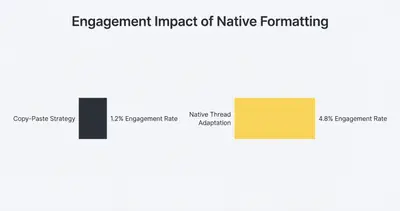
What to Change: The Repurposing Checklist
When moving content from LinkedIn to X, use this transformation checklist.
1. The Character Count and Format
- LinkedIn: You have 3,000 characters. You usually write in a "Bro-etry" style (short sentences, lots of white space).
- X (Free): You have 280 characters per post.
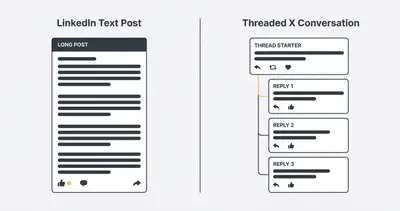
- The Fix: Turn your LinkedIn post into a Thread.
- Take your LinkedIn "Hook" (the first sentence) and make it the first tweet.
- Take each main bullet point from LinkedIn and make it a separate reply in the thread.
- Put your conclusion in the final tweet.
2. The Hook
LinkedIn hooks are often storytelling setups: "I almost lost a client yesterday, and it taught me a valuable lesson..."
X hooks need to be headlines: "How to save a client relationship in 5 minutes (without apologizing)."
On X, you are competing with breaking news and memes. Get to the point faster.
3. Hashtags
- LinkedIn: 3-5 hashtags are standard and help with discovery (e.g., #SaaS #Marketing #Growth).
- X: Hashtags consume valuable character space and often look spammy in 2025.
- The Verdict: Use zero to one hashtag on X. If you use one, make it broad (e.g., #AI). The algorithm is smart enough to categorize your text without hashtags.
4. Visuals and Links
LinkedIn penalizes posts with external links (links that take you off the site). X penalizes them even harder.
- LinkedIn: You usually put the link in the comments or the post body.
- X: Never put a link in the first tweet. It kills reach. Put the link in the last tweet of the thread or in a reply to the first tweet (the "plug").
Pro Tip: Visuals matter. LinkedIn supports PDFs (carousels). X does not support PDFs natively. If you have a LinkedIn carousel, export the slides as individual JPGs and upload them to an X thread (4 images per tweet).
Practical Example: Before and After
Let's look at a real scenario.
Original LinkedIn Post:
"I spent the weekend analyzing our automation workflows. It turns out, we were over-complicating the data entry process. By switching from a complex script to a simple N8n node, we saved 10 hours a week. Simplicity scales better than complexity. #Automation #N8n #Productivity"
Repurposed for X (Thread):
Tweet 1: Simplicity scales. Complexity breaks.
Tweet 2: We just audited our agency workflows. We found a script that was costing us 10 hours a week in maintenance.
Tweet 3: We deleted the code. We replaced it with a native no-code node.
Tweet 4: Result: 10 hours saved immediately. Stop over-engineering your systems.
See the difference? The X version is punchier, creates a narrative flow, and fits the platform's native vibe.
How to Speed Up the Process
You don't have to rewrite these manually every time. You can use AI to do the heavy lifting.
If you are already using tools like ChatGPT or Claude, you can use a prompt to reshape your content.
Try this prompt:
"I am going to paste a LinkedIn post. Please rewrite it as an engaging X thread.
- Keep the tone punchy and direct.
- No hashtags.
- Break the main points into separate tweets.
- Ensure the first tweet is a strong hook. Here is the post: [Paste Text]"
For those looking to automate this entirely, you can build workflows that watch your LinkedIn profile and automatically draft X threads for you to review.
Key Insight: Automation helps you draft, but you must review. AI often sounds enthusiastic in a generic way. Always edit the hook to sound like you before hitting post.
Conclusion
Repurposing isn't lazy; it's smart distribution.
Your ideas deserve to be seen by more people. By tweaking the format, removing the hashtags, and breaking long thoughts into threads, you can dominate two platforms with the effort of one.
Start today. Go to your top-performing LinkedIn post from last week, rewrite it as a thread, and post it on X.
Related Resources
- Automating Blog Post Writing AI N8n
- Prompt Engineering Step by Step Checklist
- 5 Simple N8n Workflows Daily Productivity
- AI Isnt Replacing Your Team Broken Workflows Are
faqs:
- question: "Can I just screenshot my LinkedIn post and put it on X?" answer: "You can, but it usually performs poorly. Native text is searchable and easier to read. Screenshots look like low-effort reposts and limit your reach."
- question: "Does X Premium change the character limit rules?" answer: "Yes, X Premium allows posts up to 25,000 characters. However, long blocks of text are harder to read on mobile. Threads generally perform better for engagement even if you have the higher limit."
- question: "Should I use hashtags on my repurposed X posts?" answer: "Generally, no. Unlike LinkedIn where 3-5 hashtags are standard, hashtags on X can clutter the post and lower click-through rates. Use them sparingly or not at all."
- question: "What is the best time gap between posting on LinkedIn and X?" answer: "Stagger them by at least 4-6 hours, or post on different days. This prevents audience fatigue for people who follow you on both platforms and maximizes your coverage across time zones."
- question: "How do I handle links when repurposing?" answer: "On LinkedIn, links often go in the comments or body. On X, links significantly reduce reach if placed in the main post. Always put your link in the final tweet of the thread or as a reply to the first tweet."