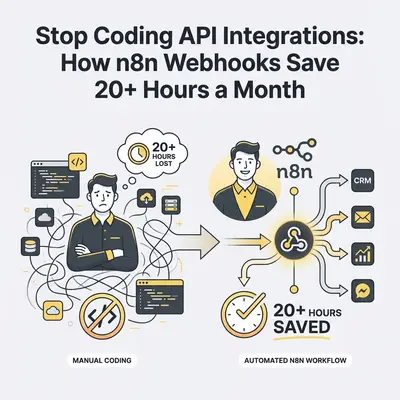
You write a Python script to sync leads from a landing page to your CRM. It works perfectly for three weeks. Then, on a Tuesday night, the API changes its authentication method, or the server runs out of memory, or a rogue character in a JSON payload crashes the whole thing.
You spend the next four hours debugging logs instead of growing your business.
This is the "maintenance tax" of custom coding API integrations. While writing code gives you ultimate control, it also burdens you with ultimate responsibility for uptime, error handling, and server maintenance.
In 2025, writing custom boilerplate code to move data from Point A to Point B is obsolete. n8n webhooks provide a better way—one that saves technical teams 20+ hours a month in setup and maintenance while offering better visibility into what’s actually happening with your data.
Here is why you should stop coding integrations and start orchestrating them.
The Hidden Cost of "Just Writing a Script"
Developers often default to writing a quick Node.js or Python script because "it’s just a simple API call." But a production-ready integration is never just an API call.
To make a "simple" script reliable, you have to build:
- Authentication handling (Oauth2 token refreshing).
- Error logging (so you know when it fails).
- Retry logic (exponential backoff for rate limits).
- Hosting infrastructure (AWS Lambda, Heroku, or a VPS).
- Security updates (patching the OS and libraries).
That "5-minute script" creates a permanent maintenance liability.
Reality Check: Most businesses underestimate integration maintenance. A script that takes 5 hours to build will cost 2-5 hours per month in debugging, updates, and server management forever.
How n8n Webhooks Change the Equation
n8n flips this model. Instead of writing code to listen for data, you simply drag a Webhook Node onto the canvas. This node gives you an instant, unique URL that acts as a receiver for any data you send it.
When you send a POST request to that URL, n8n automatically:
- Parses the JSON body.
- Captures headers and query parameters.
- Triggers the workflow immediately.
You don't need to set up a server. You don't need to configure an Express.js app. You just copy the URL and paste it into your source app (like Stripe, Typeform, or GitHub).
Visual Debugging vs. Console Logs
The biggest time-saver isn't the setup—it's the debugging.
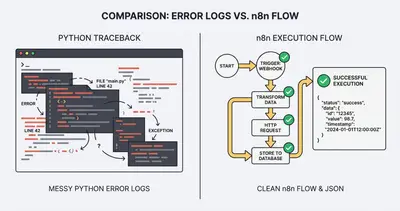
When a custom script fails, you have to SSH into a server and grep through text logs. When an n8n webhook fails (or succeeds), you get a visual execution history. You can click on any specific execution, see exactly what data came in, and trace step-by-step where the logic broke.
The "Plumbing vs. Logic" Ratio
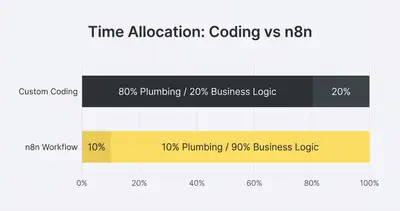
Effective automation is about focusing on business logic, not plumbing.
- Plumbing: Handling HTTP headers, parsing JSON, refreshing API tokens, managing retries.
- Logic: "If the lead score is > 50, send to Salesforce; otherwise, add to Mailchimp."
When you code integrations from scratch, you spend 80% of your time on plumbing. n8n handles the plumbing automatically, letting you spend 90% of your time on logic.
3 Real-World Scenarios: Code vs. n8n
Here is how replacing code with n8n saves specific hours in common scenarios.
Scenario 1: The "Lead Router"
Task: Receive a webhook from a Facebook Lead Form, format the phone number, and send it to Slack.
- The Code Way: Set up an AWS Lambda function. Import
requestsandjson. Write logic to parse the phone number. Set up API Gateway to expose the endpoint. Deploy.- Time: 4 hours setup + monthly maintenance.
- The n8n Way: Add Webhook node. Add "Code" node for regex formatting (2 lines of JS). Add Slack node.
- Time: 15 minutes setup + zero maintenance.
Scenario 2: Connecting Legacy Systems
Task: A legacy ERP needs to send inventory updates to Shopify every hour.
- The Code Way: Write a cron job script. Handle the SOAP XML response from the ERP. Convert XML to JSON. Authenticate with Shopify. Loop through products. Handle rate limits.
- Time: 1-2 days setup + high risk of silent failure if the cron job dies.
- The n8n Way: Use a "Schedule" trigger. Use an HTTP Request node to fetch XML. Use the built-in "XML to JSON" helper. Batch the data to Shopify.
- Time: 1 hour setup. Visual history of every run.
Scenario 3: Error Handling & Retries
Task: If the CRM API is down, retry the request 3 times before giving up and emailing the admin.
- The Code Way: Write a
try/exceptblock inside awhileloop withsleep. Configure an SMTP library to send the email.- Complexity: High. Easy to create infinite loops or block the thread.
- The n8n Way: Open the HTTP Request node settings. Toggle "Retry on Fail" to On. Set "Max Retries" to 3. Connect the "Error" output to a Gmail node.
- Complexity: Zero. Built-in feature.
Key Insight: n8n doesn't remove code entirely. It removes boilerplate code. You can still use the Code Node to run JavaScript or Python for specific data transformations, but the heavy lifting of connectivity is handled by the platform.
A Strategic Shift for 2025
The most efficient engineering teams are no longer building what they can buy or configure. If your developers are writing CRUD (Create, Read, Update, Delete) scripts, you are wasting expensive talent on low-value work.
When to Keep Coding
There are exceptions. Stick to custom code if:
- Latency must be under 10ms: n8n has a small overhead (usually 100-300ms). High-frequency trading needs raw code.
- Complex proprietary algorithms: If you are calculating protein folding structures, run that in a dedicated environment (though you could still trigger it via n8n).
When to Switch to n8n
Switch to n8n webhooks if:
- You are moving data between SaaS platforms.
- You need to iterate quickly (changing logic weekly).
- You want non-developers (Ops, Marketing) to be able to read the workflow logic.
Security Considerations
A common objection to "low-code" is security. "Is exposing a webhook URL safe?"
n8n offers robust security features for webhooks:
- Authentication: You can require Basic Auth or Header Auth for any webhook.
- Method Validation: Restrict the webhook to only accept
POSTrequests, rejectingGETorDELETE. - IP Whitelisting: If self-hosting, you can restrict access at the firewall level.
This is often more secure than a custom script hosted on a forgotten EC2 instance that hasn't been patched in two years.
Conclusion
Coding your own API integrations in 2025 is like knitting your own socks. You can do it, and it feels like an accomplishment, but it's not the best use of your time.
By switching to n8n webhooks, you eliminate the "plumbing" work, gain visual debugging tools, and reduce the maintenance burden significantly. You stop worrying about server uptime and start focusing on data flow.
Takeaway: Identify one custom script currently running in your business. Rebuild it in n8n this afternoon. You will likely finish before your coffee gets cold—and you'll save hours of debugging next month.
Related Resources
- n8n vs Make: Why Small Businesses Are Switching 2025
- What Is an API Key: A Simple Guide for AI Automation
- n8n Workflow Design Patterns: Error Handling & Production Setup
- Stop Paying for 10 Different SaaS Tools: Build Them in n8n
Official Sources
By Kevin Michael Schindler, AI Automation Expert at Evalics