
You've heard the promises: automation saves time, reduces errors, and scales your business effortlessly. You're ready to dive in, but one look at your team's mountain of daily tasks leaves you paralyzed. Where do you even start?
Every small business has a set of repetitive tasks that could be automated and are not. Yet many automation projects fail because they target the wrong processes or attempt to automate workflows that aren't ready.
Picking the wrong task to automate is a classic pitfall. You can waste weeks trying to automate a process that's too complex, too unpredictable, or just not ready, only to end up with a clunky workflow that creates more problems than it solves. The risk isn't just lost time—it's the frustration that makes you want to give up on automation altogether.
But what if you could identify the perfect "first automation" candidate in less time than it takes to brew your morning coffee?
That’s where the 5-Minute Automation Test comes in. It’s a dead-simple, four-question checklist designed to help any business owner cut through the noise and pinpoint the small, repetitive tasks that are ripe for automation. No technical jargon, no complex analysis—just a straightforward way to find your first win and build momentum.
First, a Warning: Don't Automate a Mess
The single biggest mistake in automation is rushing to automate a broken or unstable process. If your current workflow is chaotic, inconsistent, or requires constant human intervention to fix problems, automating it will only make the chaos happen faster. For a deeper framework on identifying automation opportunities and avoiding common pitfalls, see our guide on developing an automation mindset.
Reality Check: Automation is a powerful amplifier. It will amplify the efficiency of a good process, but it will also amplify the dysfunction of a bad one. Before you ever think about tools, make sure the task itself is standardized and predictable.
The 5-Minute Automation Test: Your 4-Point Litmus Test
Ask yourself these four simple questions about the task you have in mind. If you can answer "yes" to all four, you've likely found a perfect candidate for your first automation project.
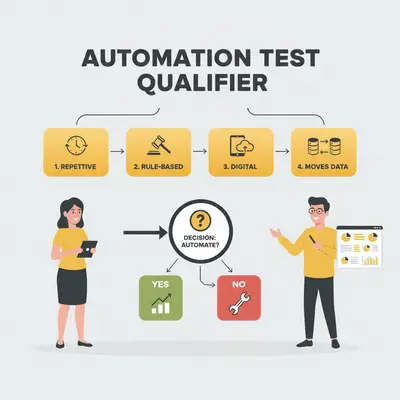
Think about the mindless, recurring tasks that eat up your day. We're talking about the jobs you could do in your sleep because you do them over and over again.
- Good example: Copying information from new sales lead emails into a spreadsheet every single day.
- Bad example: Crafting a unique, personalized proposal for a high-value client.
2. Is the Task Rule-Based?
Automation thrives on clear, consistent logic. A good task for automation follows a simple set of "if-this, then-that" rules without needing human judgment or interpretation.
- Good example: If a customer submits a "Contact Us" form, then send their information to the sales CRM and add them to the "New Leads" email list.
- Bad example: Deciding if a customer's complaint email is "urgent" based on the tone of their message.
3. Is the Task Digital?
Automation works by connecting digital triggers and actions. The task should involve digital information that can be easily accessed and manipulated by software.
- Good example: Saving a file from an email attachment to a cloud storage folder like Google Drive or Dropbox.
- Bad example: Manually scanning paper invoices, correcting OCR errors, and then entering the data into accounting software. (The scanning part is the roadblock).
4. Does the Task Involve Moving Data Between Apps?
Some of the biggest time-sinks involve acting as a human bridge between two applications that don’t talk to each other. These tasks are prime for automation.
- Good example: When a customer pays an invoice in Stripe, automatically create a new record for them in QuickBooks.
- Bad example: Researching a new market trend and summarizing the findings in a report.
Key Insight: You don't need a complex, business-critical process for your first automation. The goal is to find a small, high-frequency task that delivers a quick win. Success with a simple automation builds the confidence and experience needed to tackle bigger challenges later.
Putting the Test into Practice: Real-World Examples
To make it even clearer, here are some examples of perfect "first automation" projects versus those you should avoid for now.
Excellent Choices for a First Automation:
- Social Media Posting: Automatically share your new blog posts to LinkedIn, Twitter, and Facebook.
- Lead Data Entry: When a user fills out a lead magnet form, automatically add their details to your CRM and subscribe them to your newsletter.
- File Organization: Automatically save all email attachments from a specific client into their dedicated folder in Google Drive.
Data entry and file handling are the most common first automation projects, because they are repetitive, rule-based, and easy to check. Once you've identified a good candidate using this test, follow our step-by-step guide to building your first automation to get started.
Quick Win: A simple email filter is a form of automation. Set up a rule in your inbox to automatically tag emails from key clients or move receipts into a "Finance" folder. It takes two minutes to set up and saves you daily clutter.
Poor Choices for a First Automation:
- Complex Customer Support: Trying to build a chatbot that can answer nuanced technical questions with multiple follow-ups.
- Content Creation: Automating the entire process of writing a blog post or creating a video (AI can assist, but full automation is complex and often yields poor quality).
- Anything Requiring Subjective Review: Processes that need a human to approve a design, review a legal document, or make a strategic decision.
Pro Tip: If a task seems too complex to automate, see if you can simplify the process first. Sometimes, breaking a large, complicated task into three smaller, rule-based tasks can unlock automation opportunities.
Conclusion
For years, the power of automation felt reserved for large companies with deep pockets and dedicated IT teams. But today, the tools are more accessible than ever, and the biggest barrier isn't technology—it's knowing where to start. Industry trends show that automation adoption among small businesses has increased dramatically, with no-code platforms making it easier than ever to get started.
The 5-Minute Automation Test cuts through that complexity. By asking four simple questions—Is it repetitive? Rule-based? Digital? Does it move data?—you can confidently identify the small, recurring tasks that are perfect candidates for your first automation win. You don't need to boil the ocean; you just need to stop manually copy-pasting data from one app to another.
Start there. Find one small process, automate it, and reclaim a few hours in your week. That small victory will give you the momentum to tackle the next one, and the one after that.
Ready to find and build your first automation win? Book a free 30-minute automation consultation with Evalics today, and we'll help you identify the best starting point for your business.
FAQ
1. What are the best tools for a beginner to start with? For beginners, we recommend starting with user-friendly platforms like Zapier or Make.com. They use visual, no-code interfaces that allow you to connect thousands of common business apps without writing a single line of code. Zapier is particularly beginner-friendly with its simple trigger-action setup, while Make.com offers more advanced features for when you're ready to scale. Both platforms have extensive documentation and active communities to help you learn.
2. How much does automation typically cost for a small business? The cost can range from free to a few hundred dollars per month. Many platforms offer free tiers that are perfect for simple, low-volume tasks—Zapier's free plan includes 100 tasks per month, while Make.com offers 1,000 operations monthly. Paid plans typically start around $20-$50/month and scale up based on the number of tasks you run. For most small businesses starting out, the free tier is sufficient to automate 2-3 key workflows, which can save 5-10 hours per week.
3. How long does it take to set up a simple automation? Once you've identified a good task, a simple automation (like saving email attachments to Google Drive) can often be set up in under 30 minutes on a platform like Zapier or Make. More complex automations that involve multiple steps or data transformations might take 1-2 hours. The key is starting simple: a basic two-step automation (trigger → action) takes the least time and gives you immediate value, building confidence for more complex workflows later.
4. What's the difference between automation and AI? Automation follows predefined rules to execute tasks (if X happens, do Y). AI, on the other hand, can make decisions, interpret data, and handle tasks that require judgment, like summarizing text or categorizing customer feedback. Many modern workflows combine both. For example, you might use automation to route emails to the right department, then use AI to analyze the sentiment of customer messages. To understand when to use rule-based automation vs AI automation, see our detailed comparison guide.
5. Can I automate tasks that involve documents or PDFs? Yes, this is a common use case. Tools called "parsers" can be integrated into automation workflows to extract specific data from structured documents like invoices or purchase orders and send it to other applications. Platforms like Zapier and Make.com have built-in PDF parsing capabilities, and you can also use specialized tools like Docparser or Parseur for more complex document extraction. This is particularly valuable for automating invoice processing, form submissions, and data entry from standardized documents.
6. Is my business data safe when I use automation platforms? Reputable automation platforms take security very seriously, using encryption and complying with data privacy regulations like GDPR and SOC 2. However, it's always critical to review the security and privacy policies of any tool you use and grant it the minimum permissions necessary to perform its task. Look for platforms that offer two-factor authentication, audit logs, and clear data retention policies. Always use OAuth connections when available (which don't require sharing passwords) and regularly review which apps have access to your accounts.
By Kevin Michael Schindler, AI Automation Expert at Evalics