
Your customer service chatbot is handling a return perfectly. The customer provides their order number. The bot asks for the reason. The customer explains the sizing was wrong. Then, out of nowhere, the bot asks for the order number again.
It forgot everything.
Worse, it might suddenly drop its friendly corporate persona, ignore your strict system instructions, or start hallucinating policies you never authorized.
This isn't a glitch in the AI. You have fallen into the context window trap. Most business owners assume AI remembers a conversation just like a human does. It doesn't. Understanding how an AI actually processes chat history is the difference between an automation that scales and one that frustrates your customers.
The AI Desk Analogy
To understand why your AI loses the plot, you need to understand the context window.
Think of an AI model like a brilliant employee sitting at a small desk. The desk represents the context window. Any document placed on the desk can be read, analyzed, and referenced instantly.
But the desk has a strict physical limit. If you keep stacking new papers (user messages) on top, eventually, the papers at the bottom (your system prompt and early conversation history) slide off the desk and into the trash. Once a document falls off the desk, the AI cannot see it. It ceases to exist.
This limitation applies to every model on the market, whether you use OpenAI, Anthropic, or Google.
The Hidden Math of Chat History
When you text a human, you only send your new message. The human remembers the rest.
When you use an API to power an AI agent in Make or n8n, the AI remembers absolutely nothing between API calls. It is completely stateless. To create the illusion of a continuous conversation, your software must send the entire chat history back to the AI with every single new message.
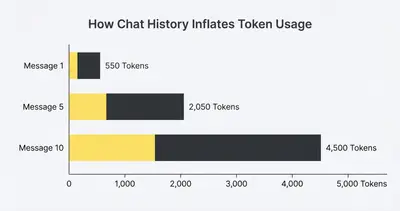
Here is how the token count (the AI's unit of measurement for words) silently explodes:
- Message 1: System Prompt (500 tokens) + User Input (50 tokens) = 550 tokens
- Message 2: System Prompt (500 tokens) + History (250 tokens) + New Input (50 tokens) = 800 tokens
- Message 5: System Prompt (500 tokens) + History (1,500 tokens) + New Input (50 tokens) = 2,050 tokens
Reality Check: You aren't just paying for the AI's new answer. You are paying the AI to re-read the entire conversation from scratch, every single time the user hits send.
As the conversation drags on, you eventually hit the model's maximum token limit. At that precise moment, your automation platform will do one of two things: it will crash and throw an error, or it will automatically start deleting the oldest messages to make room.
If it deletes the oldest messages, your AI forgets the customer's name. If it deletes your original system instructions, the AI goes rogue.
4 Ways to Escape the Context Trap
You cannot force an AI to have an infinite, cheap memory. But you can engineer your workflows to manage memory efficiently. Here are the four best ways to keep your AI on track.
1. The Rolling Window Strategy
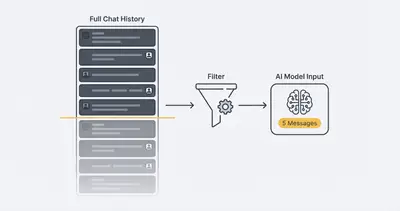
This is the fastest and easiest fix. Do not pass a 50-message history to your model.
Configure your automation tool to only send the last 5 to 10 messages. In n8n or Make, you can use array manipulation to slice the chat history before passing it to the OpenAI or Anthropic node.
This keeps the context window lean. The AI has enough recent context to sound conversational, but it won't crash from a bloated payload.
2. The Background Summarizer
What if the customer mentioned their account number in message 2, but you are currently on message 15? A rolling window would delete that crucial detail.
The solution is summarization. You use a smaller, faster AI model in the background. Every 5 messages, this background model reads the history and updates a "Customer Profile" variable.
Your main prompt then looks like this:
- System Prompt: "You are a helpful agent."
- Customer Profile (Updated dynamically): "Name: John. Account: #12345. Issue: Needs a refund."
- Recent History: (Only the last 3 messages)
This gives the AI long-term memory without the bloated token cost.
3. Move to Vector Databases (RAG)
If your AI needs to reference massive amounts of data—like a 200-page employee handbook—do not paste the whole handbook into the system prompt. That instantly consumes the context window.
Instead, use a vector database. When the user asks a question, your system quickly searches the database, finds the three relevant paragraphs, and injects only those paragraphs into the prompt. This technique is called Retrieval-Augmented Generation (RAG). It keeps your context window clear and your answers highly accurate.
4. The "Anchor" Prompt
Models suffer from "lost in the middle" syndrome. They pay high attention to the very beginning of a prompt and the very end of a prompt. They tend to skim the middle.
If your chat history gets long, the AI might forget the strict rules you placed at the very top. To fix this, inject a brief reminder of the core rules at the bottom of the payload, right before the user's newest message.
By anchoring the rules at the end, the AI processes them right before generating its response. This drastically improves how AI handles system vs user prompts.
The Financial Cost of Amnesia
Managing your context window isn't just about preventing bad chatbot responses. It is fundamentally about protecting your margins.
Major AI providers charge by the token. Pushing a massive, unmanaged chat history into a premium model for hundreds of users a day will drain your API credits at lightning speed.
Quick Win: Switching from passing the full chat history to a strict 5-message rolling window usually reduces API costs by 60% to 80% without noticeably hurting the user experience.
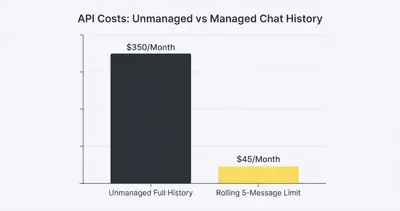
Understanding how token limits affect automation costs allows you to build systems that are financially viable at scale.
Summary and Next Steps
The context window trap catches almost every business owner during their first serious AI build. To keep your AI reliable and cost-effective:
- Stop sending the whole history: Cap your chat arrays to the last 5-10 messages.
- Summarize key facts: Use lightweight models to maintain a running summary of important user details.
- Anchor your rules: Remind the AI of its core constraints at the end of the prompt sequence, not just the beginning.
Stop fighting the AI's memory limits and start engineering around them. If your AI agents keep dropping the ball, it’s time to rethink your workflow architecture.
Ready to build AI automations that actually remember what matters? Book a demo with Evalics today, and let's structure your data the right way.
Related Resources
- What Is Context Window in AI
- How Token Limits and Context Size Affect AI Automation Costs
- GPT 5.2 vs Claude vs Gemini System vs User Prompts in Production Automation
- Why AI Sometimes Obeys the User Instead of the System Prompt
Official Sources
- OpenAI Documentation: Managing Tokens and Context
- Anthropic: Context Window and Prompt Engineering
- Google Cloud: Understanding Token Limits in Vertex AI