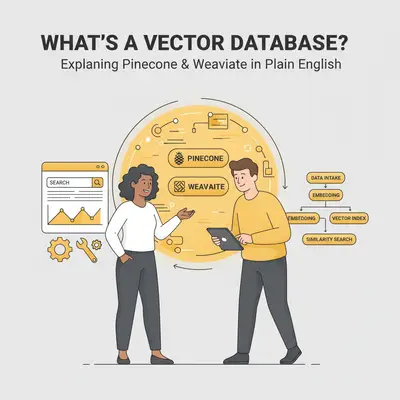
Your AI-powered customer support bot is stuck in a loop. It asks the same questions repeatedly, completely forgetting the customer's previous answers. Your new research assistant, designed to analyze hundreds of documents, can't remember the key findings from the first file by the time it gets to the third.
You've hit the AI's short-term memory limit. This is a common frustration for anyone moving beyond basic automation. AI models like ChatGPT have a finite "context window," a memory buffer that, once full, causes them to forget crucial information. This is where a vector database comes in.
Vector databases are the solution to your AI's amnesia. They provide a persistent, long-term memory, allowing your AI agents to recall vast amounts of information and perform far more complex tasks.
Quick Win: If your AI needs to know more than what fits in a single conversation, you need a vector database. It’s the simplest way to upgrade your AI from a clever tool to a knowledgeable expert on your business data.
The Problem: Why Your AI Agent is So Forgetful
Standard AI models like those from OpenAI or Anthropic have a built-in limitation: the context window. As we covered in our guide to context windows, this is like the AI's short-term memory. It can only "remember" a certain amount of information at one time.
This becomes a major problem in advanced automation for a few key reasons:
- Conversation History: In a long conversation with a customer, the AI will eventually forget what was said at the beginning, leading to a frustrating user experience.
- Large Documents: If you want an AI to analyze a document that's larger than its context window, it's impossible. The AI simply cannot "see" the entire document at once.
- Persistent Knowledge: An AI model has no memory between conversations. Each interaction starts from scratch. It cannot learn from past interactions or build up a knowledge base over time.
This gap between the AI's potential and its practical limitations is what holds businesses back from creating truly intelligent, autonomous agents. Industry analysis consistently shows that the adoption of Retrieval-Augmented Generation (RAG) is a key trend in enterprise AI, precisely because it addresses this memory gap.
Key Insight: Without a long-term memory solution, your AI is just a tool for one-off tasks. To build an AI agent that can perform complex, multi-step processes with deep knowledge of your business, you need to solve the memory problem. For more on this, see our guide on AI agents vs automations.
What is a Vector Database? A Simple Analogy
So, how do we give an AI a long-term memory? With a special kind of database designed to work the way a brain does.
Here’s a simple analogy:
- A regular database (like SQL or a spreadsheet) is like a file cabinet. It’s highly organized for storing structured data like names, dates, and numbers. You can find information, but only if you ask for it in a very specific way (e.g., "find all users in California").
- A vector database is like a brain. It's designed to understand relationships, context, and meaning. It stores information based on its semantic meaning, allowing you to find information in a much more intuitive way (e.g., "find me customers who are interested in marketing automation").
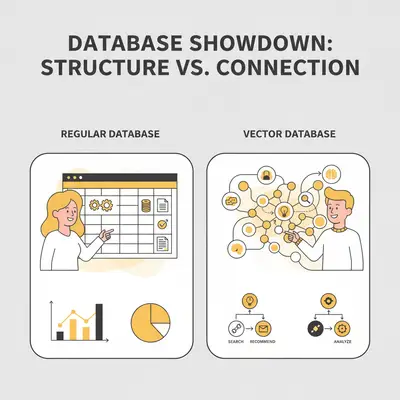
At a technical level, a vector database doesn't store text; it stores vectors. A vector is a numerical representation of the meaning behind your data. This allows the database to perform a "similarity search," finding concepts that are closely related, even if they don't use the exact same words.
Pro Tip: The magic of a vector database is that it turns unstructured data—like text from emails, documents, and transcripts—into structured, searchable information that an AI can easily understand and use.
How Vector Databases Solve the Context Window Problem
A vector database acts as an external, long-term memory for an AI. Instead of trying to cram an entire library of documents into the AI's limited short-term memory (the context window), you can keep that library in the vector database and teach the AI to retrieve information from it as needed.
This process is called Retrieval-Augmented Generation (RAG). It’s a powerful technique that combines the retrieval power of a vector database with the generative power of a large language model. Understanding when to use AI automation vs rule-based workflows helps determine if you need these advanced capabilities.
Here’s the high-level workflow:
- A question is asked: For example, "What was the key outcome of Project Alpha from last year's Q3 report?"
- Search the vector database: Instead of sending the question directly to the AI, the system first searches the vector database for the most relevant information. It might find the specific paragraphs from the Q3 report discussing Project Alpha.
- Augment the prompt: The system takes the original question and "augments" it with the relevant information retrieved from the database.
- Send to the AI: This combined prompt—the question plus the context—is sent to the AI.
- Get a better answer: The AI now has all the specific information it needs to answer the question accurately, without having to have read the entire report beforehand.
Example: A customer asks a support bot, "How do I reset my password for the Pro plan?" The RAG system searches the vector database (which contains all the company's help documents), finds the specific instructions for a Pro plan password reset, and provides that context to the AI along with the customer's question. The AI then generates a perfect, context-aware answer.
Practical Use Cases for a Vector Database
Vector databases aren't just a theoretical concept; they unlock powerful, real-world capabilities that were previously out of reach for most businesses.
Here are a few of the most common use cases:
- Intelligent Customer Support Bots: Build a chatbot that has a deep understanding of your entire knowledge base, product documentation, and past support tickets. It can provide instant, accurate answers to complex customer questions, dramatically reducing the load on your human support team. Industry research consistently shows that AI-powered conversational support can significantly improve customer satisfaction and reduce support costs.
- AI-Powered Research Assistants: Create an agent that can read, understand, and synthesize information from thousands of documents. This is invaluable for legal research, financial analysis, or any field that requires digesting large volumes of text.
- Internal Knowledge Base Q&A: Turn your company's internal documentation (e.g., in Confluence or Google Drive) into a searchable, intelligent resource. Employees can ask natural language questions and get instant answers, rather than manually searching through folders.
- Semantic Search for Your Website or App: Go beyond simple keyword search. Implement a search function that understands the user's intent, providing much more relevant and helpful results.
Ready to build a smarter AI agent? If you have a use case in mind but need help with the technical implementation, we can design and build a custom solution for you. Book a free consultation with Evalics.
Pinecone vs. Weaviate: A High-Level Comparison
Two of the most popular vector databases on the market are Pinecone and Weaviate. While they both solve the same core problem, they have different strengths and are part of a growing market of specialized databases analyzed by firms like Gartner. (Source: Gartner Magic Quadrant for Cloud Database Management Systems)
| Feature | Pinecone | Weaviate |
|---|---|---|
| Deployment | Fully managed cloud service | Open-source, can be self-hosted or used via a managed cloud service |
| Ease of Use | Very easy to get started, minimal setup | Steeper learning curve, more configuration required for self-hosting |
| Control | Less control over the underlying infrastructure | Full control when self-hosted |
| Best For | Beginners, teams that want a managed solution | Teams that want maximum control, open-source enthusiasts |
When to Choose Pinecone
Pinecone is a fully managed service, which makes it incredibly easy to get started. You don't have to worry about servers, maintenance, or scaling. It's an excellent choice if you're building your first vector database application and want to focus on development, not infrastructure.
When to Choose Weaviate
Weaviate is an open-source vector database. This gives you the ultimate flexibility. You can host it yourself for maximum control and potentially lower costs at scale, or you can use their managed cloud service. Weaviate is a great choice for teams that have DevOps resources and want to customize their setup.
Reality Check: While self-hosting Weaviate can be cheaper in terms of direct costs, don't forget to factor in the hidden costs of infrastructure management, maintenance, and the engineering time required to keep it running. For most small to medium-sized businesses, a managed service like Pinecone or Weaviate's cloud offering provides a better total cost of ownership.
How a Vector Database Fits Into Your Automation Workflow
Integrating a vector database into your existing automation stack is more straightforward than it sounds. If you're using tools like n8n and OpenAI, a vector database slots in perfectly as the "memory" layer.
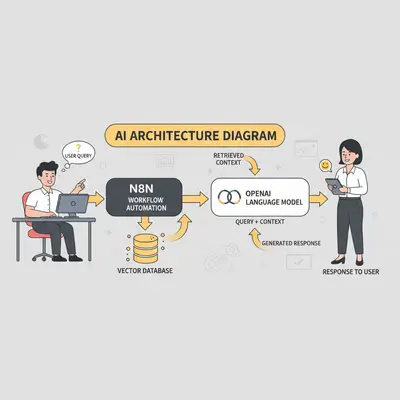
- Trigger: An event occurs in n8n (e.g., a new email arrives, a Slack message is posted).
- Query Vector Database: n8n takes the content of the trigger event and uses it to perform a similarity search in your vector database (e.g., Pinecone).
- Retrieve Context: The vector database returns the most relevant pieces of information.
- Call OpenAI: n8n sends a prompt to OpenAI that includes both the original query and the context retrieved from the database.
- Take Action: n8n uses the context-aware response from OpenAI to perform an action (e.g., draft a reply, update a CRM, send a Slack message).
Quick Win: You don't need a massive dataset to get started. You can create your first vector database with just a handful of your company's most important documents, like your FAQ page, product one-pagers, or key process documents. This is enough to build a powerful and knowledgeable internal assistant.
Getting Started: Your First Vector Database Project
The best way to understand the power of vector databases is to build something. A great first project is an internal Q&A bot for your company's knowledge base.
What you'll need:
- A set of documents: Start with 10-20 of your most important internal documents (e.g., process docs, HR policies, project summaries).
- An automation platform: n8n is an excellent choice for this.
- An OpenAI API key: For generating the text embeddings and the final answers.
- A vector database: Pinecone's free tier is perfect for a starter project.
For a 10-person agency, setting up a basic knowledge base Q&A bot typically takes 2-3 days of focused work, with ongoing maintenance of 2-4 hours per month. Using Pinecone's free tier covers up to 100,000 vectors (roughly 50-100 medium-sized documents), with paid plans starting around $70/month for 1 million vectors.
Common mistakes to avoid:
- Bad data in, bad data out: Make sure your source documents are clean, accurate, and well-formatted. The quality of your AI's knowledge depends entirely on the quality of the data you give it.
- Not chunking your data: Don't just dump entire documents into the database. Break them down into smaller, logical chunks (like paragraphs or sections). This provides more specific and relevant context for the AI.
- Ignoring metadata: Add metadata (like the document title, author, and date) to your vectors. This allows you to filter your searches and get more accurate results.
Conclusion: Give Your AI a Brain, Not Just a Calculator
Vector databases represent a major leap forward in what's possible with AI automation. By solving the critical problem of memory, they allow you to move beyond simple, one-off tasks and build sophisticated AI agents that have a deep, persistent understanding of your business.
Remember the key takeaways:
- AI's biggest limitation is its short-term memory (context window).
- Vector databases provide a long-term, searchable memory for your AI.
- This is achieved through Retrieval-Augmented Generation (RAG).
- Managed services like Pinecone are the easiest way to get started.
You’re now ready to explore the next frontier of automation. The tools are more accessible than ever, and the potential to build a truly intelligent digital workforce is within your reach.
Ready to build an AI agent with a memory?
Book a free 30-minute AI strategy session with Evalics. We’ll help you design the architecture for your first AI agent and choose the right tools for the job.
FAQ
1. What is a vector database in simple terms? A vector database is like a long-term memory for an AI. Instead of storing data in tables like a normal database, it stores the meaning of the data as numerical representations called vectors. This allows an AI to find relevant information intuitively, much like a human brain recalling a concept. It's essential for any application where the AI needs to understand context, like a customer support bot remembering conversation history.
2. How is a vector database different from a regular database? A regular database (like a spreadsheet or SQL) is good for structured data and finds exact matches (e.g., "find user with email 'test@test.com'"). A vector database is designed for unstructured data (like text) and finds information based on semantic similarity or context, even if the keywords don't match exactly. For example, it could find documents related to "customer happiness" even if they only contain the word "satisfaction."
3. When do I need a vector database? You need a vector database when your AI needs to know more information than can fit in its context window, or when it needs to have persistent knowledge across multiple conversations. It's essential for building knowledgeable chatbots, research assistants, and internal Q&A systems. If your AI's primary task is to understand and search through a large body of documents, a vector database is the right tool.
4. What's the difference between Pinecone and Weaviate? The primary difference is their deployment model and control. Pinecone is a fully managed, serverless service that is very easy to start with, making it perfect for beginners or teams without DevOps resources. Weaviate is an open-source option that offers more control and flexibility, including self-hosting capabilities, making it a good fit for teams with engineering experience who want to manage their own infrastructure.
5. How much does a vector database cost? Many vector databases, including Pinecone and Weaviate, have generous free tiers that are sufficient for small projects and development. For example, Pinecone's free tier can hold up to 100,000 vectors. Paid plans for managed services typically start around $70-$100 per month and scale based on the amount of data you store and your usage. Self-hosting can be cheaper for raw costs but requires engineering time for maintenance.
6. Do I need to know machine learning to use a vector database? No, you don't need to be a machine learning expert. Modern vector databases and embedding APIs (like those from OpenAI) handle the complexity for you. You primarily need to know how to work with APIs to load your data and perform searches. However, a basic understanding of concepts like embeddings and similarity search can be helpful for optimizing performance.
7. How do vector databases work with AI models like ChatGPT? They work together through a process called Retrieval-Augmented Generation (RAG). When a user asks a question, your application first queries the vector database to find the most relevant text chunks from your knowledge base. Then, it provides this retrieved information to ChatGPT as context along with the original question. This enables the AI to generate a more accurate and informed response based on your specific data.