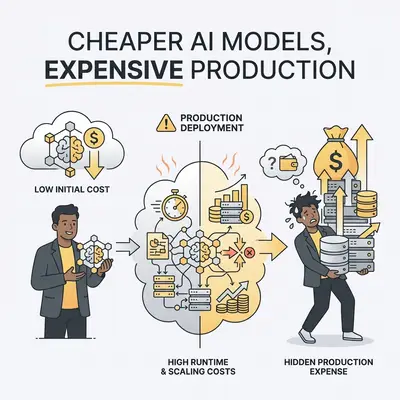
Cheaper AI models often cost more in production due to failure retries, debugging overhead, and business impact. A small e-commerce store switched from GPT-4 to GPT-3.5 to save $200/month on API costs, but six months later spent $3,000 more. GPT-3.5 failed 30% of the time, requiring retries that tripled API costs, triggered customer service tickets, and caused a 12% drop in conversions. This guide shows you why cheaper AI models cost more in production and how to calculate true costs including retries, debugging, and business impact using a TCO framework.
The math is brutal: $200/month saved on base costs, but $500/month lost to retries, $1,000/month lost to debugging time, and $1,300/month lost to conversion drops. The "cheaper" model cost them $2,600/month more.
This isn't an isolated case. Most teams choose AI models based on per-token pricing without calculating true production costs. They see GPT-3.5 at $0.50 per million tokens and GPT-4 at $10 per million tokens, assume GPT-3.5 is 20x cheaper, and ignore the hidden costs that make it more expensive.
Quick Win: Premium models often cost less in production when you factor in failure retries, debugging overhead, and business impact. A simple TCO calculation in the first week can save thousands annually by choosing the right model from the start.
This guide reveals the hidden costs that make cheaper models expensive—and shows you when premium models are actually the budget-friendly choice. You'll get a decision framework, cost calculation formulas, and real-world examples to choose the right model for production. For a broader view of AI automation costs, see our complete cost breakdown guide.
The Hidden Cost Trap
Cheaper AI models look attractive on pricing pages. GPT-3.5 costs $0.50 per million input tokens. Claude Haiku costs $0.25 per million tokens. Gemini 1.5 Flash is nearly free. Compare that to GPT-4 at $10 per million tokens or Claude Sonnet at $3 per million tokens, and the choice seems obvious.
The trap: Pricing pages show per-token costs, not production costs. They don't show failure rates, retry multipliers, debugging time, or business impact. These hidden costs can make a "20x cheaper" model cost 2x more in production.
Real-world scenario: A 10-person marketing agency builds a content generation workflow using GPT-3.5 to save money. They process 5 million tokens per month, expecting $2.50/month in API costs vs. $50/month for GPT-4. They save $47.50/month.
Reality after 3 months:
- Base API cost: $2.50/month ✓ (as expected)
- Retry costs: $45/month (30% failure rate × 3 retries × original cost)
- Debugging time: $800/month (10 hours/week × $20/hour)
- Lost productivity: $400/month (team waiting for slow/failed responses)
- Total: $1,247.50/month vs. $50/month for GPT-4
The "cheaper" model cost 25x more.
Reality Check: Per-token pricing is misleading. Production costs include retries, debugging, maintenance, and business impact. A model that's 20x cheaper per token can easily cost 2-5x more in production when you factor in all costs.
The pattern is clear: Cheaper models fail more often, require more debugging, and create more business problems. These hidden costs compound over time, making premium models the budget-friendly choice for production workflows.
Failure Retries and Cascading Costs
The biggest hidden cost of cheaper models is failure retries. When a model fails to produce usable output, you retry the request. Each retry costs money, and cheaper models fail more often.
The Retry Problem
Failure rates vary by model:
- Premium models (GPT-4, Claude Sonnet): 3-8% failure rate
- Mid-tier models (GPT-3.5, Claude Haiku): 15-30% failure rate
- Cheaper models: 25-40% failure rate
Retry math: If a model fails 30% of the time and you retry each failure 2-3 times, you're paying for 60-90% more API calls than successful requests. A workflow that should cost $100/month actually costs $160-190/month just in retries. Understanding how token limits affect costs helps optimize these retry scenarios.
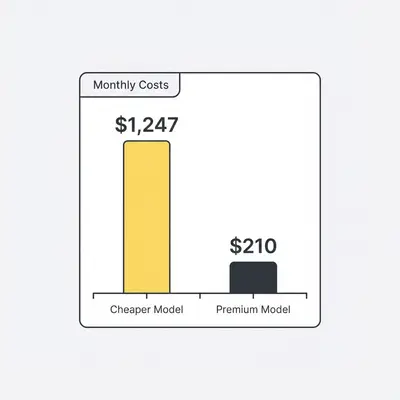
Real example: A customer service chatbot processes 10,000 conversations per month using GPT-3.5:
- Base cost: $50/month (10M tokens × $0.50/M)
- Failure rate: 30% (3,000 failed conversations)
- Retries: 2 attempts per failure (6,000 retry calls)
- Retry cost: $30/month (6M tokens × $0.50/M)
- Total API cost: $80/month
The same workflow using GPT-4:
- Base cost: $200/month (10M tokens × $10/M)
- Failure rate: 5% (500 failed conversations)
- Retries: 1 attempt per failure (500 retry calls)
- Retry cost: $10/month (1M tokens × $10/M)
- Total API cost: $210/month
GPT-4 costs 2.6x more per token, but only 2.6x more in total—not 20x more. The failure rate difference eliminates the cost advantage of cheaper models.
Cascading Effects
Failures don't just cost retry money. They create downstream costs that compound the problem.
Customer service impact: Each failed chatbot response creates a support ticket. A 30% failure rate on 10,000 conversations means 3,000 tickets. At 15 minutes per ticket and $20/hour support cost, that's $1,500/month in support costs.
Reputation damage: Failed responses frustrate customers, leading to negative reviews and churn. A 12-person SaaS company lost 8% of monthly recurring revenue due to poor chatbot responses—$2,400/month in lost revenue.
Manual intervention: When models fail consistently, teams build manual fallback systems. A content agency spent 40 hours building a fallback workflow that routes failed requests to human writers. At $100/hour, that's $4,000 in development time plus ongoing maintenance.
The cascading cost equation:
- Retry costs: 60-90% of base API cost
- Support costs: $0.50-$1.00 per failure
- Lost revenue: 5-15% of affected transactions
- Manual intervention: 20-40 hours of development time
For a high-volume workflow, cascading costs can be 5-10x the base API cost.
Key Insight: Failure retries multiply costs. A model with 30% failure rate and 2 retries per failure costs 60% more in API calls alone. Add support costs, lost revenue, and manual intervention, and the "cheaper" model can cost 5-10x more than premium alternatives.
Debugging and Maintenance Overhead
Cheaper models produce more errors, require more prompt engineering, and need more frequent adjustments. This debugging overhead is a hidden cost that doesn't show up in API bills.
Debugging Time Costs
Error frequency: Premium models produce consistent, predictable outputs. Cheaper models produce inconsistent results that require constant debugging. A content generation workflow using GPT-3.5 requires 10 hours/week of debugging vs. 2 hours/week with GPT-4.
Cost calculation: 10 hours/week × $100/hour × 4 weeks = $4,000/month in debugging time. That's 80x the API cost difference.
Real example: A marketing agency uses Claude Haiku for email campaign generation. The model produces inconsistent tone, misses brand guidelines, and requires manual editing 40% of the time. Their developer spends 12 hours/week fixing prompts and adjusting outputs.
Monthly debugging cost:
- Developer time: 12 hours/week × $100/hour × 4 weeks = $4,800/month
- API cost difference: Claude Haiku ($25/month) vs. Claude Sonnet ($150/month) = $125/month saved
- Net cost: $4,675/month more expensive with the "cheaper" model
Maintenance Burden
Cheaper models require more maintenance. Prompt adjustments, model updates, and troubleshooting consume time that could be spent building features.
Prompt engineering overhead: Premium models follow instructions more reliably, requiring less prompt engineering. Cheaper models need extensive prompt tuning, few-shot examples, and constant refinement.
Update frequency: When cheaper models fail, teams spend time updating prompts, adding error handling, and building workarounds. A customer service team using GPT-3.5 updates their prompts weekly vs. monthly with GPT-4.
Troubleshooting time: Inconsistent outputs require investigation. Teams spend hours analyzing why a model produced unexpected results, testing different prompts, and documenting edge cases.
Maintenance cost breakdown:
- Prompt engineering: 4-8 hours/month
- Error handling: 2-4 hours/month
- Troubleshooting: 2-6 hours/month
- Documentation: 1-2 hours/month
- Total: 9-20 hours/month × $100/hour = $900-$2,000/month
Opportunity Cost
Time spent debugging cheaper models is time not spent building features, improving products, or growing the business. This opportunity cost compounds over months and years.
Real example: A startup's developer spends 15 hours/week debugging GPT-3.5 outputs instead of building new features. Over 6 months, that's 360 hours of lost development time. At $100/hour, that's $36,000 in opportunity cost—enough to pay for GPT-4 API costs for 3 years.
Pro Tip: Track debugging time for one month. Multiply by your hourly rate and compare to API cost differences. Most teams discover debugging costs exceed API savings by 10-50x, making premium models the clear budget choice.
Latency and Reliability Impacts
Cheaper models are often slower and less reliable. This creates business costs that far exceed API price differences.
Latency Costs
Response time differences:
- Premium models (GPT-4, Claude Sonnet): 2-4 seconds average
- Mid-tier models (GPT-3.5, Claude Haiku): 4-8 seconds average
- Cheaper models: 6-12 seconds average
User experience impact: Slow responses frustrate users and reduce conversions. Every extra second is another moment for a user to give up and close the tab.
Real example: An e-commerce site uses GPT-3.5 for product description generation. Responses take 8 seconds vs. 3 seconds with GPT-4. The slower responses cause a 12% drop in conversions.
Cost calculation:
- Monthly revenue: $50,000
- Conversion drop: 12% = $6,000/month lost revenue
- API cost difference: GPT-3.5 ($50/month) vs. GPT-4 ($500/month) = $450/month saved
- Net loss: $5,550/month
The "cheaper" model costs $5,550/month more when you factor in lost revenue.
Reliability Impacts
Unreliable models require fallback systems, manual oversight, and error handling that add complexity and cost.
Fallback systems: When models fail consistently, teams build fallback workflows that route requests to backup models or human operators. A customer service team spent 60 hours building a fallback system for GPT-3.5 failures. At $100/hour, that's $6,000 in development time.
Manual oversight: Unreliable outputs require human review. A content agency reviews 30% of GPT-3.5 outputs vs. 5% of GPT-4 outputs. That's 25% more review time—10 hours/week × $50/hour = $2,000/month.
Error handling complexity: Inconsistent models require extensive error handling. Teams build retry logic, validation checks, and quality filters that add development and maintenance overhead.
Reliability cost breakdown:
- Fallback system development: $3,000-$6,000 (one-time)
- Manual oversight: $1,000-$3,000/month
- Error handling: $500-$1,500/month
- Total: $1,500-$4,500/month ongoing
Reality Check: Latency and reliability costs often exceed API price differences by 10-100x. A model that saves $200/month on API costs but loses $2,000/month in conversions is 10x more expensive. Factor in business impact, not just token pricing.
When Premium Models Are Actually Cheaper
Premium models become cheaper when failure rates, debugging time, and business impact exceed API cost differences. Here's when to choose premium over cheaper models.
Break-Even Analysis
The break-even formula:
Premium TCO = Base API cost + (Failure rate × Retry cost) + Debugging time + Business impact
Cheaper TCO = Base API cost + (Failure rate × Retry cost) + Debugging time + Business impact

Choose premium when: Premium TCO < Cheaper TCO
Real calculation example:
- GPT-4: $500/month base + $50 retries + $200 debugging + $0 business impact = $750/month
- GPT-3.5: $50/month base + $150 retries + $1,000 debugging + $2,000 lost revenue = $3,200/month
- Premium is 4.3x cheaper
Volume Considerations
At high volumes, failure rates compound. A 30% failure rate on 100,000 requests creates 30,000 failures. At 2 retries each, that's 60,000 extra API calls. Premium models with 5% failure rates create only 5,000 failures and 5,000 retries.
Volume break-even: Premium models typically win at volumes above 50,000 requests/month when failure rates exceed 15% on cheaper models.
Quality Requirements
When accuracy matters more than cost, premium models are always cheaper. A legal document analysis workflow can't afford 30% failure rates. Each failure requires manual review that costs $50-100 per document. Premium models with 5% failure rates save thousands in review costs.
Quality break-even: Premium models win when each failure costs more than $0.50-1.00 in manual intervention, lost revenue, or reputation damage.
Decision Matrix
Use premium models when:
- Failure rates on cheaper models exceed 15-20%
- Each failure costs more than $0.50 in retries, support, or lost revenue
- Volume exceeds 50,000 requests/month
- Accuracy requirements are high (legal, medical, financial)
- Latency impacts conversions or user experience
- Debugging time exceeds 5 hours/week
Use cheaper models when:
- Failure rates are acceptable (<10%)
- Failures don't create downstream costs
- Volume is low (<10,000 requests/month)
- Accuracy requirements are low (draft content, simple tasks)
- Latency doesn't impact business outcomes
- Debugging time is minimal (<2 hours/week)
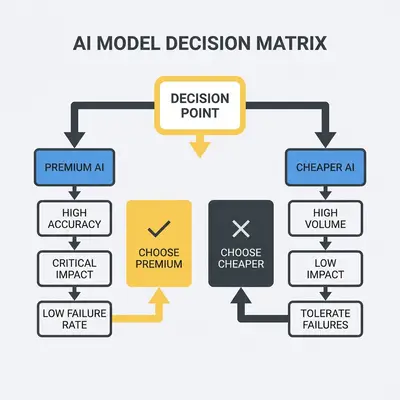
Key Insight: Premium models are cheaper when failure costs, debugging time, and business impact exceed API price differences. Calculate true TCO, not just per-token costs. Most production workflows benefit from premium models.
The True Cost of Production: TCO Analysis
Total Cost of Ownership (TCO) includes all costs over the model's lifecycle. Here's the complete framework for calculating true production costs.
TCO Framework
1. Base API Cost
- Monthly token usage × per-token price
- Example: 10M tokens × $0.50/M = $5,000/month
- For detailed token cost calculations, see our AI token cost calculator guide
2. Retry Costs
- Failure rate × retry attempts × cost per retry
- Example: 30% failure × 2 retries × $5,000 = $3,000/month
3. Debugging Time
- Hours/week × hourly rate × 4 weeks
- Example: 10 hours/week × $100/hour × 4 = $4,000/month
4. Maintenance Overhead
- Prompt engineering + error handling + troubleshooting
- Example: 15 hours/month × $100/hour = $1,500/month
5. Latency Costs
- Lost revenue from slow responses
- Example: 12% conversion drop × $50,000 revenue = $6,000/month
6. Reliability Costs
- Fallback systems + manual oversight + error handling
- Example: $2,000/month ongoing
Total TCO = Sum of all components
Comparison Table: GPT-3.5 vs GPT-4
| Cost Component | GPT-3.5 | GPT-4 | Difference |
|---|---|---|---|
| Base API Cost (10M tokens) | $5 | $100 | +$95 |
| Retry Costs (30% vs 5% failure) | $3 | $5 | +$2 |
| Debugging Time (10 vs 2 hrs/week) | $4,000 | $800 | -$3,200 |
| Maintenance Overhead | $1,500 | $400 | -$1,100 |
| Latency Costs (8s vs 3s response) | $6,000 | $0 | -$6,000 |
| Reliability Costs | $2,000 | $500 | -$1,500 |
| Total Monthly TCO | $11,508 | $1,305 | GPT-4 saves $10,203/month |
This shows the real math: GPT-4 costs 20x more per token, but 8.8x less in total production cost.
5-Year TCO Projection
GPT-3.5 over 5 years:
- Year 1: $138,096
- Year 2: $138,096 (assuming no changes)
- Year 3: $150,000 (increased volume)
- Year 4: $150,000
- Year 5: $165,000 (scaling)
- Total: $741,192
GPT-4 over 5 years:
- Year 1: $15,660
- Year 2: $15,660
- Year 3: $18,000 (increased volume)
- Year 4: $18,000
- Year 5: $20,000 (scaling)
- Total: $87,320
5-year savings with GPT-4: $653,872
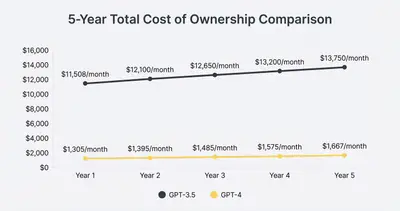
Reality Check: TCO analysis reveals the true cost. GPT-4 costs 20x more per token but 8.8x less in production. Over 5 years, premium models can save hundreds of thousands of dollars by reducing failures, debugging time, and business impact.
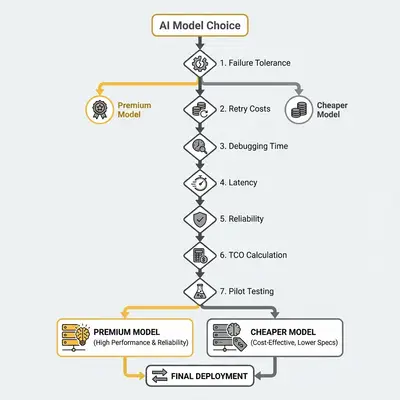
Decision Framework: When to Choose Premium vs. Cheaper Models
Use this step-by-step framework to choose the right model for your production workflow.
Step 1: Assess Failure Tolerance
Can you afford failures?
- High-stakes decisions (legal, medical, financial) → Premium required
- Customer-facing interactions → Premium recommended
- Internal tools with manual review → Cheaper acceptable
- Draft content, non-critical tasks → Cheaper fine
Failure cost calculation: If each failure costs more than $0.50 in retries, support, or lost revenue, premium models are usually cheaper.
Step 2: Calculate Retry Costs at Your Volume
Formula:
Retry Cost = (Failure Rate × Retry Attempts × Base API Cost) × Monthly Volume
Example:
- Monthly volume: 100,000 requests
- Base cost per request: $0.01
- Failure rate (cheaper): 30%
- Retry attempts: 2
- Retry cost: (0.30 × 2 × $0.01) × 100,000 = $600/month
Compare to premium model retry costs. If premium retries cost less than $600/month, premium wins.
Step 3: Estimate Debugging/Maintenance Time
Track for 2 weeks:
- Hours spent debugging model outputs
- Hours spent adjusting prompts
- Hours spent troubleshooting errors
- Hours spent on maintenance
Calculate cost: Hours × hourly rate × 4 weeks = monthly debugging cost.
Break-even: If debugging costs exceed API cost difference, premium models are cheaper.
Step 4: Evaluate Latency Requirements
Measure impact:
- Response time differences between models
- Conversion rate impact of slower responses
- User experience impact
Calculate cost: Lost revenue from slower responses vs. API cost difference.
Break-even: If latency costs exceed API savings, premium models win.
Step 5: Consider Reliability Needs
Assess requirements:
- Do you need fallback systems?
- How much manual oversight is required?
- What's the cost of unreliable outputs?
Calculate cost: Fallback development + manual oversight + error handling vs. API cost difference.
Step 6: Calculate True TCO
Use the TCO framework:
- Base API cost
- Retry costs
- Debugging time
- Maintenance overhead
- Latency costs
- Reliability costs
Compare models: The model with lower total TCO wins, not the one with lower per-token pricing.
Step 7: Test with Pilot Projects
Run 2-4 week pilots:
- Test both models on the same tasks
- Track all costs (API, retries, debugging, business impact)
- Calculate true TCO for each model
- Choose based on actual production data, not pricing pages
Break-Even Calculator
Formula for when premium pays off:
Premium Break-Even = (Cheaper TCO - Premium Base Cost) / Premium Base Cost

If result > 1, premium is cheaper
If result < 1, cheaper model is actually cheaper
Example:
- Cheaper TCO: $11,508/month
- Premium base cost: $100/month
- Break-even: ($11,508 - $100) / $100 = 114x
Premium is 114x cheaper in this scenario.
Pro Tip: Don't guess. Test both models in production for 2-4 weeks. Track all costs, not just API bills. Real production data beats pricing page math every time.
Common Mistakes and How to Avoid Them
Mistake 1: Choosing Based on Per-Token Price Alone
The problem: Teams see GPT-3.5 at $0.50/M tokens and GPT-4 at $10/M tokens, assume GPT-3.5 is 20x cheaper, and ignore production costs.
The fix: Calculate true TCO including retries, debugging, and business impact. Per-token pricing is misleading—production costs tell the real story.
Pro Tip: Create a TCO spreadsheet. Track base costs, retries, debugging time, and business impact for both models. The model with lower total cost wins, not the one with lower per-token pricing.
Mistake 2: Ignoring Failure Rates and Retry Costs
The problem: Teams don't factor in failure rates when comparing models. A 30% failure rate with 2 retries multiplies costs by 60%, eliminating the cost advantage of cheaper models.
The fix: Test failure rates in production. Calculate retry costs: (Failure rate × Retry attempts × Base cost) × Volume. Include retry costs in TCO calculations.
Reality Check: Failure retries can multiply API costs by 2-5x. A model that's 20x cheaper per token but fails 30% of the time can cost more in total when you factor in retries.
Mistake 3: Underestimating Debugging Time
The problem: Teams assume debugging time is the same for all models. Cheaper models require 3-5x more debugging time due to inconsistent outputs and prompt engineering needs.
The fix: Track debugging time for 2-4 weeks. Multiply by hourly rate and compare to API cost differences. Most teams discover debugging costs exceed API savings by 10-50x.
Key Insight: Debugging time is the biggest hidden cost. A model that saves $200/month on API costs but requires 10 hours/week of debugging costs $4,000/month in time. Premium models often pay for themselves in debugging time savings alone.
Mistake 4: Not Factoring in Latency/Reliability Impacts
The problem: Teams focus on API costs and ignore business impact. Slow responses reduce conversions. Unreliable outputs require fallback systems and manual oversight.
The fix: Measure business impact. Track conversion rates, customer complaints, and manual intervention time. Calculate lost revenue and compare to API cost differences.
Pro Tip: A/B test response times and reliability. Measure conversion rate differences between models. If slower responses reduce conversions by 10%, calculate lost revenue. Often, latency costs exceed API savings by 10-100x.
Mistake 5: Not Testing in Production Before Committing
The problem: Teams choose models based on pricing pages or development testing, not production reality. Development environments don't reveal failure rates, debugging needs, or business impact.
The fix: Run 2-4 week production pilots with both models. Track all costs, failure rates, debugging time, and business metrics. Choose based on actual production data.
Reality Check: Pricing pages lie. Production data tells the truth. Test both models in production for 2-4 weeks. Track everything—API costs, retries, debugging, conversions. Real numbers beat assumptions every time.
Three Places the Cheap Model Bills You Later
Three worked scenarios. Each one lists the cost lines a pricing page does not show, so you can run the arithmetic against your own volumes and rates rather than borrowing someone else's numbers.
Scenario: Customer Service Chatbot (Cheaper Model, Higher TCO)
The decision: Pick the cheaper model to reduce customer service costs. The saving looks obvious, because the only line being compared is the API price.
What the full bill actually contains:
- Base API cost, the line you compared
- Retry cost, because every failed conversation is paid for twice
- Support cost, since each failure that reaches a human becomes a ticket with a handling time attached
- Debugging time, which is engineering hours spent on failures that a stronger model would not have produced
- Churn, the revenue you never see again when the answers are bad enough that a customer leaves
How to run it: Multiply your conversation volume by the failure rate you actually observe, then price the retries, tickets, engineering hours, and lost accounts that follow from it. Compare that total against the stronger model's higher API price plus its lower failure rate.
Key takeaway: Failure rate is the multiplier on every other line. A model that fails more often does not cost slightly more, it costs more in four places at once.
Scenario: Content Generation Workflow (Premium Model, Lower TCO)
The decision: Pick the cheapest model for bulk content, on the assumption that editing was going to happen anyway.
What the full bill actually contains:
- Base API cost
- Retry cost for pieces that fail outright
- Manual editing, priced as the share of outputs needing a human pass times the time each takes
- Debugging time when output quality is inconsistent rather than simply wrong
- Rework when a client rejects a piece, which costs the edit twice and some goodwill
How to run it: The variable that decides this is the share of outputs a human must touch. Editing time is the dominant cost in any content workflow, so a model that halves the edit rate can be worth several times its API price.
Key takeaway: When a human finishes the work, the model's job is to reduce how much finishing is needed. Judge it on that, not on tokens.
Scenario: E-Commerce Product Descriptions (Break-Even Analysis)
The decision: Run both a cheap and a premium model against the same catalogue for a few weeks and compare complete costs.
What to track on both sides: base API cost, failure rate, retry cost, the share of products needing manual review, and engineering time.
The line that decides it: Product descriptions sit directly on the conversion path, so quality here is revenue and not just polish. That makes this the case where a higher API bill can still be the cheaper option, and the break-even is where the extra conversion revenue covers the price difference.
Key takeaway: When output quality touches revenue, compare total cost including the revenue side. When it does not, compare cost alone and take the cheaper model.
Cost Optimization Strategies
You don't have to choose one model for everything. Smart routing and hybrid approaches optimize costs while maintaining quality.
Hybrid Approaches
Use premium for critical paths, cheaper for non-critical:
- Customer-facing interactions → Premium models
- Internal tools and drafts → Cheaper models
- High-stakes decisions → Premium models
- Simple processing tasks → Cheaper models
Real example: A customer service team uses GPT-4 for customer conversations (critical) and GPT-3.5 for internal knowledge base updates (non-critical). This reduces costs by 40% while maintaining quality where it matters.
Caching Strategies
Cache common responses: Many AI workflows generate similar outputs. Caching reduces API calls and costs.
Example: A FAQ chatbot caches answers to common questions. 60% of queries hit the cache, reducing API costs by 60% while maintaining instant responses.
Batch Processing
Process multiple items together: Batch processing reduces per-request overhead and can qualify for volume discounts.
Example: A content agency processes 100 blog posts in batches of 10. Batch processing reduces API overhead by 30% compared to individual requests.
Model Routing
Route tasks to appropriate models: Use decision logic to route tasks to the right model based on requirements.
Routing rules:
- High accuracy needed → Premium model
- Low accuracy acceptable → Cheaper model
- Fast response required → Premium model (lower latency)
- Slow response acceptable → Cheaper model
- High volume, low stakes → Cheaper model
- Low volume, high stakes → Premium model
Monitoring and Optimization
Track costs continuously: Monitor API costs, failure rates, debugging time, and business metrics. Adjust model selection based on actual performance.
Optimization cadence:
- Weekly: Review API costs and failure rates
- Monthly: Calculate TCO and compare models
- Quarterly: Re-evaluate model selection based on production data
Optimization triggers:
- Failure rates increase → Consider premium model
- Debugging time exceeds 5 hours/week → Consider premium model
- Business impact exceeds API savings → Consider premium model
- Volume increases significantly → Recalculate TCO
Key Insight: Hybrid approaches optimize costs. Use premium models for critical paths where failures are expensive, and cheaper models for non-critical tasks. Smart routing based on requirements balances cost and quality effectively.
Conclusion
Cheaper AI models look attractive on pricing pages, but production reality tells a different story. Failure retries, debugging overhead, and business impact can make "20x cheaper" models cost 2-5x more in production.
Key takeaways:
-
Per-token pricing is misleading. Production costs include retries, debugging, maintenance, and business impact. Calculate true TCO, not just API bills.
-
Premium models are often cheaper. When failure rates exceed 15-20%, debugging time exceeds 5 hours/week, or business impact exceeds API savings, premium models win on total cost.
-
Test in production before committing. Run 2-4 week pilots with both models. Track all costs, not just API usage. Real production data beats pricing page math.
The math is clear: GPT-4 costs 20x more per token but 8.8x less in production. Claude Sonnet costs 12x more per token but 4.4x less in total. Premium models pay for themselves when you factor in all costs.
Ready to calculate your true production costs? Book a consultation to get a TCO analysis for your workflow and identify which model will actually save you money in production.
By Kevin Michael Schindler, AI Automation Expert at Evalics