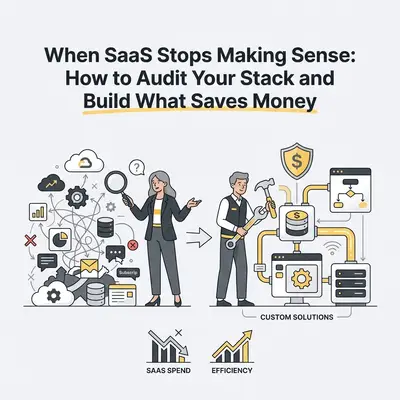
You open your company credit card statement. There is $189 for a tool three people use. $340 for a platform your team has been complaining about for six months. $79 for something nobody can identify anymore.
SaaS fatigue is real — and it is expensive.
The average small business now runs 40 to 75 software subscriptions. Most were added one at a time, justified in isolation, and never audited as a group. The cumulative bill quietly became one of your largest operating expenses.
The good news: a category of SaaS tools — the ones that just move data, trigger actions, or generate reports — can now be replaced with custom automation workflows for a fraction of the cost. The question is not whether to build, but which tools to target and when you've hit the tipping point.
This guide gives you the five signals that mean it's time to build, a practical audit method, and the real cost math behind the decision.
Why the Build Option Didn't Exist Five Years Ago
Building software used to mean hiring developers, managing infrastructure, and maintaining codebases that aged poorly. For anything but the largest companies, it was never cost-competitive with buying.
That calculus changed with two developments:
Low-code automation platforms. Tools like n8n and Make let non-developers build complex, multi-step workflows using visual node editors. You connect APIs, add logic, and automate entire business processes without writing production code.
AI-assisted development. For the parts that do require code — custom logic, data transformation, API authentication — AI coding tools can generate and debug it in minutes rather than days.
Together, these drop the build cost low enough that even workflows replacing $100-per-month SaaS tools become financially worth pursuing.
Key Insight: You are not replacing the SaaS product's engineering team. You are replacing one specific function — the data movement or trigger logic — that the SaaS vendor bundled inside a $300/month package alongside features you never use.
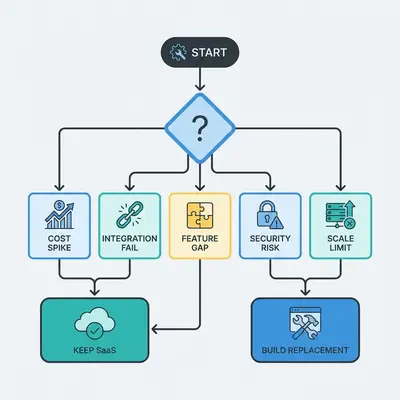
The 5 Tipping-Point Signals
Not every SaaS is a candidate for replacement. Here are the signals that tell you a specific tool has crossed the line.
Signal 1: You Are Paying for Features You Don't Use
Open the SaaS pricing page. Count the features in your current plan. Now count the ones your team has used in the last 90 days.
If you are using fewer than 30% of the features in your tier, you are paying a bundling tax. The vendor forced you into that tier because you needed one specific capability — usually an API connection, an advanced integration, or a higher usage limit.
Reality Check: Most businesses use SaaS tools for 1 to 3 core functions. If those functions are just data movement or workflow triggers, they are almost always replicable in n8n for under $50 per month total.
Signal 2: The Price Has Increased More Than Once in 18 Months
SaaS pricing has been on a one-way escalator since 2022. Vendors have raised prices, restructured tiers, and reclassified features from included to paid add-ons — sometimes multiple times per year.
If a tool has raised its price on you more than once in 18 months, the vendor has made a strategic decision to extract maximum value from existing customers. That trajectory does not reverse. It accelerates.
Build a replacement before the next price hike. The SaaS will still be there as a fallback if you need it.
Signal 3: You Are Paying Per Seat for a Tool Used by One Person
Per-seat pricing made sense when teams needed collaborative access to complex UIs. It makes no sense for back-office automation workflows that one operations person set up and nobody touches day-to-day.
If you are paying five seats for a tool that one person actively manages — because the vendor doesn't offer single-seat pricing — that is a clear candidate for replacement.
Signal 4: The Tool Is a Middleman Between Two Other Tools You Already Pay For
Look for SaaS products in your stack whose only job is to connect two other products you already subscribe to. Zapier connecting HubSpot to Slack. A reporting tool pulling data from your CRM into a spreadsheet format. An alert system watching your database and sending emails.
These "glue tools" are the highest-value build targets. They have no proprietary data, no complex UI worth preserving, and they perform a function that n8n handles natively — often better, with more control over error handling and retry logic.
Signal 5: You Are Locked Out of Your Own Data
If canceling the SaaS would make historical data difficult or expensive to export, the vendor has successfully created dependency as a feature. You are not paying for the software anymore — you are paying ransom on your own records.
Before this situation gets worse, build a parallel system. Migrate the data and run both in parallel. Then cancel.
How to Run a SaaS Stack Audit in 90 Minutes
Knowing the signals is not enough. You need a repeatable process to apply them to your actual stack.
Step 1: Export your payment data (15 min)
Pull three months of credit card and bank statements. List every recurring software charge. Include annual subscriptions divided by 12. Create a simple spreadsheet: tool name, monthly cost, primary owner, last time used.
Step 2: Classify each tool (30 min)
For each tool, answer one question: What would break if I turned this off tomorrow?
- Core systems (CRM, accounting, email, payroll): Never build these. Too much liability and UI complexity.
- Workflow tools (integrations, data pipelines, triggers, notifications): High build priority.
- Nice-to-haves (reporting dashboards, monitoring alerts, simple automations): Medium build priority.
Step 3: Score your workflow tools against the 5 signals (30 min)
For each workflow tool, count how many of the five signals apply. Score of 3 or higher = build candidate. Score of 1 or 2 = re-negotiate or downgrade first.
Step 4: Calculate the build ROI (15 min)
For each build candidate:
Annual SaaS cost = monthly price × 12
Build cost = (your hourly rate × estimated build hours) + ($40/month hosting × 12)
Break-even = build cost ÷ (annual SaaS cost - annual hosting cost)
If break-even is under 12 months, the build is financially justified.
Pro Tip: If you outsource the build to an automation consultant rather than doing it yourself, the hourly rate is higher but the build time is lower. A workflow that takes you 8 hours to build might take a specialist 2 hours. The math often still favours outsourcing at consultancy rates compared to paying a SaaS for years.
Real-World Build vs Buy Examples
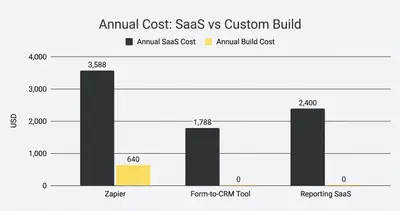
Example A: Zapier → n8n (High-Volume Automation)
A marketing agency running 3,000 Zap tasks per month pays $299/month on Zapier's Professional plan. The same workflows in self-hosted n8n run on a $20/month VPS with no task limits.
- Annual SaaS cost: $3,588
- Annual build + hosting cost: $240 (hosting) + ~$400 (4 hours build at $100/hr)
- Year 1 savings: $2,948
- Year 2+ savings: $3,348/year
Example B: A Dedicated Form-to-CRM Tool → n8n Webhook
A consultancy pays $149/month for a tool that captures form submissions and pushes them to their CRM with basic scoring logic. An n8n webhook with a three-node workflow replicates the full function.
- Build time: 2 hours
- Monthly hosting cost: included in existing n8n instance
- Annual savings: $1,788
Example C: A Standalone Reporting SaaS → Scheduled n8n Workflow
A SaaS paying $200/month for a reporting tool that queries their database and emails a weekly PDF summary. An n8n workflow with a cron trigger, database query, and email node does the same job.
- Build time: 3 hours
- Annual savings: $2,400
What You Should Never Try to Build
The build case is compelling — but it has limits. These categories are almost always better to buy:
Your CRM core. HubSpot, Salesforce, and Pipedrive have years of UX investment, mobile apps, native integrations, and reporting infrastructure. Replicating the interface alone would take months.
Payroll and tax compliance. The liability of getting payroll calculations wrong is not a risk worth taking for cost savings. Keep Gusto, Rippling, or whatever you use.
Anything handling PCI or HIPAA data. Custom-built data pipelines for payment card data or medical records require formal compliance infrastructure. The build cost skyrockets the moment regulatory requirements enter.
Tools your team lives in all day. If your team clicks around in a tool for 4+ hours daily, the UI is the value. Build the back-end workflows; keep the front-end tools.
Conclusion
The question is not "build or buy?" It's "which parts of my SaaS stack are just moving data between systems I already own?"
Those parts — the integrations, the triggers, the notification pipelines, the report generators — are what low-code platforms were built to replace. Cancel them one at a time, starting with the highest signal score from your audit.
The businesses that audit aggressively and build selectively are compressing their software costs by 60 to 80% while gaining more control and flexibility than any SaaS subscription ever gave them.
Want to run this audit on your actual tech stack? Book a free consultation with Evalics and we will identify your highest-value build targets in one session.
Related Resources
- Build vs. Buy: When to Stop Paying for SaaS and Build It Yourself
- Stop Paying for 10 Different SaaS Tools: Build Them in n8n
- The True Cost of AI Automation in 2025
- n8n vs Make 2025: Scaling Automation
Official Sources
By Kevin Michael Schindler, AI Automation Expert at Evalics