
Your automation works perfectly. Then you get the bill.
It starts small. You build a lead qualification workflow in Make (formerly Integromat). It’s beautiful. You drag bubbles, connect lines, and watch data flow. It feels like magic.
Then your business grows. You add an AI agent to research those leads. The agent needs to "think," loop, and retry failed requests. Suddenly, your $29/month subscription spikes to $400. Then $800.
This is the "Success Tax" of automation.
In 2025, the debate between n8n and Make isn't about which tool is "better." They are both incredible. The debate is about physics vs. economics. Make is built for ease of entry; n8n is built for survival at scale.
If you are a small business owner deciding where to build your next AI infrastructure, you need to look past the pretty interfaces and understand how these platforms count your money.
The Core Philosophy: Operations vs. Executions
The fundamental difference between these tools lies in what they bill you for. This single distinction will determine whether your automation costs $50 or $5,000 a month.
Make sells "Operations." Every time a bubble in your scenario does something—checks for a new email, parses a JSON, updates a row, or asks ChatGPT a question—that is 1 Operation. If your workflow has 20 steps and you run it 1,000 times, that is 20,000 operations.
n8n sells "Workflow Executions." n8n (generally) cares that the workflow ran. It cares less about how many steps happened inside that run. If your workflow has 20 steps or 200 steps, it often counts as a single execution.
Key Insight: In the era of AI Agents, "Operations" are a dangerous metric. AI agents are chatty. They loop. They self-correct. A single AI task in Make can burn 50+ operations before it produces one final output.
The Cost of "Thinking" in 2025
Let’s look at a real-world scenario. You want an AI agent to read an incoming email, research the sender on LinkedIn, draft a response, critique the response, and rewrite it if necessary.
The Make Calculation:
- Trigger: New Email (1 op)
- Search: Google Search (1 op)
- Scrape: Get Website Content (1 op)
- AI: Draft Response (1 op)
- AI: Critique Response (1 op)
- Router: If critique is bad, loop back (Logic)
- AI: Rewrite (1 op)
- Draft: Create Draft in Gmail (1 op)
If the AI loops twice to fix the tone, that single email could cost 10-15 operations. If you get 50 emails a day, you are burning ~20,000 operations a month just on email drafting.
The n8n Calculation:
- Workflow Start: Email Trigger.
- Process: All the steps above happen inside one flow.
- Result: 1 Execution.
50 emails a day = 1,500 executions a month.
This difference is exponential when you scale.
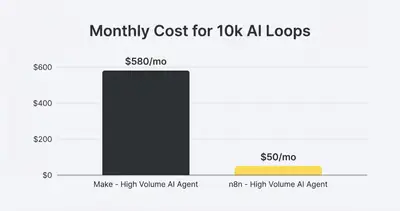
This graph isn't hypothetical. We see clients migrate operational stacks from Make to n8n solely because their "success" on Make was becoming unprofitable.
Visualizing the Workflow: Bubbles vs. Nodes
Make is visually superior for beginners. The "bubble" interface floats. It feels organic. You can see the data moving through the pipes. It is designed to make automation feel friendly.
n8n is structured like a circuit board. It uses a node-based system that flows left to right. It looks more like engineering because it is closer to coding.
Make's "Magic" Problem Make hides complexity to keep things pretty.
- Pros: fast setup, intuitive filters.
- Cons: "Magic" handling of arrays and iterators can be confusing. When you have a list of items, Make splits the workflow into multiple threads. Debugging which thread failed inside a loop can be a nightmare.
n8n's "Explicit" Power n8n forces you to understand your data structure (JSON).
- Pros: You see exactly what data is entering and leaving every node. You can write tiny snippets of JavaScript or Python directly in the nodes to transform data exactly how you want.
- Cons: The learning curve is a vertical wall for the first 48 hours.
Reality Check: If you are afraid of the word "JSON," Make will feel safer. But if you want to build robust systems, learning how JSON works in n8n is a skill that pays off forever.
The "Self-Hosted" Wildcard
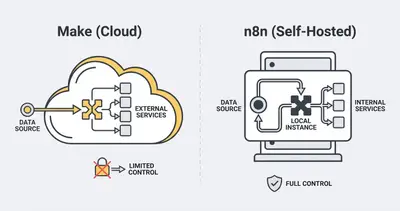
This is the nuclear option that n8n brings to the table. Make is a SaaS. You live on their servers. You abide by their limits. If their US server goes down, your business stops.
n8n is "Source Available." You can sign up for their cloud version (easiest), or you can host it yourself on a $20/month DigitalOcean droplet.
Why does this matter?
- Privacy: If you handle medical data or strict GDPR client data, self-hosting keeps the data on your infrastructure. It never touches n8n's corporate servers.
- Unlimited Executions: When you self-host, you aren't paying per execution. You are limited only by the CPU of your server.
- Custom Libraries: Need a specific Python library for data analysis? On self-hosted n8n, you can install it. On Make, you are stuck with what they provide.
For a deeper dive on securing these setups, read about n8n security features.
AI Integration: The 2025 Battlefield
Both platforms have rushed to integrate AI, but they took different paths.
Make treats AI like any other app. You add a "ChatGPT" module. You send text, you get text back. It works, but it’s transactional.
n8n is building specifically for AI Agents. They have introduced features like:
- LangChain Nodes: Native integration for building memory-aware agents.
- Vector Store Nodes: Built-in connections to Pinecone or Supabase to give your AI "long-term memory."
- Advanced AI Memory: The ability to pass conversation history effortlessly between steps.
In Make, building a chatbot that "remembers" previous messages requires complex database management and heavy operation usage. In n8n, it’s often just a setting in the node.
If your goal is to build intelligent agents rather than just data movers, n8n has a clear architectural advantage.
Pro Tip: If you are building complex multi-agent workflows, check out our guide on AI agents vs. automations to understand the architectural differences before you start building.
The Brutal Decision Framework
So, which one should you choose? It is not about which is "best." It is about which fits your stage of growth.
Stick with Make if:
- Speed is Priority #1: You need to prototype a marketing funnel in 30 minutes.
- Low Volume: You trigger automations 10-50 times a day, not 5,000.
- Simple Logic: You are moving data from A to B (e.g., Typeform to Slack).
- Non-Technical Team: Your marketing manager needs to edit the flow, and they don't know code.
Migrate to (or Start with) n8n if:
- Scaling High: You process thousands of leads, orders, or rows of data.
- AI Heavy: You are building agents that loop, reason, and retry.
- Data Privacy: You need full control over where data lives.
- Cost Control: You want a predictable bill, not one that scales linearly with your success.
Feature Comparison at a Glance
Here is how they stack up on the critical metrics for 2025:
| Feature | Make | n8n |
|---|---|---|
| Pricing Model | Per Operation (Expensive at scale) | Per Execution (Cheaper) or Flat (Self-host) |
| Learning Curve | Low (Visual, Intuitive) | Medium-High (Requires logic) |
| AI Capabilities | Standard API connections | Native LangChain & Vector support |
| Error Handling | Good, but burns operations | Excellent, robust retry logic |
| Data Processing | Consumes operations per item | Processes arrays efficiently |
The Hybrid Approach
You don't always have to choose. Many advanced teams use a Hybrid Model.
They use Make for simple, "edge" triggers—like catching a webhook from a random marketing tool that Make supports beautifully. Then, Make sends that data immediately to n8n for the heavy lifting, processing, and AI reasoning.
Make acts as the "catcher's mitt," and n8n acts as the "factory." This keeps operation costs low on Make while leveraging n8n’s power for the hard work.
Conclusion
In 2025, the tool you choose dictates your profit margins. Make is the sports car: beautiful, fast, and fun to drive, but expensive to maintain if you drive it cross-country every day. n8n is the freight train: it takes effort to get moving, but it can carry an infinite load for a fraction of the cost per mile.
If you are just starting, Make is fine. But if you are planning to scale AI automation to the core of your business, the brutal truth is that n8n is the only path that makes financial sense.
Don't wait until your bill hits $1,000/month to realize you're on the wrong platform.
Ready to stop bleeding money on automation fees? Check out our guide on building your AI tech stack or see exactly how n8n workflows cut software bills.
Related Resources
- n8n vs Make: Why Small Businesses Are Switching
- True Cost of AI Automation 2025
- Building vs Buying AI Automation
- What Is an API Key: A Simple Guide for AI Automation
Official Sources
- n8n Pricing & Self-Hosting Guide
- Make.com Pricing Model
- LangChain Integration Docs for n8n
By Kevin Michael Schindler, AI Automation Expert at Evalics