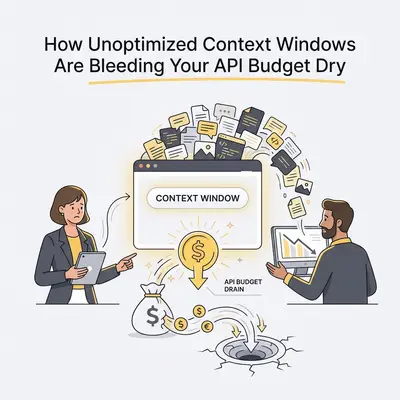
You just checked your monthly OpenAI or Anthropic bill. It is triple what you expected. Your customer service chatbot only handled a few hundred conversations, yet you are paying for millions of tokens.
You review the logs. The bot answered questions correctly. The automations fired on time. No one hacked your API key. So where did the money go?
It went into the context window.
Most business owners treat AI models like human employees. They assume that if they tell an AI a rule once, the AI remembers it. But AI APIs have no memory. To hold a conversation, the automation tool must send the entire history of the chat back to the model with every new message.
If you do not optimize this process, your API costs will compound exponentially. Here is exactly how unoptimized context windows drain your budget, and the specific steps you can take to stop the bleed today.
The Silent Cost of Chat History
Every time you send a request to an AI model, you pay for tokens. Think of a token as a piece of a word. You pay for the tokens you send (input) and the tokens the AI generates (output).
If you want to understand the basics of how this works, read our guide on what a context window is in AI.
The problem arises during back-and-forth interactions. Let us look at a standard customer service chat:
- Message 1: The user asks a question (50 tokens). The system prompt gives instructions (200 tokens). The AI answers (100 tokens). Total cost: 350 tokens.
- Message 2: The user asks a follow-up (50 tokens). To understand the context, your automation sends the system prompt, Message 1, the AI's answer, and Message 2. The AI answers again (100 tokens). Total cost: 500 tokens.
- Message 5: By the fifth exchange, you are sending the system prompt and all four previous questions and answers just to ask a simple new question. Total cost: 1,500+ tokens.
You are paying to send the exact same text over and over again. By the tenth message, your input costs have skyrocketed, even if the user only typed three words.
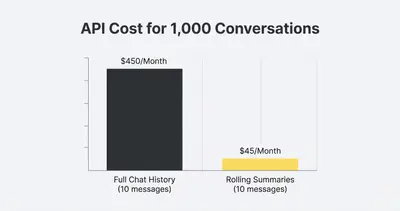
Reality Check: If your workflow simply appends new messages to an array and passes the whole array to GPT-4o, a single 10-message conversation can easily burn through 15,000 tokens. Multiply that by hundreds of users, and your budget disappears.
4 Ways You Are Wasting Tokens Right Now
Before you can fix the problem, you need to identify where the leaks are. Most unoptimized workflows suffer from one of these four flaws.
1. Passing the Entire Knowledge Base
You want your AI to answer questions about your company. So, you grab your 50-page employee handbook, paste it into the system prompt, and deploy the bot.
Every single time a user says "Hello," the AI has to re-read all 50 pages. At 25,000 tokens per interaction, you are paying top dollar just to greet your customers. This is a common trap discussed in our guide on how to calculate token costs for an AI project.
2. Ignoring Whitespace and Formatting
APIs do not read like humans do. Every space, tab, and line break counts. If you scrape a website and feed the raw HTML code directly into an AI prompt, you are paying for thousands of layout tags, style elements, and empty spaces that the AI does not need to understand the text.
3. Using Premium Models for Basic Tasks
Not every task requires GPT-4o or Claude 3.5 Sonnet. If you use a premium model just to classify an email as "Support" or "Sales," you are overpaying by a factor of 50.
4. The "Never Forget" Trap
Most conversations drift. A customer asks about a refund, gets the answer, and then asks about a new product. The AI does not need the exact transcript of the refund discussion to answer the product question. Yet, unoptimized workflows force the AI to carry that dead weight until the chat ends.
Key Insight: The bigger the context window, the harder it is for the AI to find the right answer. Bloated prompts do not just cost more money. They actually reduce the accuracy of the model.
How to Fix It: 5 Strategies to Cut API Costs
You do not need to switch providers to lower your bill. You just need to build smarter workflows. Here are five practical strategies to optimize your context windows immediately.
Strategy 1: Implement Rolling Summaries
Instead of sending the full chat transcript, use a cheaper AI model to summarize the conversation.
When a chat hits five messages, trigger a background workflow. Have a cheap model (like GPT-4o-Mini or Claude 3 Haiku) read the transcript and generate a tight, 50-word summary of the facts.
Before: "User asked about pricing. AI explained pricing. User said it was too high. AI offered a discount. User asked for the link..." (800 tokens)
After: "Summary: User is interested in pricing, received a 10% discount offer, and is currently requesting the payment link." (20 tokens)
Pass this short summary into the next prompt along with the user's newest message. You retain the context but eliminate the bloat.
Strategy 2: Truncate the Array (The "Last 3" Rule)
If you do not want to build a summary workflow, simply truncate the chat history. Most conversations only require immediate context.
Configure your automation tool (like Make or n8n) to only keep the last three exchanges.
- Keep the System Prompt (always required).
- Keep User Message N-2 and AI Response N-2.
- Keep User Message N-1 and AI Response N-1.
- Add the Current User Message.
Drop everything older. The user will not notice, and your token usage will remain flat instead of growing exponentially.
Strategy 3: Strip and Clean Your Data
Never send raw data to an AI model if you can avoid it. Use basic text formatting nodes in your automation platform to clean the input before it reaches the API.
- Strip HTML: Use a regex or HTML-to-text parser to remove all
<div>,<span>, and<script>tags from scraped content. - Remove extra spaces: Use a string replacement function to convert multiple spaces into a single space.
- Remove empty lines: Delete repeating newline characters.
Quick Win: Cleaning up raw data can easily reduce your input token count by 30%. It takes two minutes to set up a text-cleaning node in n8n, and it saves money on every single execution.
Strategy 4: Adopt a "Tiered Routing" System
Stop using expensive models for everything. You should use a tiered approach based on the complexity of the task.
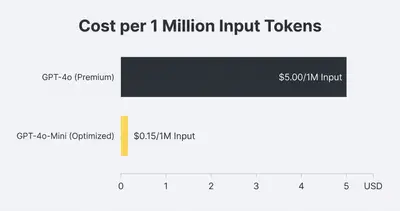
For example, when an email arrives, use a cheap model (like GPT-4o-Mini) to read the email and extract a category. This costs fractions of a cent.
If the category is "Simple Question," let the cheap model draft the reply. If the category is "Complex Complaint," route the payload to your premium model (like Claude 3.5 Sonnet).
This approach is detailed further in our breakdown of the real cost of AI models at scale. By limiting premium models only to tasks that require high reasoning, you protect your margins.
Strategy 5: Use RAG Instead of Massive System Prompts
If you are pasting a 50-page document into your system prompt, stop immediately. You need Retrieval-Augmented Generation (RAG).
Instead of forcing the AI to read the whole document every time, a RAG system works like a search engine. When the user asks a question, the system searches your document for the one specific paragraph that contains the answer. It only sends that single paragraph to the AI.
You go from sending 25,000 tokens per message to sending 500 tokens per message. The upfront effort to build a RAG workflow pays for itself in the first month of API savings. Learn how to optimize these prompts further in our guide to stopping API token waste.
Measuring the Impact
Optimization requires measurement. You cannot improve what you do not track.
Log the token usage for every workflow execution. Most automation platforms allow you to extract the usage object from the API response. Send this data to a Google Sheet or database.
Track the average tokens per conversation. Implement one of the fixes above—like the "Last 3" truncation rule—and watch the average plummet.
Pro Tip: Set up billing alerts in your OpenAI or Anthropic dashboard. Set a hard cap to ensure a rogue automation loop does not drain your credit card overnight.
Stop Paying for Bloat
Unoptimized context windows are a silent tax on your business. Every time you send unnecessary history, raw formatting, or massive documents, you are throwing away profit margins.
The fix is straightforward. Clean your data. Truncate your chat histories. Summarize long conversations. Route simple tasks to cheaper models.
Your automations will run faster. Your AI will give better answers because it isn't distracted by irrelevant text. And most importantly, your monthly API bill will finally make sense.
Take 15 minutes today to audit your most active workflow. Look at the raw payload being sent to the AI. If you see thousands of words of old conversation history, implement a truncation rule. Your budget will thank you.
Related Resources
- What Is Context Window in AI
- How to Calculate Token Costs for an AI Project
- Stop Wasting API Tokens How to Optimize AI Prompts for Cost
- The Real Cost of AI Models at Scale What Pricing Pages Dont Show
Official Sources
By Kevin Michael Schindler, AI Automation Expert at Evalics