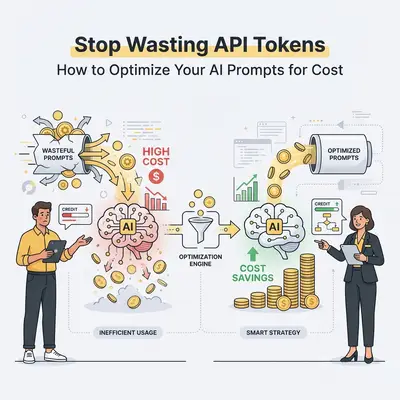
You built a seamless AI workflow. It reads incoming customer emails, extracts the data, and updates your CRM. It works flawlessly. Then, at the end of the month, you check your API dashboard and freeze.
Your automation bill is five times higher than you expected.
Most business owners treat AI models like search engines. They type long, conversational paragraphs. They attach massive documents "just in case." They let the AI write overly polite, three-paragraph responses.
When you use ChatGPT in your browser, that inefficiency is fine. You pay a flat $20 monthly fee. But when you build automations using APIs, you pay by the token. Every word, space, and punctuation mark has a price tag.
If your workflows are processing thousands of tasks a month, bad prompt engineering is literally draining your bank account. Here is exactly how to optimize your AI prompts, trim the fat, and stop wasting API tokens.
Understanding Token Economics
Before you can optimize costs, you need to understand how API pricing works. AI models do not read words; they read "tokens."
A token is a chunk of text. In English, one token is roughly four characters. A typical paragraph is about 100 tokens.
When you use an API, you are billed for two things:
- Input Tokens: The prompt you send to the AI (including context and system instructions).
- Output Tokens: The answer the AI generates.
Key Insight: Output tokens are much more expensive. For most premium models, generating a word costs three to four times more than reading a word. Controlling what the AI outputs is your fastest path to savings.
If you want a deeper dive into the math, check out our guide on How To Calculate Token Costs For An AI Project.
1. Eliminate the "Please and Thank You" Tax
AI does not have feelings. It does not care if you say "please." It does not need you to explain your day.
Every conversational filler word you include in an automated prompt costs money. If your automation runs 5,000 times a day, those polite words compound into a massive hidden tax.
Unoptimized Prompt: "Hello AI! Please look at the email below. I would really appreciate it if you could kindly extract the customer's name and phone number for me. Thank you so much!" (34 tokens)
Optimized Prompt: "Extract the customer name and phone number from the email below. Output strictly as JSON." (16 tokens)
By cutting the conversational fluff, you cut your input tokens in half. Across millions of API calls, this simple shift saves real money.
2. Restrict Output Verbosity
As mentioned earlier, output tokens are expensive. If you ask an AI to summarize an article, it will naturally try to write a comprehensive, flowing essay. You must forcefully constrain its output.
If you only need a yes or no answer, tell the AI exactly that.
Poor Output Control: "Is this lead qualified based on our criteria?" (The AI responds: "Based on the criteria provided, this lead appears to be highly qualified because they have a budget of $10,000 and are ready to buy..." - 30+ Output Tokens)
Strict Output Control: "Is this lead qualified? Reply strictly with YES or NO. Provide no other text." (The AI responds: "YES" - 1 Output Token)
Quick Win: Always include constraints like "Maximum 2 sentences," "Reply only with the exact value," or "Do not include conversational filler" in your system prompts.
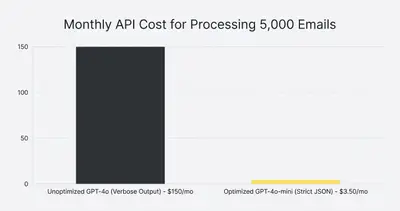
3. Implement Strict JSON Output
When automating data transfers between apps (like moving email data to Salesforce), you rarely need conversational text. You need structured data.
Using a feature called "JSON Mode" forces the AI to return only data points without any conversational wrapping. This entirely eliminates the "Here is the data you requested:" filler that models love to generate.
When you enforce strict structured outputs, you guarantee that you only pay for the exact data points you need. For more tips on building reliable structures, read our Prompt Engineering For Automation guide.
4. Optimize Your Context Window
The "context window" is the AI's short-term memory. It dictates how much text you can send the model in a single request.
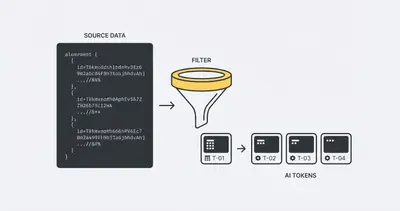
Just because an AI model can read a 500-page PDF doesn't mean you should send it one. Many businesses make the mistake of sending an entire email thread history or a full database export just to answer a simple question.
The Fix: Filter your data before it hits the AI.
- If you are analyzing customer sentiment on a support ticket, only send the last three messages, not the 40-message history.
- If you are extracting invoice totals, strip out the HTML formatting from the email body before sending it to the API.
- Use standard text instead of raw HTML. HTML tags (
<div>,<br>) consume massive amounts of tokens while providing zero contextual value to the AI.
To understand why this matters for your budget, review The Real Cost Of AI Models At Scale.
5. Route Tasks to Cheaper Models
You do not need a Ferrari to drive to the grocery store. Similarly, you do not need OpenAI's GPT-4o or Anthropic's Claude 3.5 Sonnet to format a date string or categorize an email.
Smaller, faster models like GPT-4o-mini or Claude 3.5 Haiku cost pennies compared to their larger counterparts.
Use "Model Routing" in your workflows:
- Step 1: Use a cheap model (like Haiku) to read an incoming email and categorize it (e.g., "Support", "Sales", "Spam").
- Step 2: If it's Sales, route it to an expensive, highly capable model (like GPT-4o) to draft a complex, personalized response.
- Step 3: If it's Spam, end the workflow. Cost: practically zero.
Reality Check: Downgrading your model is the fastest way to cut costs, but test carefully. If a cheap model consistently fails and requires human correction, the cheap model actually becomes more expensive. Learn more about this trap in When Cheaper AI Models Become More Expensive In Production.
6. Take Advantage of Prompt Caching
If you use long system prompts—like giving an AI a 10-page brand voice guideline or a massive code repository—your input token costs will be astronomical.
Modern API providers have introduced Prompt Caching. This feature temporarily saves your large system instructions on their servers.
If you send 100 requests in an hour using the exact same system prompt, the AI only reads that massive document from scratch once. For subsequent requests, it pulls from the cache. This typically provides a 50% to 80% discount on input tokens.
How to use it:
- Put all your static, unchanging instructions at the very top of your prompt.
- Put the dynamic data (like the specific user email you are processing) at the very bottom.
- Ensure your automation platform (like n8n or Make) is configured to utilize caching headers if required by the API provider.
Summary: Your API Cost Reduction Checklist
Stop treating API calls like free browser chats. Treat every token like a line item on your budget.
- Remove conversational fluff. Cut the please, thank you, and unnecessary context.
- Constrain the output. Force short answers and use strict JSON mode.
- Clean your inputs. Strip out HTML tags, signatures, and irrelevant email history before sending data to the AI.
- Use cheaper models. Let Haiku or GPT-4o-mini do the simple sorting, save the expensive models for deep reasoning.
Optimizing your prompts isn't just about saving money. A shorter, more focused prompt also makes the AI faster and significantly less prone to hallucinations. You get a cheaper bill and a more reliable workflow.
Ready to build high-performance, cost-effective automations? Book a demo with Evalics today, and let us help you scale your operations without scaling your API bills.
Related Resources
- How To Calculate Token Costs For An AI Project
- Prompt Engineering For Automation How To Get Better Results From AI In Your Workflows
- When Cheaper AI Models Become More Expensive In Production
- The Real Cost Of AI Models At Scale What Pricing Pages Dont Show
Official Sources
- OpenAI API Pricing Details
- Anthropic Prompt Caching Documentation
- Google Gemini API Pricing and Limits
By Kevin Michael Schindler, AI Automation Expert at Evalics