
I spent last weekend building an autonomous research agent in n8n. The goal was simple: give it a company name, and have it scrape their website, find recent news, and write a summary.
It worked perfectly—for exactly 12 minutes.
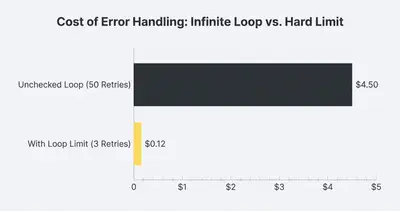
Then, it hit a 404 error on a website. Instead of stopping or skipping it, the agent tried again. And again. And again. By the time I checked my OpenAI dashboard, it had burned through 40,000 tokens in a tight loop, apologizing to itself for the error and trying the exact same broken link fifty times.
Building AI agents is different from building standard automations. In a standard workflow, if a step fails, the workflow stops. In an agentic workflow, the AI "thinks" it can fix the problem, often making it worse.
If you are moving from linear automations to AI agents, things will break. Here is exactly what broke in my setup, why it happened, and the specific fixes you need to make your agents production-ready.
1. The "Apology Loop" of Death
The most dangerous part of an AI agent is its desire to be helpful.
When my agent encountered a tool error (like a failed HTTP request), the n8n output sent the error message back to the LLM. The LLM, acting like a polite chatbot, responded: "I apologize for the error. Let me try that again."
It then triggered the exact same tool with the exact same parameters. The tool failed again. The LLM apologized again.
Reality Check: An unmonitored AI agent is like a determined intern who doesn't know when to ask for help. It will burn through your budget trying to fix a problem it cannot solve.
The Fix: Force a "Give Up" Condition
You cannot rely on the LLM to realize it's stuck. You must hard-code a limit.
I implemented a simple Counter Node in n8n that increments every time the agent loops back to the decision step.
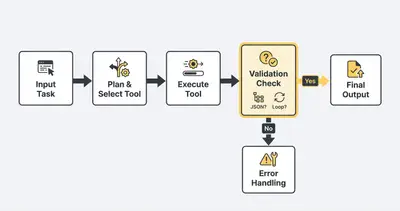
- Set a Loop Limit: If the loop count exceeds 5, the workflow forces a stop and sends me an alert.
- Inject System Instructions: I updated the System Prompt: "If a tool fails twice with the same error, do NOT retry. Mark the task as failed and move on."
2. Context Window Explosion (Memory Bloat)
In n8n, the Window Buffer Memory node allows the AI to remember previous messages. This is great for conversation, but fatal for data processing.
My agent scraped a website and returned 5,000 words of text. The agent analyzed it, then moved to the next step. However, that 5,000 words of scraped text stayed in the conversation history.
When the agent went to perform the next action, it re-sent the entire history—including that massive scraped text—back to OpenAI. My token usage didn't grow linearly; it grew exponentially.
The Math of the Crash:
- Step 1: Send prompt (500 tokens).
- Step 2: Scrape site (Result: 6,000 tokens).
- Step 3: Agent "thinks" about next step. Input: 6,500 tokens.
- Step 4: Agent performs search. Input: 7,000 tokens.
- Step 5: Agent summarizes. Input: 8,000 tokens.
By step 5, I was paying for that initial scraped text over and over again.
The Fix: The "Forgetful" Workflow
I replaced the standard memory node with a strict Sliding Window coupled with a summary step.
- Limit History: Only keep the last 3 interactions.
- Ephemeral Data: I changed the workflow so that large data blobs (like website scrapes) are processed by a separate chain, and only the summary of that data is returned to the main agent's memory.
Pro Tip: Never feed raw data (HTML, JSON dumps, long articles) directly into your agent's main conversational memory. Process it, extract the insight, and feed only the insight back to the agent.
3. The JSON Formatting Hallucination
I wanted my agent to output the final result as structured JSON so I could add it to a Google Sheet.
- Prompt: "Output the company data in JSON format."
- Result:
Here is the JSON you requested:
{
  "company": "Evalics",
  "status": "Active"
}
Hope that helps!
See the problem? The AI added conversational filler ("Here is the JSON...", "Hope that helps!"). When n8n tried to parse this with a JSON node, it crashed immediately because the output wasn't valid JSON—it was text containing JSON.
The Fix: Structured Output Parsers
You have two options here, and I ended up using both for redundancy:
- Use the "JSON Output Parser" (LangChain/n8n): This node is designed to strip away the conversational fluff and extract the JSON object.
- System Prompt Enforcement: I changed the prompt to: "You are a JSON-generating machine. Do NOT output any conversational text. Start with { and end with }."
Even better, OpenAI and Anthropic now support Structured Outputs (or JSON mode) natively. Enabling this in the model settings inside n8n forces the API to return valid JSON, eliminating the "chatty" wrapper entirely.
4. Tool Confusion (When the AI Picks the Wrong Hammer)
My agent had access to three tools:
google_searchwebsite_scraperemail_sender
When I asked it to "Find info on Company X," it sometimes used google_search, but other times it tried to use website_scraper on the string "Company X" (which isn't a URL), causing an error.
The AI didn't fully understand when to use which tool because my tool descriptions were vague.
Key Insight: The "Description" field in your n8n tool definitions is actually a prompt. The AI reads it to decide if it should use that tool.
The Fix: Prompt Engineering for Tools
I rewrote the tool descriptions to be incredibly prescriptive:
- Old Description: "Scrapes a website."
- New Description: "Use this ONLY when you have a valid URL starting with http/https. Do not use this for searching company names. Use google_search for finding URLs first."
Once I clarified the "rules of engagement" for the tools, the agent stopped trying to scrape keywords and started searching for URLs first.
5. The "Silent Failure" (Hallucinated Success)
The scariest error wasn't a crash—it was a lie.
The agent failed to find an email address for a lead. Instead of returning "Not Found," it hallucinated an email: contact@company-name-guessed.com. It looked real. It followed the right format. It was completely fake.
This happens because LLMs are prediction engines, not databases. It predicted that an email address should exist there.
The Fix: Verification Steps
I added a verification layer to the workflow.
- Source Citation: I required the agent to return the source URL where it found the data.
- Null Output Training: I explicitly trained it in the system prompt: "If you cannot find the information on the page, return 'NULL'. Do not guess."
The Cost of Mistakes
We often think of automation as "free" once built, but bad agents are expensive. During my "broken" weekend:
- Broken Agent: 50 loops x 2,000 tokens x $0.01/1k = $1.00 per single run.
- Fixed Agent: 4 steps x 500 tokens x $0.01/1k = $0.02 per single run.
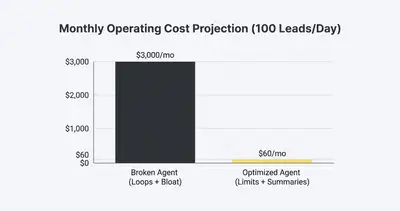
That is a 50x cost difference. If you deploy this to handle 100 leads a day, the broken version costs you $3,000/month. The fixed version costs $60/month.
Summary: How to Build Agents That Don't Break
Building in n8n is powerful because you can visually see the logic flow, but you need to safeguard against the probabilistic nature of AI.
- Kill the Loop: Set a hard limit (max 3-5 retries) on any autonomous loop.
- Trim the Memory: Use a sliding window or summary node. Never store raw data dumps in context.
- Enforce Structure: Use JSON mode or output parsers to prevent conversational fluff from breaking downstream nodes.
- Be Specific: Treat tool descriptions like code comments. Tell the AI exactly when not to use a tool.
- Verify: Force the AI to cite sources or return NULL rather than guessing.
AI agents are not "set and forget" immediately. They require a "sandbox phase" where you watch them fail, patch the holes, and then—only then—let them run wild.
Related Resources
- AI Agents Vs Automations
- N8n Memory Bloat Fixes Handle Large Payloads Without Crashes
- N8n Workflow Design Patterns Error Handling Production Setup
- True Cost Of AI Automation 2025
Official Sources
- n8n AI Agent Documentation
- OpenAI Structured Outputs Guide
- LangChain Memory Concepts
By Kevin Michael Schindler, AI Automation Expert at Evalics