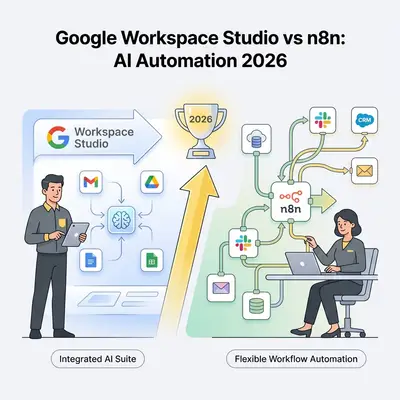
Choosing between Google Workspace Studio vs n8n in 2026 requires a clear understanding of whether you prioritize native ecosystem integration or total architectural control. Google Workspace Studio excels at internal document and email automation because it runs inside the Google stack and needs almost no wiring. n8n is the stronger choice for complex, multi-vendor data pipelines, because its node library reaches services Studio has no connector for at all. The 'better' tool depends entirely on how much of your work lives outside Google.
Google Workspace Studio is built for teams already living in the Google Cloud ecosystem, offering seamless, low-code agentic capabilities that require minimal maintenance. Conversely, n8n provides a self-hostable, node-based environment favoured by developers who want granular control over data privacy and custom logic. This guide breaks down the specific trade-offs between these two platforms, helping you decide which should serve as your primary automation engine.
Which AI Workflow Tool Wins for 2026 Automation: Google Workspace Studio or n8n?
Choose Google Workspace Studio when:
- Your workflows live mostly in Gmail, Drive, Sheets, Calendar, and Chat
- You want natural language agent creation instead of low-code canvas building
- You prefer a managed, low-maintenance platform with Workspace-grade security
- You are already paying for Gemini for Google Workspace and want to unlock more value
Choose n8n when:
- Your processes span CRM, accounting, support, marketing tools, and internal APIs
- You need self-hosting, regional control, or strict data residency
- You care about deep error handling, observability, and complex logic
- You want to build agentic, multi-step workflows that coordinate many tools and models
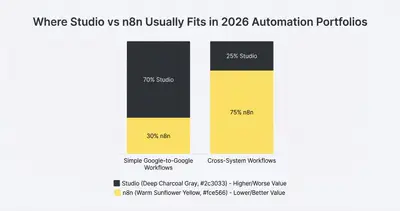
For most small and mid-sized teams, the winning setup is hybrid. Studio handles Google-to-Google automation and inbox grunt work. n8n orchestrates cross-system flows, multi-agent AI, and long-running processes.
Quick Win: If 80% of a workflow is inside Gmail or Drive, start in Studio. If 80% touches external tools like Salesforce, HubSpot, Stripe, or Snowflake, start in n8n and treat Workspace as one of many integrations.
What Are the Foundational Differences Between Google Workspace Studio and n8n?
Before comparing features and pricing, get clear on what each product actually is.
Google Workspace Studio in 2026
Google Workspace Studio is Google’s agentic AI and automation layer for Workspace. It evolved from the earlier Flows product and is now generally available in Business and Enterprise editions of Google Workspace. It lets you:
- Describe automations in natural language and have Gemini build agents
- Use pre-built steps and templates for email triage, meeting summaries, approvals, and more
- Manage agents directly from Workspace apps like Gmail, Chat, and Drive
- Orchestrate Gemini-powered decisions with native access to Workspace data
Crucially, Studio inherits Workspace's security posture. Google states that "data processed within Studio (such as prompts or data accessed by agents) is not used to train Google's general AI models outside the customer's domain," and that "access controls are respected - Studio can only access data that the initiating user has permission to access" (Google Workspace Studio; see also the Google Workspace Privacy Hub for the full generative-AI commitments).
n8n v2.0 and Beyond
n8n is a low-code automation and integration platform. With v2.0, it pushes deeper into secure-by-default execution and AI workflows:
- Visual canvas and low-code building with hundreds of nodes
- Self-hosted and Cloud options, with an execution engine you can run in your own infrastructure
- Secure-by-default task runners that isolate Code node execution
- Role-based access control, data tables, and projects for governance
- AI Agent nodes, evaluation workflows, and tools for multi-agent orchestration
n8n is not tied to any single vendor ecosystem. It is the glue layer you can put in front of Google, Microsoft, your SaaS stack, and custom internal services.
Reality Check: Gartner expects 40% of enterprise applications to be integrated with task-specific AI agents by the end of 2026, up from under 5% in 2025. That does not mean you need 20 different agent platforms. It means you need one or two orchestration layers you trust.
How Do Google Workspace Studio AI Agents Compare to n8n Low-Code Flexibility?
Studio: Natural Language First
Studio is built for people who live inside Workspace rather than automation tooling.
- You describe a workflow in plain language. Gemini 3 suggests an agent with triggers, AI steps, and actions.
- You configure conditions and branches with guided menus instead of expressions or code.
- You monitor and adjust agents directly from Gmail or Chat, often without opening a separate builder UI.
This is perfect for:
- Inbox triage and prioritization
- Meeting summaries and action item extraction
- Routing documents and approvals across Drive and Chat
- Lightweight integrations to Asana, Jira, or Salesforce via official add-ons
You trade fine-grained control and vendor neutrality for speed and simplicity.
n8n: Visual Canvas and Deep Control
n8n leans into low-code:
- You build workflows on a drag-and-drop canvas.
- Every node exposes detailed configuration, expressions, error branches, and test runs.
- You can write custom JavaScript in Code nodes, or wire in your own APIs, databases, and vector stores.
This makes n8n ideal when:
- You need complex branching, loops, retries, or compensation logic
- You want to standardize error handling across workflows
- You need to call many different tools and AI models from the same flow
- You want to gradually refactor scripts or cron jobs into a visual system
Pro Tip: Use Studio to reduce “long tail” admin requests for simple automations and reserve n8n for flows where testability, observability, and long-term ownership really matter.
How Does Google Workspace Studio Gemini Integration Compare to n8n Multi-AI Orchestration?
Studio: Gemini Deeply Embedded
Studio’s core bet is that Gemini should sit inside your everyday apps:
- Gemini can read emails, docs, and calendar events to power summarization and decisions.
- Agents can classify, route, and draft responses in Gmail and Chat.
- Meeting workflows can summarize calls, extract tasks, and push them to Docs, Sheets, or third-party tools.
You do not think about tokens, model selection, or prompt-completion APIs. Google abstracts that behind agent templates and policy controls.
This is powerful if:
- Your AI use cases are mostly communications, document workflows, and basic analysis inside Workspace
- You want strong policy control over what data agents can see and how outputs are logged
n8n: Multi-Agent, Multi-Model, Multi-Tool
n8n treats AI as one set of nodes among many:
- AI Agent nodes connect to OpenAI, Anthropic, Gemini, local models, and more.
- You can build multi-agent architectures where planner, executor, and critic agents live in separate sub-workflows.
- You can attach tools such as HTTP Request, vector stores, data tables, and evaluation nodes to each agent.
This aligns with 2026 trends toward agentic systems where agents plan, act, evaluate, and adapt over time.
Example scenarios where n8n has an edge:
- Multi-step marketing content pipelines with planning, drafting, review, and localization agents
- Support triage that calls multiple tools, searches knowledge bases, and escalates to humans
- Data operations that use AI for anomaly detection, enrichment, and structured output before handing back to deterministic steps
Key Insight: Use Studio when the “brain” and the “workspace” are the same. Use n8n when the brain must see beyond Workspace and reason across your full stack.
How Do Security and Compliance Controls Differ Between Google Workspace Studio and n8n?
Studio: Workspace-Grade Security by Default
Studio rides on top of Google Workspace’s security commitments:
- Data processed within Studio "is not used to train Google's general AI models outside the customer's domain" (Google Workspace Studio).
- Access controls respect existing sharing and permission models in Gmail, Drive, and Chat.
- DLP policies, context-aware access, and audit logs continue to apply to agent activity.
For many SMBs and midmarket teams, this “security by inheritance” is enough. Your security discussions are about Workspace contracts and data regions, not about securing a separate automation stack.
n8n v2.0: Secure-by-Default, But Your Responsibility
n8n 2.0 shipped as a "secure by default" release. n8n's own announcement states that "task runners are now enabled by default, meaning all Code node executions run in isolated environments with limited access," that the update has "blocked environment variables from Code nodes," and that it disables "nodes that allow arbitrary command execution by default" - covering high-risk nodes like ExecuteCommand (Introducing n8n 2.0). n8n's Enterprise and Cloud plans also offer role-based access control and project-level permissions, independent of this release, for controlling who can edit, run, or see workflows and credentials.
Reality Check: n8n can be hardened to meet strict compliance, but you are responsible for hosting, network isolation, and secret management. Workspace Studio pushes more of that burden onto Google.
If you are in a regulated industry, a common pattern is:
- Use Studio for low-risk internal productivity use cases.
- Use self-hosted n8n in a locked-down environment for sensitive data flows and AI that must never leave your cloud or on-prem network.
Which Automation Use Cases Are Best Suited for Google Workspace Studio vs n8n in 2026?
Where Studio Shines
Studio is best when the workflow:
- Starts and ends in Workspace
- Involves human communication, documents, or meetings
- Needs AI for summarization, classification, or simple routing
Examples:
- Summarizing and labeling weekly customer update emails, then notifying yourself in Chat when one needs a response (there's no step that posts to a shared Chat space - notifications only ever reach the flow's owner)
- Auto-labelling invoices in Gmail and pushing metadata to Sheets, so finance works from a shared tracking Sheet instead of a chat ping
- Turning meeting recordings into action items in Docs and tasks in Asana via an add-on
These automations are close to the user, easy to understand, and easy to roll out across teams with minimal training.
Where n8n Shines
n8n is best when the workflow:
- Spans many systems and teams
- Needs resilient error handling and retries
- Requires non-trivial data transformation or branching
- Orchestrates multiple agents or models
Examples:
- Lead lifecycle from marketing form to CRM, billing, product provisioning, and lifecycle email tool
- Incident response that connects monitoring, ticketing, on-call notifications, runbooks, and post-mortem documentation
- ETL-style data pipelines that pull from APIs, clean data, store it in warehouses, and trigger downstream models
Example: A SaaS company can keep Studio agents to triage support inboxes and create internal notes while n8n orchestrates the full incident pipeline from alerts to resolution.
What Is the Total Cost of Ownership for Google Workspace Studio vs n8n?
Studio Pricing: Bundled, but Not Free
Studio is included in Business and Enterprise Workspace plans. You do not see a separate line item for it, but you do pay in:
- Workspace license tier (Starter, Standard, Plus, Enterprise)
- Gemini add-ons and usage limits
For small teams, Business Standard or Business Plus is usually enough. For larger or regulated organizations, Enterprise tiers bring advanced DLP, data regions, and support.
Total cost is dominated by:
- Number of Workspace users
- Gemini usage (summaries, agent runs)
- Any add-on security or support packages
n8n Pricing: Executions and Hosting
n8n pricing depends on deployment:
- n8n Cloud: You pay by monthly executions. n8n states "all plans include unlimited users & workflows and every integration," while executions, concurrent runs, shared projects, and environment/version-control features scale up from the Starter tier to Business and Enterprise (n8n pricing).
- Self-hosted Community: Free, but you must run, secure, and scale the infrastructure yourself.
- Self-hosted Business or Enterprise: License plus your infrastructure, with extras like RBAC, external secrets, and environments.
Your total cost includes:
- Server or Kubernetes costs
- Time to maintain upgrades and security
- Any managed database or monitoring tools
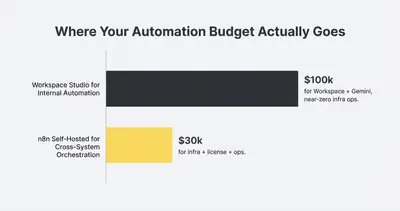
Key Insight: Studio’s marginal cost is low if you already standardize on Workspace. n8n’s marginal cost is low if you already invest in running reliable infrastructure and need a shared automation backbone for many systems.
How Do Google Workspace Studio and n8n Support Scalability for 2026 AI Workflows?
Analyst firms expect agentic AI and multi-agent systems to become a core pattern for workflow automation by 2026. The winners will be platforms that:
- Orchestrate many tools and data sources
- Provide strong guardrails and observability
- Balance autonomy with human oversight
Studio leans into:
- Embedded agents for “everyday work” inside Workspace
- Templates for common office workflows
- Tight integration with Gemini and Workspace governance
n8n leans into:
- Agent orchestration across many nodes and sub-workflows
- Evaluations, metrics, and data tables for monitoring AI behavior
- Support for external vector stores, custom memory, and multi-model routing
For simple agentic scenarios, both tools work. For multi-agent architectures with planner, executor, and critic loops, dedicated memory, and cost control, n8n is usually the more appropriate core.
For a deep-dive on those architectures, see the guide on building multi-agent workflows in n8n.
Which AI Workflow Tool Should You Choose for Your Business Automation?
Scenario 1: Small Agency Email and Content Ops
- Team size: 8
- Stack: Gmail, Drive, Docs, Sheets, Asana, a basic CRM
- Needs: Inbox triage, meeting notes, light client reporting
Best primary tool: Google Workspace Studio.
Use Studio agents to sort client inboxes, summarize meetings, and push tasks to Asana. Bring in n8n later if you add more systems like HubSpot or a billing platform.
Scenario 2: B2B SaaS Onboarding and Billing
- Team size: 30
- Stack: HubSpot or Salesforce, Stripe, product backend, Workspace, internal APIs
- Needs: End-to-end onboarding, data sync, customer lifecycle messaging
Best primary tool: n8n.
Use n8n to orchestrate CRM, billing, and product provisioning. Use Studio locally for sales inbox automations and internal email workflows.
Scenario 3: Regulated Company with Strict Data Residency
- Team size: 50–200
- Stack: Workspace or Microsoft 365, private VPC, internal systems, multiple data regions
- Needs: Strong auditability, isolation, and custom deployment policies
Best primary tool: Self-hosted n8n Enterprise.
Run n8n in your own cloud, integrate with external secrets managers, and use RBAC and projects to segment access. Studio still helps with low-risk internal workflows but is not the system of record for compliance-sensitive automation.
Quick Win: Map your top 10 workflows and classify each as “Workspace-only” or “Cross-system.” Use that map to decide where to anchor Studio and where to anchor n8n.
How Does Implementation Time-to-Value Compare Between Google Workspace Studio and n8n?
Time to First Automation
- Studio can deliver value in a single afternoon for a team that already uses Workspace. Agents are created in a few prompts and clicks.
- n8n requires more up-front setup, especially if self-hosted. You must provision infrastructure, configure secrets, and decide on governance.
Ongoing Ownership
- Studio centralizes ownership with Workspace admins and power users. Automation lives close to the apps people use each day.
- n8n centralizes ownership with platform or automation engineers who think in terms of systems, SLAs, and shared infrastructure.
If you have neither function yet, it is often easier to start with Studio for local wins, then bring in n8n when you feel the pain of cross-system integration.
What Additional Resources Are Available for Google Workspace Studio and n8n?
- Google-to-Google comparison guide: Google Workspace Flows vs n8n: Which Automation Tool Fits Your Use Case?
- Deep dive on Studio agents: Building AI Agents in Google Workspace Studio: Step-by-Step Guide (2026 Updates)
- n8n security in detail: n8n v2.0 Security Features: How to Secure Your Workflows in 2026
- Multi-agent architectures: Agentic AI in n8n: How to Build Multi-Agent Workflows for Complex Tasks
Where Can You Find Official Guides and Deep Dives for Google Workspace Studio and n8n?
- Google Workspace Studio overview and templates: Google Workspace Studio
- n8n 2.0 security hardening announcement: Introducing n8n 2.0
- n8n pricing and plan details: n8n pricing
- 7 workflow automation trends and agentic AI outlook: Kissflow Workflow Automation Trends 2026
- Agentic AI and automation impact: McKinsey on Agentic AI in the Enterprise
FAQ: Which AI Automation Stack Is Right for Your 2026 Strategy?
Google Workspace Studio and n8n are not direct enemies. They solve different layers of the same problem. Studio makes Workspace itself smarter for everyday users. n8n builds the automation backbone that ties your tools and agents together.
For 2026, a pragmatic approach is to let Studio own local, human-centric workflows inside Google apps while n8n owns cross-system orchestration, multi-agent intelligence, and long-term automation architecture. To see concretely where that line falls, these 10 production-ready Workspace Studio flows for small teams are each built only from steps Google ships today, and they name the limits - no sending email, no posting to a shared Chat space, no Shared Drive access - that push a workflow over to n8n.
If you want help deciding which workflows to put where, start by mapping your top processes and classifying them by systems touched, data sensitivity, and required AI depth. From there, it becomes much easier to see where Studio wins and where n8n is the clear choice.
By Kevin Michael Schindler, AI Automation Expert at Evalics