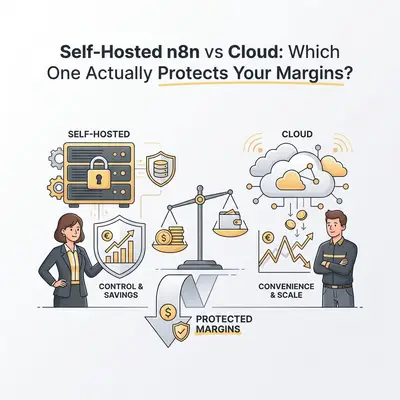
You start automating to save money. But if you pick the wrong infrastructure for your n8n workflows, you might end up spending more on overage fees and technical debt than you save in labor.
Choosing between n8n Cloud and Self-Hosted n8n isn’t just a technical decision. It is a financial one.
Most business owners look at the monthly subscription fee and stop there. They miss the hidden costs of maintenance, the risk of downtime, and the strict execution limits that punish success.
If you are running simple daily tasks, the Cloud is a safety net. If you are processing thousands of AI leads, the Cloud can become a financial bottleneck.
Here is the math on which option actually protects your margins.
The Core Difference: Convenience vs. Control
Before we look at the dollar amounts, you need to understand what you are actually buying.
n8n Cloud is a SaaS (Software as a Service). You pay n8n to handle the servers, updates, security, and uptime. You are paying for convenience.
Self-Hosted n8n means you run the software on your own server (usually a Virtual Private Server like DigitalOcean, Hetzner, or AWS). You control the hardware, the version updates, and the security. You are paying for control with your time.
Key Insight: Cloud limits you by executions (number of runs). Self-hosted limits you by hardware (CPU and RAM).
The Cost Breakdown: Where the Money Goes
Let’s look at a realistic scenario for a growing agency using AI automation.
Scenario: The Scaling Agency
You run an agency processing 20,000 workflow executions per month. These aren't simple triggers; they are heavy AI flows involving ChatGPT, vector databases, and CRM updates.
Option A: n8n Cloud
On the Cloud, you are bound by tiers.
- Starter: ~€20/mo (Limited executions).
- Pro: ~€50/mo (Higher limits, but AI eats through these fast).
- Scale: Can jump to hundreds per month quickly.
If your automation has a loop that runs 500 times to clean a database, that counts against your quota. If you hit your limit, your business processes stop until you upgrade or the month resets.
Option B: Self-Hosted (Community Edition)
You pay for the infrastructure.
- Server (Hetzner/DigitalOcean): ~€5 - €10/mo for a decent VPS (2-4GB RAM).
- Software License: €0 (Community Edition).
- Storage/Backups: ~€2/mo.
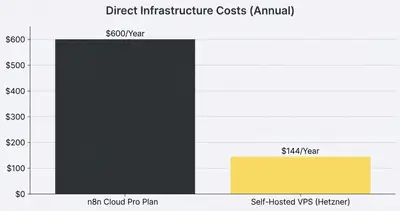
On paper, self-hosting costs €12/mo vs €50+ for Cloud. But this ignores the "Hidden Tax" of self-hosting.
The "Hidden Tax" of Self-Hosting
The graph above makes self-hosting look like a no-brainer. But infrastructure is only half the equation. You must account for Maintenance Time.
When n8n Cloud goes down (rarely), their engineers fix it. When your self-hosted server runs out of memory at 2 AM because a webhook flooded it, you fix it.
The Real Cost of "Free"
If you bill your time at $100/hour, here is what self-hosting actually costs:
- Setup: 2 hours ($200).
- Monthly Updates: 30 mins ($50/mo).
- Troubleshooting: 1 hour/mo average ($100/mo).
- Security/Backups: 30 mins/mo ($50/mo).
Total "Time Cost": ~$200/mo.
Suddenly, that €50/mo Cloud subscription looks like a bargain.
Reality Check: Do not self-host unless you (or someone on your team) is comfortable with Linux terminals, Docker containers, and SSH keys. If you have to hire a consultant every time the server crashes, you have lost your margin.
For a deeper look at what happens when things break, read about backup and recovery strategies.
When to Switch: The Crossover Point
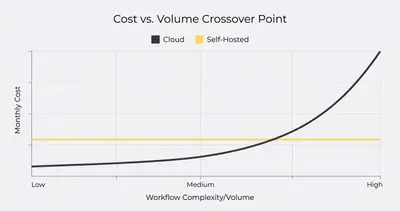
There is a specific volume where the Cloud becomes too expensive, and self-hosting becomes necessary regardless of the maintenance effort.
1. The "Heavy AI" Workload
AI automations are resource-intensive. They often require long timeouts (waiting for GPT-4 to generate text) and large data payloads.
- Cloud: Long execution times can hit timeout limits or burn through "active workflow" caps.
- Self-Hosted: You can adjust the
EXECUTIONS_PROCESStimeout environment variable to run workflows for as long as you need. You can boost RAM to 8GB for $5 more per month to handle massive data sets.
2. The High-Volume Webhook
If you trigger a workflow every time a user visits your website, you might hit 100,000+ executions a month.
- Cloud: You will be forced into an Enterprise tier costing thousands.
- Self-Hosted: A standard $20 VPS can handle millions of simple webhooks if configured correctly.
3. Data Privacy and GDPR
Some clients demand that their data never leaves a specific jurisdiction or a private VPC (Virtual Private Cloud).
- Cloud: You rely on n8n’s compliance.
- Self-Hosted: You have total sovereignty. You can lock the server down behind a VPN so it isn't even accessible from the public internet.
Technical Trade-offs: What You Lose by Self-Hosting
Going self-hosted isn't just about saving money. You lose some integrated features that make life easier.
- Managed OAuth: On Cloud, connecting to Google or Slack is often one click. On self-hosted, you often have to create your own GCP Console Apps and manage Client IDs/Secrets manually.
- Zero-Downtime Updates: Updating a self-hosted instance usually requires restarting the Docker container, which causes a few seconds (or minutes) of downtime.
- Support: Community Edition relies on the forums. You don't get dedicated support tickets unless you pay for an Enterprise license.
However, if you are scaling, you can mitigate these issues. Read our guide on workflow optimization techniques to keep your self-hosted instance running smoothly.
The Verdict: Which Protects Your Margins?
The decision comes down to your resource scarcity: Are you short on cash or short on time?
Choose n8n Cloud If:
- You are just starting. You have fewer than 50 active workflows.
- You have no DevOps skills. You don't know what
docker-compose up -dmeans. - Your workflows are low-volume. You sync data once an hour, not once a second.
- Time is your most expensive asset. You want to build, not manage servers.
Choose Self-Hosted If:
- You are scaling fast. You process 50k+ executions/month.
- You use heavy AI processing. You need custom timeout settings and high RAM.
- You have technical chops. You are comfortable managing a Linux VPS.
- You are cost-sensitive but time-rich. You prefer spending 2 hours a month on maintenance to save $500/mo in fees.
Pro Tip: Start on Cloud. It is the fastest way to validate your ROI. Once your monthly bill exceeds $100 or you hit execution limits, export your workflows and migrate to a self-hosted instance.
Final Summary
- Cloud protects your time. It is perfect for validation and small teams.
- Self-Hosted protects your cash flow at scale. It is essential for high-volume agencies.
Don't optimize for server costs before you have revenue. But once the automation works, owning the infrastructure is the ultimate margin protector.
Ready to dig deeper into costs? Check out the hidden costs of AI automation that catch most business owners off guard.
Related Resources
- n8n vs Make: Why Small Businesses Are Switching
- How to Improve n8n Workflow Performance
- Backup and Recovery for Your Automations
- The True Cost of AI Automation 2025
Official Sources
By Kevin Michael Schindler, AI Automation Expert at Evalics