
Your customer asks a simple question about your return policy. Your brand-new AI chatbot confidently tells them they have 90 days to return any item for a full refund.
There is just one massive problem. Your actual policy is 30 days.
Now you have an angry customer, a lost margin on a return, and a profound lack of trust in your automation setup.
When an AI confidently invents facts, it is called a "hallucination." Hallucinations happen because Large Language Models (LLMs) are not search engines. They do not look up facts in a database. They are advanced prediction engines. They guess the next most likely word in a sentence based on patterns.
If your chatbot lacks strict rules, it will prioritize sounding helpful over being accurate.
You can fix this. You do not need to be a software engineer. You just need to understand why your bot is guessing and how to lock down its instructions.
Here is exactly why your AI chatbot keeps hallucinating and the step-by-step methods to fix it.
1. The Temperature is Set Too High
Every AI model has a setting called "temperature." Temperature controls creativity.
A temperature of 0.0 means the AI is strict, robotic, and highly predictable. It will give the same answer every time. A temperature of 1.0 means the AI is highly creative, unpredictable, and prone to taking risks.
Many default AI platforms set the temperature around 0.7. This is great for writing marketing copy. It is terrible for customer support.
When a bot with a 0.7 temperature cannot find the answer to a customer's question, its "creativity" kicks in. It invents an answer that sounds plausible.
Quick Win: Go into your AI platform's API settings or agent configuration. Change the temperature to 0.1 or 0.2. This immediately reduces hallucinations by forcing the model to favor the most probable, factual responses.
2. Your System Prompt is Too Vague
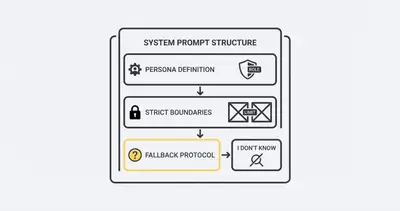
Your system prompt is the master set of instructions for your AI. It tells the bot who it is and how to behave.
If your system prompt says: "You are a helpful customer service assistant for our shoe company," you are setting yourself up for failure.
"Helpful" is a dangerous word for AI. If the AI does not know the answer, it thinks being "helpful" means giving the customer some kind of answer, even a fake one.
You must treat the AI like a new employee who takes instructions literally. You need to establish hard boundaries.
The "I Don't Know" Protocol
You must explicitly teach your AI how to fail safely.
Update your system prompt to include a strict negative constraint. This tells the AI exactly what to do when it hits a knowledge gap.
Change this: "Answer customer questions about our products."
To this: "You are a strict support agent. You may only answer questions using the provided company knowledge base. If the user asks a question that is not explicitly covered in the knowledge base, you must reply exactly with: 'I am sorry, I do not have that information. Let me connect you with a human agent.' Do not guess. Do not make up information."
3. The Context Window is Overloaded
Your chatbot has a memory limit. This is called the context window.
Many business owners try to fix a dumb chatbot by uploading their entire 500-page employee handbook into the system prompt.
This causes immediate problems. When you stuff too much text into an AI's context window, it suffers from "lost in the middle" syndrome. The AI remembers the very beginning of your document and the very end. It completely forgets the middle.
If your refund policy is on page 250, the AI will likely hallucinate the answer because it cannot retrieve the actual text.
Key Insight: More data does not equal better answers. Highly targeted, concise data yields the highest accuracy.
The Solution: RAG (Retrieval-Augmented Generation)
Stop putting all your data into the system prompt. Instead, use RAG.
RAG connects your chatbot to a database. When a customer asks a question, the system searches your database for the exact paragraph relevant to the question. It extracts only that paragraph and sends it to the AI.
The AI then reads just that one highly relevant paragraph and formulates a response.
This dramatically reduces hallucinations because the AI is only looking at a few sentences of verified facts, rather than searching through a massive 500-page manual. For this, you will need to set up a vector database.
4. Poorly Formatted Source Data
AI models read text. They do not read visual layouts.
If you upload a highly stylized PDF brochure with multiple columns, graphics, and sidebars, the AI reads it as a jumbled wall of text.
When the data is messy, the AI gets confused. When it gets confused, it hallucinates to fill in the gaps.
How to format data for AI:
- Use Markdown: Structure your documents using headers, bullet points, and bold text.
- Remove Fluff: Delete marketing jargon from your internal knowledge base. Use simple, direct language.
- Use Q&A Format: The best way to train a support bot is to provide a document of Frequently Asked Questions. The AI can easily match user intent to a specific Q&A pair.
The Financial Impact of Fixing Hallucinations
Hallucinations are not just annoying. They cost real money. Let's look at a realistic scenario for a small e-commerce brand handling 1,000 support tickets a month.
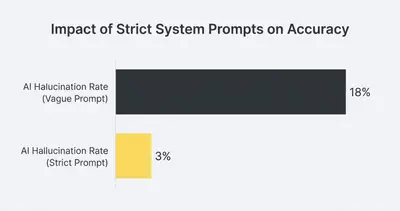
Before optimization, the chatbot has a 0.7 temperature and vague prompts. It hallucinates on 15% of queries. These errors require human intervention, or worse, result in honored (but fake) policies.
After optimization (0.1 temperature, strict system prompts, and RAG), hallucinations drop to 2%.

By spending two hours refining the system prompt and lowering the temperature, this business owner saves thousands of dollars in manual corrections and lost revenue.
Step-by-Step Maintenance Routine
Your chatbot requires ongoing maintenance. Customer behavior changes, and your product lineup evolves. You cannot set it and forget it.
Implement this simple weekly review process to keep your chatbot accurate.
Step 1: Review the Chat Logs
Once a week, pull a random sample of 20 chatbot conversations. Read them manually. Look for instances where the bot sounds overly confident about a topic you know is complex.
Step 2: Identify the Trigger
If you spot a hallucination, find the exact user message that triggered it. Did the user use slang? Did they ask a multi-part question? Understanding the trigger helps you fix the root cause.
Step 3: Update the Knowledge Base
If the bot hallucinated because the information was missing, do not just tweak the prompt. Add the correct information to your knowledge base. Ensure the data is clear and formatted correctly.
Reality Check: You will never achieve 100% accuracy. The goal is to build a system that fails gracefully by handing the conversation to a human when it gets confused.
Stop Guessing, Start Directing
An AI chatbot is an incredible tool for scaling your operations, but it is fundamentally a people-pleaser. If you do not give it strict rules, it will invent answers to keep the conversation moving.
You control the output by controlling the input.
Lower your temperature settings. Write explicit, strict system prompts. Give the AI an "I don't know" escape hatch. Clean up your source data.
When you treat your AI like a strict analytical tool rather than a creative writer, it stops hallucinating and starts working exactly as intended.
Ready to build reliable, hallucination-free AI agents for your business? Book a demo with Evalics today. We help small businesses implement automation that works right the first time.
Related Resources
- Understanding AI Hallucinations What They Are and How to Prevent Them
- System Prompt vs User Prompt AI Behavior
- Prompt Engineering Step by Step Checklist
- What Is Context Window in AI
Official Sources
- OpenAI API Reference: Understanding Temperature
- IBM: What are AI Hallucinations?
- Anthropic: Prompt Engineering Interactive Tutorial
By Kevin Michael Schindler, AI Automation Expert at Evalics