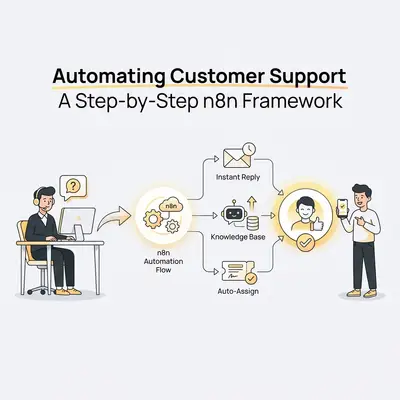
Your customer support inbox is a leaking bucket. You spend hours answering the same five questions—"Where is my order?", "How do I reset my password?", "What's your pricing?"—while the urgent, high-value tickets get buried in the noise.
Most businesses try to fix this by hiring more staff or buying expensive, pre-packaged helpdesk bots that frustrate customers with robotic loop-de-loops.
There is a better way. By building a custom support agent in n8n, you can automate the repetitive 80% of queries while intelligently routing the complex 20% to your actual team. You own the data, you control the logic, and you stop paying per-seat fees for software that doesn't quite fit your needs.
Here is the exact step-by-step framework for automating customer support using n8n.
The "Traffic Cop" Framework
Before dragging a single node onto the canvas, you need to understand the architecture. A successful support automation isn't just an AI text generator; it is a decision engine.
Think of your automation as a Traffic Cop rather than a writer. Its primary job is to direct traffic, not just generate words.
Key Insight: The biggest mistake beginners make is sending every email directly to ChatGPT to write a reply. This leads to hallucinations and angry customers. You must Triage first, then Act.
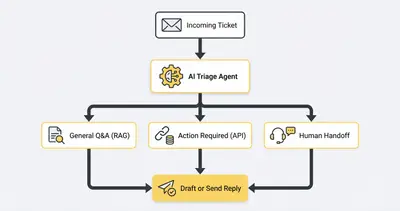
Here is the logical flow we will build:
- Trigger: Receive the ticket (Email, Slack, or Form).
- Triage (The Brain): Classify the intent (Urgent, Refund, General Info, Spam).
- Route:
- Path A (Simple): Retrieve answer from Knowledge Base (RAG) $\rightarrow$ Draft Reply.
- Path B (Complex): Alert human team $\rightarrow$ Acknowledge receipt.
- Path C (Action): Perform API task (e.g., look up order status in Shopify).
- Handoff: Review (optional) and Send.
Step 1: The Trigger & Standardization
First, you need to ingest the data. Whether your customers contact you via Gmail, a web form, or a dedicated tool like Zendesk, n8n can handle it.
The challenge is that every channel formats data differently. An email has a "Subject" and "Body," while a Slack message just has "Text."
The Setup:
- Use the Webhook Node (for forms) or Gmail Trigger Node (for emails).
- Immediately follow this with a Set Node to standardize the data into a clean JSON format that the rest of your workflow can understand.
{
  "customer_email": "jane@example.com",
  "ticket_id": "12345",
  "message_body": "I ordered three days ago and haven't received tracking.",
  "source": "gmail"
}
This ensures that if you change your input source later (e.g., switching from email to a chatbot), the rest of your automation doesn't break.
Step 2: AI Triage (The Gatekeeper)
This is the most critical step. We are not asking the AI to answer yet. We are asking it to categorize.
Use the AI Agent Node connected to a fast, cheap model (like GPT-4o-mini or Claude 3 Haiku).
The Prompt:
"Analyze the incoming customer message. Classify it into one of these categories:
- Order Status: Customer asking about delivery or tracking.
- Technical Issue: Something is broken.
- Refund/Billing: Financial dispute.
- General Question: Pricing, hours, simple info.
- Spam/Irrelevant.
Return ONLY the category name."
Pro Tip: Don't skip this step. If you treat a "Refund Request" the same as a "General Question," you will frustrate customers. Refund requests might need a human immediately, whereas general questions can be fully automated.
Step 3: The Routing Logic (Switch Node)
Once the AI categorizes the ticket, use a Switch Node (or If/Else node) to direct the workflow down the correct path.
Path A: The Knowledge Base (RAG)
For "General Questions" or "Technical Issues," the AI needs context. It cannot answer "How do I reset my API key?" if it hasn't read your documentation.
This is where RAG (Retrieval-Augmented Generation) comes in.
- Vector Store Tool: Connect your n8n agent to a vector database (like Pinecone or Supabase) where your help docs are stored.
- Retrieval: The agent searches your docs for the most relevant paragraphs.
- Generation: The agent writes an answer using only the information found in those docs.
For a deeper dive on vector databases, read our guide on Vector Databases like Pinecone and Weaviate.
Path B: The Action Agent (API Lookups)
For "Order Status" inquiries, a generic answer isn't enough. The customer wants their specific tracking number.
- Shopify/Stripe Node: Connect n8n to your e-commerce platform.
- Get Data: Use the customer's email address to look up the latest order.
- Condition: If the order status is "Unfulfilled," draft a message apologizing for the delay. If "Shipped," provide the tracking URL.
This is a dynamic response that feels personalized because it uses real-time data.
Step 4: The Human Handoff (Safety First)
Automation is not all-or-nothing. For categories like "Refund/Billing" or "Angry Customer" (detected via sentiment analysis), you do not want the AI to reply automatically.
Instead, build a "Human Loop":
- Draft, Don't Send: The AI generates a proposed draft response.
- Notification: Send this draft to a private Slack channel or add it as a "Draft" in Gmail.
- Human Review: A support agent reads it, edits if necessary, and hits send.
This reduces the agent's work from "writing a full email" to "approving a draft," saving 90% of the time while maintaining 100% control.
Reality Check: You will never automate 100% of support. Aim for 60-80%. The remaining 20% are the high-touch interactions that build brand loyalty.
The Economics: AI vs. Human Support
Why go through the trouble of building this in n8n instead of just hiring a VA? The cost difference is staggering, but the speed difference is even more critical.
Human agents have physical limits—they sleep, they eat, and they can only type so fast. An n8n workflow scales infinitely.
Beyond the hard costs, the "Time to First Response" drops from hours to seconds. In a market where speed leads to sales, this efficiency directly impacts revenue.
3 Common Pitfalls to Avoid
1. The "Infinite Loop"
If you automate replies via email, ensure your bot doesn't reply to auto-replies.
- Fix: Add a filter in your trigger to ignore subjects containing "Out of Office," "Undeliverable," or "Auto-reply."
2. Hallucinating Policies
If you don't strictly ground your AI, it might promise a refund you don't offer.
- Fix: In your System Prompt, explicitly state: "If you do not find the answer in the provided context, state that you are connecting them to a human. Do NOT invent policies."
3. Ignoring Tone
A robotic, overly formal response sounds like... well, a robot.
- Fix: Provide "Few-Shot Examples" in your prompt. Show the AI 3 examples of past emails you wrote that have the perfect tone. It will mimic that style.
Taking It Further
Once you have the basic framework running, you can expand:
- Multi-Channel: Connect the same logic to WhatsApp or SMS.
- Sentiment Analysis: Automatically flag angry emails for VIP handling.
- Proactive Support: If a shipment is delayed via API, message the customer before they ask.
If you are debating which platform to use for this, check out our comparison of n8n vs Make to see why n8n's branching logic makes it superior for support agents.
Summary
Automating customer support isn't about replacing human connection; it's about removing the friction that prevents it.
Key Takeaways:
- Triage First: Don't let AI answer everything. Categorize intent immediately.
- Use RAG: Ground your AI in your actual documentation to prevent lies.
- Human in the Loop: Always have a "Draft Only" mode for sensitive topics like billing.
By building this framework in n8n, you create an asset that grows with your business, runs 24/7, and ensures no customer is ever left wondering, "Did they get my email?"
Related Resources
- n8n Workflow Design Patterns for Error Handling
- AI Chatbots vs Email Automation: When to Use Each
- How to Choose the Best AI Model for Your Use Case
- Building Your AI Platform Tech Stack
Official Sources
- n8n AI Agent Documentation
- OpenAI API Pricing
- Anthropic Claude Model Guide
Ready to build your own support agent? Book a demo with Evalics and let's map out your automation strategy.
By Kevin Michael Schindler, AI Automation Expert at Evalics